When it comes to managing multi-tier applications in Active Directory, Kerberos delegation is the secret sauce that keeps everything talking smoothly. It allows services to access backend resources on behalf of authenticated users, enabling efficient interactions between application tiers such as web services and databases. Sounds convenient, right?
The security risk depends on which delegation model is configured in your Active Directory environments. The one important delegation you should know about is unconstrained delegation. It’s a legacy Kerberos model that grants broad trust to services and significantly increases the domain’s attack surface.
Despite modern alternatives being available, it remains enabled in many environments—often on legacy service accounts or overlooked application servers. This allows attackers to laterally across the domain and escalate privileges within the Active Directory.
In this blog, we explore unconstrained delegation in Active Directory, including:
- What is Kerberos delegation and how it works
- Why unconstrained delegation is vulnerable
- Identify and remove unconstrained delegation
- Best practices to prevent delegation-based attacks
What is Kerberos Delegation?
In Active Directory, Kerberos delegation is a capability of Kerberos authentication that allows a service to impersonate a user when accessing another service on the user’s behalf. This delegation does not grant a service additional permissions; instead, it allows a service to temporarily authenticate to other services using the user’s Kerberos credentials.
This capability is essential for multi-tier applications, such as a web server retrieving data from a backend database while maintaining the user’s identity.
When a service accesses another service by impersonating the user, this behavior is commonly referred to as a Kerberos double-hop scenario. In such scenario, the user authenticates to the first service, which then authenticates to a second service on the user’s behalf.
To support these scenarios, Microsoft introduced multiple delegation models over time, each improving the security limitations of the previous one.
Types of Kerberos Delegation
Here are the Kerberos delegation options available on the Windows-based Active Directory environments.
Unconstrained Delegation
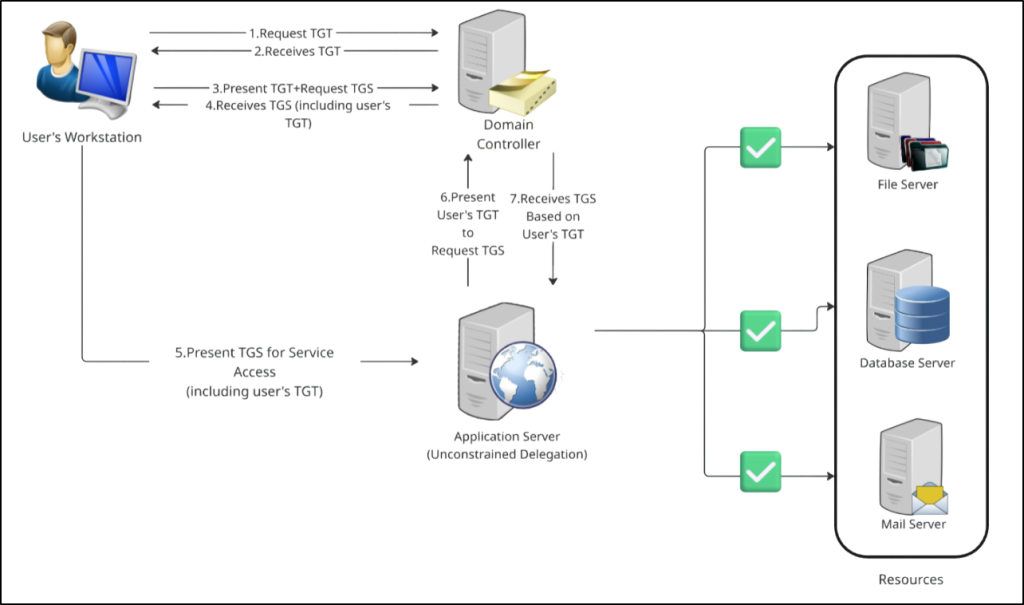
Unconstrained Kerberos delegation was first introduced with Windows Server 2000. When enabled, a service is trusted to impersonate users and access any service in the domain on behalf of the user without restriction. Behind the scenes, it sets the TRUSTED_FOR_DELEGATION flag in the userAccountControl attribute of the service or computer account.
In this model, the user’s Kerberos Ticket Granting Ticket (TGT) is forwarded to the service. The service can then reuse the forwarded TGT to request service tickets for other resources across the domains, with no restrictions on which services can be accessed.
While this approach simplifies authentication for legacy applications, it introduces significant security risks—especially if privileged users authenticate to the delegated service. For this reason, unconstrained delegation should be avoided on servers and service accounts.
Domain Controllers rely on unconstrained delegation by design to support core Kerberos authentication and are protected through stronger Tier-0 security controls. However, if an attacker compromises a service account or server configured for unconstrained delegation, they can extract cached TGTs and impersonate users across the domain.
Constrained Delegation
To address the risks of unconstrained delegation, Microsoft introduced constrained delegation in Windows Server 2003.
With constrained delegation, a service can impersonate users only to specific services. The allowed target services are explicitly defined, which reduces the delegation scope and limits potential abuse.
In contrast to unconstrained delegation, constrained delegation uses the TRUSTED_TO_AUTH_FOR_DELEGATION flag in the userAccountControl when the resource is trusted for delegation to specified services using any authentication protocol. Then, it stores the list of permitted target service SPNs in the msDS-AllowedToDelegateTo attribute.
These built-in restrictions make constrained delegation a much safer alternative to unconstrained delegation when configured correctly.

Resource-Based Constrained Delegation (RBCD)
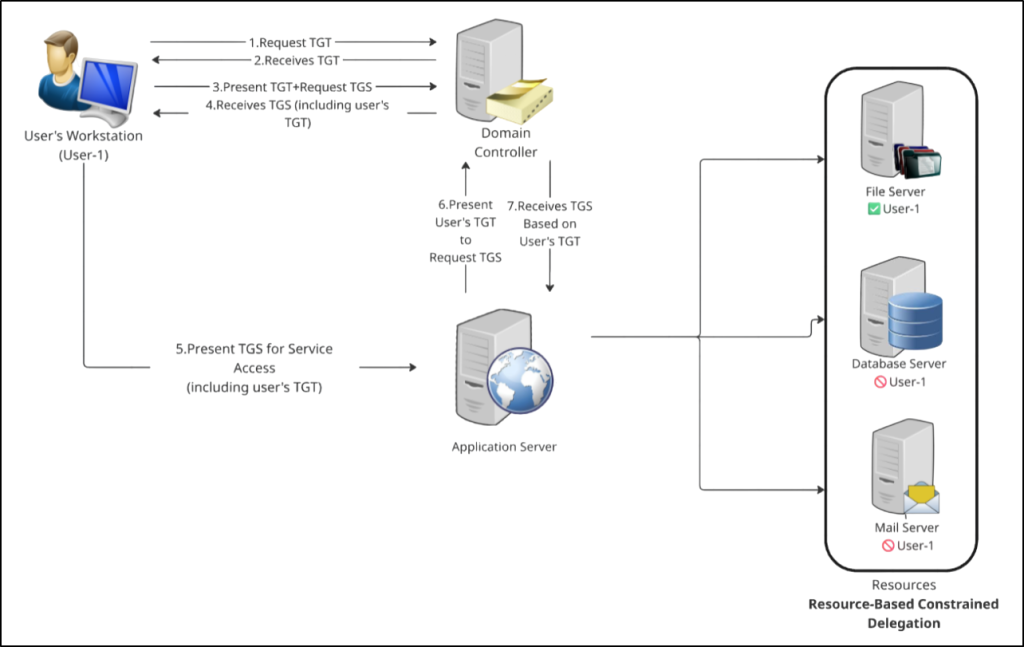
Resource-Based Constrained Delegation (RBCD) was introduced in Windows Server 2012 and represents the most secure and flexible delegation model.
Unlike traditional delegation, control is shifted from the calling service to the target resource. This means delegation permissions are stored on the target resource itself (for example, a back-end file server or database server) using the msDS-AllowedToActOnBehalfOfOtherIdentity attribute. This allows the resource to explicitly control which accounts are permitted to act on behalf of users.
This model reduces administrative overhead, improves security boundaries, and is the recommended delegation approach for modern Active Directory environments.
The following table provides a summary of Kerberos delegation types, highlighting attribute changes and ADUC configuration settings.
| Delegation Type | Delegation Tab Setting in ADUC | Key Attribute / Flag Changes |
| Unconstrained Delegation | Trust this computer for delegation to any service (Kerberos only) | Sets the TRUSTED_FOR_DELEGATION flag in the userAccountControl attribute of the service or computer account. |
| Constrained Delegation | Trust this computer for delegation to specified services only (Use Kerberos only) | No delegation flags are set on the userAccountControl attribute. Populates the msDS-AllowedToDelegateTo attribute with the allowed target service SPNs. |
| Constrained Delegation | Trust this computer for delegation to specified services only (Use any authentication protocol) | The system sets the TRUSTED_TO_AUTH_FOR_DELEGATION flag in the userAccountControl attribute and populates the msDS-AllowedToDelegateTo attribute with the allowed target service SPNs. |
| Resource-Based Constrained Delegation (RBCD) | No option available to enable | No delegation flags are set on the calling service. Populates the msDS-AllowedToActOnBehalfOfOtherIdentity attribute on the target resource, storing the SIDs of accounts allowed to delegate to it. |
Why Unconstrained Delegation is a Vulnerable Option
Unconstrained delegation introduces significant risk because it allows a service to receive and reuse a user’s Kerberos Ticket Granting Ticket (TGT) after authentication. This enables the service to impersonate the user and access any Kerberos-enabled service in the domain without restriction.
Although unconstrained delegation does not directly assign permissions, it just forwards the user’s identity. As a result, the delegated service inherits whatever level of access the user already has. If a privileged user, such as a Domain Admin, authenticates to a system trusted for unconstrained delegation, the impact can be equivalent to granting domain-wide access.
From an attacker’s perspective, this behavior makes unconstrained delegation an attractive target. Once a delegated service or server is compromised, any forwarded Kerberos tickets are cached in the system’s memory (LSASS), where attackers can extract them and impersonate users. In some cases, attackers can even trigger privileged systems to authenticate automatically using techniques commonly referred to as the ‘printer bug’, further increasing the risk.
Attackers commonly use Kerberos-focused tools like Rubeus to perform Pass-the-Ticket and ticket reuse attacks, enabling lateral movement while impersonating legitimate users. Alternatively, adversaries leverage tools such as Mimikatz, PowerView, and Impacket to extract Kerberos tickets and enumerate delegation settings. They then abuse delegated authentication to access additional services across the environment.
How to Find and Disable Unconstrained Delegation in Active Directory
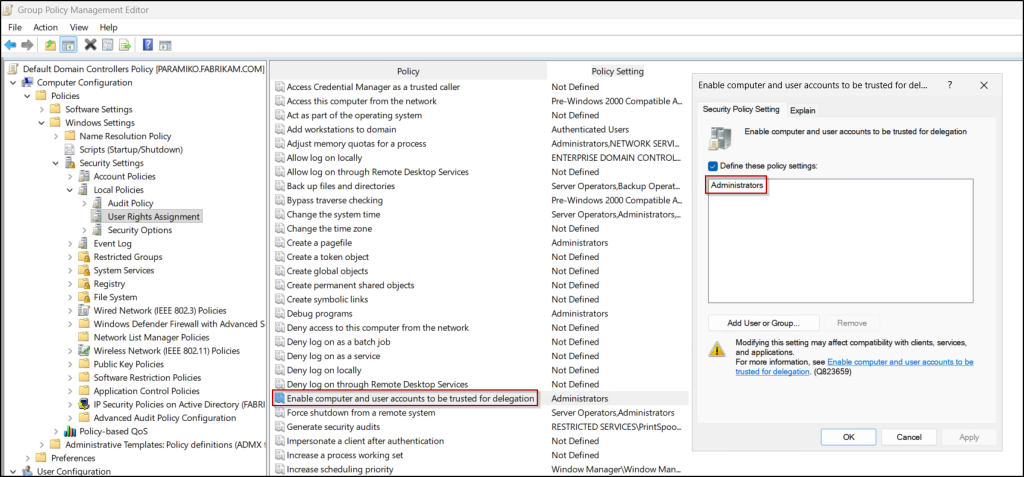
To manage delegation control of an Active Directory object, the SeEnableDelegationPrivilege user right is required. By default, members of the Administrators group have this right in Active Directory.
You can find objects with legacy Kerberos delegation enabled either using the Active Directory Users and Computers console or PowerShell. Based on the requirements, use any one of the following methods.
- Identify and block unconstrained delegation using ADUC
- Find and disable Kerberos unconstrained delegation using PowerShell
1. Identify and Block Unconstrained Delegation Using a Saved Query
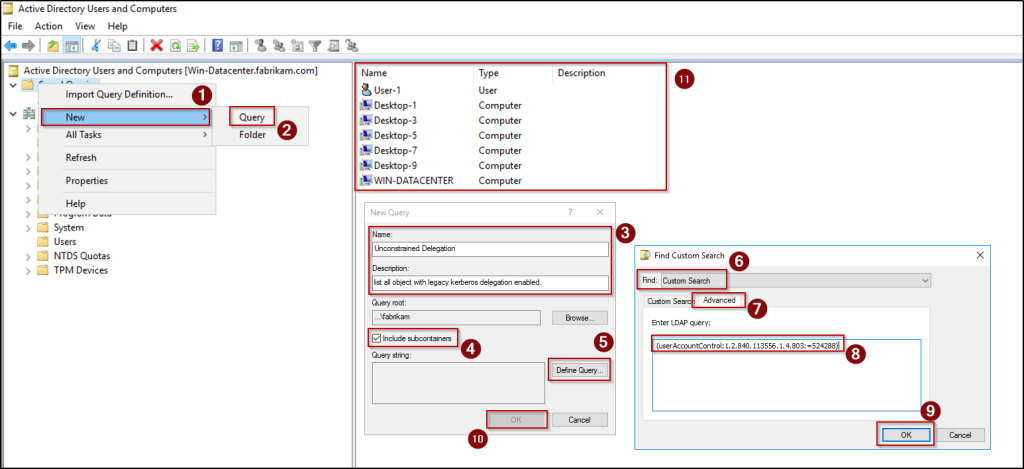
To list all objects with unconstrained delegation configured, we can use saved query by following the steps below.
- Open the Active Directory Users and Computers (ADUC) console, then in the left pane, right-click on Saved Queries, and select New → Query.
- Provide a suitable name and description for the query, ensure that the Include subcontainers checkbox is selected, and then click Define Query.
- Select Custom Search from the ‘Find’ drop-down list, navigate to the Advanced tab, and enter the following LDAP query to view all legacy Kerberos delegation enabled objects.
1(userAccountControl:1.2.840.113556.1.4.803:=524288)
- Click OK to define the query, then click OK again to save and close the configuration window.
- The list of unconstrained Kerberos delegation enabled objects in Active Directory will be displayed anytime when you select this saved query.
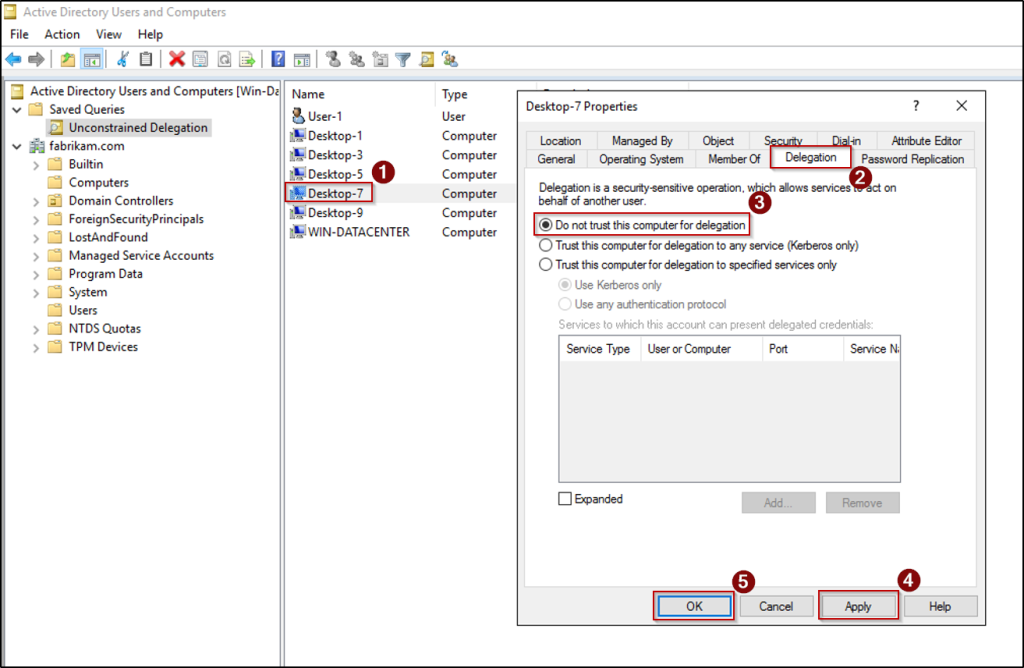
- Now, to disable unconstrained delegation on specific object, right-click the object, select Properties, and navigate to the Delegation tab.
- Next, choose the “Do not trust this computer for delegation” option, click Apply, and select OK.
2. Find and Disable Kerberos Unconstrained Delegation Using PowerShell
In the ADUC console, you must check each user’s Delegation tab in the account properties individually to remove unconstrained delegation, which makes the process time-consuming. To avoid this hassle, you can use the PowerShell cmdlets below to display all unconstrained delegation enabled objects and block delegation to save time efficiently.
The configuration for unconstrained delegation is stored within the userAccountControl attribute of user and computer accounts. Specifically, the flag TRUSTED_FOR_DELEGATION (value 524288) allows an account to participate in unconstrained delegation.
|
1 2 3 4 5 6 |
$results = Get-ADObject -Filter "UserAccountControl -band 524288" -Properties Name, samAccountName, ObjectClass, DistinguishedName | Select-Object Name, samAccountName, ObjectClass, DistinguishedName if ($results) { $results | Format-Table -AutoSize } else { Write-Host "No accounts found with unconstrained delegation privileges." } |

To disable unconstrained delegation for a specific service user or computer, use the following cmdlet. Make sure to replace <TargetAccountDistinguishedName> with the appropriate distinguished name (DN).
|
1 |
Set-ADAccountControl -Identity "<TargetAccountDistinguishedName>" -TrustedForDelegation $false |
If you want to disable legacy Kerberos delegation for all enabled devices at once, you can use the following cmdlet.
|
1 |
Get-ADObject -Filter "UserAccountControl -band 524288" | Set-ADAccountControl -TrustedForDelegation $false |
Important:
- Don’t Remove Delegations on DCs: Domain Controllers require delegation to function. Ensure you are not removing unconstrained delegation on your DCs.
- Application Breakage: Some legacy applications (like old SQL clusters or IIS sites using Kerberos Double-Hop) might actually need delegation to work.
Best Practices to Prevent Unconstrained Delegation Attacks
To effectively reduce the risks associated with Kerberos delegation, adopt a defense-in-depth approach that combines configuration hygiene and continuous monitoring.
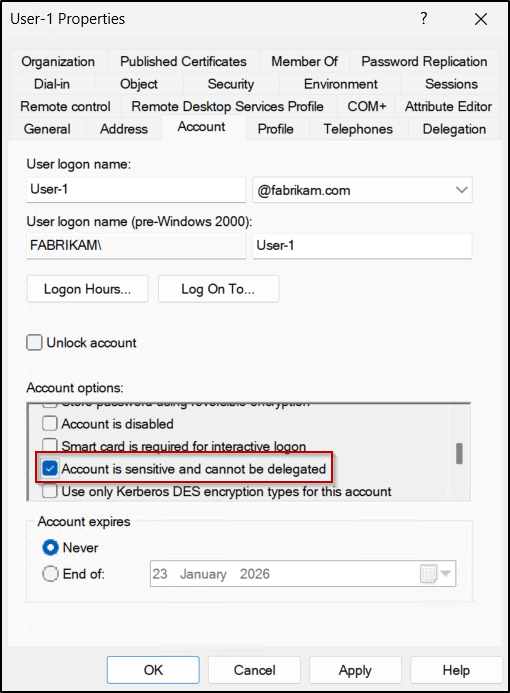
- Mark sensitive accounts as non-delegable: Enable “Account is sensitive and cannot be delegated” for privileged user and service accounts to prevent their Kerberos tickets from being forwarded or used, even if delegation is misconfigured.
- Limit who can manage delegation settings: Avoid adding unnecessary users or groups to the “Enable computer and user accounts to be trusted for delegation” user right in the Domain Controller security policy. As it allows modification of delegation-related attributes and can lead to serious security exposure if misused.
- Verify delegation requirements: Determine whether unconstrained delegation is actually required. In many cases, it can be disabled or replaced with constrained delegation or RBCD.
- Use modern service account types: Prefer group Managed Service Accounts (gMSAs) or computer accounts over traditional user-based service accounts to reduce credential exposure.
- Use the Protected Users group: Add highly privileged accounts to Protected Users group to prevent them from being used in unconstrained delegation and to block TGT caching.
- Minimize local administrator rights: Remove unnecessary local administrator access on end-user devices to limit attacker persistence if a workstation is compromised.
- Enable Windows Defender Credential Guard: Protect domain credentials by isolating them from the operating system, preventing attackers from extracting credentials from memory even if they gain local administrative access.
- Monitor delegated systems closely: Treat any system with delegation enabled as high risk and monitor it for abnormal authentication behavior.
Now that you understand how Kerberos delegation works and why unconstrained delegation poses a serious security risk, it’s important to look beyond just this configuration. Constrained delegation and RBCD can also introduce risk if it is misconfigured or overly permissive. With the steps outlined in this blog, you can uncover and disable unconstrained delegation–enabled accounts and move toward a safer Principle of Least Privilege (PoLP) approach. If you have any questions, feel free to drop a comment below.
Stay tuned for more insights on Active Directory administration!