Over the past years, Microsoft has accelerated its AI innovation to enhance productivity across the Microsoft 365 ecosystem. As a result, Copilot is becoming a core part of how organizations work within M365 environments. With this rapid expansion, admins are challenged by scattered settings, such as integration across Microsoft 365 apps, data access configurations, CA policies for Copilot, etc.
To simplify this, Microsoft is introducing Copilot Readiness Packages, which helps admins apply recommended settings and actions to securely deploy Copilot in their environment. These packages are designed to reduce setup complexity, ensure alignment with Microsoft’s guidance, and streamline overall governance.
Let’s explore what Copilot Readiness Packages are, where to find the packages, their benefits, and more.
Copilot Readiness Packages – Overview
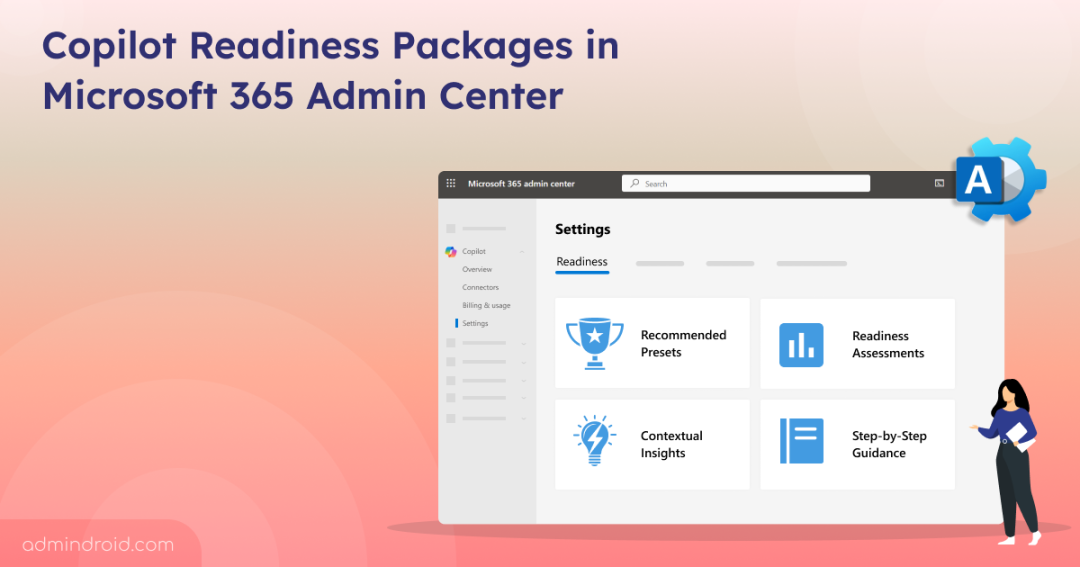
The new readiness packages will appear in the Microsoft 365 admin center. This experience comes with several beneficial capabilities:
- Predefined Configuration Packages: The packages come with configuration settings grouped based on key administrative outcomes.
- Recommended Presets: Each package comes with Microsoft-recommended presets to support a secure and optimized Copilot deployment.
- Personalized Readiness Assessment: Provides a tailored view highlighting gaps, required actions, and configuration areas that need attention.
- Contextual Insights: Offers step-by-step instructions to streamline setup, enhance governance, and ensure secure Copilot adoption.
How to Access the Copilot Readiness Packages
Admins can access the readiness packages by navigating Microsoft 365 admin center → Copilot → Settings → Readiness.
Note: There is no need for a Microsoft 365 Copilot license to use this feature. Admins can manage both Copilot Chat and Microsoft 365 Copilot settings without holding a license.
Importantly, no changes are applied automatically. Microsoft 365 admins can review and apply configurations as needed.
Inside the portal, admins can review recommended presets, check their personalized readiness assessment, and follow guided steps to apply missing configurations. Additionally, Microsoft provides a dedicated option to share feedback regarding the packages directly within the admin center.
Rollout Timeline
The Copilot Readiness Packages in the Microsoft 365 admin center will roll out as follows:
- Targeted Release: Mid-Dec 2025 → Mid-Jan 2026
- General Availability: Mid-Jan 2026 → Late Feb 2026
Conclusion
Microsoft’s new readiness packages are designed to reduce complexity in configuration setups and prepare organizations for AI-driven productivity. Share your thoughts on these new upcoming packages.
Stay tuned for more Microsoft updates and insights!