As the Microsoft 365 ecosystem grows, keeping tenant settings aligned with the intended configuration becomes increasingly complex. In traditional tenant configuration management, resources are managed using individual credentials. Visibility is often limited, making it difficult to determine whether the tenant deviates from the desired state. This often forces IT teams to manually identify and fix configuration drift, which is a time-consuming and error-prone process.
To address these challenges, Microsoft is introducing Unified Tenant Configuration Management (UTCM). It’s currently available in preview. Let’s explore what this update brings!
What is Unified Tenant Configuration Management?
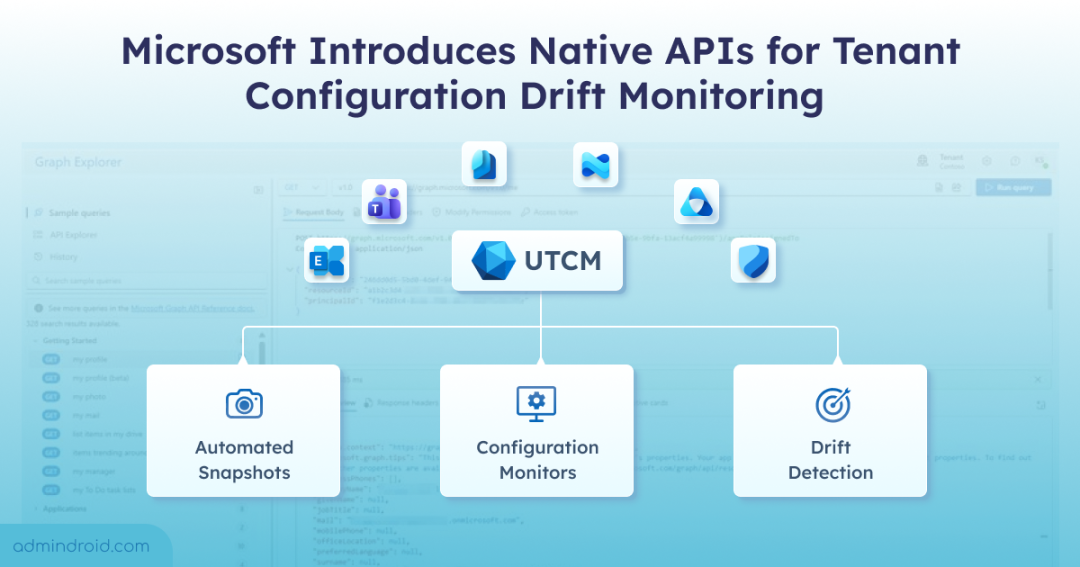
Unified Tenant Configuration Management (UTCM) is a set of Microsoft Graph APIs that enables centralized monitoring of tenant configuration settings across M365 workloads. It helps you automate configuration monitoring to quickly detect configuration drift and ensure settings remain secure, consistent, and compliant with organizational standards.
You might wonder how this differs from existing tools like Microsoft 365 DSC. Unlike Microsoft 365 DSC, which relies on PowerShell-based Desired State Configuration, UTCM is built natively on Microsoft Graph APIs. This aligns with Microsoft’s broader shift toward Graph APIs for tenant management and automation.
UTCM supports configuration management across the following workloads:
- Microsoft Defender
- Microsoft Entra
- Microsoft Exchange Online
- Microsoft Intune
- Microsoft Purview
- Microsoft Teams
Note: UTCM APIs follow a declarative configuration model, where you can define the desired state of tenant settings. This can include various settings across the UTCM supported workloads and resource types to detect deviations from that desired state.
Prerequisites to Access UTCM APIs in Microsoft Graph
Before you can use the UTCM APIs, follow the below given pre-requisites.
- UTCM service principal and permissions: Your organization must set up authentication for APIs by configuring the UTCM service principal to your tenant before any tenant configuration API calls can be made.
- Acquire access token and permissions: To call UTCM APIs using Microsoft Graph, your application must acquire an access token. Additionally, the app needs the appropriate Microsoft Graph permissions.
How Tenant Configuration Tracking Works with UTCM APIs
Imagine your organization has a baseline configuration for Microsoft Teams policies and Exchange mailbox settings. Over time, users or admins might change settings, intentionally or accidentally. UTCM allows you to capture a snapshot of the desired state, continuously monitor live settings against it, and detect any deviations (configuration drifts), so corrective action can be taken proactively.
UTCM is built on three foundational elements like:
Note: These APIs are under the beta version in Microsoft Graph and are subject to change.
What are Configuration Snapshots API?
To monitor your tenant’s configuration effectively, start by creating a baseline using the configurationBaseline API. This baseline captures the desired state of your Microsoft 365 tenant and serves as a reference point for future comparisons.
Once the baseline is established, you can capture the current state of your tenant’s settings at any point using the configurationSnapshotJob API in UTCM. This API allows you to:
- Create snapshot jobs to extract tenant settings and compare them against the baseline.
- List existing snapshot jobs to view previously captured configurations.
- Get details of specific snapshot jobs to review the extracted settings.
- Delete snapshot jobs when they are no longer needed.
By using these APIs together, you can continuously monitor your tenant’s configuration, detect deviations or drift, and maintain alignment with the desired configuration state.
Limitations of Configuration Snapshots
- You can create unlimited daily snapshots, but total extracted resources are limited to 20,000 per tenant each month.
- Snapshots are retained for 7 days before automatic deletion.
- Only 12 snapshot jobs are visible at a time; older jobs must be deleted to create new ones.
What are Configuration Monitors API?
After creating a baseline and capturing snapshots, you can create and manage monitors using the configurationMonitor API.
The configurationMonitor API continuously compares your live tenant settings against the snapshot baseline to detect any changes. Monitors automatically run every 6 hours, helping ensure consistent configurations across your Microsoft 365 environment.
Once monitors are running, you can list and get monitoring results using the configurationMonitoringResult API. This allows you to review detected changes, deviations, and compliance status based on the baseline, providing insights for corrective actions if needed.
Limitations of Configuration Monitors
- Up to 30 monitors per tenant can be created.
- Each monitor tracks a maximum of 800 resources per day per tenant across all monitors.
- Updating a monitor’s baseline deletes all previous drift history for that monitor.
- Monitoring interval is fixed at 6 hours and cannot be modified.
What is Configuration Drift API?
You can list and get configuration drifts using the configurationDrift API. When the configurationDrift API detects a difference from the baseline, it generates a configuration drift record. These records allow you to review what changed, when it changed, and take corrective action using the relevant admin tools. All active drifts remain available for review until they are resolved.
Limitations of Configuration Drift
Once a drift is marked as fixed, it is retained for 30 days before deletion.
That’s it! Start by focusing on high-impact areas like conditional access, MFA posture, Exchange transport rules, Intune compliance policies, or DKIM/DMARC settings. These configurations let you catch the drift early and stay in control. I hope this blog helps you understand how to leverage UTCM APIs to monitor and manage your Microsoft 365 tenant effectively. Stay tuned for upcoming M365 updates!