SharePoint has always been at the center of collaboration in Microsoft 365 – powering intranets, document management, communication sites, business solutions, and more. Over the years, Microsoft has continuously refined SharePoint with features like Knowledge Agent, SharePoint Premium, etc., making it more intuitive, scalable, and secure.
Now, Microsoft is introducing a major refresh: The New SharePoint Experience. 🚀
In this blog, we’ll explore what the new SharePoint experience brings to the table and how it reshapes the way users work and collaborate.
The New SharePoint Experience
The reimagined SharePoint experience is visually refreshed and reorganized for clarity and simplicity. It features a redesigned app bar, AI-powered tools, and a neutral theme.
Note: Access to the AI-assisted features requires a Microsoft 365 Copilot license.
Rollout Timeline
Microsoft will roll out the new SharePoint experience in phases:
- Public Preview: Early March 2026 → Late April 2026
- Targeted Release: Early May 2026 → Mid-May 2026
- General Availability (Worldwide, GCC, GCC High, DoD): Mid-June 2026 → Mid to Late September 2026
How to Enable the New SharePoint Experience?
To try the new SharePoint experience, it needs to be manually enabled by a SharePoint or Global Administrator in the SharePoint admin center. To enable the new SharePoint experience,
- Go to the SharePoint admin center.
- Navigate to Settings → SharePoint → New SharePoint experience.
- Tick the checkbox for “Enable the new SharePoint experience.”
- Click Save.
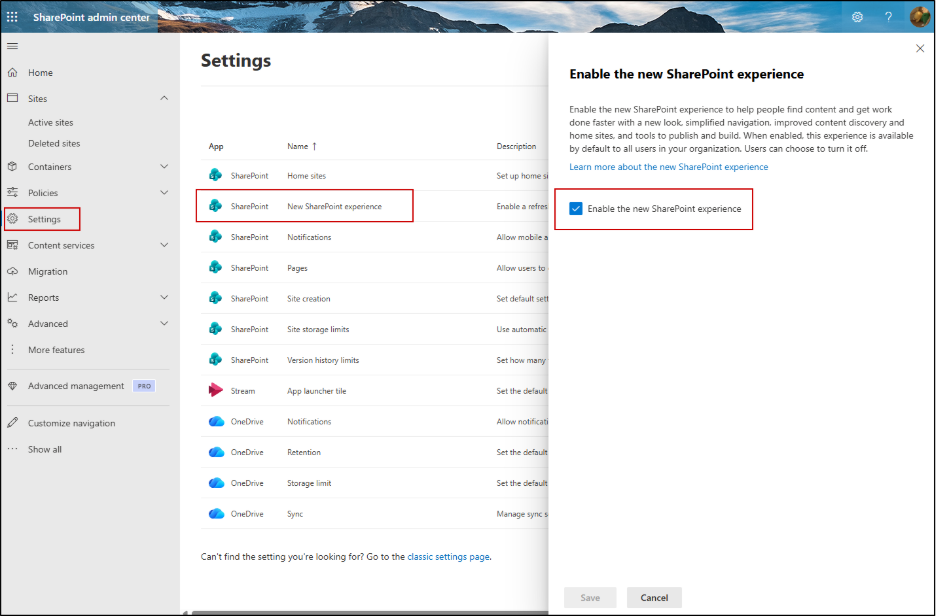
Once enabled, this experience will be available by default to all users in your organization. Users will notice a “New SharePoint” toggle at the bottom of the app bar when they open SharePoint. During the preview period, they can switch back to the previous app bar anytime by turning off the New SharePoint toggle.
What’s Coming in the New SharePoint Experience
The new SharePoint experience introduces the following improvements:
Completely Redesigned SharePoint App Bar
In the old app bar experience, navigation was presented in a more unified layout without clearly separated, task-focused categories. The new experience introduces a modern, centralized app bar with 5 navigation sections – Home, Discover, Publish, Build, and OneDrive.
The icons displayed depend on whether global navigation has been configured for your tenant:
- If global navigation is configured, the first icon represents your Home site.
- If global navigation is not configured, the first icon will be Discover.
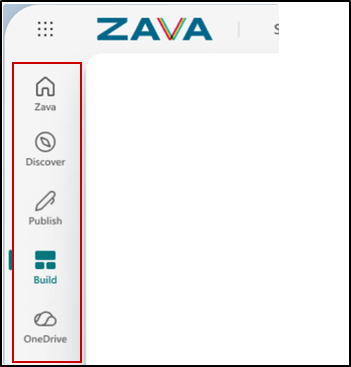
Each icon leads to a dedicated experience:
🌐 Home
The redesigned app bar includes a Home tab, which displays global navigation with the appropriate logo and name when enabled.
From here, users can quickly access company news, events, resources, and important updates in one place.
This section acts as the main intranet entry point, where users can easily find company announcements, resources, events, and important updates in one place.
With this update, experiences previously offered through Viva Connections are brought directly into the SharePoint Home site. This allows organizations to provide a consistent and branded workplace experience across SharePoint on the web and Microsoft Teams (desktop and mobile).
🔎 Discover
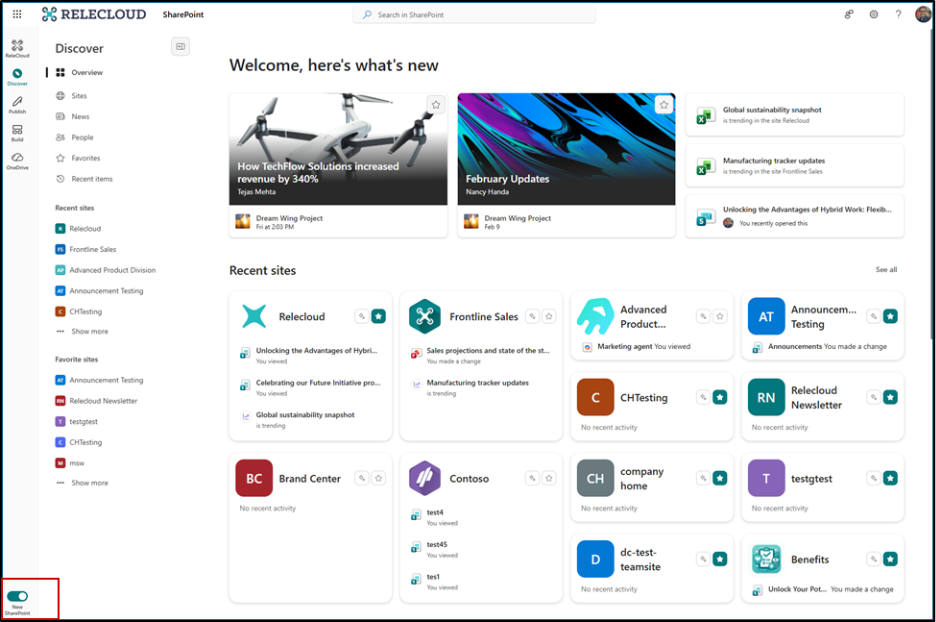
Discover replaces the traditional SharePoint start page with refreshed site cards that make it easier to find relevant content without spending time searching. With AI-powered actions, users can ask questions, catch up on updates, and stay current on the sites they follow through personalized insights.
- Overview – Displays recent updates across sites, recently visited sites, and activity from coworkers in one consolidated view.
- Sites – Shows your Recent, Favorite (Formerly ‘Followed Sites’), and Suggested Sites for quick access.
- News – Highlights news posts published across your organization.
- People – Surfaces updates and activity from coworkers.
- Favorites (Formerly ‘Saved for Later’) – Lists files, pages, and news posts you have marked as favorites.
- Recent Items – Provides quick access to content you recently opened or edited.
📝 Publish
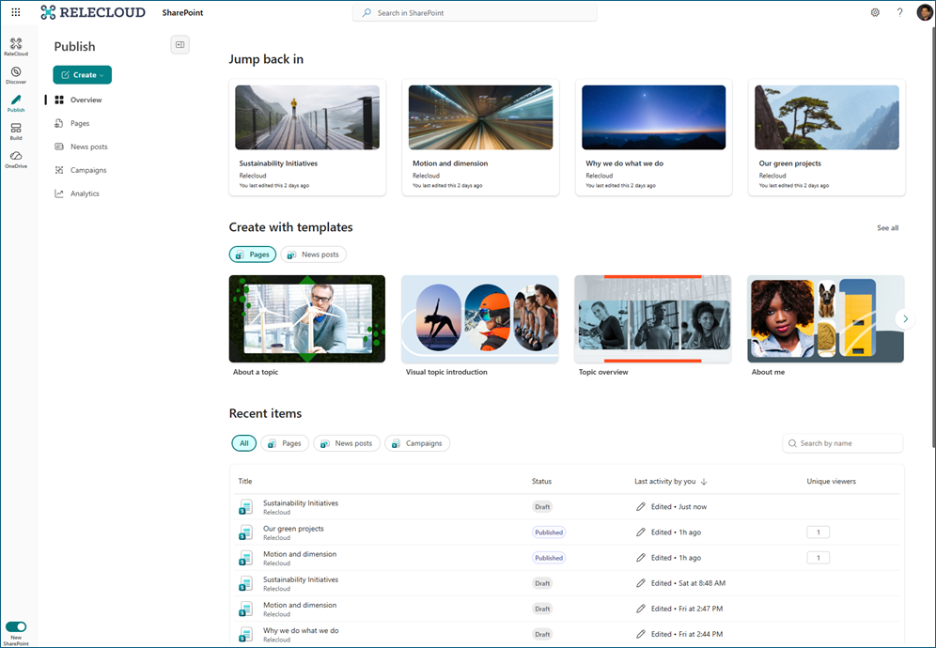
The Publish experience provides a single place to create, manage, and publish pages & news posts.
- Overview – Create pages and news posts using ready-made templates and view recent publishing activity and analytics in one place. The Overview page also includes Jump Back In, letting you quickly continue editing recently worked-on drafts.
- Pages– See all the pages you’ve created along with your favorite pages.
- News Posts – Access news posts you’ve published and the ones you’ve marked as favorites.
- Campaigns – Access campaign-style communications powered by Amplify. Selecting a campaign takes you into Amplify, where you can create new publications and manage ongoing campaigns.
- Analytics – View metrics like unique viewers and engagement for pages and news posts.
- Quick Actions – Quickly act on items from the Recent or item tables.
📢 In addition, SharePoint is also introducing 31 brand-new modern templates designed to make creating Pages and News posts faster and easier. The updated gallery offers improved browsing, filtering, and search capabilities, plus more entry points from Site Settings, Site Contents, onboarding prompts, and the Stream app. This update is enabled by default and rolling out from March to April 2026.
⚙️ Build
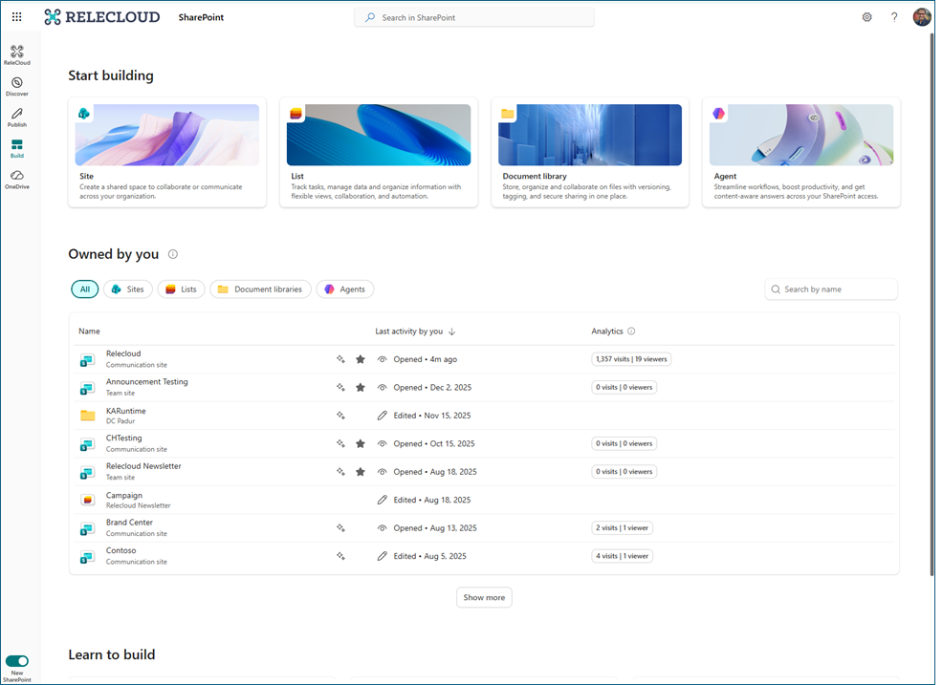
The Build experience brings creation, management, and AI-assisted actions into a single place, making it easier to create and manage SharePoint solutions.
From this page, users can create sites, lists, document libraries, and AI-powered agents. It also shows the items you own, along with recently accessed or modified sites, lists, libraries, and agents, making it easier to continue working on what you started.
For users with AI in SharePoint, the Build experience allows you to describe what you want to create using natural language and refine it with the solution planner. If AI capabilities are not enabled, the page still provides ready-to-use templates and quick access to previously created items.
Modernized Experience & Smarter Navigation
The new experience improves SharePoint’s theme in the following ways:
- Refined interface across pages, news, libraries, and lists – Core areas now have a cleaner and more consistent look. This makes it easier to move between different sections without confusion.
- Unified neutral look: SharePoint now has a consistent, neutral theme across the product for a cleaner appearance.
- Consistent UI palette: Applies a neutral color palette across all SharePoint surfaces, including SPFx placeholders.
- Cleaner layouts – Pages feel less crowded and more structured. This helps users focus better while reading or managing content.
Note: Site-level branding remains unchanged, preserving your organization’s unique identity.
AI in SharePoint
AI in SharePoint is the evolution of what was previously introduced as Knowledge Agents. Microsoft has now integrated these capabilities directly into SharePoint and renamed the experience as “AI in SharePoint”.
It enables users to plan, build, and manage SharePoint solutions using natural language. By simply describing what they want to create, SharePoint generates a structured plan that can include sites, pages, libraries, lists, and starter content, helping teams set up solutions faster.
AI capabilities are available across multiple SharePoint content types:
- Sites: Describe the solution you need, and SharePoint creates a structured setup with sites, pages, lists, and libraries.
- Pages: Draft, refine, and reorganize page content directly on the canvas using AI.
- Libraries: Automatically extract metadata, organize files, and manage content without manual tagging.
- Lists: Create, edit, and manage lists using natural language, including populating data from files.
- Structured Documents: Convert Word documents into templates where users fill forms and generate consistent documents.
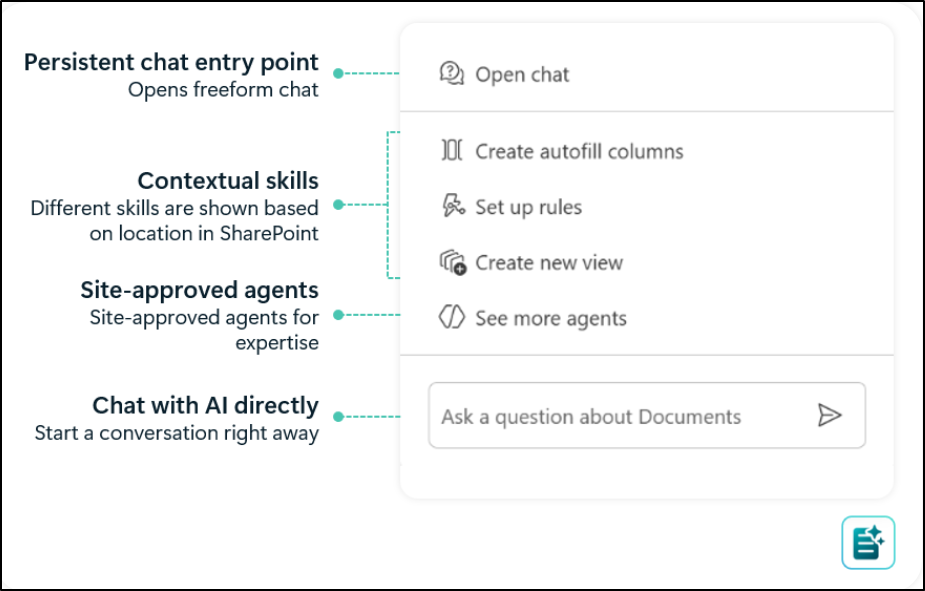
Organizations will also be able to define custom AI skills that guide how solutions are created. These skills help enforce standards for site structure, metadata, libraries, and document creation, ensuring content is created consistently across the organization.
These capabilities are rolling out through the AI in SharePoint public preview starting March 2026.
SharePoint Admin Agent for Smarter Governance
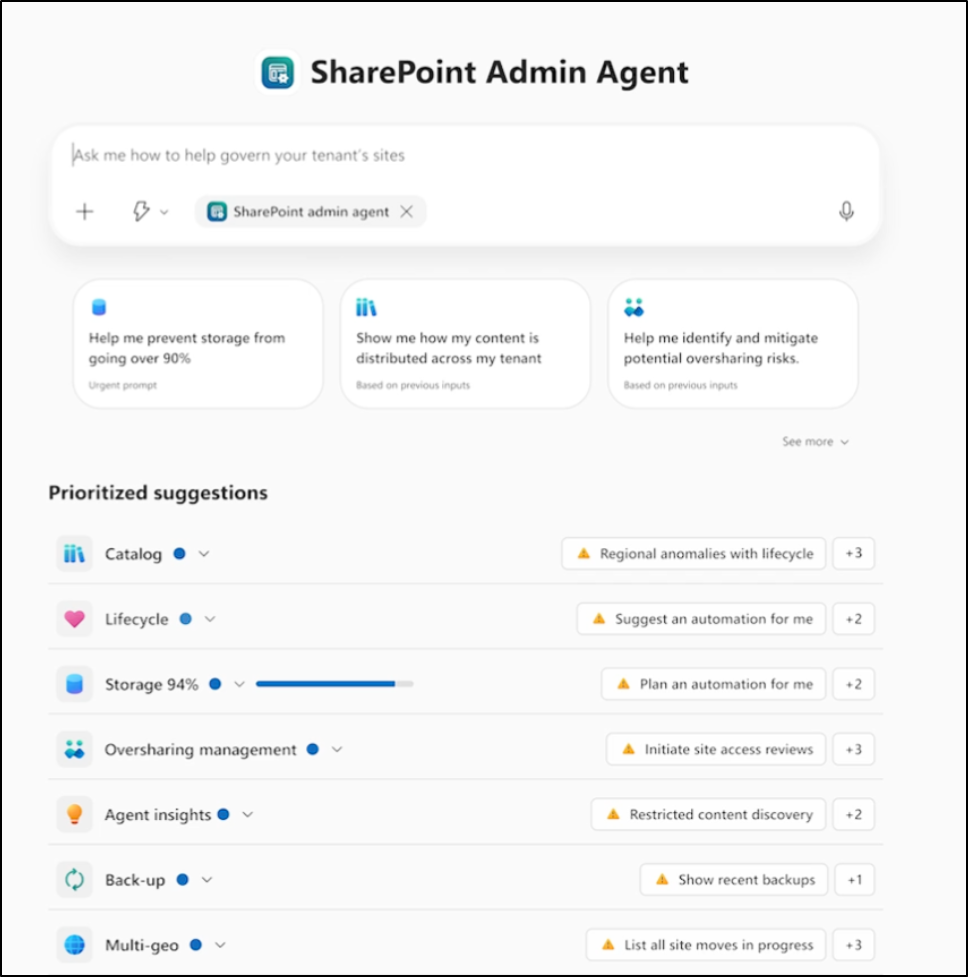
In addition to the above, Microsoft is also introducing the SharePoint Admin Agent, an AI-powered assistant in the SharePoint admin center available for administrators with a Microsoft 365 Copilot license. It helps admins manage governance and security across SharePoint more efficiently.
Key capabilities include:
- Permission analysis: Identify tenant-wide permissions and quickly detect potential oversharing risks.
- Site lifecycle insights: Detect ownerless sites, inactive sites or high-risk sites and take cleanup actions.
- Storage monitoring: View storage trends across sites and identify opportunities to free up space.
- AI-powered recommendations: Get insights and suggested actions to improve governance and maintain a healthy SharePoint environment.
Closing Thoughts
The New SharePoint Experience marks a significant step forward in making SharePoint more intuitive, organized, and user-friendly. With a refreshed design, smarter navigation, AI-assisted capabilities, it helps users work more efficiently and stay connected to what matters most.
It’s not just a refresh; it’s a smarter, task-focused SharePoint experience made for you.