If you’ve been relying on the handy standalone SharePoint Online and OneDrive for Business plans, I’m about to make you a little sad. 🙂
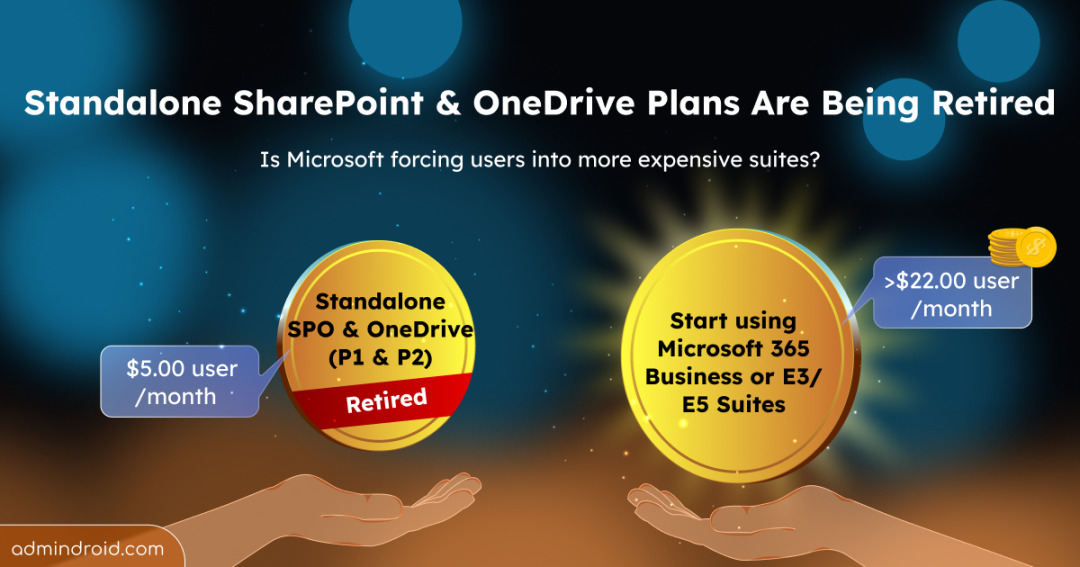
Microsoft is going to officially retire SharePoint Online and OneDrive for Business Plans 1 and 2.
For years, these standalone plans did exactly what we needed for about $5 or $10/user per month. That chapter is now closing.
Microsoft is now nudging everyone toward full Microsoft 365 suites (like Business or Enterprise plans). And for many users, this feels more like being pushed into larger, more expensive bundles they don’t actually need.
P.S.: I know, I know; it feels like paying for the whole toolbox when all you needed was a screwdriver! 😒
The End of an Era! Reason for Standalone SharePoint Plans Retirement
To be fair, for many small businesses, these standalone plans were the best choice! These plans were simple, affordable, functional, and did the job everyone needed.
- SharePoint Online Plan 1 was just $5/user/month for solid document management and 1TB of pooled storage.
- SharePoint Online Plan 2 doubled that to $10/user/month with unlimited storage plus compliance features.
- OneDrive for Business followed a similar pricing model.
But according to Microsoft, the decision comes down to three main reasons:
- First, demand for standalone plans has dropped significantly.
- Second, maintaining these separate offerings has become increasingly expensive.
- And there was what they vaguely call “unintended usage.” This “unintended usage” is widely understood to mean people were treating these plans as cheap bulk storage instead of collaboration tools.
Put all of that together, and Microsoft decided it was time to simplify and consolidate.
The Alternative: Microsoft Business or Enterprise Suites
Now, Microsoft is nudging customers toward Microsoft 365 suites like Business or Enterprise plans like Business Standard, Premium, E1, E3, or E5.
Microsoft does mention alternatives like pay-as-you-go storage and capacity add-ons, but those still require rethinking budgets, licensing strategy, and data placement.
All these changes tie back to Microsoft’s broader focus: building a more secure and integrated cloud experience. And with that, Microsoft 365 suites are now the primary entry point to access SharePoint and OneDrive.
For organizations that only need storage and file collaboration, this can feel like being pushed into a full suite you may not fully use. 💯
This impact can become clearer with pricing. With the recent price hike in Microsoft starting from July 2026, the alternative suites will range roughly from $22 to $60+ per user per month.
I will put some context behind the pricing jump, so that the numbers don’t shock you!
As said earlier, standalones typically cost $5–$10 per user per month. Once those plans are retired, the closest Microsoft 365 alternatives start at a much higher entry point:
- Microsoft 365 Business Basic – $7/user/month
- Microsoft 365 Business Standard – $14/user/month
- Microsoft 365 Business Premium – $22/user/month
- Microsoft 365 E1 – $10/user/month
- Microsoft 365 E3 – $39/user/month
- Microsoft 365 E5 – $60/user/month
While Business Basic and E1 exist, they often don’t offer a true replacement for teams relying heavily on SharePoint and OneDrive features. In practice, so many organizations would need to end up looking at Business Premium or E3. And these pricing ranges from $22 to $60 per user per month.
That’s a 3x to 10x cost increase, bundled with services like Teams, Exchange, and advanced security features that many teams may never fully use!
- $5 → $22 is roughly a 3–5x jump
- $5 → $60 is a 12x jump
- Even $10 → $39 or $60 is still a 4x–6x increase
And that increase comes bundled with services like Teams, Exchange, and advanced security features, which some teams may not need if their original requirement was simply storage and document collaboration.
This is not a small jump that every organization could make!
The Retirement Timeline:
The good thing about this entire news is that we aren’t being kicked out immediately; the time is quite generous.
- End of Sale – June 1, 2026: No new customers can purchase these plans after May 31, 2026. But existing customers can still renew them.
- End of Renewal – January 2027: If your contract ends after this date, you’ll have to pick a new plan, no more renewals.
- End of Service – December 2029: Service officially ends for everyone! Everyone must have transitioned by this date.
So, is this a “Forced” Upgrade?
In a way, yes! While Microsoft may not call it a forced upgrade, for many customers, it effectively is. The choice isn’t whether to move; it’s where to move and how much more you’re willing to pay to get there.
Understand the difference between Microsoft 365 subscription plans and choose the option that truly fits your needs!
The long transition window does help, and alternatives can soften the immediate impact. But even with these options, the direction is clear: the Microsoft 365 ecosystem is steadily shifting toward bundled suites and no more standalones.
Start planning sooner rather than later.