Zero Trust has become one of the most preferred security approaches for modern Microsoft 365 organizations. At its core, Zero Trust is a security model that shifts from the old assumption of “trust once inside the network” to a modern principle of “never trust, always verify.”
Despite this clarity, many organizations still face challenges in knowing where to start or how to achieve Zero Trust effectively. To address this, the Microsoft Zero Trust workshop, a free community tool, provides a practical strategy and a clear roadmap for adoption.
An Overview of Microsoft’s Zero Trust Workshop
Zero Trust is built on the idea that threats can exist both inside and outside the network. As a result, every access request is treated as untrusted until verified, no matter where it comes from or what resources it tries to access. The Microsoft Zero Trust workshop helps organizations turn this principle into practice with a structured and simplified approach.
Built on insights from thousands of customer engagements, the workshop helps organizations assess their current environment. It then provides a clear, step-by-step roadmap to strengthen their overall security posture. Through this workshop, organizations can learn to apply the three core Zero Trust principles:
- Verify explicitly: Always authenticate and authorize based on identity, device health, location, and other risk factors.
- Use least privilege access: Provide only the minimum required permissions, using just-in-time and just-enough access to minimize the attack surface.
- Assume breach: Operate under the premise that breaches can and will occur. Design your Microsoft 365 environment to detect, respond, and remediate quickly. Reduce the blast radius and segment access to limit potential damage.
By embracing Zero Trust, organizations can build a stronger, more resilient security posture that adapts to cloud adoption, remote work, and increasingly sophisticated cyber threats.
How to Use Microsoft’s Zero Trust Plan
The Zero Trust workshop enables organizations to build a practical and structured strategy for adopting a strong Zero Trust security posture. This workshop typically involves two key steps:
1. Execute the Zero Trust Assessment Tool
The Zero Trust assessment tool is a PowerShell cmdlet that assesses essential configurations of your organization to verify the security baseline. In its initial implementation, the tool generated a spreadsheet report focused on Identity and Devices. The assessment has now been enhanced to produce an HTML report covering four pillars: Identity, Devices, Data, and Network. Infrastructure and Security Operations are currently out of scope and are planned for future inclusion.
If this is your first time accessing the Zero Trust assessment tool, execute the snippet below.
|
1 2 3 |
Install-Module ZeroTrustAssessment Connect-ZtAssessment Invoke-ZtAssessment |
This tool requires PowerShell 7 or higher and uses Microsoft Graph to read your tenant configuration. When executing the cmdlet, it is recommended to log in with a non-guest account from your Entra ID tenant.
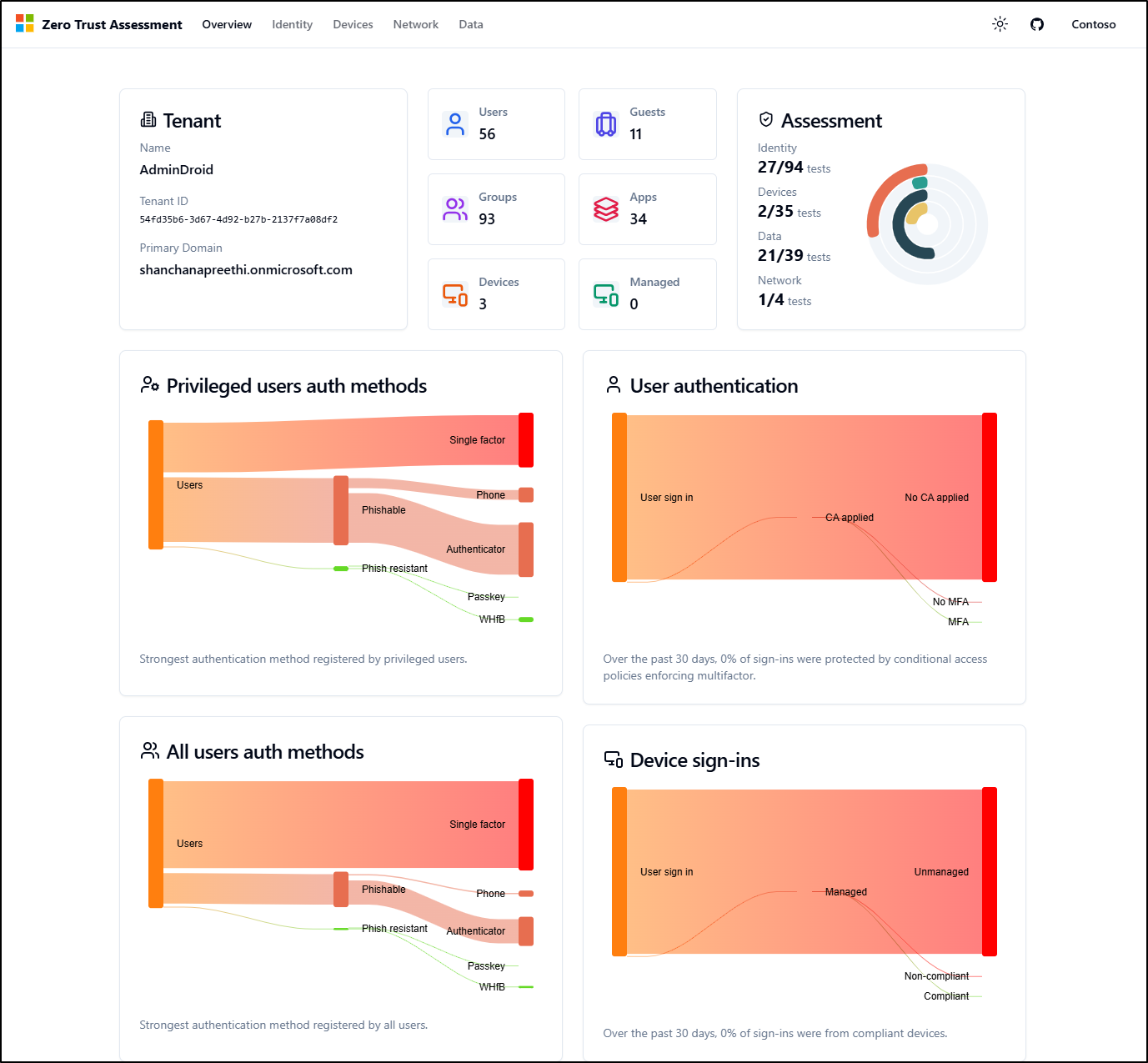
Once executed, the tool generates a consolidated report that provides a unified view of your Zero Trust posture. The Overview dashboard delivers a top-level visibility of your tenant’s security health. It features key metrics for users, groups, and devices alongside an overall assessment score. Additionally, it provides visual charts for authentication methods and sign-in patterns to help you identify trends at a glance.
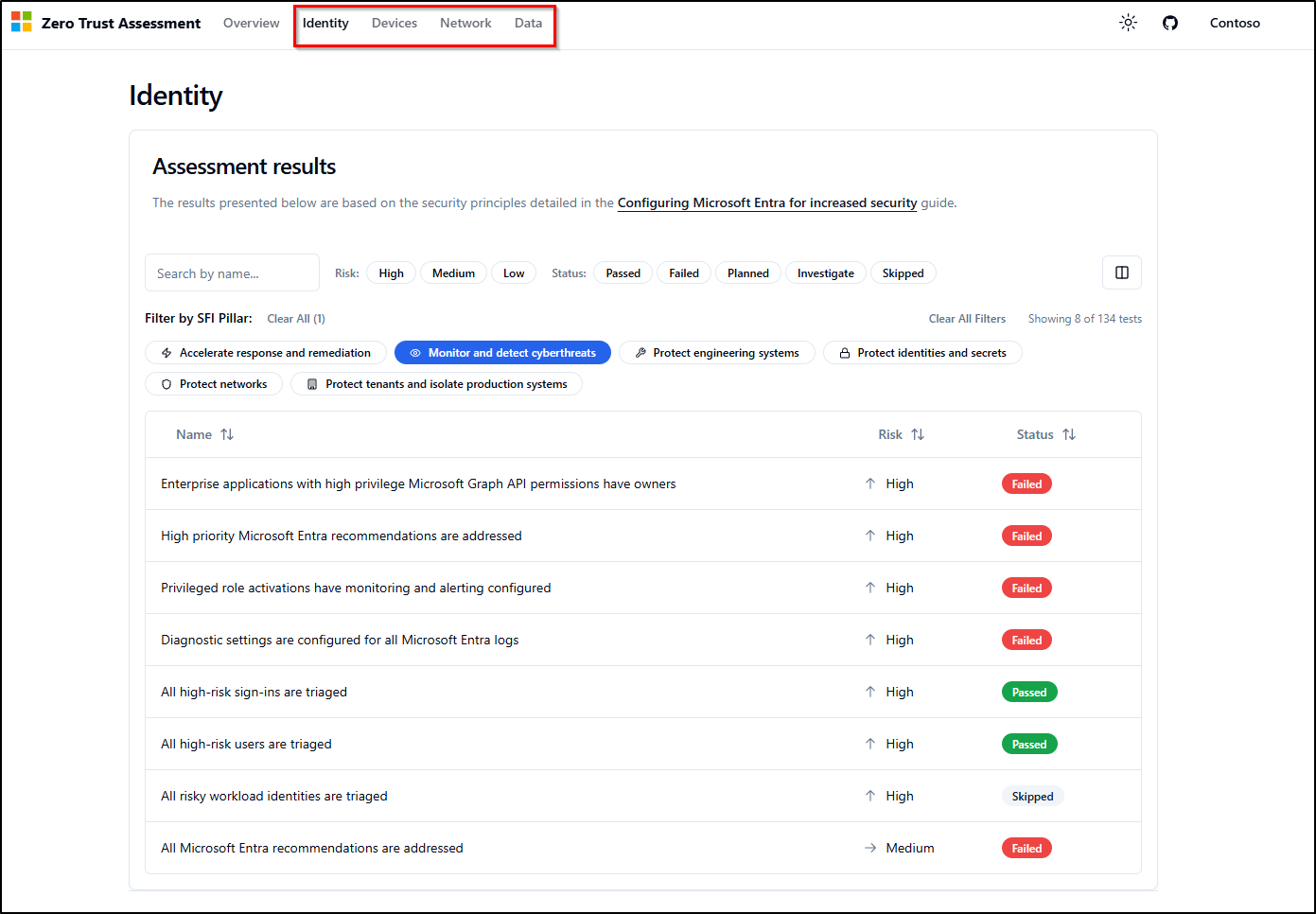
For deeper analysis, navigate to specific pillars, such as Identity, to review the status of individual roadmap activities. Configuration tests are categorized to help you quickly identify security gaps:
- Passed: Your organization aligns with the recommended security baseline.
- Failed: The configuration is missing or does not meet the recommended baseline.
- Skipped: The check is not applicable, typically due to licensing limitations.
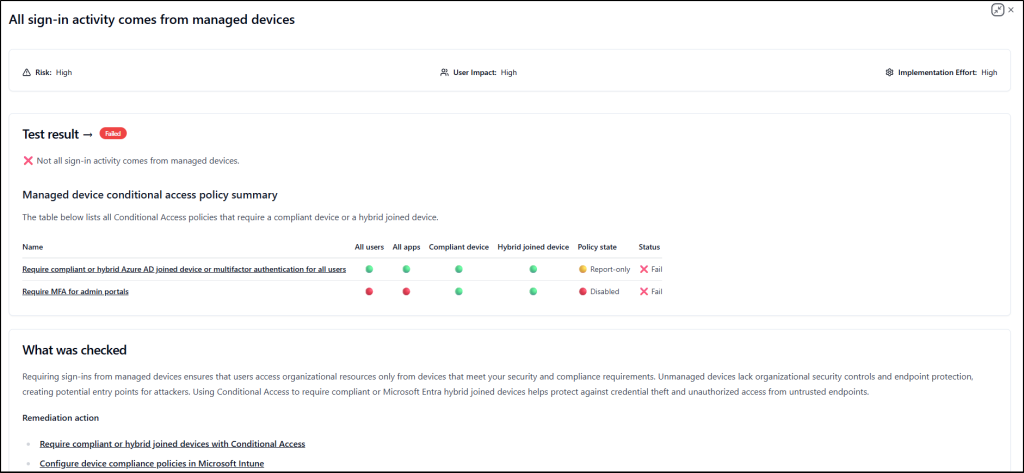
By drilling down into failed configurations, you can assess associated risks and access step-by-step remediation guidance. This structured approach ensures you have the exact instructions needed to strengthen your environment and improve your overall Zero Trust score.
With a clear understanding of your current Zero Trust posture and identified gaps, the next priority is to engage the right stakeholders. Use the workshop delivery guide to identify and notify key members from your organization and deployment partners for each specific Zero Trust pillar.
2. Run the Zero Trust Strategy Workshop
Once you have aligned the necessary stakeholders, leverage the workshop tool to lead dedicated sessions for each pillar.
The workshop is designed to provide a structured framework for organizations to adopt a Zero Trust strategy and implement security solutions across the environment. It supports the prioritization of critical tasks and the development of implementation plans aligned with their organizational goals.
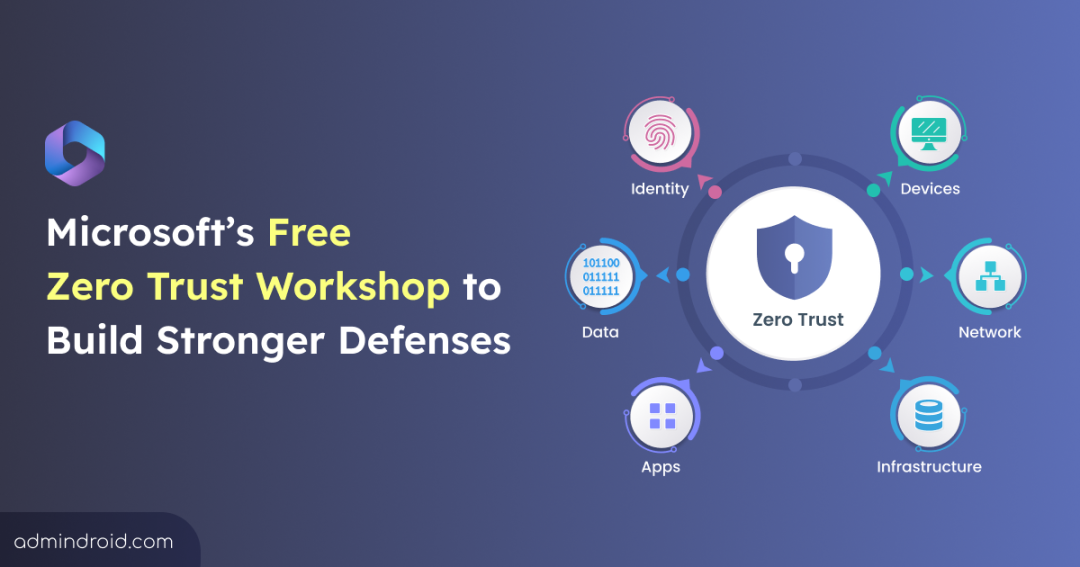
Previously, running the workshop tool generated a downloadable Excel spreadsheet to track Zero Trust roadmap activities. It included dedicated sheets for the following six Zero Trust pillars, allowing admins to choose a pillar based on their current focus:
- Identity
- Devices
- Data
- Network
- Infrastructure
- Security Operations
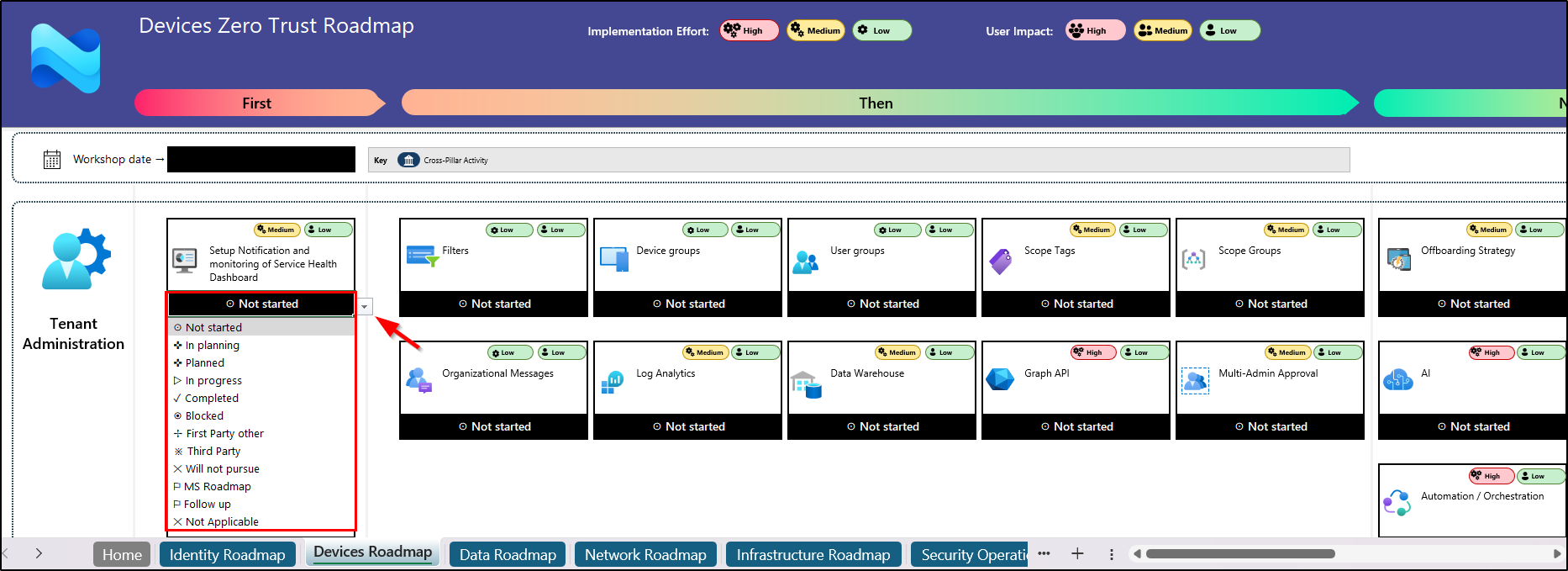
However, this experience has now transitioned into a more modern, streamlined, and interactive model.
What Changed in the Zero Trust Workshop Experience?
The Zero Trust workshop tool has now evolved into a centralized web-based application, offering a more interactive and streamlined approach to planning and execution.
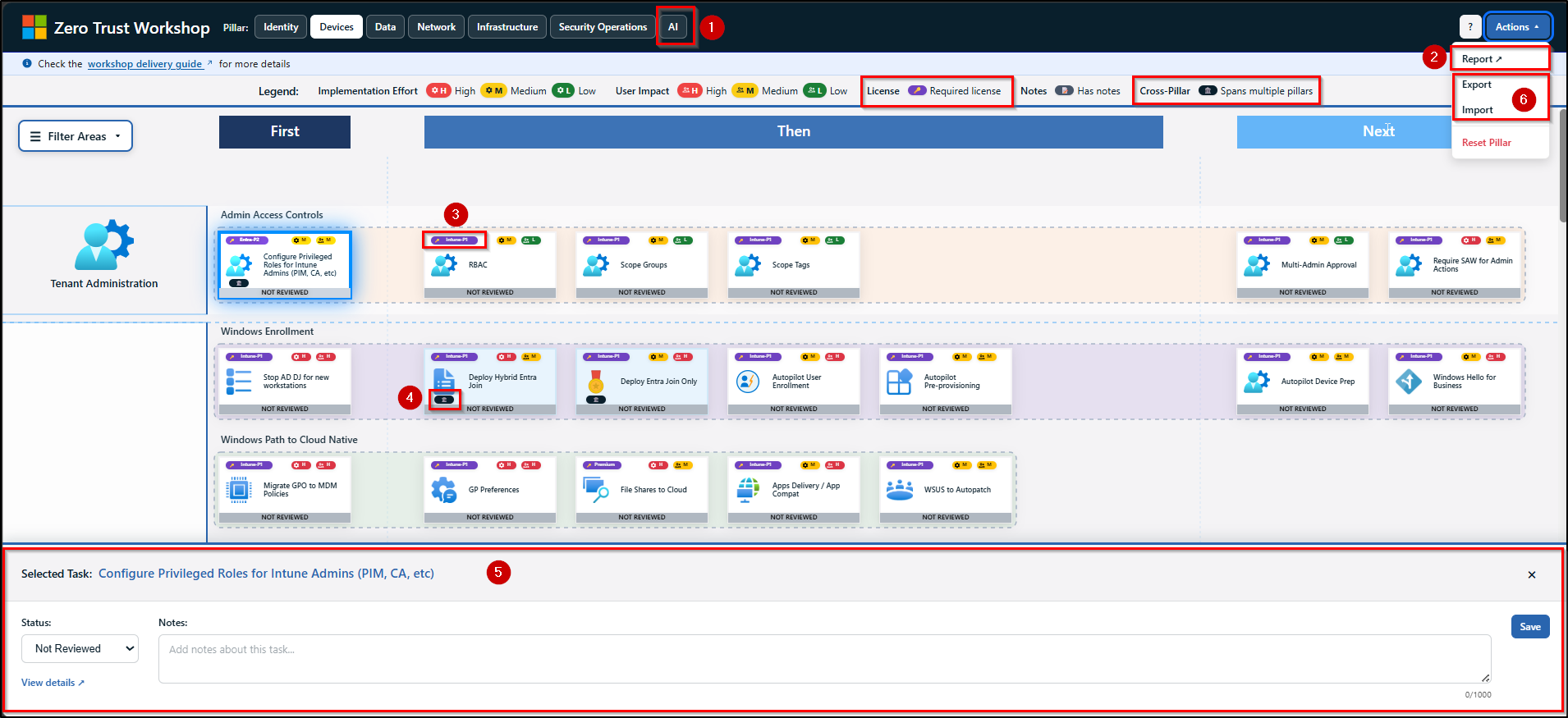
- It also introduces a dedicated AI pillar alongside the six core pillars of Zero Trust to address the complexity of AI-driven environments. Similar to the other pillars, AI roadmap activities are organized into swim lanes, clearly indicating what should be done first, next, and later.
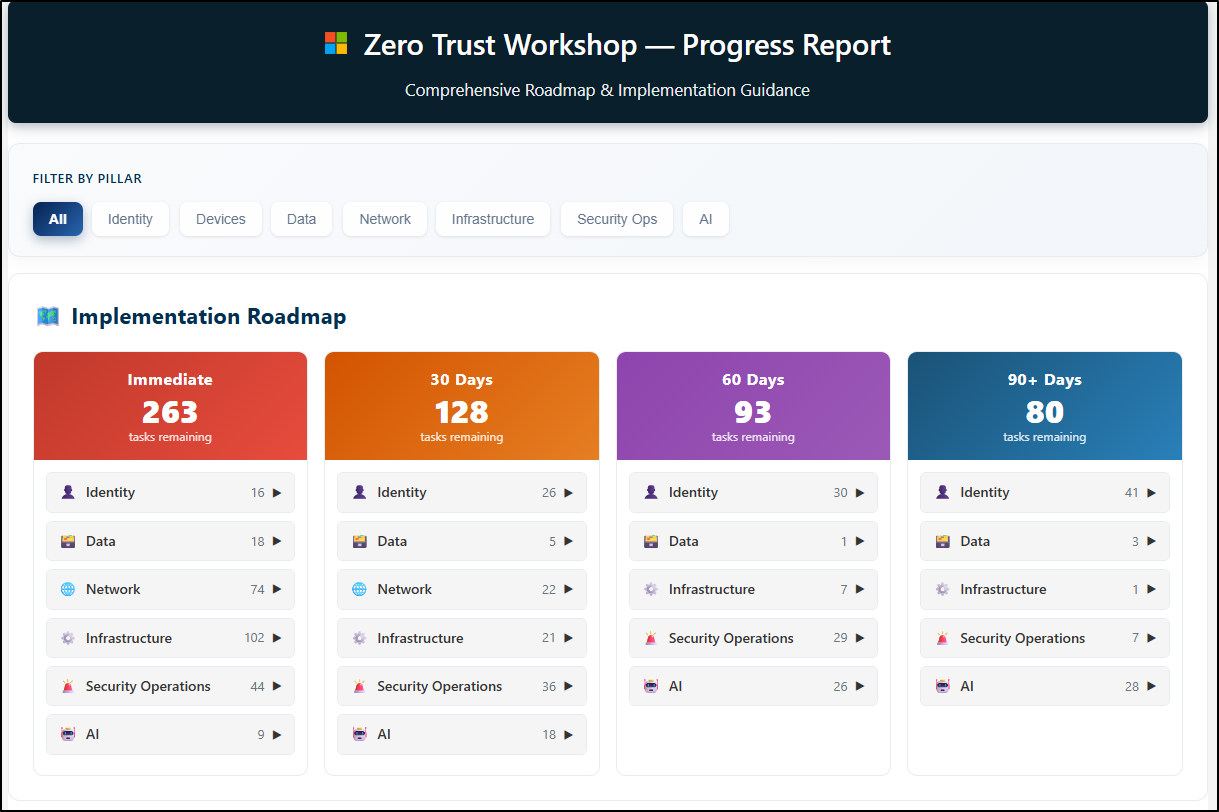
- With features like automated summaries and implementation plans, this update brings greater structure to the process. It also provides clear visibility into task status, including tasks remaining immediately, those due within 30, 60, and 90 days, completed task summaries, and more.
- In the previous Excel experience, each item included labels for implementation effort and user impact. This has now been extended to include license requirements as an additional label for each item.
- Additionally, an icon-based indicator has been introduced to highlight whether a roadmap item is a cross-pillar task, meaning it spans multiple Zero Trust pillars.
- Similar to the Excel-based experience, teams can click any item to view guidance, complete actions, and update status (e.g., In Planning, In Progress, Completed, Blocked) to track progress. In the web-based application, these capabilities are now accessible through a bottom pane when an item is selected.
- The Zero Trust web app supports exporting roadmap data in JSON or CSV format for use in tools like Azure DevOps or Jira. It also allows importing data to merge or replace existing roadmap activities.
- The Reset Pillar option is used to revert all tasks within a specific pillar (e.g., Devices) back to their original/default state.
- The roadmap now includes new activities in the Data and Network pillars, such as monitoring audit logs for data access and enabling cloud firewall capabilities, along with other actions to support Zero Trust adoption.
Organizations can use the implementation report to review findings, establish a baseline, and address identified gaps. This helps refine their security strategy and track progress through periodic assessments, typically every six months.
Core Pillars of the Zero Trust Workshop
Let’s take a closer look at each core pillar and its role in strengthening your Zero Trust strategy.
1. Identity
The Identity pillar serves as the primary control plane for a Zero Trust architecture, centering protection on every user and service identity. Its goal is to ensure that every identity is continuously verified, granted only the minimum access required, and strictly governed throughout its entire lifecycle.
- Application access and authentication: Helps gain visibility into all applications and modernize authentication approaches. It enables admins to reduce reliance on legacy apps, manage shadow IT, and enforce controls such as Conditional Access for secure and compliant access to organizational resources.
- Users and groups: Focuses on modernizing identity management across hybrid environments by moving away from legacy authentication methods. It enables the adoption of passwordless sign-in methods such as Windows Hello for Business and FIDO2. Also, it improves user access through self-service capabilities and secure collaboration across Microsoft 365 services.
- Identity governance: While previous stages secure the “lock on the door,” this area controls who holds the keys and for how long. It focuses on how user data, including external identities, is governed to ensure the right access. This is achieved through regular access reviews and automated lifecycle workflows that minimize human error.
- Operations and privileged access: This area focuses on hardening high-risk identities, such as privileged accounts and Tier-zero roles, to minimize the impact of a breach. It streamlines security by implementing break-glass accounts, enforcing just-in-time access via PIM, and remediating over-privileged permissions, and more.
2. Devices
Managing device access is critical to ensuring only secure and compliant endpoints interact with Microsoft 365 organizational resources. This pillar focuses on evaluating device health, enforcing endpoint protection, and governing access across managed and unmanaged devices.
- Centralize tenant administration: Secure administrative access to device management by ensuring only authorized admins operate under trusted and controlled conditions.
- Use Conditional Access and PIM to secure Intune administrative and device actions by enforcing compliant device access, location-based restrictions, and strong authentication controls. Require multi-admin approvals and perform critical operations only from Secure Admin Workstations (SAW).
- Implement RBAC in Microsoft Intune and Microsoft Entra ID using scope groups and tags to align with least privilege and assume breach principles. This ensures admins have only the minimum required access and visibility, restricted to specific users, devices, and management objects like apps and configuration profiles.
- Modernize Windows Device Management with MDM: Here, the device is the new perimeter, allowing access only from healthy, managed Windows endpoints. This is achieved by moving to cloud-native MDM using Microsoft Entra ID Join and migrating GPOs to Microsoft Intune. By enforcing security baselines such as compliance policies, Cloud LAPS, etc., and cloud-based updates, admins ensure devices remain secure and compliant.
- Secure mobile access (MAM/MDM): Protect iOS and Android devices using MAM for strict data protection policies and MDM for managed enrollment and controlled resource access.
- MAM: Enforce access controls (PIN or biometric), apply data protection policies (encryption, backup restrictions, screen capture), and configure conditional launch settings (e.g., block jailbroken or rooted devices, block screen capture).
- MDM: Use compliance policies and device-based Conditional Access, along with enrollment restrictions and threat defense integration. Deploy policies Wi-Fi, VPN, and certificate profiles, and manage app deployment across platforms.
- Enforce macOS compliance: This area focuses on bringing macOS into the Zero Trust model by enforcing enrollment and configuration profiles for controls such as Gatekeeper, FileVault encryption, and firewall settings. By integrating Microsoft Defender for Endpoint and compliance policies, organizations can verify macOS device health before granting access to sensitive data.
3. Data
This data pillar ensures your most valuable information is protected throughout its lifecycle. Beyond just locking down files, it focuses on visibility and control to ensure data is automatically shielded based on risk, regardless of where it travels or who accesses it.
- Know and protect your data: Ensures sensitive data such as financial records, personal information, and intellectual property is identified and protected wherever it resides. It classifies and labels data based on sensitivity and enforces DLP policies to prevent unauthorized sharing and leakage.
- Manage data access: Focus on securing admins of DLP, MIP, and IRM, as they work with critical configurations, alerts, and incident data. It includes adopting RBAC and privileged access controls, enforcing trusted device standards, and segmenting administrative roles to reduce risk.
- Protect critical assets: Aims to identify and protect critical assets such as product designs, proprietary formulas, and defense or military-related information. It involves planning protection strategies based on regulatory needs, using DLP, sensitivity labels, and cryptographic controls like Bring Your Own Key (BYOK) and Double Key Encryption (DKE).
4. Network
Network security no longer relies on a physical perimeter. By removing the assumption of trust for internal users and devices, this area focuses on securing the connection itself, regardless of where it originates or what network it uses. These efforts are organized into the following key areas:
- Modernize VPN and protect legacy apps: Move beyond traditional VPN by implementing Microsoft Entra Global Secure Access, enabling QuickAccess, deploying connectors, applying B2B guest access controls, and more. Route users only to required applications, enforce session-level controls, and continuously validate access to reduce exposure and prevent lateral movement.
- Secure access to all internet resources: Safeguards web and cloud access by monitoring connections and blocking malicious activity. It uses Secure Web Gateway (SWG) capabilities, along with advanced controls like AI gateway, agentless access, etc., to ensure safe access to the internet and Microsoft 365 resources from anywhere.
- Network and application protection & control: Strengthens the environment by isolating network segments and preventing unauthorized movement. It applies controls like DDoS protection, network access control, and more to improve visibility and stop threats before they impact critical applications.
5. Infrastructure
As Microsoft workloads span across cloud and on-prem environments, securing the underlying infrastructure becomes critical. This pillar focuses on protecting servers, VMs, containers, storage, databases, APIs, and core services through segmentation and continuous threat detection.
- Governance and compliance: This focus area shifts from setting up servers to orchestrating a governed environment across Azure, Amazon Web Services (AWS), and Google Cloud Platform (GCP). It aligns business needs and ownership with technical controls in Microsoft Defender for Cloud. Enforcing governance rules, tracking Secure Score, and integrating with SIEM establishes a strong foundation for Zero Trust infrastructure.
- Servers and compute resources: Harden VMs, containers, and on-premises servers against lateral movement using Defender for Servers, CSPM, and Defender for Containers to achieve unified security. Key actions include enforcing JIT access, vulnerability scanning, and file integrity monitoring, along with container registry scanning, Defender sensors, and Azure Arc for hybrid protection.
- Secure and govern data storage: Strengthens storage security posture by protecting workloads such as Azure Blob Storage, Azure Files, and Azure Data Lake Storage using Microsoft Defender for Storage. It enables malware scanning, sensitive data discovery, and multi-cloud connectors to ingest metadata, assess posture, and apply threat protection.
- Protect and Monitor Database Workloads: Secures structured data by detecting threats and vulnerabilities across database platforms in Azure, on-premises, and multicloud environments. Microsoft Defender for Databases provides advanced threat protection for Azure SQL, SQL Servers on machines, open-source databases, and Cosmos DB, ensuring continuous monitoring and risk mitigation.
- APIs and infrastructure services: Ensures secure API and application access by using Microsoft Defender for APIs and Azure API Management to monitor traffic and prevent unauthorized exposure, along with Microsoft Defender for App Service, Key Vault, and Resource Manager to protect application components and centralize secret management.
6. Security Operations
Effective threat defense depends on the ability to detect, investigate, and respond in real time. This pillar brings together threat detection and response capabilities to help organizations identify threats early and act before they escalate. To achieve this, it focuses on the following key areas:
- Identity Threat Protection: This first line of defense strengthens account security and prevents lateral movement by eliminating excessive permissions, restricting delegation, and deploying decoy (honey) accounts to detect misuse. Use Microsoft Defender for Identity and Microsoft Entra ID Protection to identify and remediate compromised identities in real time, ensuring attackers cannot move across the environment.
- Secure Email and Collaboration: This focus area secures Microsoft Exchange Online and Microsoft Teams through targeted protection controls. Apply anti-phishing, anti-spam, anti-malware, outbound spam policies, and email authentication for mail. Additionally, enforce Safe Links and Safe Attachments across collaboration channels.
- Endpoint Threat Protection: This focus area ensures that every device, whether a laptop or mobile, is continuously monitored and hardened. This provides next-gen protection and Attack Surface Reduction (ASR), ensuring that even off-network devices are continuously monitored for signs of a breach.
- Govern Cloud Applications: This area shines a light on “Shadow IT.” By using connectors and policies, you gain visibility into which third-party apps are accessing your data, allowing you to enforce governance and block high-risk app-to-app communication.
- Integrate SIEM/SOAR+XDR: Centralize security logs from Microsoft services and third-party sources into Microsoft Sentinel. Automate alert triage, incident response, and routine investigations so your team can focus on analyzing advanced threats.
- Leverage AI for Security: Enhance security operations with Microsoft Copilot for Security by summarizing incidents, generating queries, and guiding response actions. Manage plugins to retrieve security context, perform actions, and integrate with approved services, while Security Compute Units (SCUs) provide the compute capacity required for AI-driven analysis.
7. Zero Trust for AI (Newly introduced)
As AI agents and MCP servers become central to your workflow, they must be managed with the same strict standards as any other user or device. This new Zero Trust for AI pillar ensures your AI environment remains governed and secure, focusing on the following key stages:
- Map and assess AI risk: Focuses on identifying AI assets and conducting risk assessments using tools like Microsoft Defender and DSPM to gain visibility and track evolving threats.
- Register all agents: Ensures all AI agents are registered and governed through Agent 365 Registry and Microsoft Entra ID, so every agent operates under defined authentication and control.
- Secure AI authentication and access: Strengthen access to AI systems across identities, networks, and data. Apply risk-based Conditional Access policies, enable Microsoft Entra Global Secure Access, block unsanctioned AI apps, and enforce sensitivity labels and DSPM controls. Complement these with sign-in monitoring, defined ownership, and access packages for controlled access.
- Securely build AI agents: Promotes secure development practices by designing AI agents with proper controls, validated inputs, and secure integrations. Proactive measures such as red teaming help prevent misuse and vulnerabilities.
- Security detection and response: Enhances resilience by detecting and responding to threats in real time through tools like Microsoft Sentinel and Defender XDR.
Final Thoughts
The Zero Trust workshop is a joint effort between customers and the Microsoft team to develop a 12–24 month Zero Trust Strategy and Deployment Plan. By aligning across all core pillars of Zero Trust architecture, organizations can move from assessment to execution with clear priorities and measurable outcomes.
With continuous enhancements, the workshop enables organizations to strengthen their security posture, adapt to evolving threats, and build a resilient, modern security foundation.