As a part of ongoing migration to Graph API, Microsoft has been rolling out updates step-by-step and Exchange Online is finally getting its moment. With the retirement of the legacy Reporting Web Services in Exchange Online, Microsoft is making ongoing efforts to improve message trace efficiency. To support this, Microsoft has now rolled out message trace support in Microsoft Graph API for Exchange Online admins. This opens up a new way to track emails programmatically, aligning with the new Message Trace experience announced earlier. In this blog, we’ll explore how message trace works with Microsoft Graph and guide you on getting started. 🚀
New Message Trace Support Using Microsoft Graph API
Before jumping into Microsoft Graph API for message trace, let’s take a step back and understand why this change was needed.
For years, Exchange Online admins relied on the Get-MessageTrace and Get-MessageTraceDetail cmdlets in the Reporting Web Service to run message trace and message trace detail queries. However, Microsoft has announced that this service will be deprecated by April 8, 2026. To track emails more effectively and support the migration to Graph API, Microsoft has now extended programmatic message trace support to Graph. This new capability will replace the existing legacy message trace functionality that relied on the Reporting Web Services API.
With this change, you can query message trace data using modern, REST-based endpoints instead of the legacy service. Currently, this capability is available as a preview feature, aimed at improving the overall tracing experience and preparing for the transition.
Once the rollout is complete, message trace and message trace detail operations will be supported in Microsoft Graph.
📅 Rollout Timeline
The general availability of message trace in Microsoft Graph API in late January 2026, with rollout expected to complete by early February 2026. Once rolled out, it will automatically apply to your tenant, without any additional licenses.
How to Onboard Message Trace API in Microsoft Graph?
Now, let’s walk through the step-by-step procedure to prepare Microsoft Graph for message trace access.
1. Create a Service Principal for Message Trace
Before you call the Message Trace API, you must create a service principal specifically for the Message Trace. Previously, Microsoft allowed apps to access Microsoft Graph without a registered service principal (known as service-principal–less authentication). But now, Microsoft has announced that this approach will be deprecated by March 2026.
To avoid any interruption when using the Message Trace API, you must register and use a service principal. Here are the steps below to create a service principal and prepare it for message trace access.
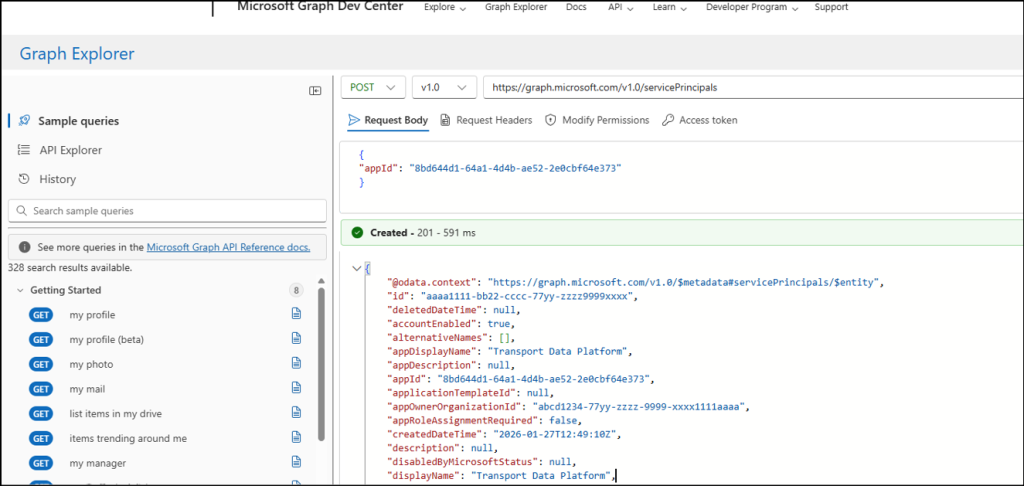
- Sign in to Microsoft Graph Explorer.
- Set the HTTP request method to POST.
- Enter the endpoint as: https://graph.microsoft.com/v1.0/servicePrincipals.
- In the request body, provide the app Id of the Message Trace for which you are creating the service principal. This is usually the first part of the application’s ID.
123{"appId": "8bd644d1-64a1-4d4b-ae52-2e0cbf64e373"}
- Click Run Query. Once executed, the service principal will be created.
2. Access Message Trace API in Microsoft Graph
With the registered service principal in place, your app is now ready to authenticate properly and access the Message Trace API in Microsoft Graph. Here’s how you can use message trace in Microsoft Graph.
- To fetch message trace records, set the HTTP method to GET and use the following endpoint:
1https://graph.microsoft.com/beta/admin/exchange/tracing/messageTraces
- For a more granular view, you can retrieve detailed trace information for a particular recipient. Set the HTTP method to GET and use this endpoint:
Replace <ExchangeMessageTraceId> with the actual message trace ID and <RecipientUPN> with the target recipient’s email address. This request returns detailed delivery and processing information for that specified recipient.1https://graph.microsoft.com/beta/admin/exchange/tracing/messageTraces/<ExchangeMessageTraceId>/getDetailsByRecipient(recipientAddress='<RecipientUPN>')
To get a complete breakdown of all available parameters and filters, you can refer here.
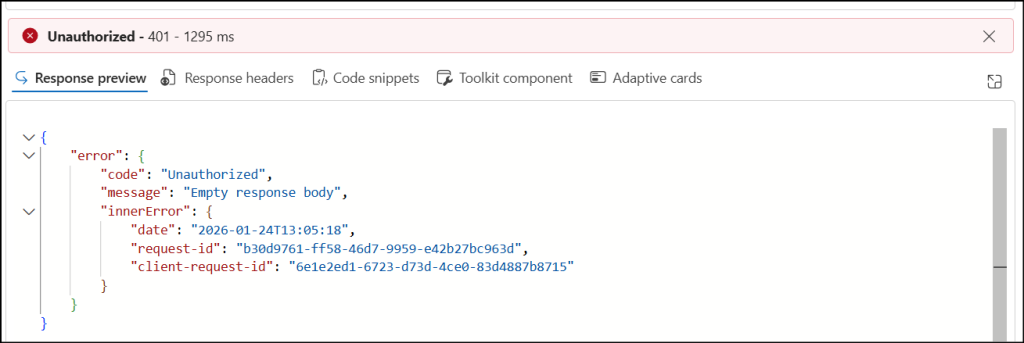
Note: Provisioning of service principal can take a few hours to complete. If you try to access data before the provisioning is finished, you may receive a 401 Unauthorized error.
How Microsoft Graph Manages Message Trace Query Traffic?
To keep Exchange Online running smoothly for everyone, Microsoft enforces rate-based throttling on message trace queries. This ensures fair usage of resources and consistent service availability across tenants. Below are the throttling limits for Message Trace queries.
- All message trace and message trace detail requests share the same quota, so every call counts toward the same limit.
- At the tenant level, Microsoft allows a maximum of 100 query requests within a 5-minute rolling window (throttling threshold). If your request rate stays below this threshold, your queries run normally without throttling.
- If an automation task or script is configured to run more frequently than the throttling threshold, it must be adjusted to stay within the allowed request rate. Otherwise, your queries may be throttled.
- Even a single query is subject to these limits to ensure fairness and service reliability. One query can return up to 5,000 results, which means you can retrieve as many as 500,000 results in a 5-minute window.
- If you spread your queries evenly over time, this can scale up to 144 million results per day.
Note: A query request and the result size are not the same. A query request refers to each API call you make and the result size is the number of messages returned as a response.
Key Considerations for Using Message Trace in Microsoft Graph
To get the most out of message trace in Microsoft Graph API, here are a few key things for admins to keep in mind.
- If your organization is still using the Reporting Web Service for automated or programmatic message trace, you may face disruptions once Microsoft completes the rollout. This is the right time to review & update your existing scripts and workflows to work with Microsoft Graph.
- For newly onboarded Exchange Online tenants, message trace based on the Reporting Web Service will be deprecated automatically. In these cases, Microsoft Graph API is the recommended and future-ready option for message trace.
- It’s also important to note that this change does not affect end users. Email delivery remains the same. The update only impacts how administrators and developers retrieve message trace data.
So, if you rely on message trace for automation or reporting, plan your migration to Microsoft Graph now. Making the move early will help you avoid last-minute issues and ensure a smooth transition when the rollout is complete.
Closing Lines
And that’s a wrap! We hope the message trace in Graph API should be a big win for Exchange Online admins seeking an easy, modern way to trace emails. We’d love to know how useful this update is for you. Feel free to share your thoughts, questions, and experiences in the comment section below. And don’t forget to stay tuned for more upcoming blogs and updates! 😉