While AI apps and agents are rapidly sprawling across Microsoft 365 organizations, many security teams still lack clear visibility into how these tools are used or the specific risks they introduce. This blind spot can lead to issues ranging from shadow AI and data leaks to entirely new attack vectors caused by risky agent behaviors.
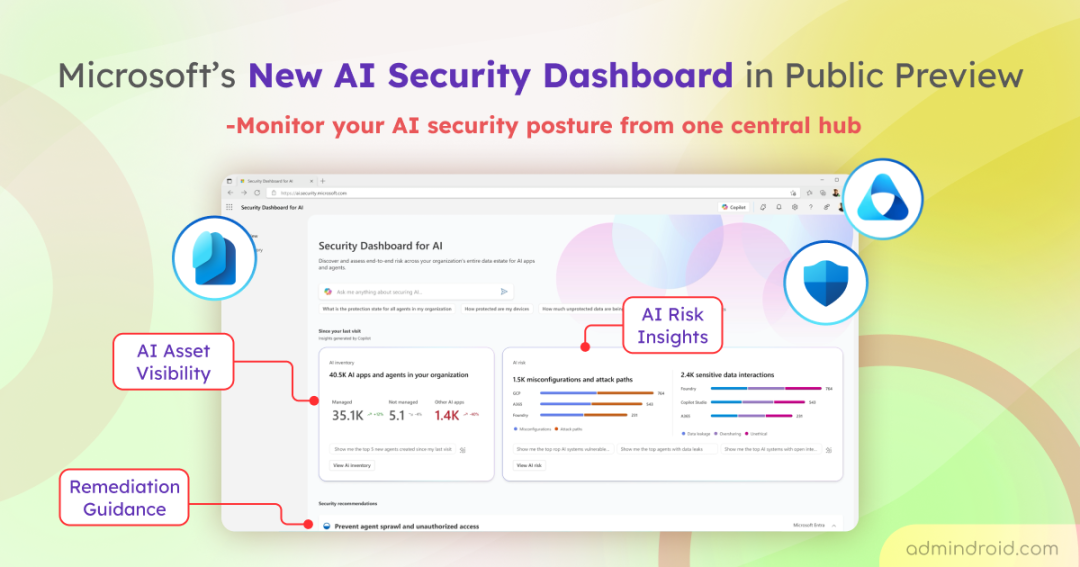
To bridge this visibility gap, Microsoft has launched the new Security Dashboard for AI in public preview. This dashboard consolidates fragmented AI signals to deliver a unified view of your AI security posture. In this blog, we’ll walk through how this AI security dashboard works and how you can use it to secure your AI frontier. Let’s dive in!
Overview of the New AI Security Dashboard
The Security Dashboard for AI is a centralized experience that gives organizations clear visibility into their AI landscape and associated risks. By combining insights from Microsoft security solutions such as Microsoft Defender, Entra, and Purview, it simplifies AI oversight and improves operational efficiency. Key signals include:
| Microsoft Entra | Microsoft Defender | Microsoft Purview | Microsoft Security Copilot |
| Identity management for governing app and agent identities. Conditional Access for risk-based AI app access control. Privileged Identity Management (PIM) to track and control high-level access rights. | Threat protection for monitoring AI workloads and endpoints. Cloud security posture management to uncover weaknesses. App security to assess SaaS AI app risks. | Data classification to protect AI-accessible data. Data Loss Prevention (DLP) to reduce sensitive data exposure. Insider risk management to detect unusual AI activity. Compliance protections for generative AI scenarios. | Prompt-based exploration for investigating AI risks. Aggregated AI risk insights across solutions. Agent discovery and categorization for shadow and unmanaged AI. |
Based on the insights outlined above, the dashboard helps organizations understand where AI is used, how it interacts with data, and where potential vulnerabilities may exist.
The dashboard helps organizations understand where AI is used, how it interacts with data, and where potential vulnerabilities may exist.
This unified AI Security dashboard supports:
- Monitoring AI usage trends to enable proactive governance and safer adoption.
- Identifying unmanaged AI apps and agents to detect emerging risks early.
- Analyzing high-impact AI risks, including risky agents and unsanctioned AI apps, with clear severity and context.
- Understanding how AI tools interact with sensitive data to minimize oversharing and data exposure risks.
- Turning insights into action with responsive threat protection when AI-related issues arise.
As an added advantage, the Security Dashboard for AI requires no additional licensing for customers who already use Microsoft security solutions like Defender, Entra, and Purview.
Key Insights from the Security Dashboard for AI
The Security Dashboard for AI is accessible through the Microsoft security portal and includes the following three dedicated tabs that help organizations discover and assess end-to-end risks across their AI estate.
1. Overview Page: Monitor Your AI Security Posture from a Unified View
The Overview tab provides instant visibility into your AI security by offering:
- AI Risk Scorecard: A quick visual snapshot of your security health that helps track posture and detect drift in near real-time.
- AI Asset Visibility: A clear breakdown of managed and unmanaged AI assets, helping you identify shadow AI at a glance.
- Integrated Security Recommendations: A prioritized set of actions across Microsoft Entra, Defender, and Purview to help prevent data sprawl, unauthorized access, and oversharing while addressing AI risks.
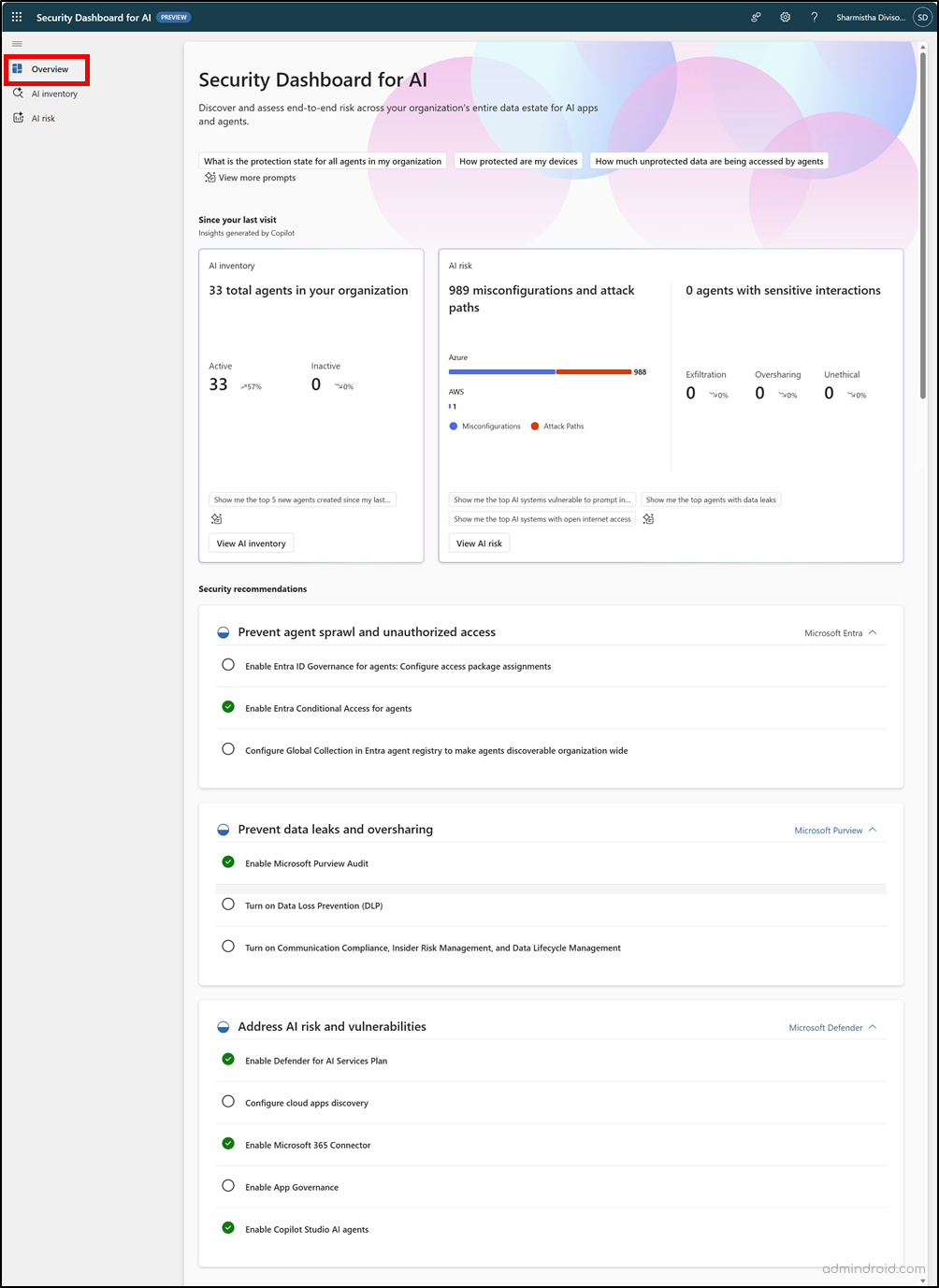
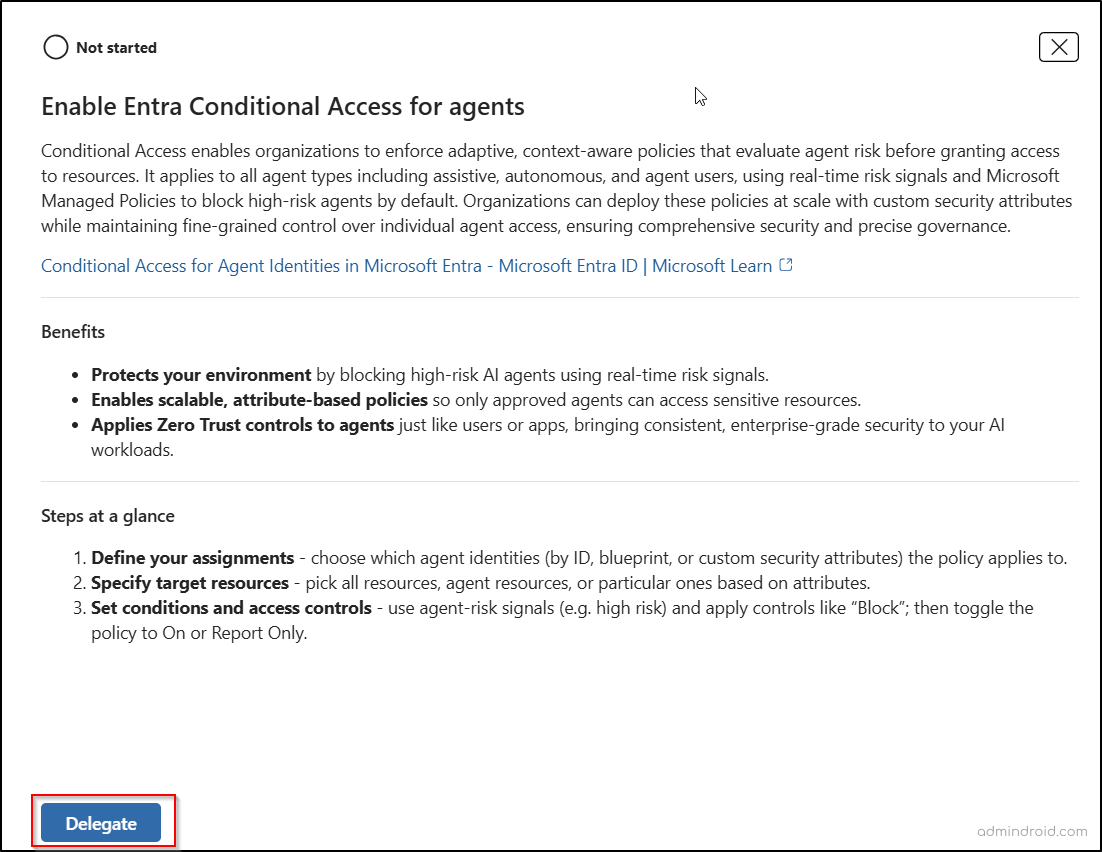
- You can also delegate remediation tasks to the appropriate teams directly from the dashboard. Simply select a recommendation, click Delegate, and choose the appropriate users and groups.
2. AI Inventory Page: Get a Comprehensive View of AI Assets and Discovery
The AI Inventory tab gives security teams a centralized view of AI assets, helping them discover AI applications and agents, assess risks, and take remediation actions from one place. It covers both internal and external AI resources so teams can maintain clear visibility across their environment.
The inventory delivers coverage across several key areas:
- Visibility into Microsoft AI solutions such as Microsoft 365 Copilot, Copilot Studio, and Microsoft Foundry applications & agents.
- Monitoring third-party AI platforms including OpenAI ChatGPT and Google Gemini.
- MCP (Model Context Protocol) server monitoring to maintain security and control across AI deployments.
Beyond visibility, the AI Inventory tab also helps teams actively investigate and manage assets. Security teams can apply filters to focus on specific asset types or risk levels, review detailed configurations and compliance status, and export data for further analysis.
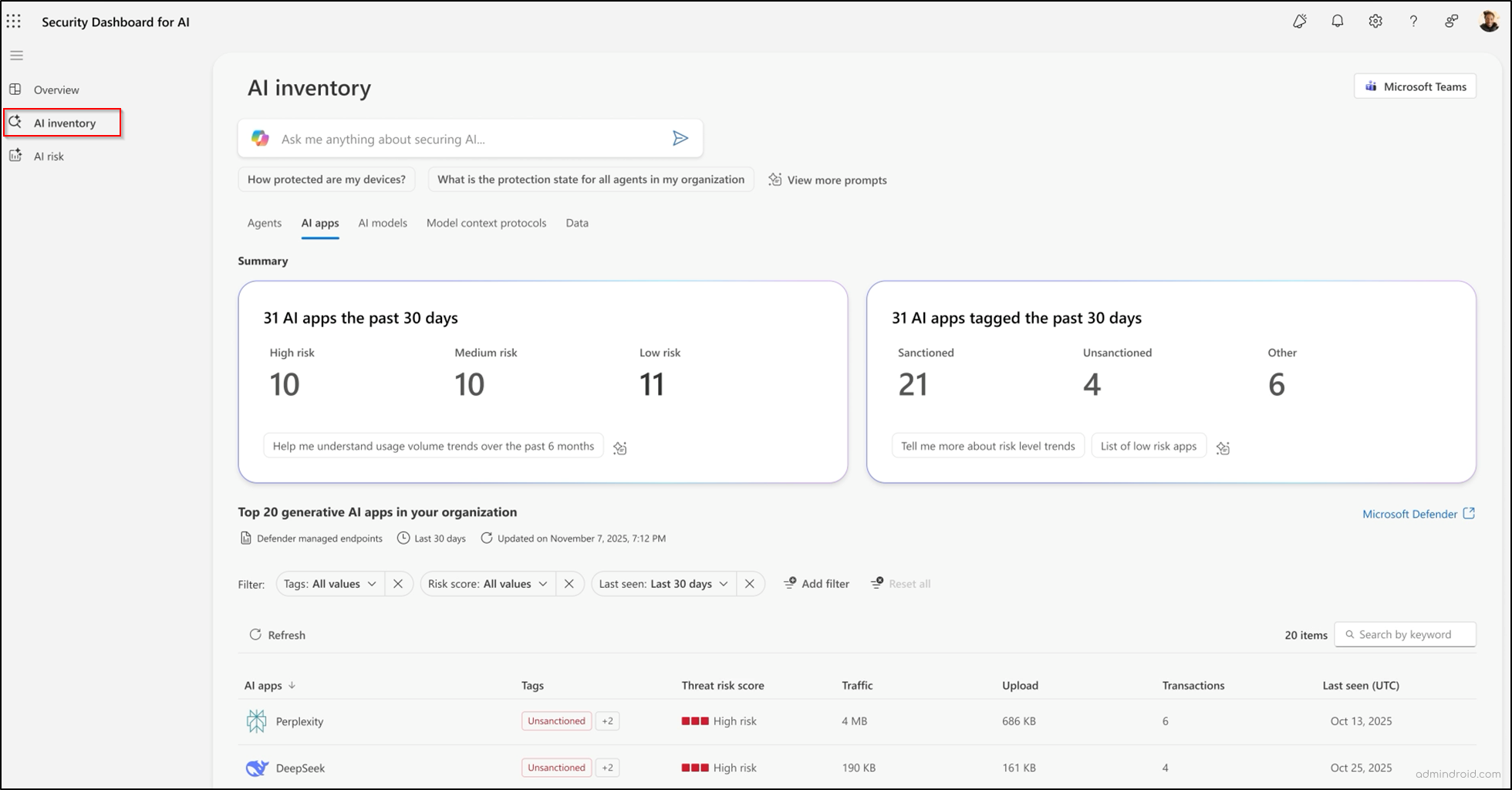
For deeper investigation, selecting an AI agent reveals activity history along with recommendations to strengthen data protection. For AI models, MCP servers, and other applications, the Show more in Defender option opens detailed insights and mitigation guidance in Microsoft Defender.
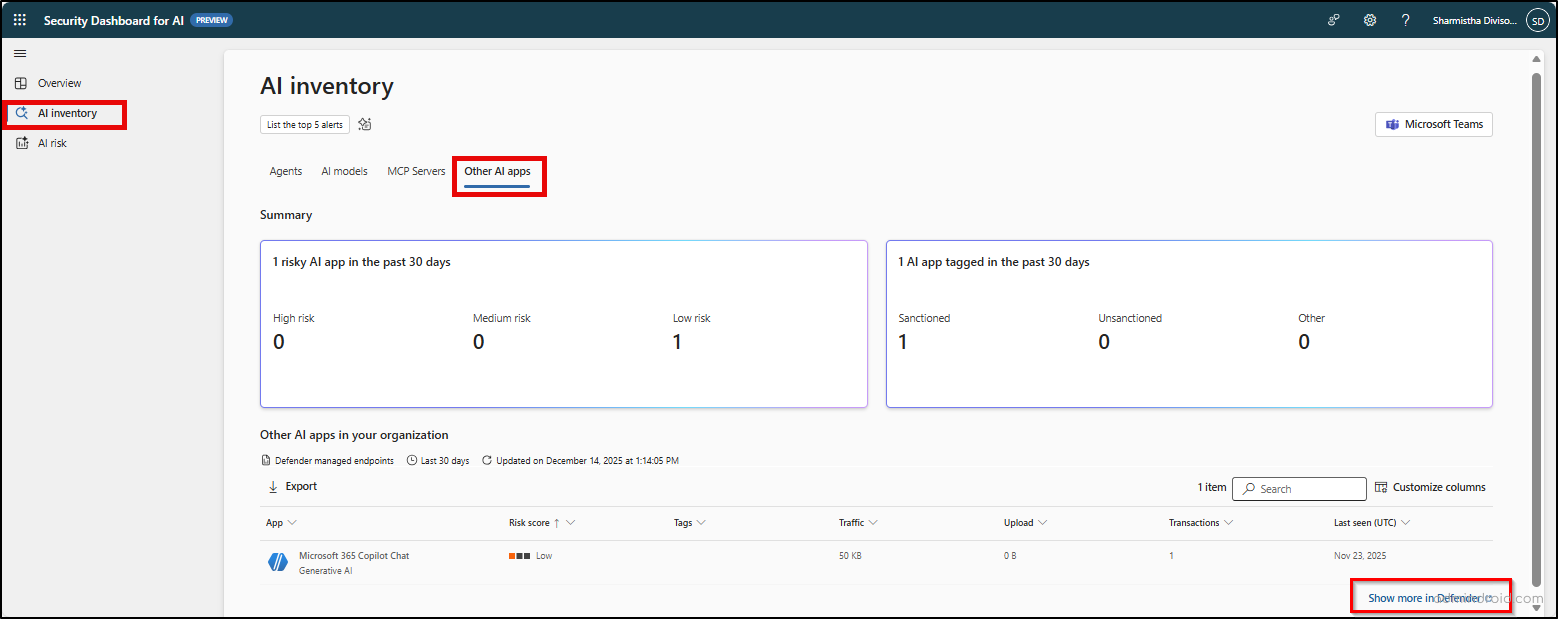
This approach helps teams move from visibility to action without switching between multiple tools.
3. AI Risk Page: Prioritize and Investigate AI Security Risks
The AI Risk page helps leaders identify which vulnerabilities pose the greatest business risk. With real-time summary cards and trend charts, teams can spot emerging patterns and prioritize immediate concerns. Each risk category links directly to Microsoft Defender or Microsoft Purview for deeper analysis and remediation.
Microsoft Security Copilot further supports investigations with AI-powered, natural language insights. It helps uncover shadow AI, detect unmanaged agents, and explore complex risk scenarios through prompt-based queries. This enables security teams to turn risk data into actionable insights and strengthen their AI security posture.
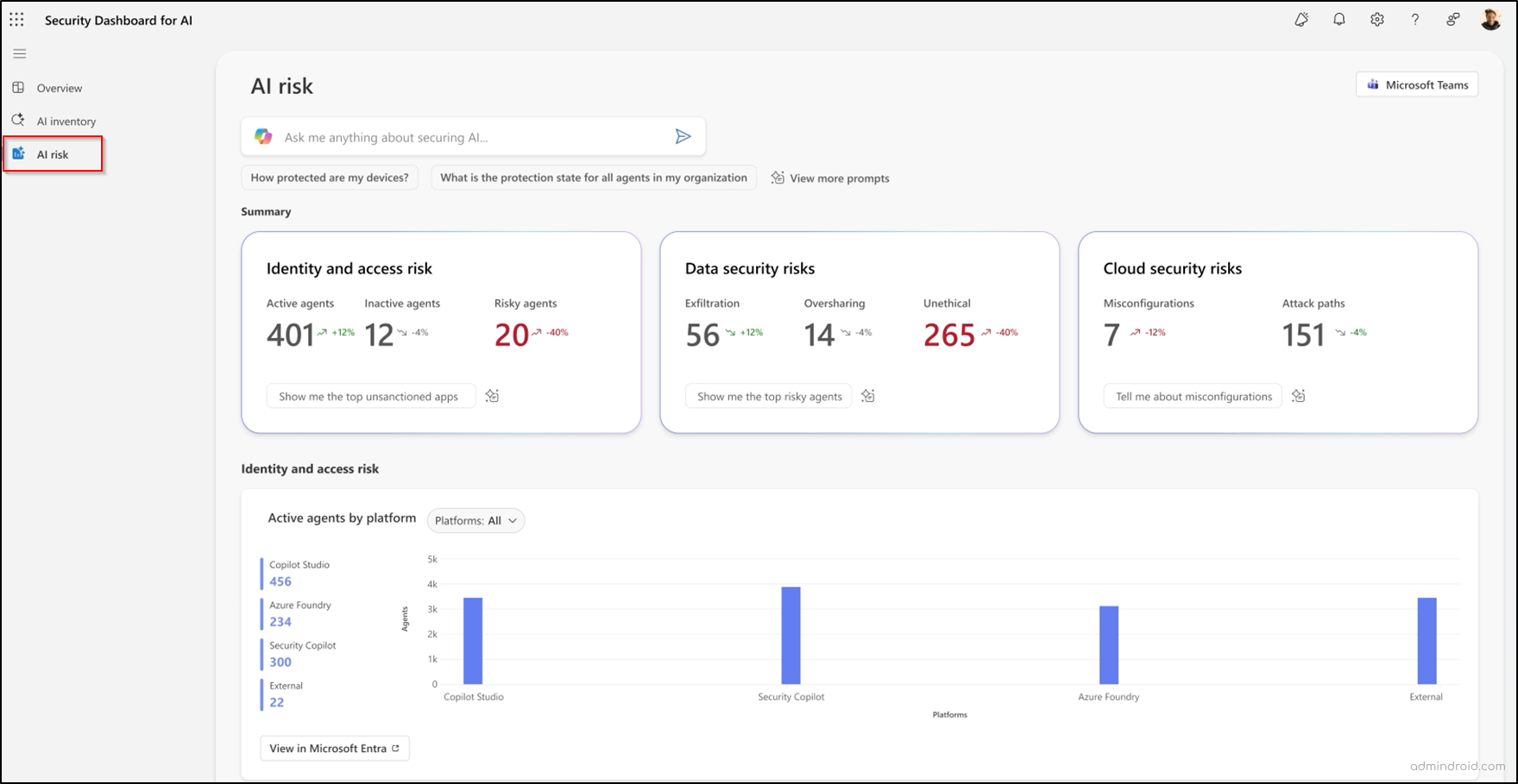
You can also share the dashboard reports through Microsoft Teams to keep stakeholders informed and support more effective AI risk management.
Note: A Security Copilot prompt gallery is available across all tabs to help you explore insights more efficiently.
Permissions Required to Access the Security Dashboard for AI
To access the Security Dashboard for AI, appropriate permissions are required. Global administrators have full access, while global readers have view-only access across all dashboard data.
In addition, certain built-in roles can access specific dashboard data based on their assigned permissions, as outlined in the table below.
| Item | Security admin | Compliance admin | AI admin | Agent ID admin | Agent registry admin |
| Overview page summary cards | |||||
| AI inventory | ✅ | ✅ | ✅ | ❌ | ❌ |
| AI risk: Misconfigurations and attack paths | ✅ | ❌ | ❌ | ❌ | ❌ |
| AI risk: Agents with sensitive interactions | ✅ | ✅ | ✅ | ❌ | ❌ |
| Overview page recommendations category | |||||
| Prevent agent sprawl and unauthorized access | ✅ (Excludes configuring global collection in the Entra agent registry) | ✅ | ✅ | ❌ | ❌ |
| Prevent data leaks and oversharing | ✅ (Excludes enabling Microsoft Purview audit) | ✅ | ✅ (Excludes enabling Microsoft Purview audit) | ✅ (Limited to turning on Communication Compliance, Insider Risk Management, and Data Lifecycle Management) | ✅ (Limited to turning on Communication Compliance, Insider Risk Management, and Data Lifecycle Management) |
| Address AI risk and vulnerability | ✅ (Excludes enabling app governance) | ✅ | ✅ | ❌ | ❌ |
| AI inventory page permissions | |||||
| AI agents | ✅ | ✅ | ✅ | ❌ | ❌ |
| AI models | ✅ | ❌ | ❌ | ❌ | ❌ |
| MCP Servers | ✅ | ✅ | ❌ | ❌ | ❌ |
| Other AI apps | ✅ | ✅ | ❌ | ❌ | ❌ |
| AI risk page permissions | |||||
| Identity and access risk | ✅ | ✅ | ✅ | ❌ | ❌ |
| Data security risk | ✅ | ✅ | ✅ | ❌ | ❌ |
| Cloud security risk | ✅ | ✅ | ❌ | ❌ | ❌ |
| Misconfigurations and attack paths | ✅ | ❌ | ❌ | ❌ | ❌ |
| Agents with sensitive interactions | ✅ | ✅ | ✅ | ❌ | ❌ |
With the right access in place, organizations can fully leverage the dashboard’s insights to monitor and reduce AI risks.
In a nutshell, the Security Dashboard for AI brings visibility, risk assessment, and actionable guidance into one unified experience. By helping organizations discover AI usage, monitor risks, and prioritize remediation, it enables security teams (CISO) and risk leaders to stay ahead of evolving AI threats.
While currently leveraging familiar telemetry from Defender for Cloud Apps, its real potential lies in consolidating these signals into a dedicated AI context. If Microsoft successfully scales this dashboard to account for the vast ecosystem of third-party AI apps, it will become an indispensable tool for securing the modern AI environment.