For the past couple of years, AI meeting assistants have been booming well. Tools like “Meeting Notetaker,” “AI Assistant,” and “Read.ai Bot” became popular for generating transcripts, summarizing discussions, and helping people manage meeting fatigue.
Yeah, useful stuff, in the right context. But for many Teams’ admins and organizers, this has also become a frustrating and oddly persistent issue!
The core problem is that these bots enter meetings through third-party integrations connected by participants, not the organizer. That means a bot could potentially record sensitive conversations while the meeting host is completely unaware. 👎
Because of that, one of the most common questions appearing in Reddit threads and admin forums has been:
- How do I prevent external AI bots from joining my Teams meetings?
- How can we block third-party AI note-taking apps from entering meetings?
- Is it possible to stop AI notetakers from joining?
- How do I prevent users from allowing AI apps into meetings?
There wasn’t a clean answer. Most solutions were workarounds at best, not real fixes. But the good news is that things are about to change.
Before we get to that, let’s first look at the workarounds people have been relying on. That will help us understand why this new capability makes such a big difference.
The List of Workarounds to Block 3rd Party AI Assistants in Teams Meetings
This problem wasn’t new, so the admins got creative and a little desperate with workarounds. 😅
Require CAPTCHA Verification for Teams Meetings
One of the first suggestions was enabling CAPTCHA verification for external participants.
If the bot can’t solve the CAPTCHA challenge, it won’t be able to enter the meeting. But in reality, it didn’t work consistently. Many reported that certain AI assistants simply join meetings with the participants bypassing CAPTCHA entirely. In some cases, CAPTCHA also created usability issues for legitimate users.
Require Email OTP Verification for External Participants
Another workaround involved requiring external participants to verify their email using OTP before joining meetings.
This can block some bots, but it comes with side effects. In some cases, it can end up blocking legitimate external participants, especially if the tenant restricts consumer Teams users. OTP verification requires a Teams Premium license and relies on the consumer’s Teams identity flow.
Essentially, organizations had to choose between blocking bots or keeping meetings accessible for real guests; it was hard to choose one out of these!
Use Lobby Settings to Block AI Assistants
Some admins chose the simple route: make every external user wait in the meeting lobby.
It does help reduce unwanted participants, but meeting organizers need to manually identify and deny external bots. In large organizations with thousands of users, expecting every organizer to correctly identify AI bots in the lobby isn’t realistic! 😒
Others went even further into technical controls. For example:
- Blocking Azure Communication Services (ACS) anonymous join clients using PowerShell
- Disabling sign-in for enterprise app registrations
- Blocking user consent for third-party apps
- Disabling anonymous join in Microsoft Teams
Sometimes these methods helped, but each had its own flaw as a workaround. To say precise, admins were being forced to solve a visibility problem using configuration workarounds. And that’s never ideal!
Microsoft Teams Detects External Meeting Assistant Bots
Now, Microsoft Teams is introducing a much simpler approach.
A new native capability that detects and labels external meeting assistant bots when they attempt to join meetings hosted by your organization.
Yes, a built-in detection capability that admins have been asking for! Teams will explicitly tag an external AI as a meeting assistant bot, right before they get in.
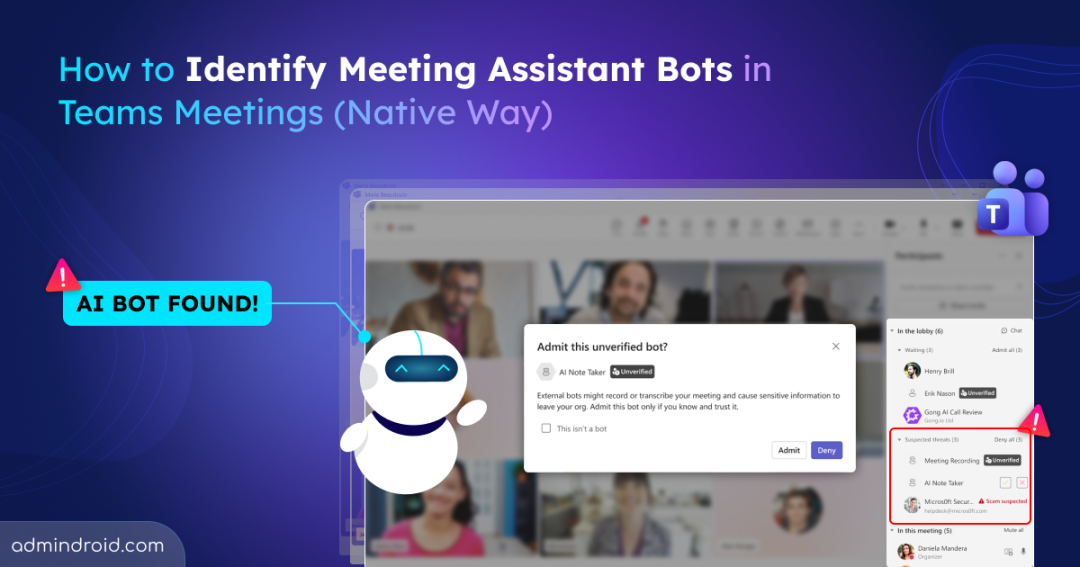
→ You can find them in the Suspected threats section on the right-hand side, labelled as ‘Unverified.’
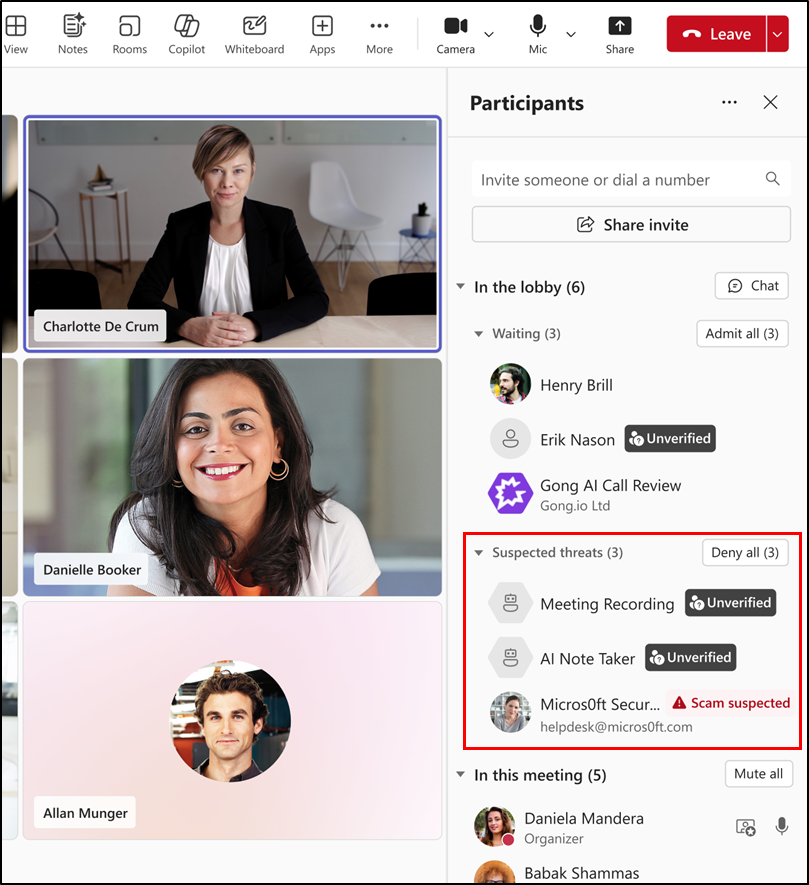
You don’t need a Teams Premium license or any workarounds anymore. Microsoft Teams analyzes the details of everyone attempting to join a meeting and identifies whether any of them are external automated bots. It works in a way as below:
- When a third-party AI-powered assistant bot tries to join a meeting hosted in your tenant, Teams detects it and flags it in the meeting lobby under the section ‘Suspected threats’.
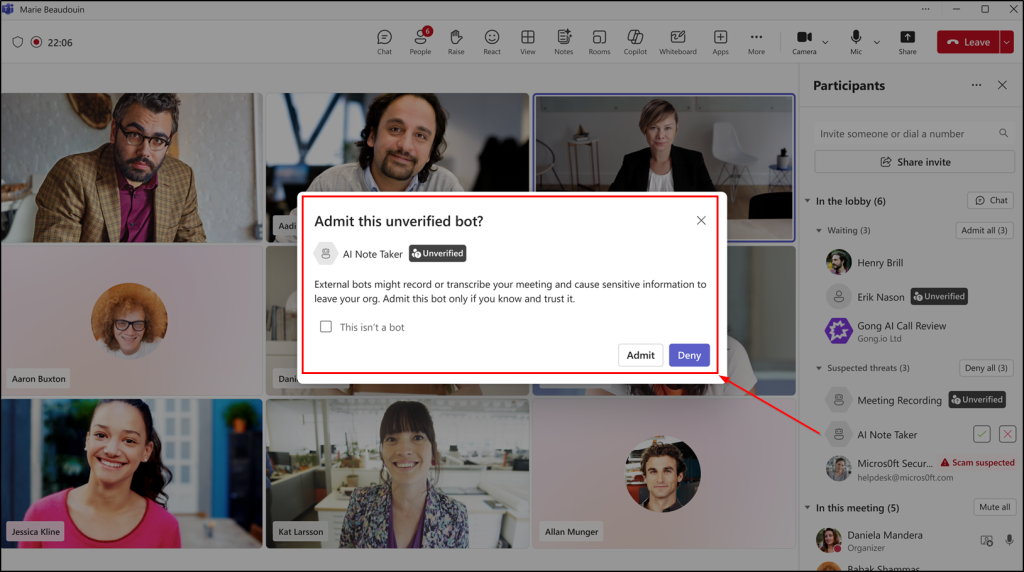
- Microsoft marks these anonymous participants with the “Unverified” trust indicator. Selecting the meeting assistant opens a pop-up showing its details and available actions.
- From there, the organizer can approve the bot to join, deny the request, or even remove it during the meeting if they catch it a little too late.
This small lobby tag solves a genuinely big usability problem. Nothing joins silently anymore!
How to Manage Teams Meeting Policy to Control AI Bots
To manage this, a new meeting policy option will be introduced in the Teams admin center, and it will be enabled by default.
From there, admins can customize it further based on the organization’s needs, such as:
- Requiring organizer approval before bots can join meetings
- Adjusting how bot detection behaves across meetings
Microsoft has also hinted at more granular admin controls arriving in the future. And there will be even better ways to manage automated participants. Sorry to say, for now, the policy itself hasn’t appeared yet in the Microsoft Teams admin center. 🙁
This will be updated once it becomes visible in meeting policies. For now, the rollout timeline is announced as follows:
- Targeted Release: Mid-May 2026 → Early June 2026
- General Availability (Worldwide & GCC): Early June 2026 → Mid-June 2026
Is this the Perfect Solution?
Not entirely, but it’s definitely a big improvement.
Microsoft themselves acknowledge that some bots may slip through depending on their behavior. Since detection relies on meeting join metadata, bots that mimic regular participants could occasionally avoid being flagged.
Note: There might still be bots that are undetected by the system due to their intrinsic behavior. Encourage users to report them directly from the meeting or app to help improve Microsoft’s detection technology.
But the glad to be news is it’s native, on by default & requires no Teams Premium license whatsoever.😮💨
But compared to the patchwork of CAPTCHA challenges, OTP verification, Entra app restrictions, and PowerShell workarounds, this is a very welcome improvement.
It took a while, but it’s finally here.