Have you ever hit capacity limits with private channels in Microsoft Teams? Perhaps you’ve reached the channel limit per team or handled frustrating requests from members wondering why they couldn’t schedule meetings directly within a teams private channel. It’s been a constant balancing act, managing these constraints while finding workarounds to keep teams productive.
Those challenges are about to disappear! Microsoft’s new enhancements to Teams private channels deliver the scalability and functionality you’ve been requesting. Let’s dive into what’s changing and why it matters for your Teams environment.
What are the Upcoming Changes to Microsoft Teams Private Channels?
Previously, private channels in Microsoft Teams had strict limits and missing features that often-slowed collaboration. Now, Microsoft is removing those barriers with the following key updates:
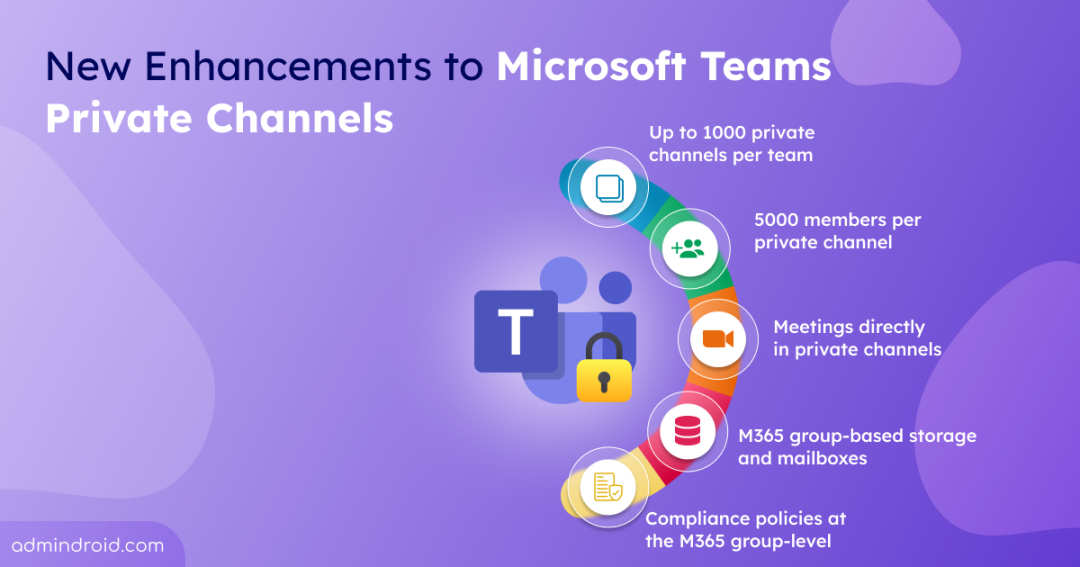
- Teams can grow from 30 to 1000 private channels.
- Each private channel supports up to 5000 members instead of 250.
- Members can schedule and host meetings directly in private channels.
- Private channels will transition to Microsoft 365 group-based storage.
- Mailboxes will move from an individual-user basis to a channel-based mailbox.
- Compliance policies (e.g. DLP, retention policy, etc.) will apply at the team’s Microsoft 365 group level instead of the individual user level.
- Migration runs from October 2025 to May 2026.
These enhancements make private channels more practical for large, secure, and well-governed teamwork.
Note: Newly created private channels will now use the site’s root document library as a default file storage instead of automatically generating a dedicated document library.
When Will These Updates be Available in Microsoft 365?
The rollout began in October 2025 and was expected to be completed by late April 2026. During this period, Microsoft started migrating existing private channels to support the new capabilities while allowing channels to continue functioning normally throughout the transition.
Microsoft also confirmed that features like increased private channel limits (up to 1,000 channels per team) and private channel meeting scheduling will become fully available in early May 2026 after migration completes.
However, migration is still blocked for some private channels that require manual admin action.
Action Required from Microsoft 365 Admins Before June 5, 2026
Microsoft has already completed migration for most Teams private channels. However, some channels are currently not eligible for automatic migration that require admin action within the next few days. They are:
- Empty private channels inaccessible to any tenant user
- Guest-only private channels with no internal users
Admins must assign at least one internal user as the owner for each affected Microsoft teams private channel before June 5, 2026.
If no action is taken before the deadline, Microsoft will automatically soft-delete those channels. These private channels will remain recoverable for 30 days. After that recovery period, they will be permanently deleted.
To track the migration progress, admins can use the following PowerShell cmdlet after connecting Microsoft Teams module:
|
1 |
Get-TenantPrivateChannelMigrationStatus |
This cmdlet will return totalChannels, migratedChannels, and remainingChannels data to monitor migration moves from 'InProgress' to 'Completed'. You can refer the below image.

After identifying affected channels, admins can use Microsoft Graph cmdlets to add internal users as owners and remediate orphaned or guest-only private channels.
- First, connect to Microsoft Graph with the required permissions:
|
1 |
Connect-MgGraph -Scopes "ChannelMember.ReadWrite.All","Group.ReadWrite.All" |
- Then, use the following cmdlet to add an internal user as a private channel owner:
|
1 |
$params = @{ "@odata.type" = "#microsoft.graph.aadUserConversationMember" roles = @("owner" ) "user@odata.bind" = "https://graph.microsoft.com/v1.0/users/<UserID>" } New-MgTeamChannelMember -TeamId $teamId -ChannelId $channelId -BodyParameter $params |
Since rollout timing may vary for each tenant, admins and compliance managers should complete the required remediation and policy reviews before the migration completes.
What Additional Actions are Required from Admins and Compliance Managers?
With private channels moving to group-based storage and mailboxes, admins and compliance managers need to update eDiscovery, DLP, & retention policies to match the new model.
Purview eDiscovery and Legal Hold
Now, legal holds are applied to user mailboxes since private channel data resided in each member’s mailbox. After this update, the latest message will be moved to the team’s group mailbox, while edits and deleted messages will stay in the users’ mailboxes.
- Actions before migration
- When private channel data moves from user mailboxes into the group mailbox, legal holds must also shift. If a hold already exists, apply it to the team’s group mailbox so new content is preserved.
- Actions after migration
- Ensure legal holds cover both the user mailbox and the new group mailbox for complete coverage.
- Apply any new legal holds directly to the team’s group. eDiscovery searches should include both user and team’s group mailbox to capture pre-migration and post-migration content completely.
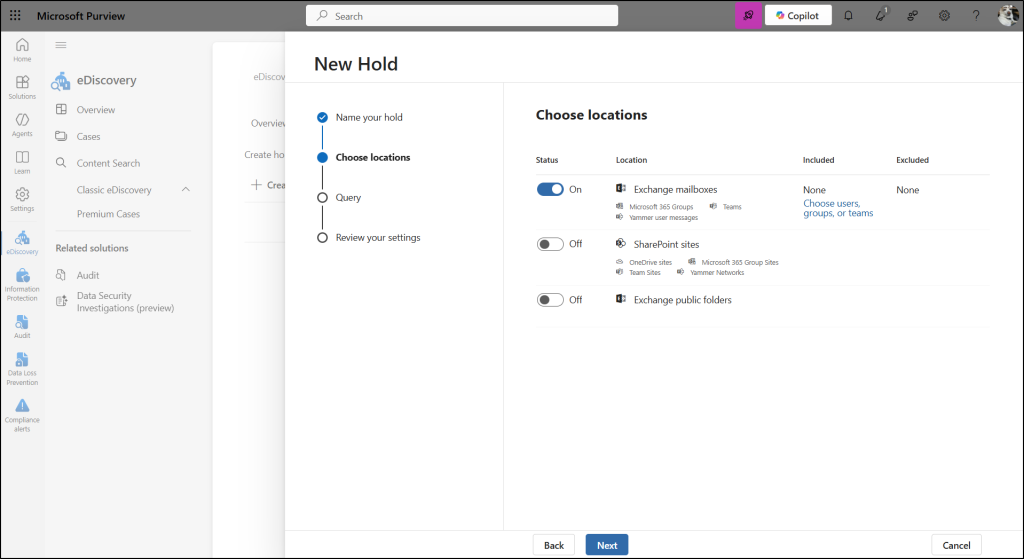
Note: During migration, users on hold retain copies of message history (edits/deletions) in their preserved library folder until the hold expires, while the latest message version is copied to the private channel’s group mailbox.
Purview Data Loss Prevention (DLP)
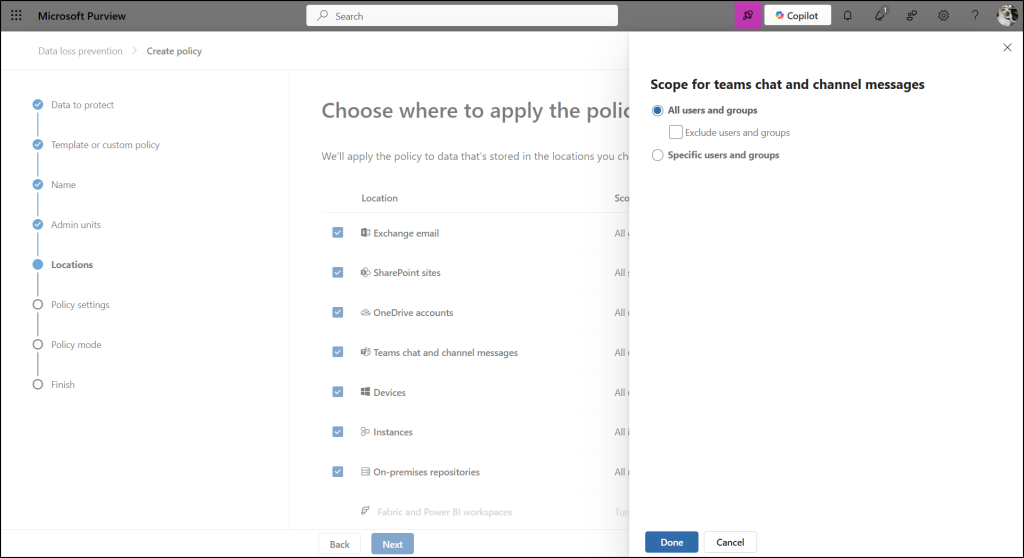
Currently, private channel messages are included in DLP policies applied to individual user mailboxes. When update applied, DLP policies at the team’s Microsoft 365 group level will cover private channel messages. This automatically includes all private channel content.
- Actions before migration
- Update the “Teams chat and channel messages” policy to include the team’s group containing the private channel (along with user mailboxes) so new private channel messages are covered under DLP.
- Actions after migration
- Ensure the “Teams chat and channel messages” policy is scoped to the team’s group containing the private channel.
Purview Retention Policy
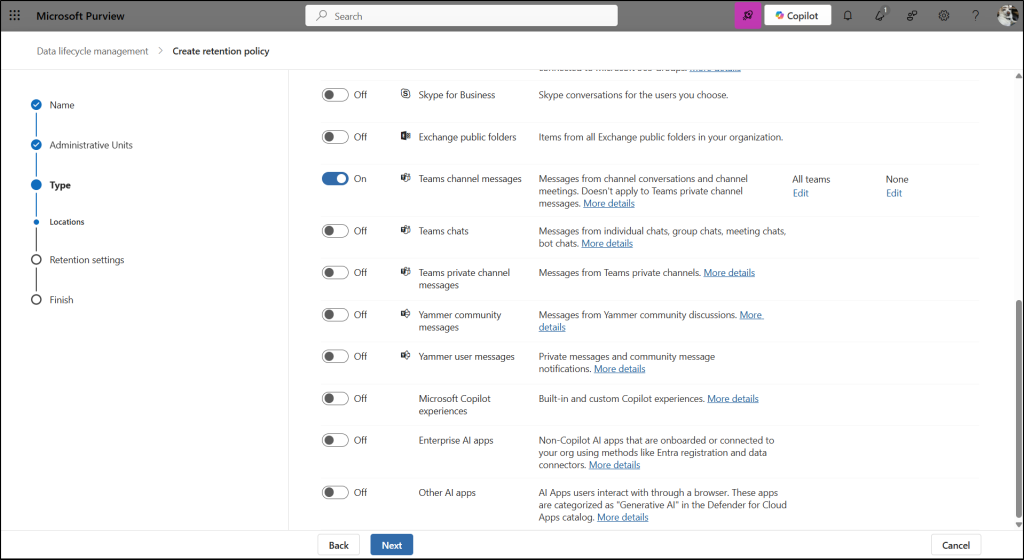
Currently, you can create private channel–specific retention policies under the Retention policies section in Microsoft Purview > Data Lifecycle Management, and Microsoft applies those policies at the user mailbox level.
After this update, admins can no longer create new private channel–specific policies. Instead, Teams channel messages retention policies applied to the team’s group will automatically include private channels.
Microsoft will continue preserving message data from existing private channel policies in user mailboxes, but admins can only remove those policies, not edit them.
- Actions before migration
- Apply existing private channel retention policies (originally on user mailboxes) to the team’s group via “Teams channel messages” to cover new private channel messages in the policy.
- Actions after migration
- Verify if the parent team’s group retention policy aligns with the private channel’s policy; if not, create a new or equivalent policy to ensure consistent retention.
Few Helpful Things Know About Teams Private Channel Enhancements
- If you want to identify a user’s private channel memberships, you can use the Teams Admin center or run Get-TeamChannelUser cmdlet in PowerShell to list Teams members.
- Microsoft is not automatically migrating mailbox-level policies because group policies apply to all channels in a team. Because some mailbox policies cover all user messages and others only private channels, admins and compliance managers must determine which policies to enforce.
- If policies applied at the user mailbox level (such as legal hold, eDiscovery, retention, or DLP) differ from those applied at the team level, compliance managers need to adjust them carefully.
- You must apply policies to the team’s group to cover new private channel messages, as group policies govern all channels in that team.
- When users are on hold, eDiscovery searches should include both the user’s mailbox and the group mailbox for full data coverage.
- During migration, end users may notice duplicate results in Teams search. But both results will open the same private channel content.
- If you take no action, user-level policies will stop applying to new private channel data. Only team-level policies applied to the group will remain in effect.
These enhancements make private channels in Microsoft Teams more flexible, scalable, and secure. With higher limits, direct meeting options, & simplified compliance, you can manage private channels easily and improve user experience. Now is the right time to review your Teams setup and prepare to take advantage of these enhancements.