Multi-factor authentication (MFA) is one of the most effective defenses against identity-based attacks. Even when credentials are compromised, MFA provides a crucial second layer of protection that helps prevent unauthorized access. Among the available MFA methods, the Microsoft Authenticator app is the most widely used, serving as a trusted endpoint for approving sign-ins across devices and applications.
However, MFA is only as strong as the devices on which it operates. When approvals occur on jailbroken or rooted devices, where built-in system protections can be bypassed, the effectiveness of MFA itself comes into question.
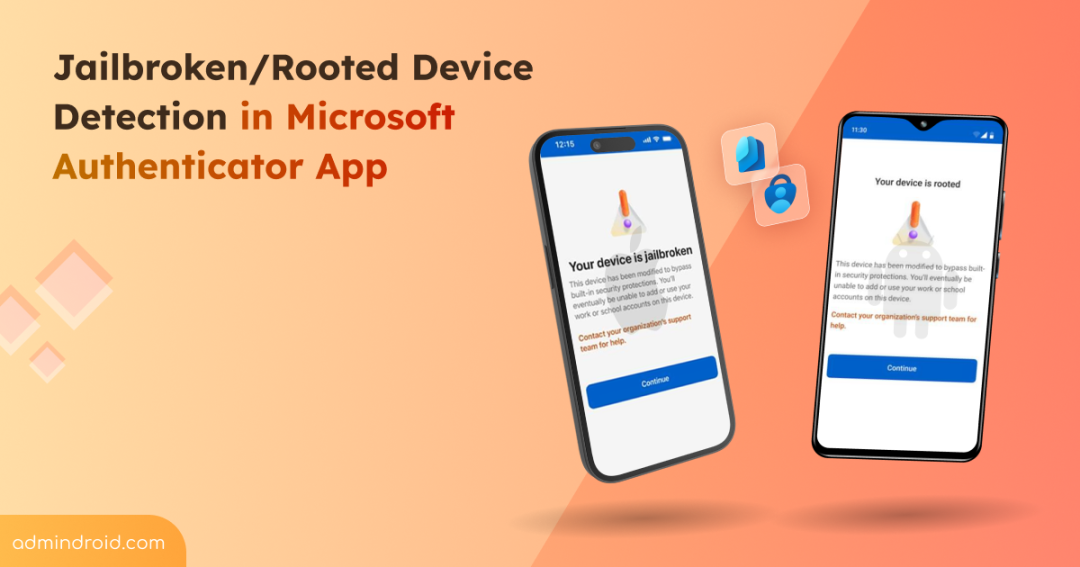
To address this risk, Microsoft has introduced an update to the Authenticator app that adds jailbroken or rooted detection for work or school Entra credentials. This feature blocks Entra credentials from being used on jailbroken or rooted devices and ensures the authentication process remains secure. In this blog, we’ll explore how Authenticator’s jailbroken or rooted device detection works and how it helps keeping Entra credentials secure.
What is Jailbreaking or Rooting on Mobile Devices?
Jailbreaking (iOS devices) or rooting (Android devices) are ways users remove the built-in restrictions imposed mobile operating systems by device manufacturers. This provides users with superuser (root) access that allows complete customization and control over the device at an admin level.
Users often jailbreak or root their devices to unlock advanced customization, install apps from unofficial sources, remove preinstalled software, or bypass platform limitations. For personal experimentation or development, this level of control can be appealing. In fact, jailbreaking is legal in the United States under the Digital Millennium Copyright Act (DMCA) introduced in 2010.
While this access offers flexibility, it also introduces security risks. Devices with elevated access can be more vulnerable to malware attacks, credential theft, and unauthorized access, which can put work or school accounts at risk. That’s why jailbroken or rooted devices are often treated as non-compliant and restricted using device compliance policies, conditional launch settings, and similar controls.
With that context in mind, let’s dive deep into the update that blocks authentication from jailbroken or rooted devices.
How Microsoft Authenticator Blocks Entra Credentials on Jailbroken or Rooted Device?
Jailbroken or rooted device detection in the Authenticator app is a secure-by-default feature to protect organizations from credential misuse. This update will be automatically enforced across tenants and does not require any admin configuration. Most importantly, there is no option for admins to opt out of this behaviour.
The protection runs as a continuous check and prevents Microsoft Entra credentials from working on jailbroken iOS devices or rooted Android devices. As a result, users who rely on jailbroken or rooted devices for MFA may experience sign-in disruptions.
The rollout of this change happens gradually in three phases, with an estimated one-month gap between each phase. This allows users to understand the impact and take corrective action before full enforcement is applied. These phases are designed to move from awareness to enforcement in a controlled manner. This update applies only to work or school accounts and does not affect personal or third-party accounts in Microsoft Authenticator.
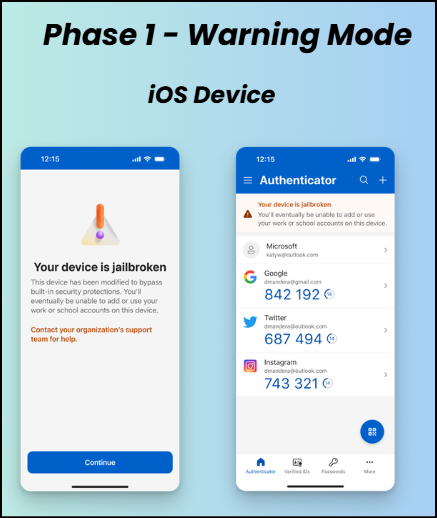
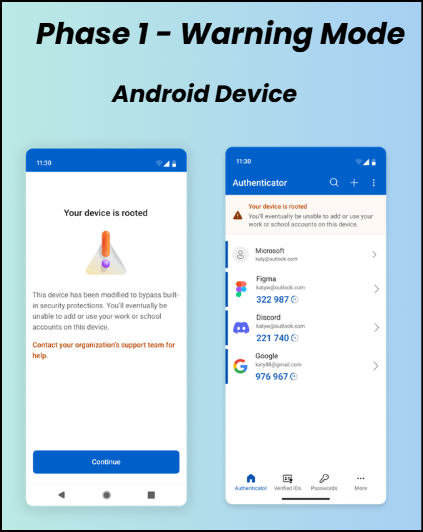
Phase 1 – Warning Mode
When a device is identified as jailbroken or rooted, the Microsoft Authenticator app displays warning messages or banners to inform users about the device status. These alerts are dismissible and are intended to notify users of the risk and encourage them to move their MFA registration to a non-jailbroken or non-rooted device. If the user remediates the issue during Phase 1, the warning is removed and authentication continues to work normally.
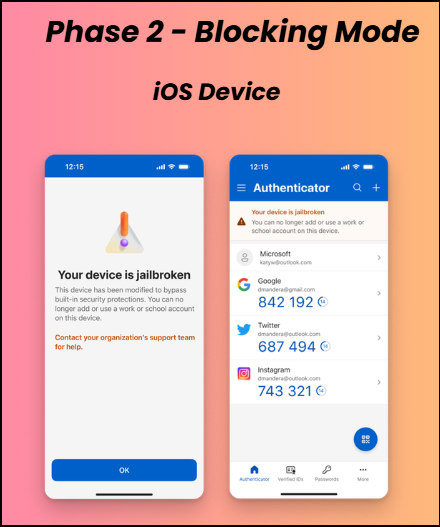
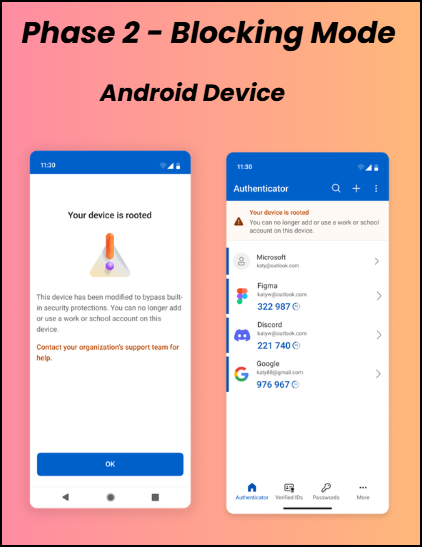
Phase 2 – Blocking Mode
If a user is still using the jailbroken or rooted device after ignoring the Phase 1 warning, Microsoft Authenticator will move to blocking mode. In this phase, users will be prevented from registering new Entra credentials for work or school accounts and will no longer be able to authenticate using the device. Although a notification is shown to inform users about the restriction, access remains blocked until they switch to a non-jailbroken or non-rooted device.
Phase 3 – Wipe Mode
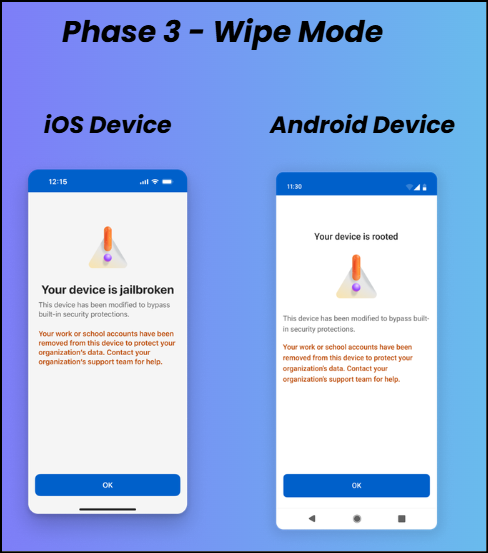
If no action is taken in the earlier phases, enforcement escalates to wipe mode. All existing Entra credentials stored on the jailbroken or rooted device are removed, completely preventing authentication from that device. Once wipe mode is enforced, users permanently lose access to Entra credentials on the device and must re-register MFA on a non-jailbroken or non-rooted device.
Rollout Timeline
🗓️ General availability of the jailbroken or rooted device detection in the Multifactor Authenticator app begins in February 2026 and is expected to be completed by April 2026.
Wrapping Up
With this update, Microsoft ensures that MFA approvals can only come from devices that meet basic integrity standards. As the phased rollout progresses, encouraging users to move MFA to compliant devices early will help minimize disruption while maintaining strong identity protection.
We hope this blog has provided a clear understanding of jailbreak and root detection in the Microsoft Authenticator app. If you have any comments or questions, feel free to share them in the comments below. We’d love to hear from you. Stay tuned for more upcoming blogs!