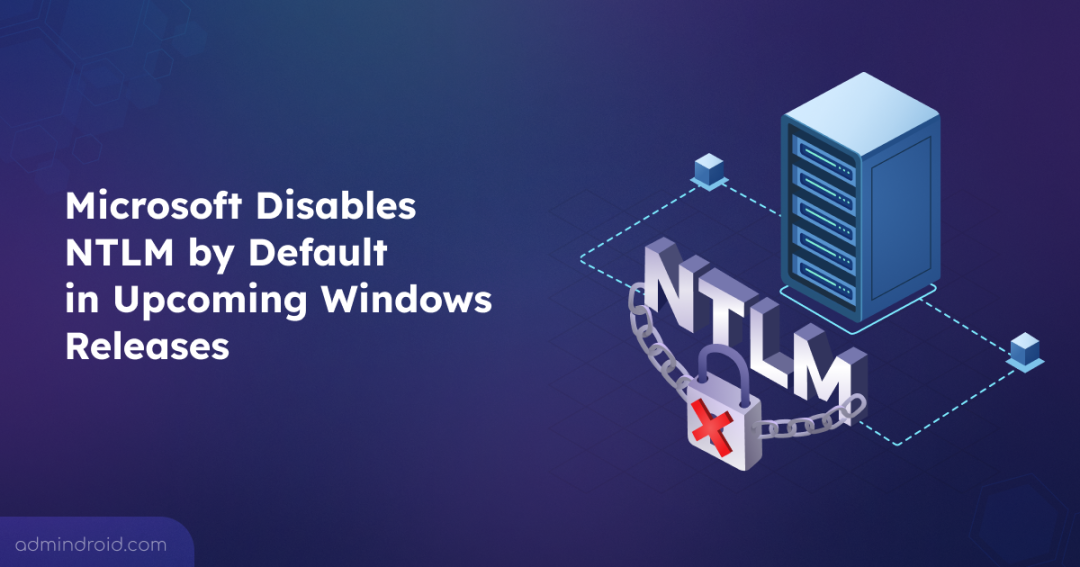
NTLM has long been a fallback authentication protocol for legacy applications and systems in Windows environment, with a history spanning more than 30 years. However, it introduces well-known security risks that no longer align with today’s Zero Trust and identity-first security models. As part of its ongoing focus on advancing Windows security, Microsoft is taking a decisive step toward modern authentication.
In upcoming Windows releases, NTLM will be disabled by default, marking a major shift in how authentication is handled across Active Directory. By moving away from NTLM and prioritizing Kerberos, Microsoft aims to reduce exposure to credential-based attacks and strengthen authentication across the enterprise.
In this blog, we’ll walk through why Microsoft is disabling NTLM by default, breaking down the phased timeline, along with the upcoming capabilities.
Why Microsoft is Moving Away from NTLM Authentication
NTLM (New Technology LAN Manager), is a challenge-response authentication protocol introduced in 1993 with Windows NT 3.1. While it was widely used in early Windows environments, it was designed for a security landscape that no longer exists.
Kerberos has since replaced NTLM and is the default authentication protocol for domain-joined devices starting with Windows 2000. In June 2024, Microsoft officially classified NTLM as a deprecated authentication feature. Deprecated means, it remains available for use but no longer receives updates or enhancements and could be removed in a future Windows release.
Despite this status, NTLM continues to be used as a fallback when Kerberos authentication is unavailable, allowing it to persist in modern environments. Over time, NTLM has been repeatedly abused through NTLM relay and Man-in-the-Middle (MitM) attacks. In these attacks, an adversary intercepts authentication traffic to impersonate legitimate users.
Modern vulnerabilities such as PetitPotam, ShadowCoerce, DFSCoerce, and RemotePotato0 show how attackers can coerce high-value targets, including DCs, into authenticating against machines they control. By disabling NTLM by default, Microsoft is aiming to limit reliance on insecure fallback authentication and provide stronger Kerberos‑based alternatives.
Microsoft’s Roadmap for Disabling NTLM by Default
Microsoft is rolling out the move to disable NTLM by default through a phased approach, allowing organizations to address risks without disrupting authentication.
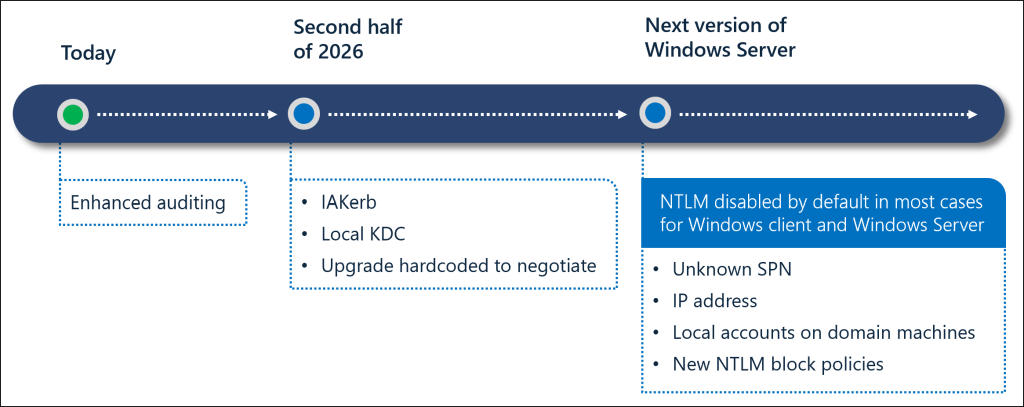
Phase 1: Improved NTLM Visibility Through Auditing
The transition has already begun with enhanced NTLM auditing, available in Windows 11, version 24H2, and Windows Server 2025 for clients, servers, and domain controllers. These logs help admins,
- Identify which accounts and processes are using NTLM.
- Find why NTLM was chosen over modern protocols like Kerberos.
- Track where NTLM authentication is happening, including machine name and IP address.
- Helps detect NTLMv1 usage across clients, servers, and domain controllers.
NTLM auditing is enabled by default and can be managed using the NTLM Enhanced Logging policy for clients and servers. Domain wide logging is managed via Log Enhanced Domain-wide NTLM Logs policy.
To simplify large-scale NTLM auditing, AdminDroid’s Active Directory audit reports provide clear visibility into NTLM authentication activity across users, systems, and DCs. Reports on all NTLM authentication events, including successful and failed NTLM logon events help admins quickly identify and focus on remediation efforts.
Recommended Action:
- Map NTLM Dependencies Across Applications: Review all applications and services to determine which depend on NTLM. Engage app owners and developers to update critical workloads where possible for a smooth transition toward Kerberos-first authentication.
Phase 2: NTLM Dependency Reduction with Kerberos Enhancements
These updates are planned for the second half of 2026 on Windows Server 2025 and Windows 11, version 24H2 or later. The second phase focuses on reducing NTLM usage by resolving the main scenarios that force fallback. Features like IAKerb and the Local Key Distribution Center (pre-release) allow Kerberos authentication to succeed even when domain controller connectivity is limited.
For local account authentication, the Local KDC ensures that NTLM fallback is no longer required on modern systems. Additionally, core Windows components are being updated to prefer Kerberos, which reduces reliance on hardcoded NTLM usage.
Recommended Actions:
- Migrate and Validate Workloads on Kerberos: Test important workloads with Kerberos authentication to confirm compatibility. The upcoming Windows updates will expand Kerberos coverage. So early validation will prevent disruptions when NTLM is eventually disabled by default.
- Enable Kerberos Enhancements Early: Where available, deploy Kerberos improvements through Windows Insider builds or early releases. This provides additional authentication options and reduces reliance on NTLM fallback.
- Test NTLM disabled Configurations in Sandbox: Simulate NTLM-disabled scenarios in Active Directory test environment to catch potential issues without impacting production systems.
Phase 3: Default Disablement of NTLM in Windows
In the final phase, NTLM will be disabled by default in the next major Windows Server and client releases. This does not mean NTLM is completely removed from Windows. Instead, the OS will operate in a secure-by-default state where network NTLM authentication is blocked and no longer used automatically.
Windows will use modern, more secure Kerberos-based authentication. NTLM will remain present in the OS and can still be explicitly re-enabled via policy if needed, providing a controlled transition for legacy applications.
This approach balances meaningful security improvements with a phased, supported path to reduce NTLM reliance while strengthening authentication across Active Directory environments.
Note: The timeline and availability of features may change as Microsoft updates its engineering schedule.
Wrapping Up
That’s it. With Microsoft disabling NTLM by default, legacy authentication can no longer be postponed. While NTLM can technically be re-enabled through policy, doing so is not recommended, as it increases the risk of attacks and leaves your environment vulnerable.
How prepared is your environment for NTLM being disabled by default? Are you expecting any compatibility challenges? Share your thoughts, questions, or experiences in the comments below, and stay tuned for more updates and best practices.