For years, Teams and Places have quietly grown into powerful platforms for events, spaces, and hybrid work. Features like immersive experiences, smart space discovery, and network-optimized streaming hinted at what modern collaboration could become. But for many organizations, those capabilities sat just out of reach, locked behind premium tiers and added complexity.
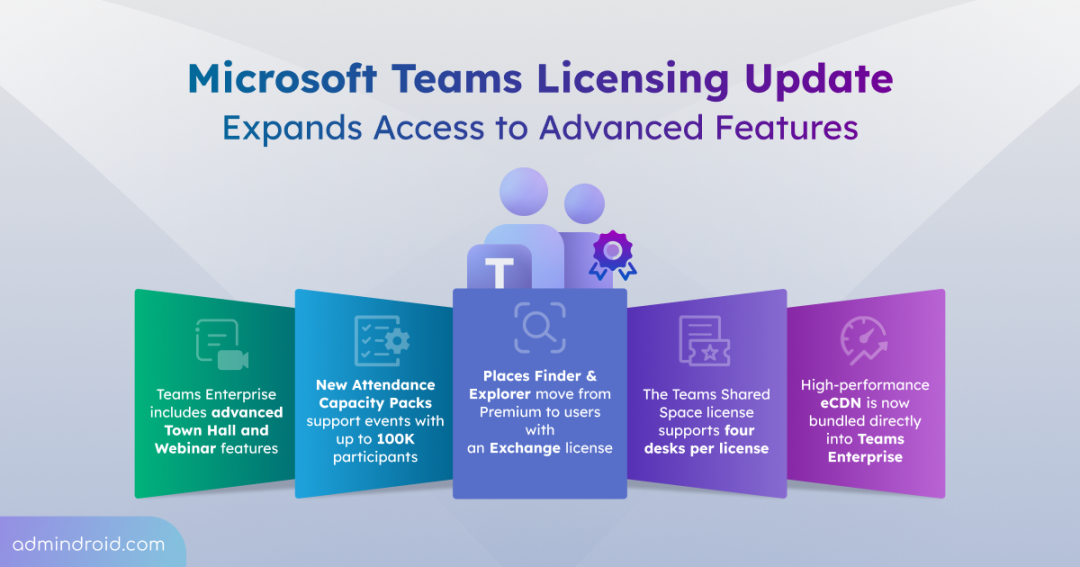
That changes on April 1, 2026. With the Teams and Places licensing update, Microsoft is moving several high-value features into core Teams Enterprise licenses. This simplifies adoption and expands access to advanced tools for large-scale events and workspace management.
What’s Changing with Teams and Places Licensing Update?
Microsoft is introducing meaningful licensing changes across Microsoft Teams, Teams Premium, and Microsoft Places to expand access to advanced capabilities and simplify adoption. This update brings:
- Access to advanced town hall and webinar features
- New attendee capacity packs to scale events
- Expanded availability of Microsoft Places capabilities
- Simplified licensing for shared workspaces
1. Access to Advanced Town Hall and Webinar Features in Teams Enterprise
To enable organizations host studio-quality, high-capacity events with better branding and deeper insights, advanced town hall and webinar features are now available in Teams Enterprise. This expansion includes:
- Seamless Streaming Chat: Enables smooth communication between organizers and large audiences by minimizing message delays.
- Live Audience Reactions: Allows participants to react in real time, making events more interactive and engaging.
- Custom Branding for Emails and Themes: Supports branding across event invitations, registration pages, and the digital artifacts attendees receive.
- Instant Town Hall Event Insights: Empowers town hall and webinar hosts with live telemetry on broadcast, performance, and reliability.
- Microsoft eCDN Analytics: Includes native Enterprise Content Delivery Network support to optimize bandwidth and ensure stable, reliable live streaming across the network.
- Immersive 3D Experiences: Allows hosts to create custom metaverse-style environments where attendees engage as avatars to interact in a more collaborative, spatial way at no extra cost.
Organizations can support up to 3,000 interactive attendees with full engagement features or scale up to 10,000 participants in a view-only experience.
2. New Attendee Capacity Packs to Scale Events
To support organizations hosting massive global events, Microsoft is introducing Attendee Capacity Packs. These add-on licenses allow you to scale your Town Halls to unprecedented levels while maintaining the same robust feature set found in standard Enterprise events.
- Massive Reach: You can easily increase your event capacity for up to 100,000 participants with these packs while retaining the same robust event features.
- Flexible Sizing: Licenses come in a variety of pack sizes (ranging from 5,000 to 100,000 attendees), letting you choose exactly what your event requires.
- Simplified Assignment: Once transacted, these packs become available for assignment in the Teams Admin Center (TAC).
3. Expanded Availability of Microsoft Places Capabilities
Microsoft Places is a connected workplace app that helps teams coordinate where work happens and modernize how they use the physical office. Core features that were once “Premium-only” are now available to any user with a license that includes Outlook and Teams calendars. Eligible licenses include:
- Enterprise & Business: Microsoft 365 E3, E5, Business Basic, Standard, and Premium.
- Office & Exchange: Office 365 E1, E3, E5, and Exchange Online.
- Teams: Various standalone Teams licenses.
Organizations can now leverage these advanced features within their existing subscriptions:
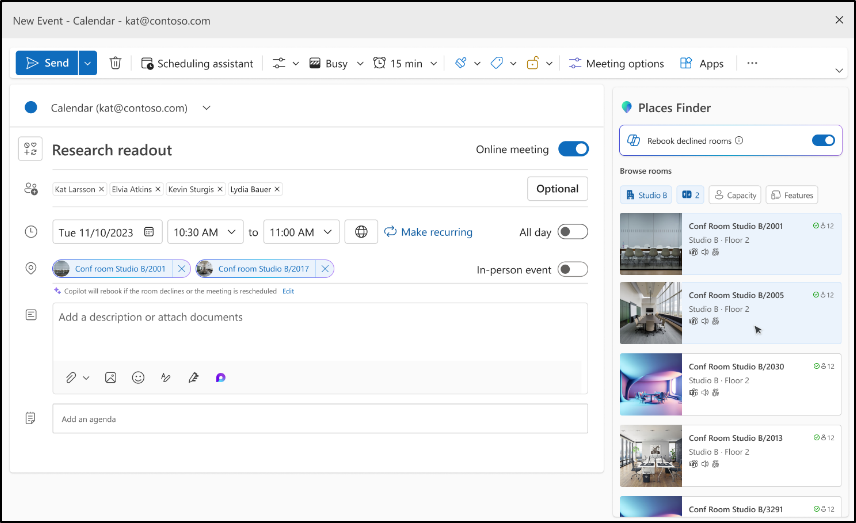
- Places Finder: Go beyond simple room booking with enriched contexts like floor plans, space images, and available technology. This enables organizations to upgrade from the basic “Room Finder” to a full, directory-driven search experience.
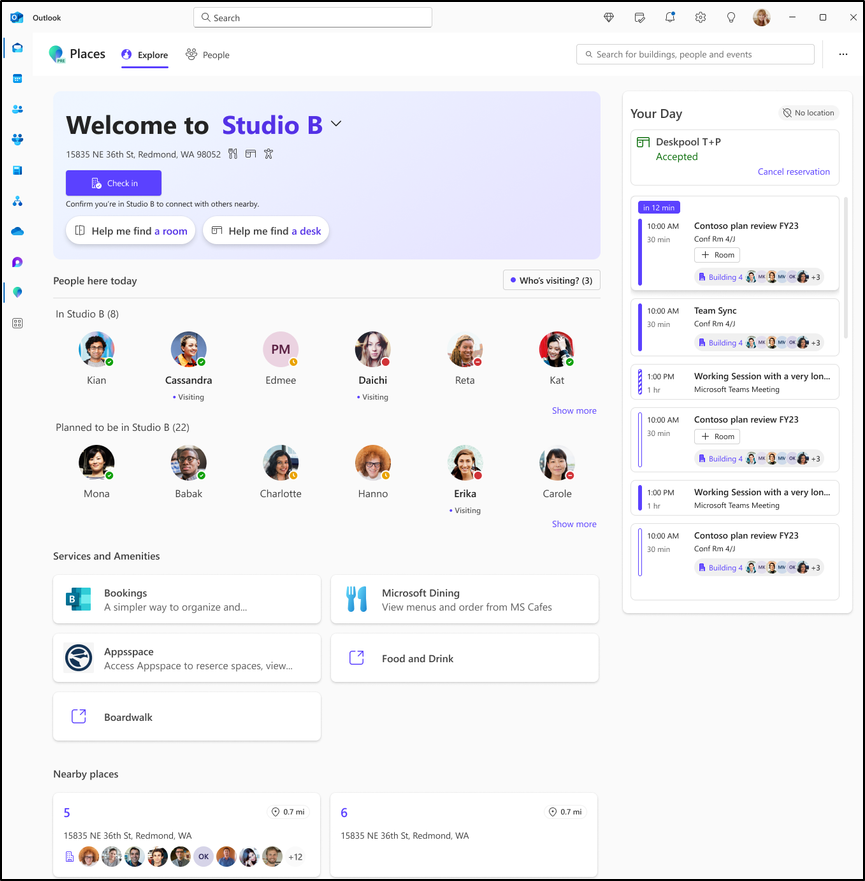
- Places Explorer: Provides a map-based interface to book desks and rooms while viewing colleague locations. This is accessible directly through the Microsoft Places app within Outlook and Teams.
4. Simplified Licensing for Shared Workspaces
The Teams Shared Devices license is being rebranded as the Teams Shared Space license, reflecting a broader and more inclusive scope. Previously, this license was primarily used to manage single hardware assets like common area phones, Teams Panels, and hot-desking displays.
Under the new model, a single license allows organizations to manage up to four desks, while continuing to support existing shared assets like rooms and standalone devices. This makes it the central licensing solution for managing all physical workplace inventory. Along with this, the following features are included with this license:
- Advanced Desk Booking: Employees can reserve specific desks in advance through Teams or Outlook, ensuring a seamless experience when they arrive at the office.
- Individual Space Assignment: Admins can now assign licenses directly to bookable desks, rooms, or shared areas, providing granular control over available inventory.
- Unified Directory Management: Admins can manage all physical spaces within the Places Directory, including setting booking rules, auto-release policies, and defining space properties.
- Inventory and Utilization Analytics: Organizations get access to detailed reporting to track how shared desks are being used, helping to optimize office layouts.
- Third-Party Ecosystem Integration: Microsoft Places can now integrate with external systems to sync floor plans, spatial data, and check-in signals (like badge scans or plugging into a dock).
This shift effectively turns Microsoft Teams and Microsoft Places into a comprehensive platform for managing the modern hybrid workplace at scale.
For organizations with legacy Teams Shared Device licenses, no immediate action is required to transition to the new license. However, to take advantage of the increased allotment of four spaces per license, admins must assign an additional no-cost license. This is applied to the extra desks or spaces in the Teams Admin Center.
Frequently Asked Questions on Teams Licensing Changes
1. If my organization has the required licenses, when will users gain access to this functionality?
Users with the required Enterprise or Business licenses will be able to access the advanced features announced in this update starting April 1, 2026.
2. Will Teams Premium still be available after April 1, 2026?
Yes. Teams Premium will remain available as an add-on. It is intended for organizations that require higher levels of security, advanced AI insights, and deeper personalization beyond the Enterprise offerings.
3. What specific capabilities will remain exclusive to Teams Premium?
Even after the April 2026 update, several high-value features will remain exclusive to the Teams Premium experience such as,
- Advanced Security & Meeting Controls: Includes end-to-end encryption for meetings, watermarking to prevent leaks, sensitivity labels, and restricted screen sharing or recording permissions.
- Intelligent AI Recap & Insights: AI-generated summaries and task tracking for PSTN calls (mobile/landline), 1:1 calls, and advanced Phone call queue analytics.
- Personalized Branding: The ability to use custom meeting templates, branded lobbies, organization-specific backgrounds, and custom “Together Mode” scenes to reflect your company’s identity.
- Advanced Virtual Appointments: Features such as SMS reminders for appointments, branded waiting rooms, and post-appointment analytics.
So, the extensive list of Teams Premium features will continue to make it the go-to choice for organizations that need advanced security, intelligent experiences, and deep customization.
4. What are the prerequisites for hosting immersive events in Teams?
For immersive events, ensure users are running the latest, supported Microsoft Teams clients and have compatible VR hardware, such as Meta Quest devices. This ensures a smooth and fully supported immersive experience.
5. Are Microsoft Places features available without a Shared Space license?
Yes. Microsoft Places features are available to all users with an Exchange license. The Teams Shared Space license is required only for organizations that want to book, manage, and analyze individual desks. Also, the Places Management portal also remains accessible to all customers for onboarding and configuring the Places Directory.
6. How does a Shared Space license enhance reporting and insights?
A Shared Space license unlocks inventory and utilization analytics for licensed spaces, including desk usage data captured through Teams device signals. These insights help IT teams track occupancy trends, improve space efficiency, and plan workplaces more effectively.
In a nutshell, these updates represent a major step forward in making advanced collaboration tools available to everyone. Whether you are hosting global town halls or optimizing your office desk layout, the new licensing model is designed to grow with your needs. Start exploring your new capabilities today and get ready for the full rollout this April!