Self-Service Password Reset (SSPR) in Microsoft 365 was designed to cut down helpdesk tickets by letting users securely reset their own passwords and quickly regain access.
Until now, SSPR verified a user’s identity using contact details stored in their directory profile, such as a phone number or alternate email address, even if they weren’t registered as authentication methods.
While incredibly convenient, this passive setup created a glaring identity security gap. Without explicit validation, organizations using SSPR are relying on unverified directory data that lacks true proof of possession.
But that’s about to change this September. Without further delay, let’s see how Microsoft fills this gap!
SSPR Verification Requires Registered Authentication Methods
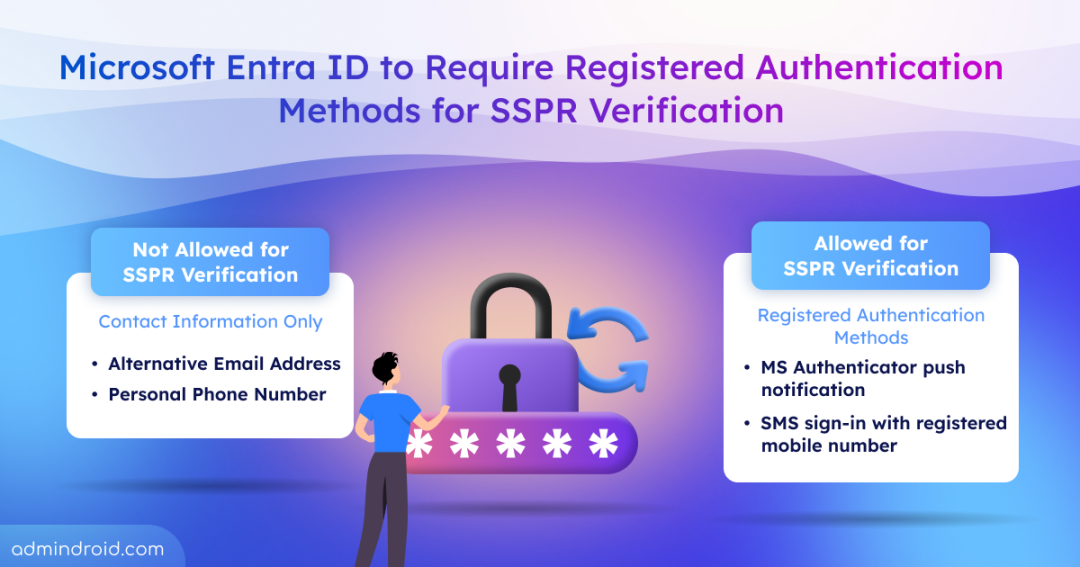
Yes, starting September 7, 2026, Microsoft will require users to have registered authentication methods for SSPR verification.
To see why this matters, imagine a scenario where an HR sync populates a user’s profile with an old phone number they no longer own. Because the user was never required to verify ownership, the outdated number remains available for password recovery.
Likewise, directory-based contact information populated during onboarding may be outdated, unverified, or no longer under the user’s control. Relying on such data for password recovery introduces security risks because it has not been explicitly validated by the user as an authentication method.
To eliminate this vulnerability, Microsoft is mandating explicitly registered authentication methods for SSPR verification as part of its Secure Future Initiative (SFI). This ensures that password reset verification relies entirely on trusted, user-validated methods where ownership is actively proven, rather than relying on unverified directory text.
This update applies globally to all Public and US Government clouds (GCC, GCC High, and DoD). Moving forward, every user and administrator in SSPR-enabled tenants must actively prove ownership of their recovery methods.
Rollout Timeline
To give organizations sufficient time to audit and prepare their users, Microsoft is rolling out this security update in two distinct phases:
- July 6, 2026 (The Registration Campaign): Microsoft will launch a built-in registration campaign. Users and administrators signing in without a formally registered, SSPR-compatible method will receive proactive prompts to set one up.
- September 7, 2026 (Strict Enforcement): The final enforcement deadline. After this date, unregistered contact details will no longer function for password reset verification.
Here is what admins should do next!
3 Must-Do Actions Before Microsoft Enforces SSPR Authentication Methods
To ensure zero downtime and prevent helpdesk bottlenecks, admins should review compliance, audit tenant accounts, and automate user registration before the final deadline hits.
- Verify SSPR-compatible authentication methods
- Identify users without registered SSPR Auth
- Enforce SSPR Auth method registration via the campaign
1. Self-Service Password Reset Authentication Methods in Microsoft 365
To meet the new security standard, users must explicitly register and validate their recovery methods. The following authentication methods are supported for SSPR verification:
- Microsoft Authenticator: Push notifications or verification codes via the mobile app.
- SMS (Text Message): One-time verification codes sent to an explicitly registered mobile phone number.
- Voice Calls: Automated phone calls to a registered mobile or office phone number.
- Email One-Time Passwords (OTP): Verification codes sent to a registered alternate email address.
- Software OATH Tokens: Time-based codes from third-party authenticator apps (like Google Authenticator).
- Hardware OATH Tokens: Physical key fobs or tokens that generate time-based verification codes.
Users who lack registered methods will be unable to complete password resets and will be prompted to contact an administrator.
2. How to Identify Users Without Registered SSPR Authentication Methods
Before the deadline, admins must review users’ SSPR status, identify unregistered users, and ensure they set up an SSPR-compatible authentication method.
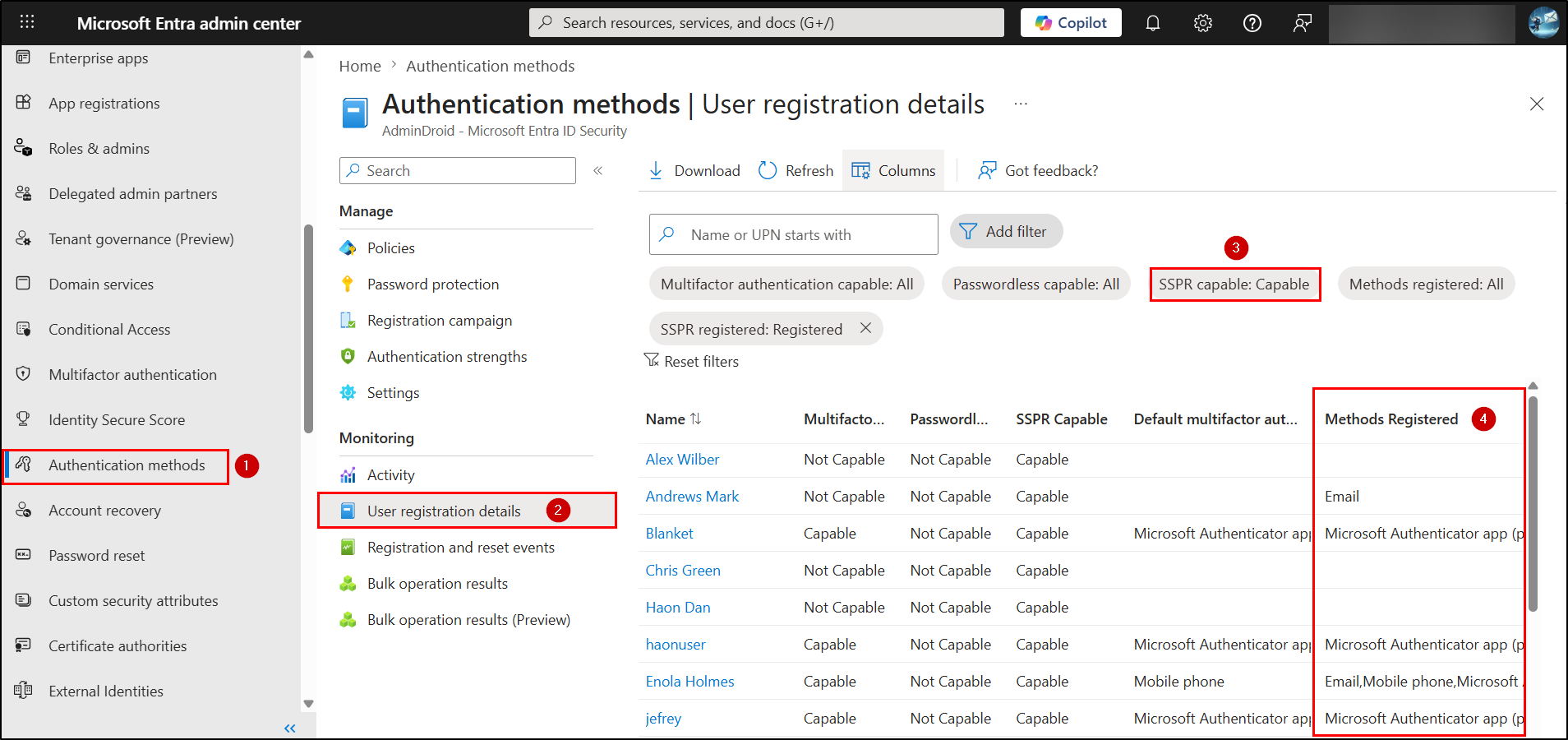
- Sign in to the Microsoft Entra admin center and navigate to the Authentication methods page.
- Under Monitoring section, select User registration details.
- Filter the report to view SSPR capable users in your tenant.
- Review the Methods registered column to determine whether users have registered authentication methods that satisfy your SSPR policy.
3. Enforce Authentication Method Registration for SSPR
The next step is to ensure users have registered the required authentication methods before SSPR enforcement begins.
- Enable the Entra ID Registration Campaign: Starting July 6, 2026, Microsoft will roll out the SSPR registration campaign. It will automatically prompt users without SSPR-compatible authentication methods to register the required methods for password reset verification.
- Direct Users to the Security Info Portal: Launch an internal awareness campaign directing users to My Security Info portal. Instruct them to explicitly add and verify their mobile numbers or alternative emails there, converting static directory facts into user-validated security claims.
Taking these steps now will help prevent users from being locked out of Self-Service Password Reset when Microsoft begins enforcing registered authentication methods on September 7, 2026.
That’s it! Moving from unverified directory details to proven authentication methods strongly protects your tenant’s identity security. By auditing your environment and driving proactive user registration today, you can fix this security gap well ahead of the deadline without overwhelming your helpdesk.