For years, identity security in Microsoft 365 has focused on protecting users. Organizations deployed MFA, Conditional Access, and passwordless authentication to stop account compromise.
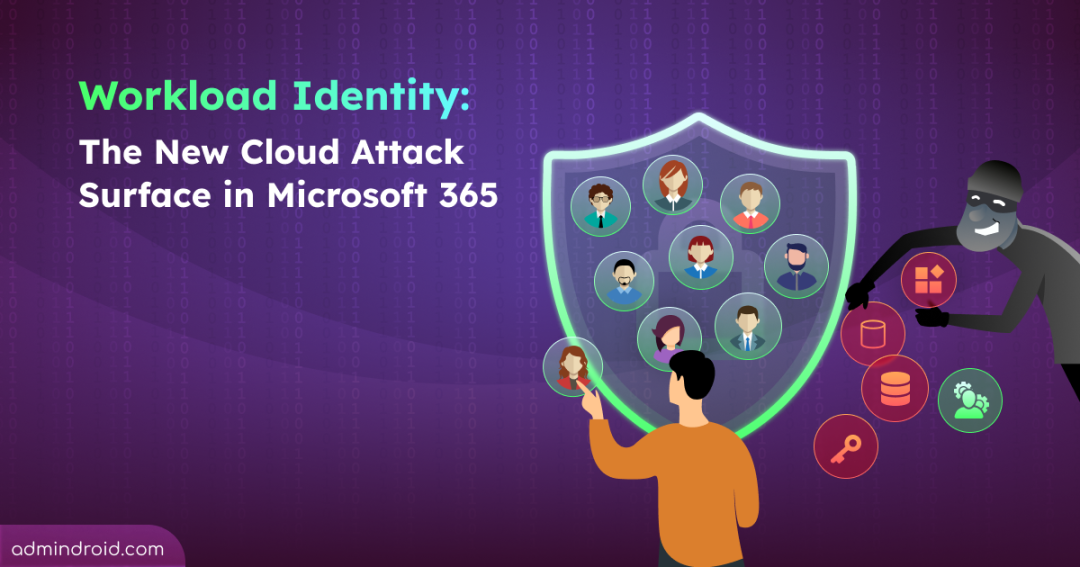
However, Microsoft’s Storm-2949 attack campaign highlighted an emerging reality that today’s threats don’t stop with user accounts. Rather than stopping at a compromised user account, the attackers attempted to establish persistence through a service principal, a workload identity used by applications and automated services. Fortunately, the attempt failed because the compromised account lacked the necessary privileges. Had it succeeded, the attackers could have gained long-term access through a trusted workload identity operating quietly in the background.
As organizations strengthen user identity security, attackers are shifting their attention to workload identities. In this blog, we’ll explore why they’re becoming a prime target and how to secure them in Microsoft Entra ID.
In this blog, let’s dive deep into:
- What are workload identities in Microsoft Entra ID?
- Why are workload identities becoming a major attack surface?
- How to detect and review workload identity risks in Microsoft Entra ID
- How to remediate a workload identity breach in Microsoft 365
- Simplify workload identity management with AdminDroid 365
What Are Workload Identities in Microsoft Entra ID?
Modern Microsoft 365 environments rely heavily on automation. Whether it’s a PowerShell script, a Power Automate workflow, or a third-party backup tool, these tasks need a way to authenticate and perform actions without user intervention. That’s where workload identities come in.
A workload identity is a non-human identity that allows an application, service, container, or script to authenticate and access Microsoft 365 resources without requiring a user to type in a username and password. Just like user accounts, they can authenticate, receive permissions, and perform actions within the environment.
Within Microsoft 365, workload identities primarily exist as:
- Application Objects: The global definition and blueprint of your application across all tenants.
- Service Principals: The actual local instance of an application within your specific tenant. This is what holds the permissions and roles, and it’s exactly what the Storm-2949 threat actors tried to compromise.
- Managed Identities: A subset of service principals managed automatically by Azure, eliminating the need for developers to manage credentials.
Why Are Workload Identities Becoming a Major Attack Surface in Microsoft 365?
In many environments, Entra ID workload identities now outnumber users. While this growth has driven immense productivity, it has also turned workload identities into a prime target for sophisticated threat actors.
Here are the other critical vulnerabilities that make Microsoft Entra workload identities an attractive target for attackers.
- Poor credential management for non-human identities
- Weak workload identity visibility and governance
- High privileged access and data exposure
- Expansion of AI-powered applications in Microsoft Entra
1. Poor Credential Management in Entra Workload Identities
Unlike human users, workload identities rely on credentials such as client secrets, certificates, and more to authenticate and access resources. While these credentials enable automation, they also introduce unique security risks that attackers actively exploit.
- No MFA Protection: Workload identities cannot respond to multi-factor authentication prompts. If an attacker steals a valid credential, they can authenticate directly.
- Credential Exposure: Client secrets are often hardcoded into source code, config files, or repositories, making them vulnerable to leaks and theft.
- Long-Lived Secrets: Credentials are left unchanged for extended periods to avoid workflow disruptions. If compromised, they can provide attackers with persistent access.
2. Weak Workload Identity Visibility and Governance
Many organizations do not monitor workload identities with the same rigor applied to user accounts, creating opportunities for attackers to operate unnoticed.
- Monitoring Gaps: Service principals and managed identities often receive less security monitoring than users, reducing visibility into suspicious activity.
- Orphaned Identities: Test applications, legacy service principals, and unused workload identities remain active for years, expanding the attack surface.
- Hidden Malicious Activity: Since workload identities routinely perform automated tasks, malicious actions can easily blend in with normal operations.
- Limited Detection Signals: Unlike user accounts, workload identities lack consistent behavioral patterns such as sign-in locations and usage habits. This makes traditional anomaly detection less effective.
3. High Privileged Access and Data Exposure
Many workload identities are granted broad permissions to simplify deployments. If a single workload is compromised, the attacker can gain access to organizational data and resources.
- Over-privileged Access: Applications are often granted more application and delegated permissions than necessary, and these permissions are rarely reviewed.
- Access to High-Value Data: A compromised workload identity may expose Microsoft Graph, databases, Azure resources, SharePoint sites, Teams data, and more.
- Third-Party Application Risk: Attackers may exploit trusted third-party applications and integrations to access organizational data.
4. Expansion of AI-Powered Applications in Microsoft Entra
AI agents and Copilots are designed to access data, retrieve information, and perform actions across Microsoft 365. To support these capabilities, they often rely on highly privileged workload identities, increasing the potential impact of a compromise.
- Broad Access to Microsoft 365 Data: AI-powered applications often require extensive access to Outlook emails, Teams chats, SharePoint site contents, and more.
- Greater Impact of Identity Compromise: A compromised AI-related identity can potentially expose large volumes of sensitive information.
- Prone to Prompt Injection Attack: Attackers may manipulate AI inputs or abuse granted permissions to trigger unauthorized actions or leak sensitive data.
Taken together, these risks paint a clear picture: compromising a workload identity can be far more valuable than stealing a single user’s password. While user accounts are protected and monitored closely, workload identities often operate in the background with persistent access to critical applications and data.
Now that we understand why workload identities have become a prime target, let’s explore the governance practices and security controls that can help reduce the risk.
How to Detect and Review Workload Identity Risks in Microsoft Entra ID
There is rarely a single indicator that confirms a workload identity compromise. However, attackers often leave traces as they establish access, modify permissions, or create persistence. Use the following checklist to identify suspicious workload identity activity in Microsoft Entra ID.
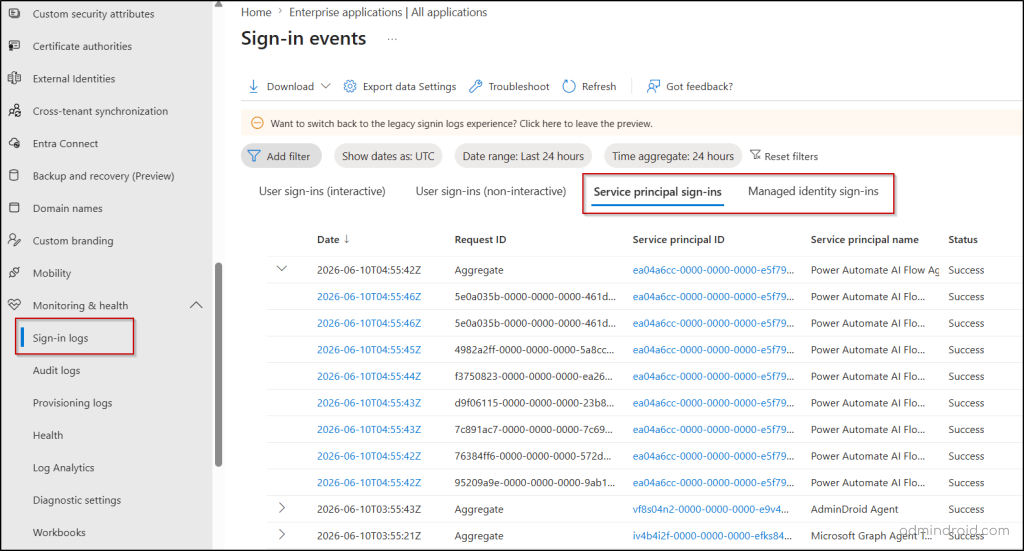
1. Monitor Workload Identity Sign-ins: Let’s start with the Entra ID sign-in logs. Pay attention to unusual sign-in locations, IP addresses, credential type, and other anomalous activity. A major red flag is usually an internal automation script suddenly signing in from a public cloud provider’s IP address instead of your known corporate network.
👉 Follow the path to audit workload identity sign-ins:
Microsoft Entra admin center → Entra ID → Monitoring & health → Sign-in logs → Service principal sign-ins or Managed identity sign-ins
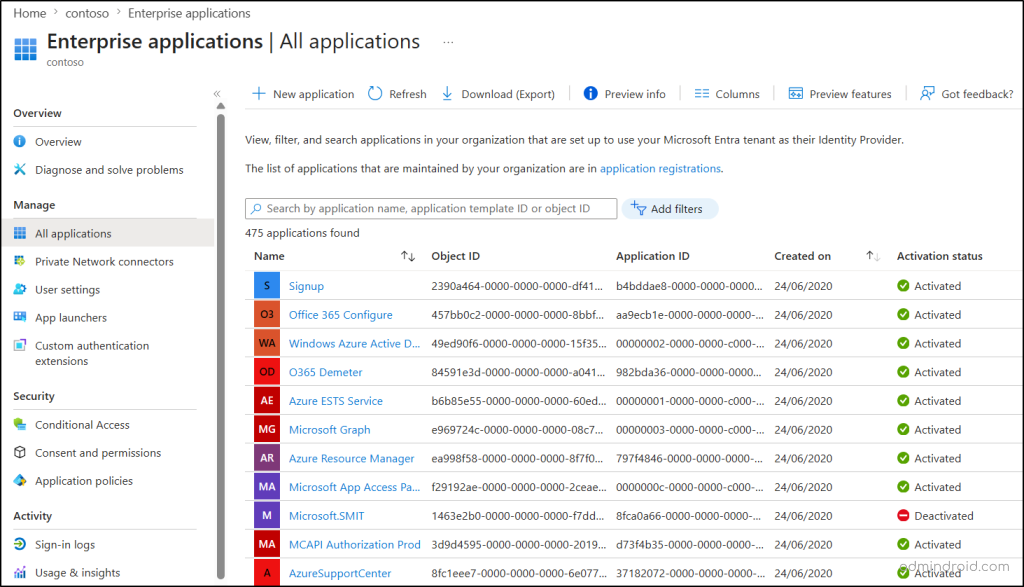
2. Review All Microsoft Entra Workload IDs: Track all application registrations and enterprise applications in your Microsoft Entra tenant. This helps identify all unauthorized workload identities and ensure they have a legitimate purpose.
👉 Follow the path to find all workload identities in Microsoft Entra ID:
Microsoft Entra admin center → Identity → Applications → App registrations / Enterprise applications
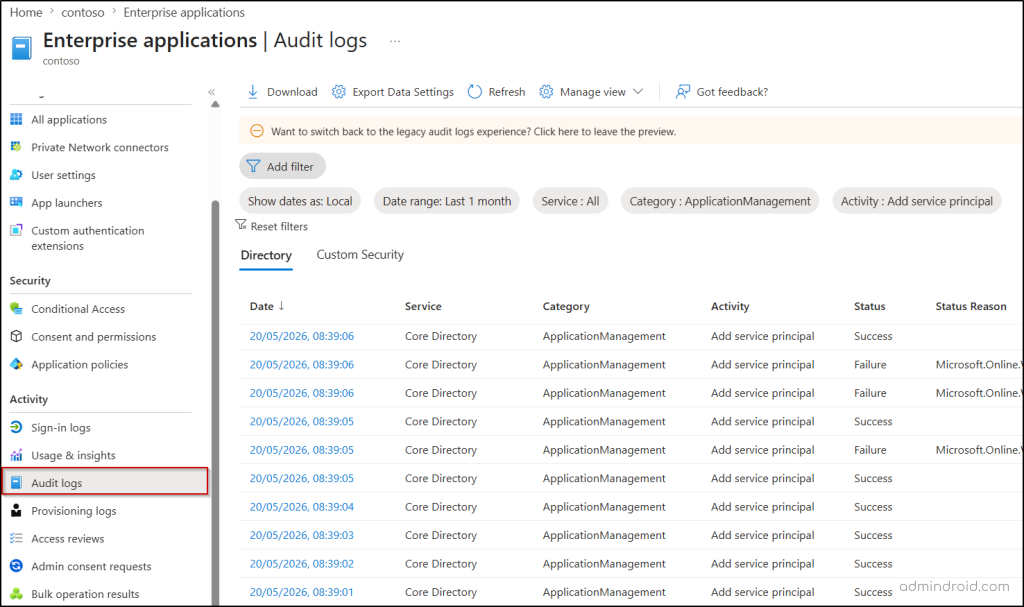
To audit recently created workload identities in Microsoft Entra ID, follow the path below:
Microsoft Entra admin center → Entra ID → Enterprise Applications → Audit logs → Filters: Activity = Add application or Add service principal
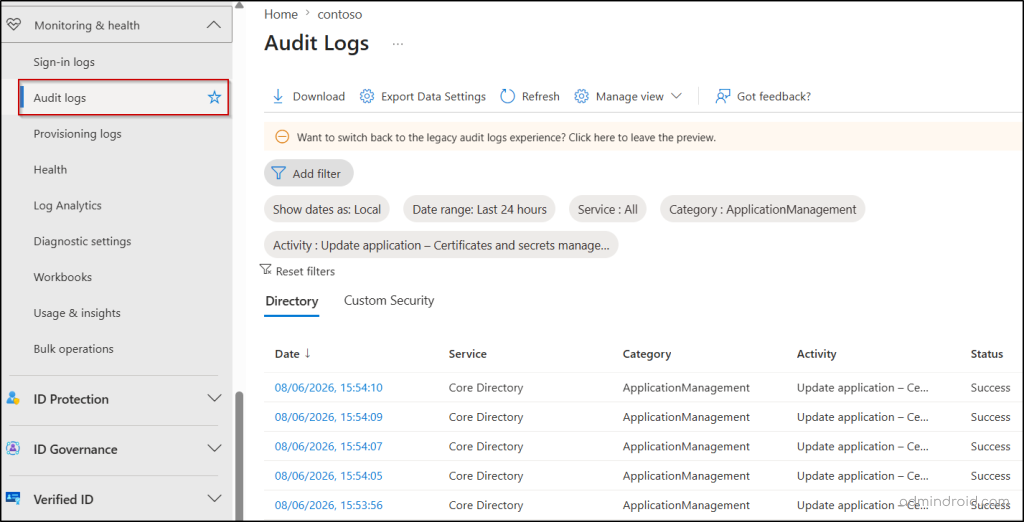
3. Review Credential Additions to Workload Identity: Newly added credentials may indicate an attempt to establish persistence. Validate every recent secret and certificate added to applications and service principals.
👉 Follow the path to get all newly added credentials in Microsoft Entra applications:
Microsoft Entra admin center → Entra ID → Monitoring & health → Audit logs → Filters: Set Category = ApplicationManagement and Activity = Update application – Certificates and secrets management
Note: Microsoft Entra audit logs retain data for 30 days in Microsoft Entra ID P1 and P2 tenants. To investigate credential additions beyond this period, use the unified audit logs in Microsoft Purview. This provides up to 180 days of audit retention, while eligible Premium licensing can extend retention further.
4. Monitor Changes to Application Ownership: Adding a new application owner is a common way for attackers to gain complete control over applications. Therefore, check and investigate all unusual owner assignments in Microsoft Entra applications.
👉 Follow the path to track ownership changes in applications and service principals:
Microsoft Entra admin center → Entra ID → Monitoring & health → Audit logs → Filters: Set Category = ApplicationManagement and Activity = Add owner to application or Add owner to service principal
5. Audit Application Permissions and Consent Grants: Review newly granted application permissions, especially those that provide broad access to Microsoft 365 data. Verify who initiated the request and who approved the consent.
👉 Follow the path to review application permissions and consents in Microsoft Entra:
Microsoft Entra admin center → Entra ID → Monitoring & health → Audit logs → Filters: Set Category = ApplicationManagement and Activity = Consent to application or Add app role assignment to service principal
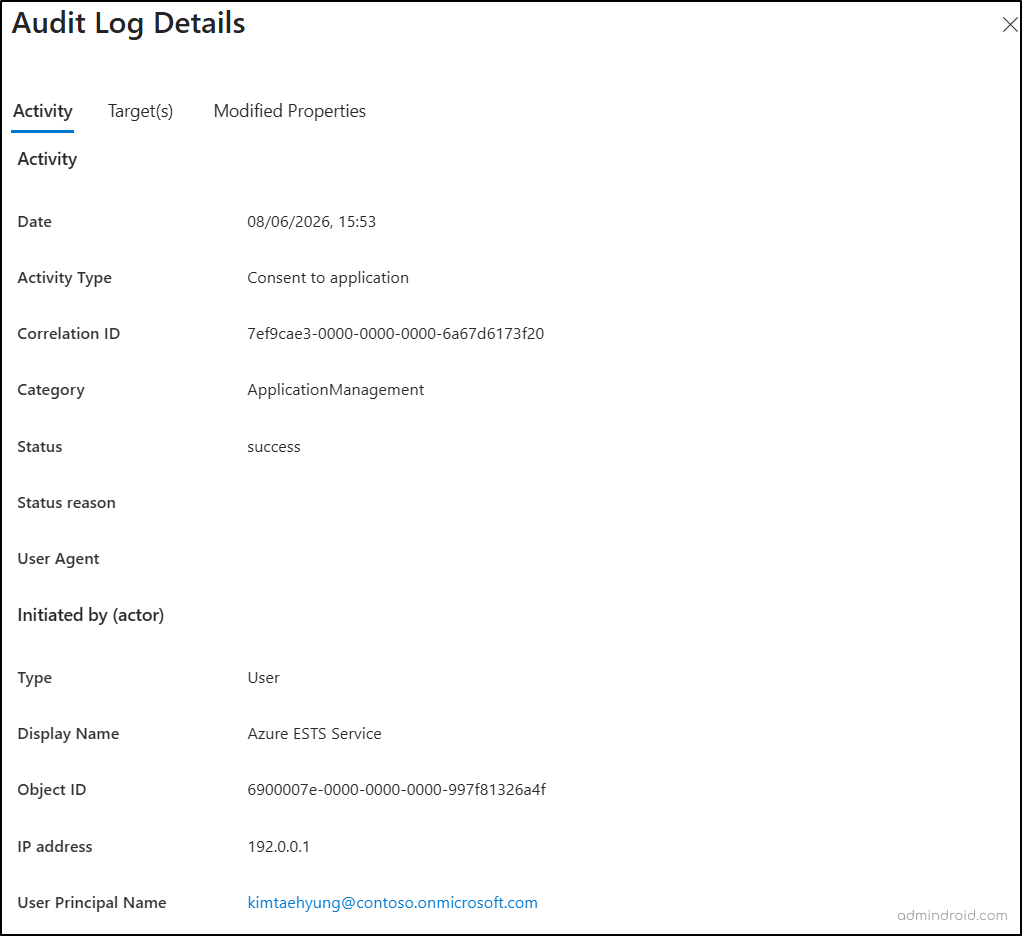
6. Review Administrative Changes to Applications: Unexpected changes to application configurations may indicate attempts to establish persistence. Watch out for newly added Redirect URIs, modified authentication methods, or newly configured federated credentials.
👉 Follow the path to audit administrative changes to enterprise applications:
Microsoft Entra admin center → Entra ID → Monitoring & health → Audit logs → Filters: Set Category = ApplicationManagement and Activity = Update application or Update service principal
How to Remediate a Workload Identity Breach in Microsoft 365
Let’s say you’ve discovered a compromised or suspicious workload identity. Unlike a user account, you can’t simply reset a password to remediate the identity attack. You need to contain the threat, remove attacker access, and assess its impact across your environment.
Incident Response Actions for Compromised Workload Identities in Entra ID
The longer an attacker maintains access to a workload identity, the more opportunities they have to exfiltrate data, establish persistence, escalate privileges, and move laterally across your Microsoft 365 environment.
Perform the following actions immediately to contain compromised workload identities in Microsoft Entra.
- Disable workload identity in Microsoft Entra
- Remove suspicious credentials
- Rotate application credentials
- Revoke excessive application permissions
- Remediate workload identity ownership
- Investigate and remediate the breach impact
- Audit for lateral movement
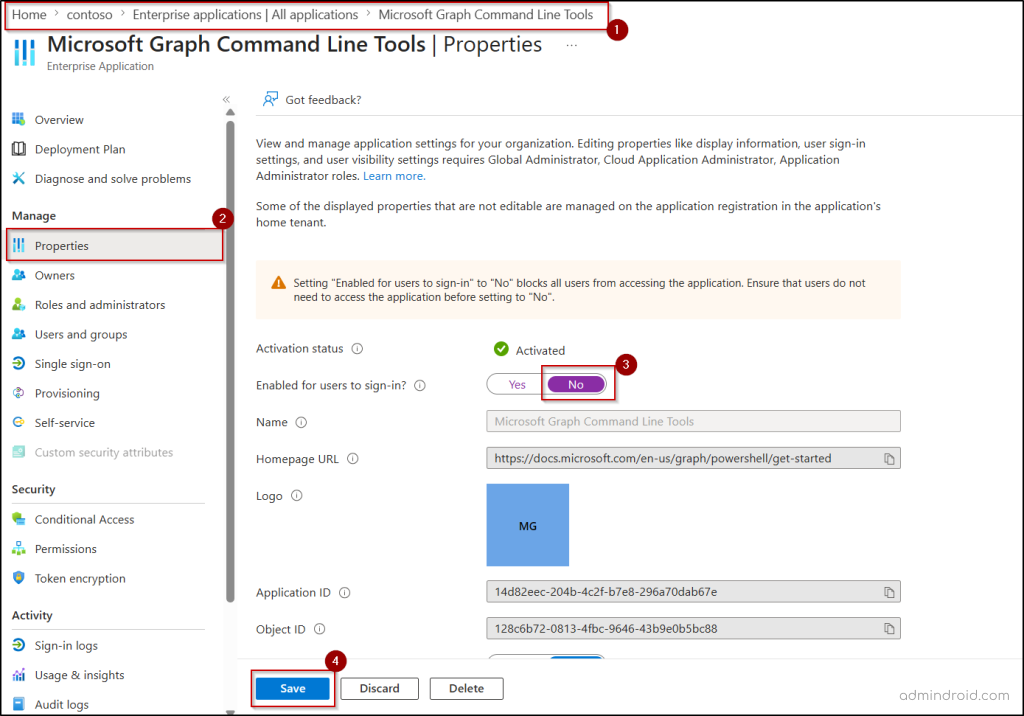
1. Disable Workload Identity in Microsoft Entra
Immediately disable the affected service principal or enterprise application to block attacker access. This contains the threat while preserving evidence for investigation.
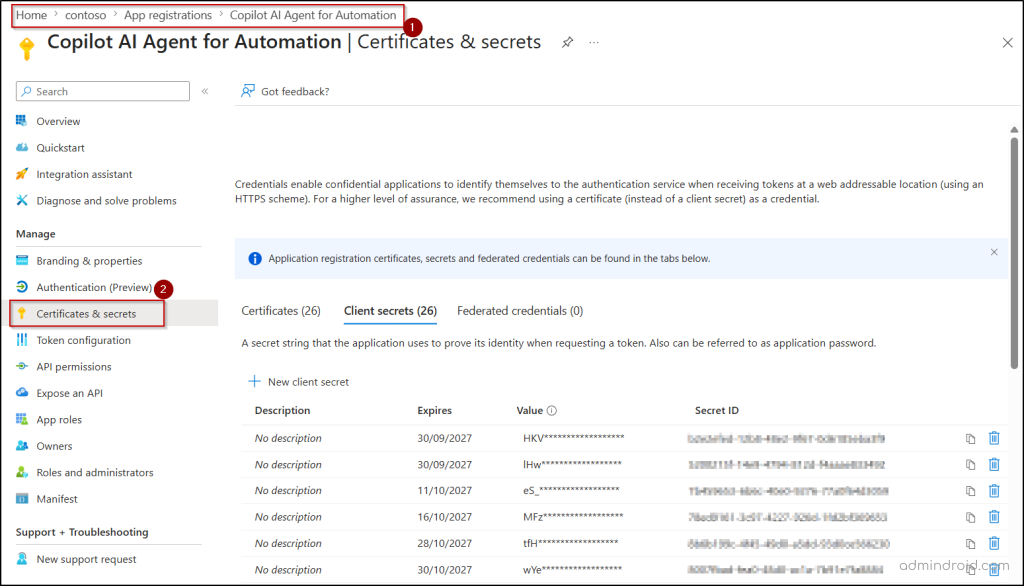
2. Remove Suspicious Credentials
Threat actors frequently add rogue client secrets, certificates, or federated credentials to maintain access. Review and remove unauthorized or suspicious credentials from app registrations in the Entra admin center.
Handy Tip: Restrict the creation of client secrets in Microsoft Entra applications whenever possible, as they can be leaked or stolen easily. To reduce credential-related risks, prefer more secure alternatives such as managed identities, certificate-based authentication, or federated credentials.
3. Purge and Rotate All Entra Application Credentials
If a workload identity is compromised, treat all associated credentials as potentially exposed. Remove all existing credentials and replace them with short-lived credentials or more secure authentication methods.
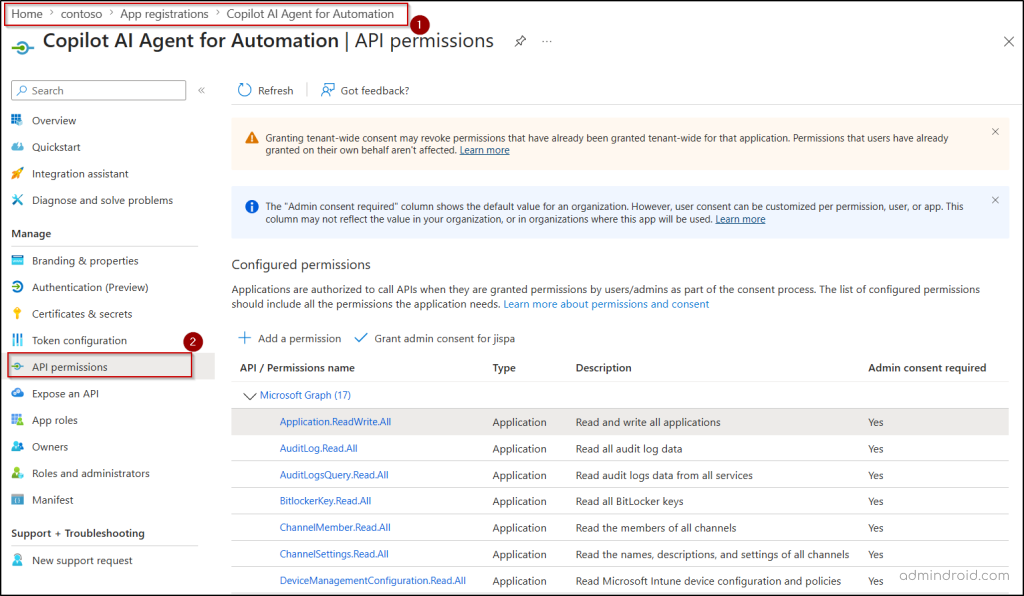
4. Revoke Microsoft Entra Application Permissions
Review all granted app permissions and remove unnecessary access, especially high-risk permissions such as ReadWrite.All and FullControl.All. This limits the blast radius of the massive M365 cloud breach.
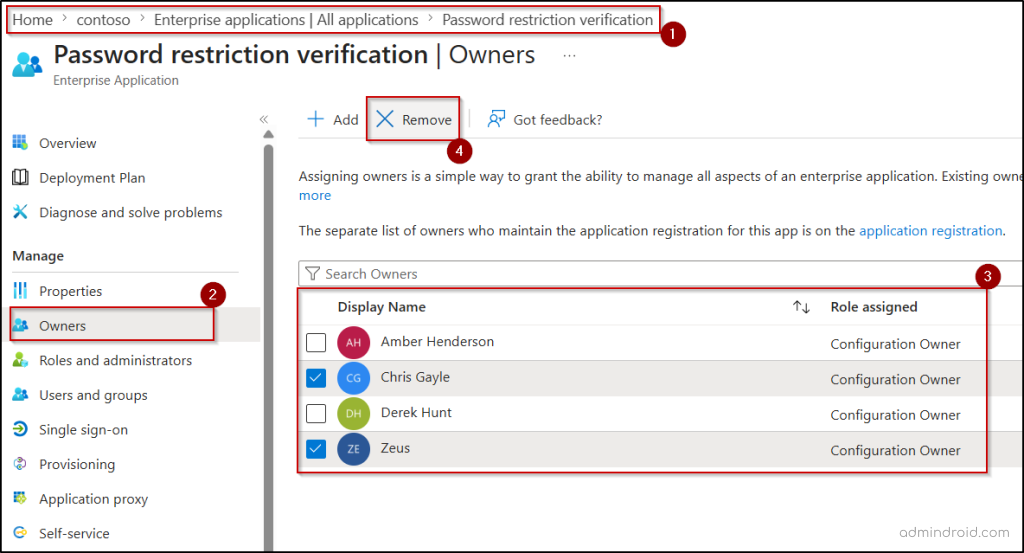
5. Remediate Ownership Assignments of Workload Identities
Clean up the app’s metadata so the attacker cannot use a compromised user account to re-inject credentials later. Review the Entra application owners and remove any newly created users, external guests, or unusual owner accounts.
6. Investigate the Scope of the Workload Identity Breach
Now that the attacker is locked out, you must audit what they stole or modified while they had access. Use Microsoft Purview Audit logs to reconstruct the attack timeline. Filter by the specific App ID or Service Principal ID to isolate every single directory modification. Address any unauthorized changes and take steps to protect affected data and resources.
7. Audit Related Applications for Lateral Movement
Sophisticated attackers rarely stop at a single application. Once inside, they will look for additional identities to expand their foothold. Review related applications to spot evidence of lateral movement and immediately remediate any additional compromised Entra identities.
Proactive Measures to Reduce the Microsoft Entra Workload ID Attack
To effectively defend against modern cloud attacks, organizations must move beyond reactive security and adopt a proactive workload identity security strategy. The following controls can significantly reduce your Microsoft 365 workload identity attack surface and help prevent future compromises.
1. Enforce Least Privilege: Apply the principle of least privilege access and only grant the exact, granular API permissions an application or automated service requires to function.
2. Remove Inactive Workload Identity: Identify and remove legacy application registrations, test applications, proof-of-concept deployments, and unused enterprise applications that no longer serve a purpose.
3. Eliminate Long-Lived Credentials: Restrict client secret lifetimes to 90 days or less, rotate certificates regularly, and remove all unused credentials to reduce the opportunity window for attackers.
4. Implement Conditional Access for Workload Identities: Apply Microsoft Entra Conditional Access policies to workload identities and restrict how service principals authenticate. This provides an additional layer of protection if credentials are compromised in a tenant.
5. Monitor Risky Workload Identities: Microsoft Entra ID Protection continuously evaluates risky workload identity telemetry, like leaked credentials, suspicious sign-in behavior, anomalous service principal activity, etc. This allows you to investigate and reduce workload identity threats early.
6. Implement Continuous Access Evaluation: Traditional access tokens can remain valid even after security conditions change. By enabling Continuous Access Evaluation (CAE) for workload identities, you can enforce policy changes, risk spikes, and location blocks in near real-time, instantly revoking active access tokens.
7. Regularly Monitor Application Details: Periodically review workload identity owners, permissions, consent grants, and role assignments. This helps you identify excessive permissions, orphaned applications, and unauthorized ownership changes.
8. Establish Workload Identity Governance: Treat workload identities with the same level of security applied to user accounts in Microsoft 365. Implement processes for application onboarding, permission reviews, credential management, risk monitoring, and workload identity retirement.
As organizations continue adopting automation, AI agents, Microsoft Copilot, and cloud-native applications, the number of workload identities will only continue to grow. Without proper governance, that growth quickly becomes an unmanaged attack surface.
A proactive workload identity security strategy ensures these identities remain business enablers—not hidden entry points for attackers.
Simplify Workload Identity Management with AdminDroid 365
While Microsoft Entra ID provides the data needed to manage workload identities, gaining a clear view of your risk posture often requires navigating multiple logs, reports, and admin portals.
AdminDroid 365 simplifies the process by bringing Microsoft Entra workload identity insights into a single, user-friendly GUI. Here is how AdminDroid turns workload identity chaos into total control.
1. Detect Suspicious Workload Identity Sign-ins
AdminDroid’s sign-in analytics provide detailed visibility into workload identity sign-in activity, helping you spot unusual authentication patterns before they become security incidents. Filter the report by service principal name, sign-in status, time, IP address, city, risk level, and risk state to instantly flag suspicious sign-ins.
2. Uncover Hidden Workload Identity in Your Tenant
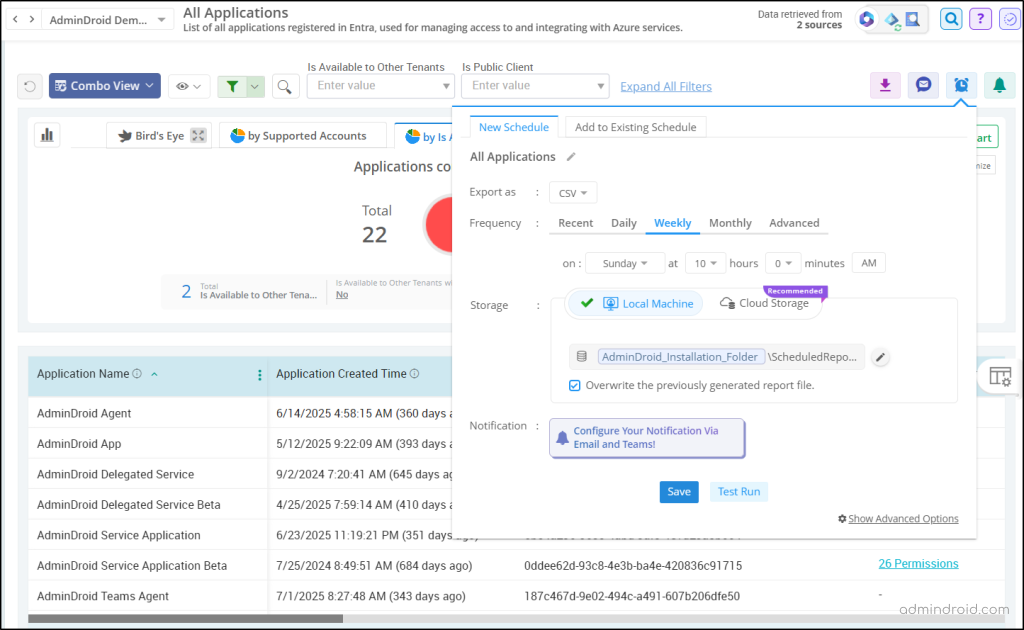
AdminDroid’s all applications and all service principals reports provide a complete inventory of all workload identities in your tenant. Quickly review permissions, credentials, owners, redirect URIs, and more from a single report. You can schedule these reports at regular intervals to stay ahead of newly created workload identities.
3. Track Credential Changes Before Attackers Do
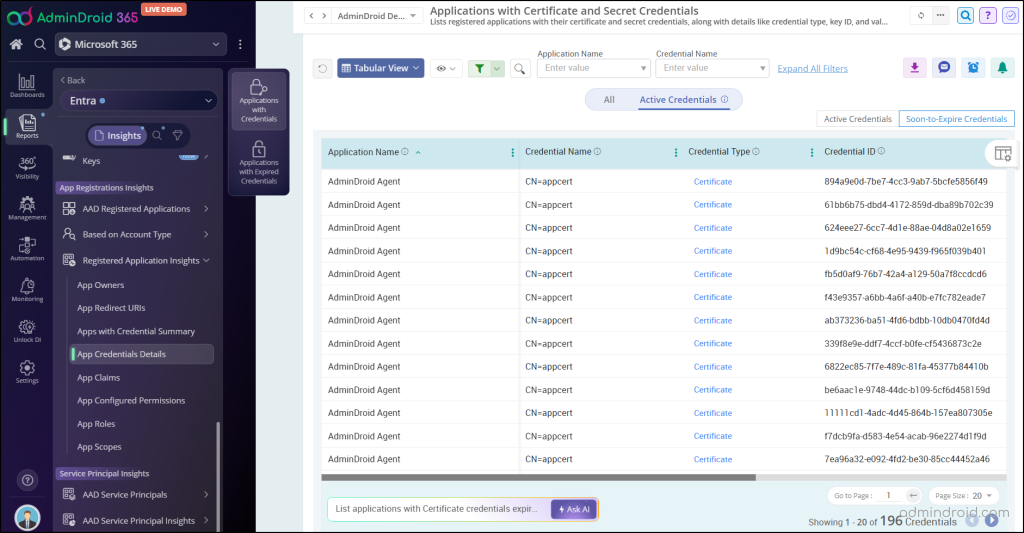
Get a complete view of application and service principal credentials with dedicated reports for soon-to-expire and expired credentials. You can also audit Microsoft Entra application credential changes in near real time to quickly identify suspicious activity.
Taking it a step further, AdminDroid’s pre-built alert policy ‘Credentials additions to service principal’ watches your back 24/7. Just enable the policy to get an immediate alert in your inbox or Teams the moment a client secret or certificate is attached to an app.
4. Shrink Your Workload Identity Attack Surface
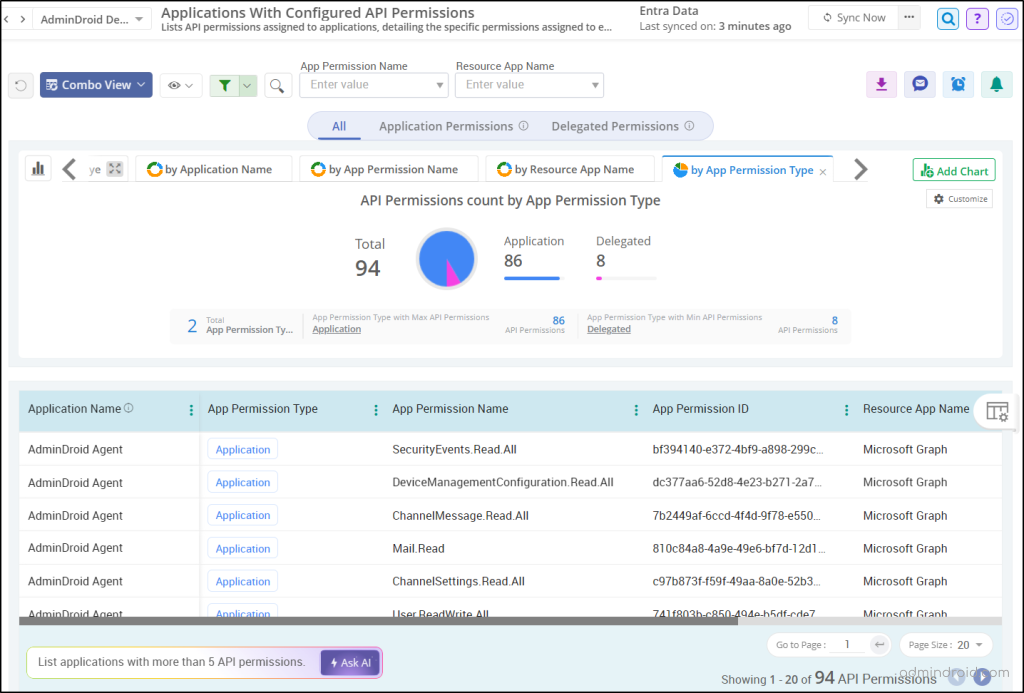
Over-privileged applications are a major security blind spot. AdminDroid allows you to regularly monitor API permissions configured on applications, listing every application and delegated permission assigned to the workload identities.
4. Shut Down Illicit Consent Attacks
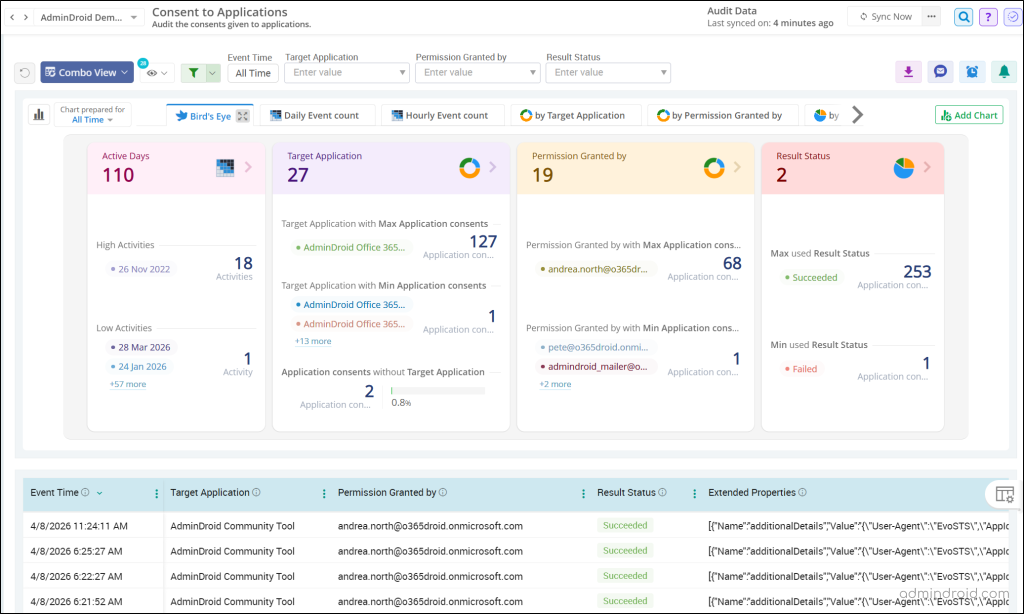
Modern attackers often use sophisticated phishing campaigns to trick users or admins into authorizing malicious workload identities. Once consent is granted, attackers can gain access without stealing credentials. Therefore, it is essential to track all admin or user consent to a Microsoft Entra application.
AdminDroid’s Microsoft 365 auditing tool helps you audit every consent granted to applications in Entra ID in near real-time. Track who granted the permission, what permission was granted, the target application, the event time, and more to intercept illicit takeovers immediately.
Workload Identity: The New Target of Attackers
User identities are no longer the sole gatekeepers of your cloud environment. Workload identities often hold privileged access to critical applications, services, and organizational data, making them a valuable target for attackers.
To stay ahead of evolving threats, organizations must extend their identity security strategy beyond users. Regularly reviewing application permissions, monitoring service principal changes, auditing workload identity sign-ins, and enforcing strong governance practices can significantly reduce the risk of compromise.
We hope this blog helped you understand why workload identities are becoming a prime target for attackers and how you can proactively secure them in Microsoft Entra ID. If you have any questions or experiences to share, feel free to leave a comment below. We’d love to hear from you!