Active Directory still runs quietly behind countless enterprise environments, handling identities, access, policies, and authentication every day. That’s despite decades of predictions that its days were numbered.
Yet, keeping pace with its evolving capabilities and managing Active Directory isn’t always simple, and relying on default admin tools only makes it harder. Native utilities can handle routine tasks, but they don’t always cut it when you need deeper security insights, forensics, automation, or advanced reporting.
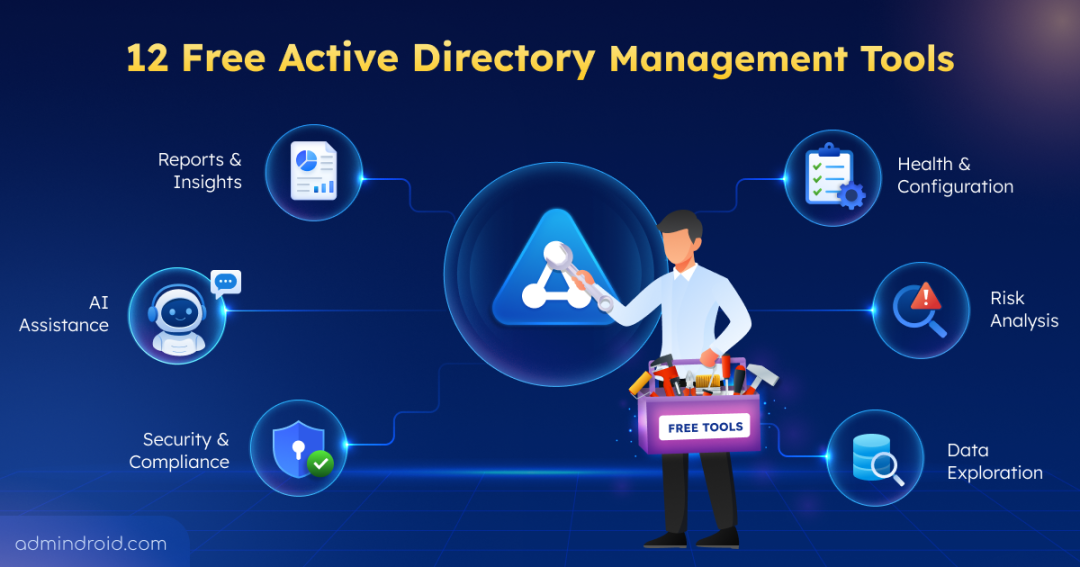
That’s where the right tools can make all the difference, especially when they come without a price tag or a quotation form attached. We’ve rounded up 12 free Active Directory management tools that go beyond the basics to simplify day-to-day administration. Let’s jump right in.
1. ADACL Scanner: Analyze Access Control Lists to Uncover Risky Permissions
As delegated access, nested groups, and inherited permissions pile up, getting a clear picture of Active Directory permissions can become difficult. Hidden rights like WriteDACL and GenericAll can quietly expand your attack surface, while finding them often means digging through permissions across numerous AD objects.
That’s where ADACL Scanner comes in.
What ADACL Scanner does?
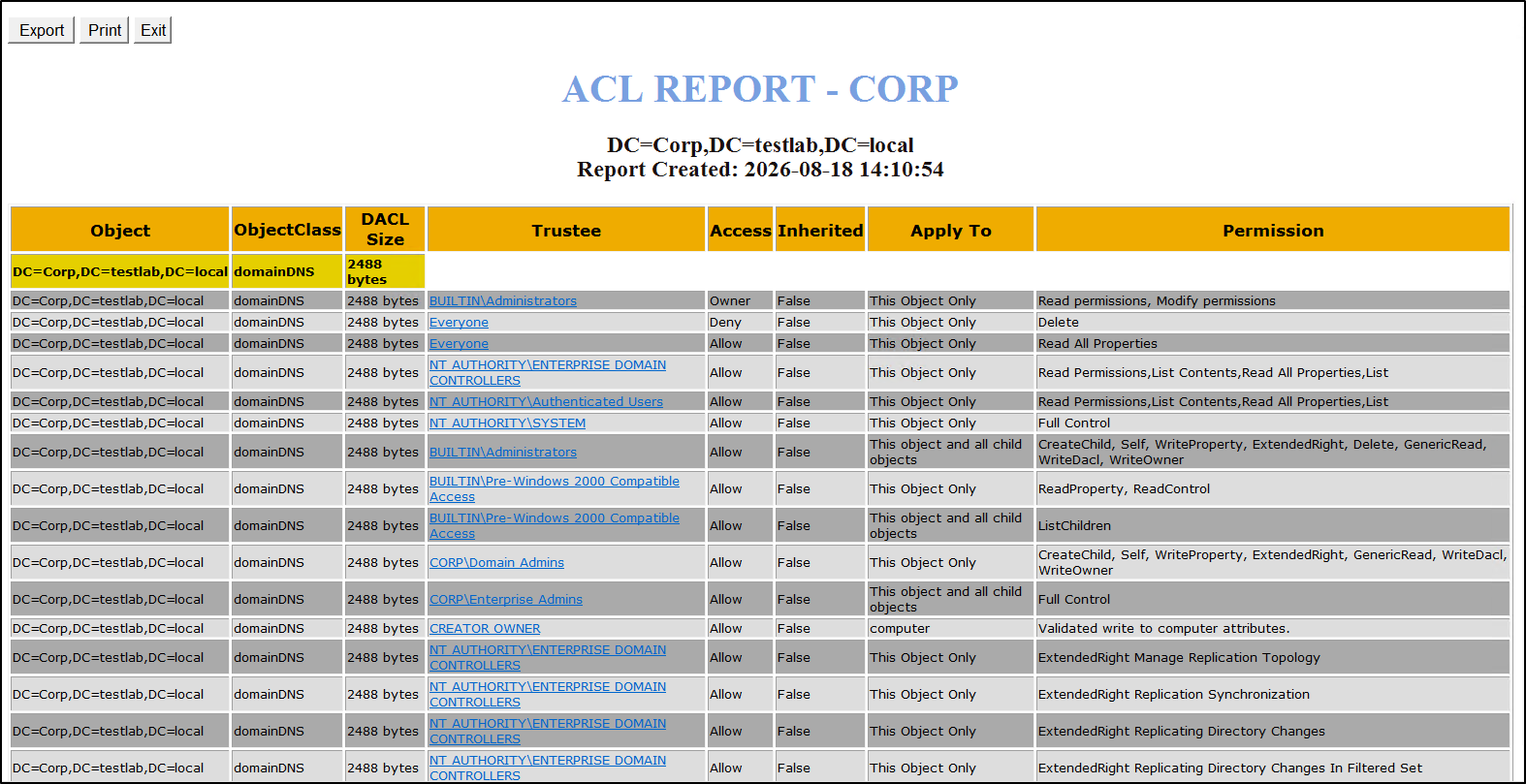
ADACL Scanner is a free PowerShell-based tool with a GUI that brings Active Directory permissions into clearer view. It analyzes ACLs across AD objects to help admins identify excessive or potentially dangerous access, review effective rights, and tighten permissions.
Core capabilities:
- Scans DACLs and SACLs across AD objects and linked GPOs. DACLs and SACLs across AD objects, OUs, containers, and linked GPOs.
- Filters permissions by access type, user, group, or object type.
- Checks effective permissions for selected users and security principals.
- Compares current and previous permissions to spot changes.
- Generates HTML reports and exports ACL data to CSV or Excel.
- Reports object owners, inherited permissions, and disabled inheritance.
- Highlights critical permissions with color-coded results.
Ready to uncover hidden permission risks in Active Directory? Use ADACL Scanner for easier permission auditing.
2. AdminDroid Free Version: Generate, Schedule, & Export 200+ Active Directory Reports
Finding essential Active Directory data, such as inactive users, empty groups, or unmanaged contacts, can mean switching between admin consoles and PowerShell scripts. Additionally, native tools often lack convenient export and scheduling capabilities, making it difficult to automate and monitor Active Directory reports.
That’s where AdminDroid Free Version can help.
How does AdminDroid lend a hand?
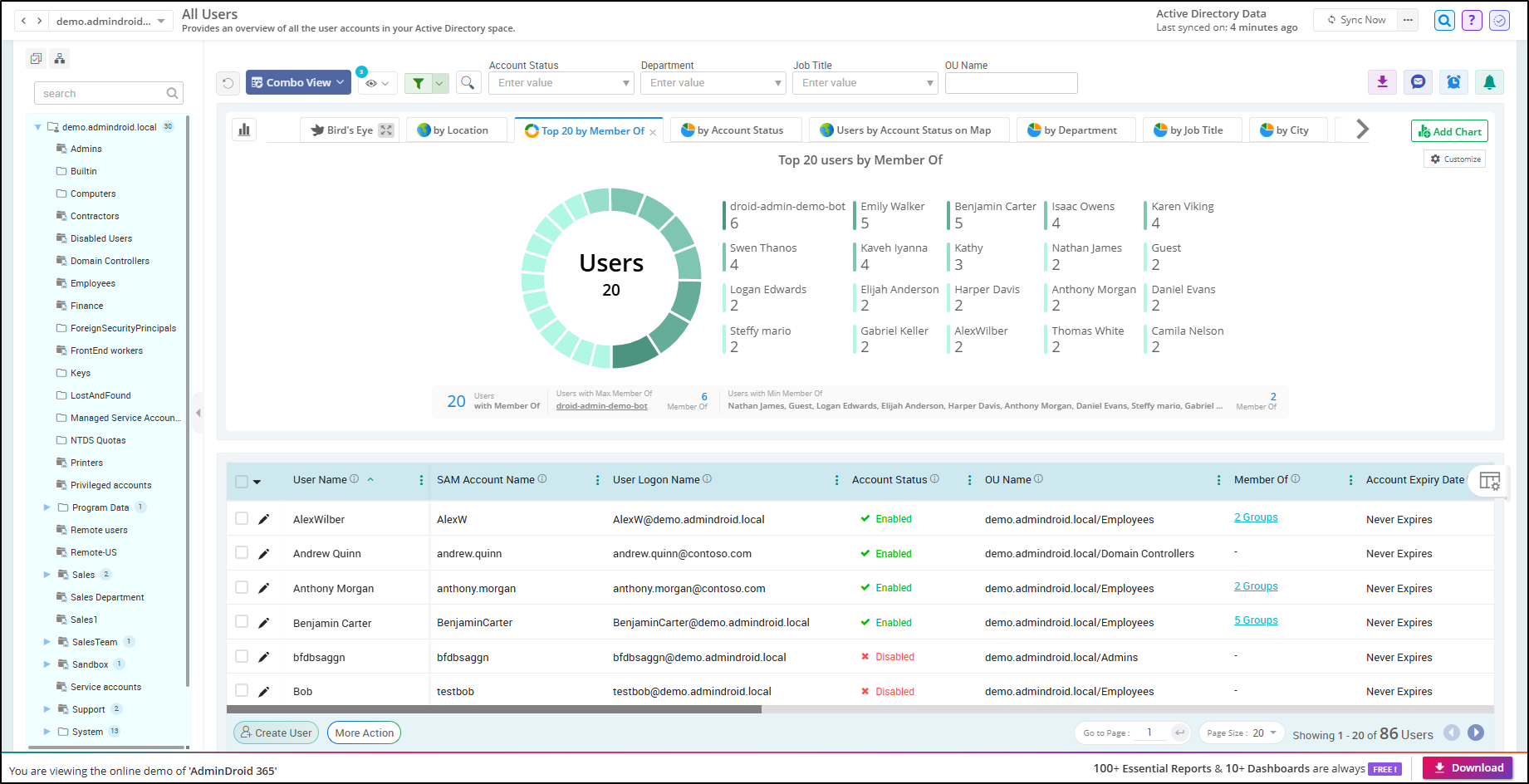
AdminDroid’s free Active Directory reporting tool provides 200+ reports covering users, groups, computers, contacts, and other key AD data. Moreover, it features interactive tree views, flexible sorting, filtering, and saved views to tailor reports to your exact needs. Beyond these conveniences, AdminDroid also provides powerful capabilities for exporting and scheduling Active Directory reports.
Core Capabilities:
- 200+ reports covering users, groups, computers, GPOs, passwords, admins, OUs, security, etc.
- 10 interactive dashboards with a bird’s-eye view of key Active Directory insights.
- Report exports in CSV, PDF, HTML, XLSX, and other formats.
- Flexible scheduling to automate report delivery via email.
- User management actions to create, enable, disable, and delete user accounts.
- Automate user life cycle management workflows like onboarding, offboarding, inactive user cleanup using 15 free automation runs.
Need deeper visibility into your Active Directory? Explore AdminDroid’s free Active Directory reporting tool.
3. BloodHound: Map and Analyze Active Directory Attack Paths
In complex Active Directory environments, ACLs, user sessions, and group memberships can combine to create hidden paths to privileged access. Attackers actively look for these paths to move laterally through the domain and escalate their access.
Without a clear view of these connections, security teams can miss how a low-privileged account could potentially lead to more privileged access across the domain. BloodHound helps security teams see these connections at a glance.
How BloodHound maps your AD:
BloodHound uses graph theory to map relationships between users, groups, computers, permissions, sessions, trusts, and other identity objects. Its official collector, SharpHound CE, gathers Active Directory data and feeds it into BloodHound, where admins can visualize relationships and discover potential attack paths.
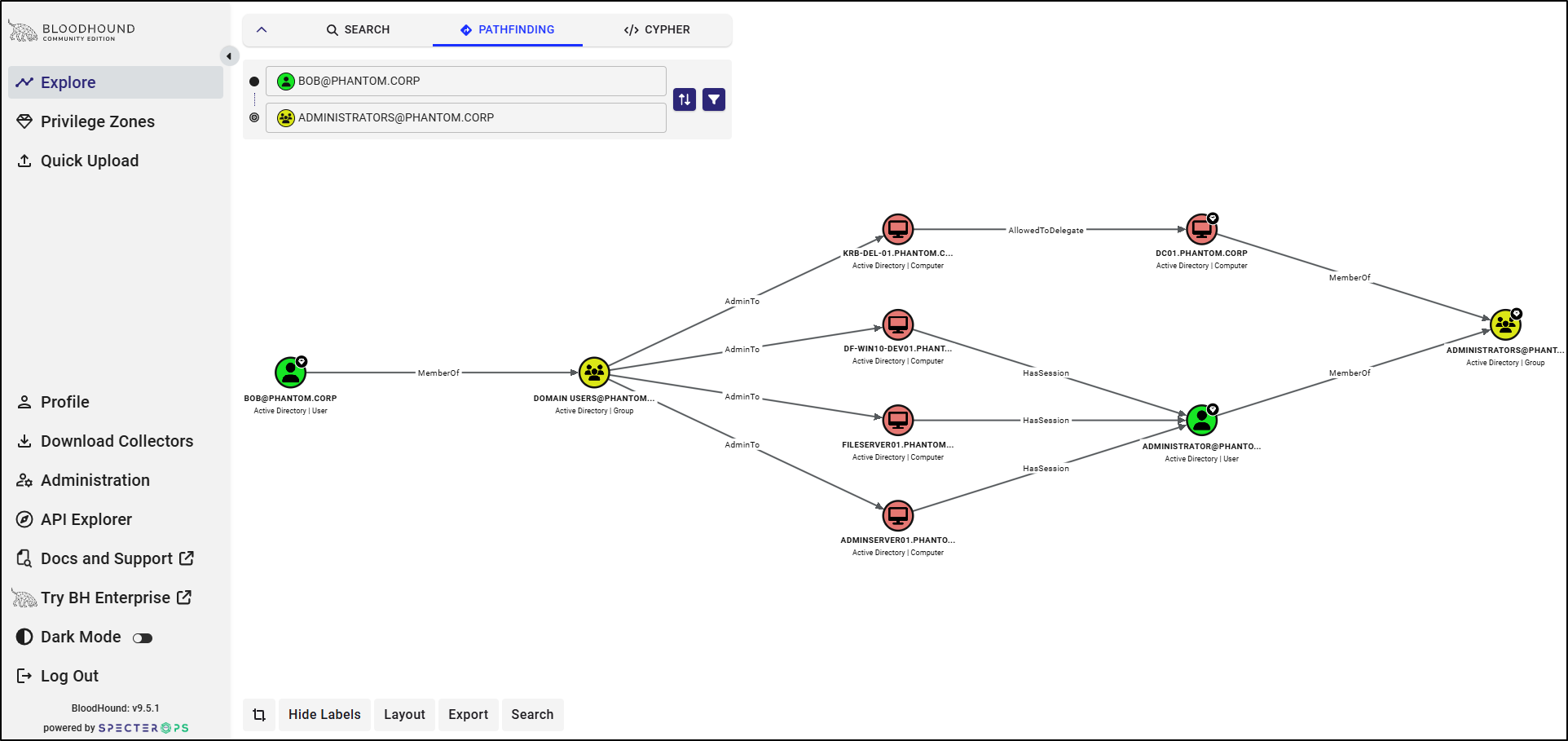
Core Capabilities:
- Collects AD data with SharpHound CE, including memberships, trusts, GPOs, OUs, sessions, and local groups.
- Reveals attack paths to Tier Zero assets and other critical resources.
- Maps Active Directory relationships across users, groups, computers, permissions, and trusts.
- Identifies abusable AD configurations involving AD CS, NTLM, delegation, and privileged access.
- Exports graph data in JSON for further analysis and integration.
- Supports Cypher queries for advanced graph-based analysis.
- Supports multiple deployment options, including Docker and platform-specific installations.
Want to uncover hidden attack paths to your critical Active Directory assets? Get started with BloodHound.
4. Purple Knight: Evaluate and Strengthen Your Active Directory Security
Active Directory remains the primary target for modern identity attacks, yet legacy misconfigurations, unmonitored permissions, and subtle security drift often go unnoticed. Native monitoring tools rarely expose these deep Active Directory vulnerabilities until an attacker exploits them. That’s where Purple Knight comes in.
What Purple Knight delivers?
Purple Knight is a free Active Directory security assessment tool that scans your environment for Indicators of Exposure (IOEs) and Indicators of Compromise (IOCs). It analyzes your directory against known attack vectors and provides security scores along with prioritized remediation guidance.
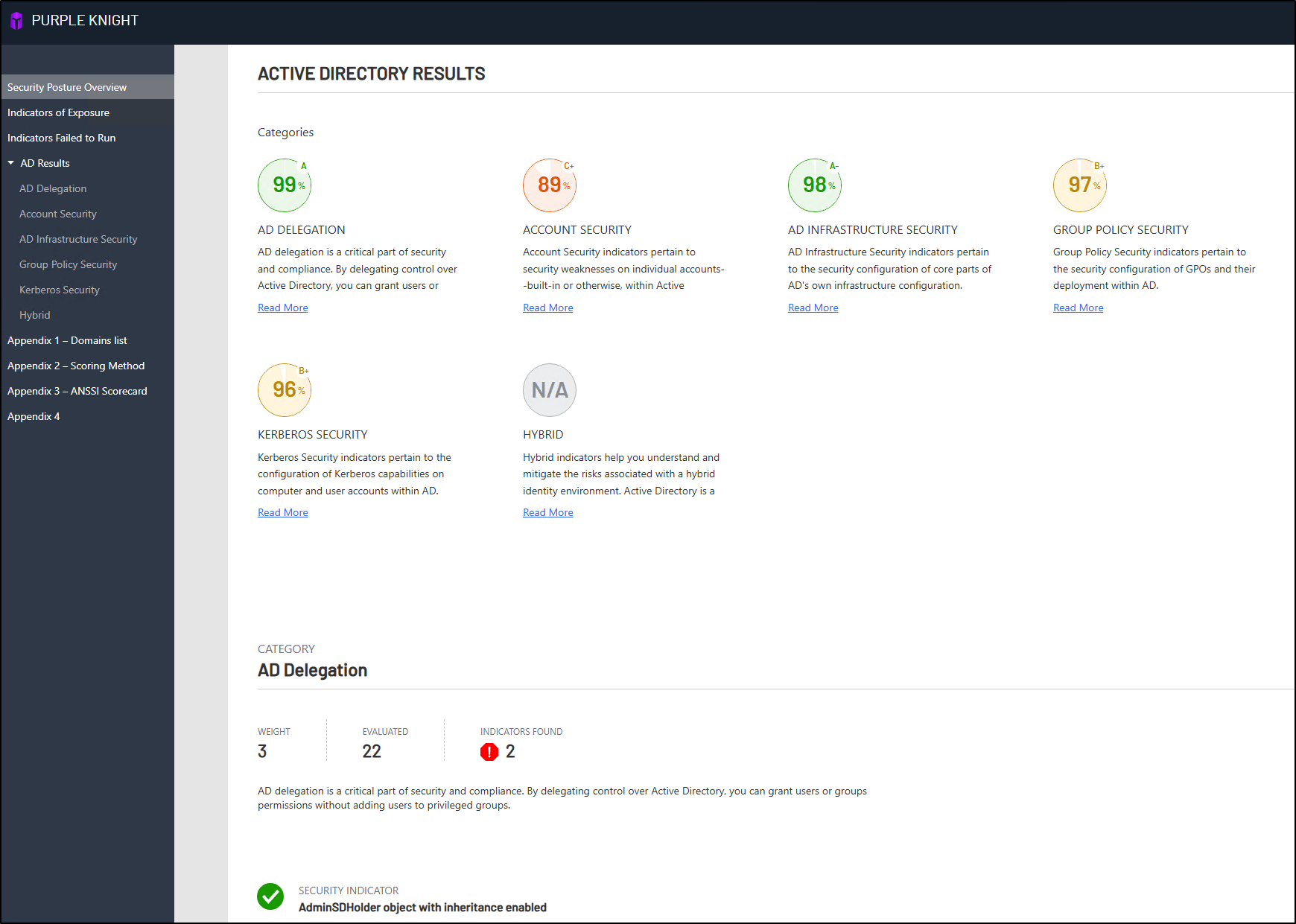
Core Capabilities:
- Scans Active Directory for 215+ security indicators covering common exposures and compromise techniques.
- Identifies risks across account security, Kerberos, Group Policy, AD delegation, and AD infrastructure.
- Assesses Microsoft Entra ID and Okta alongside Active Directory in hybrid environments.
- Maps findings to MITRE ATT&CK, MITRE D3FEND, and ANSSI frameworks.
- Provides prioritized remediation guidance to help admins address security gaps.
- Generates detailed security reports with pass/fail results, findings, risks, and remediation recommendations.
Struggling to find hidden Active Directory security gaps? Try Purple Knight to scan, score, and secure your Active Directory instantly.
5. AdminDroid LDAP Explorer: Explore Active Directory Data the Modern Way
Active Directory stores a vast amount of directory data, but finding specific objects and their attributes through native LDAP tools can be complex. Switching between consoles and manually crafting LDAP queries can make directory exploration and troubleshooting time-consuming. AdminDroid LDAP Explorer is built to simplify this.
How LDAP Explorer works:
AdminDroid’s LDAP Explorer for AD is a free tool that provides a visual interface for exploring Active Directory objects. Admins can browse directory objects, inspect attributes, and analyze directory data without touching the command line or writing complex LDAP queries. Instead of manually searching or scrolling through object properties, they can simply click an object to view its attributes and details at a glance.
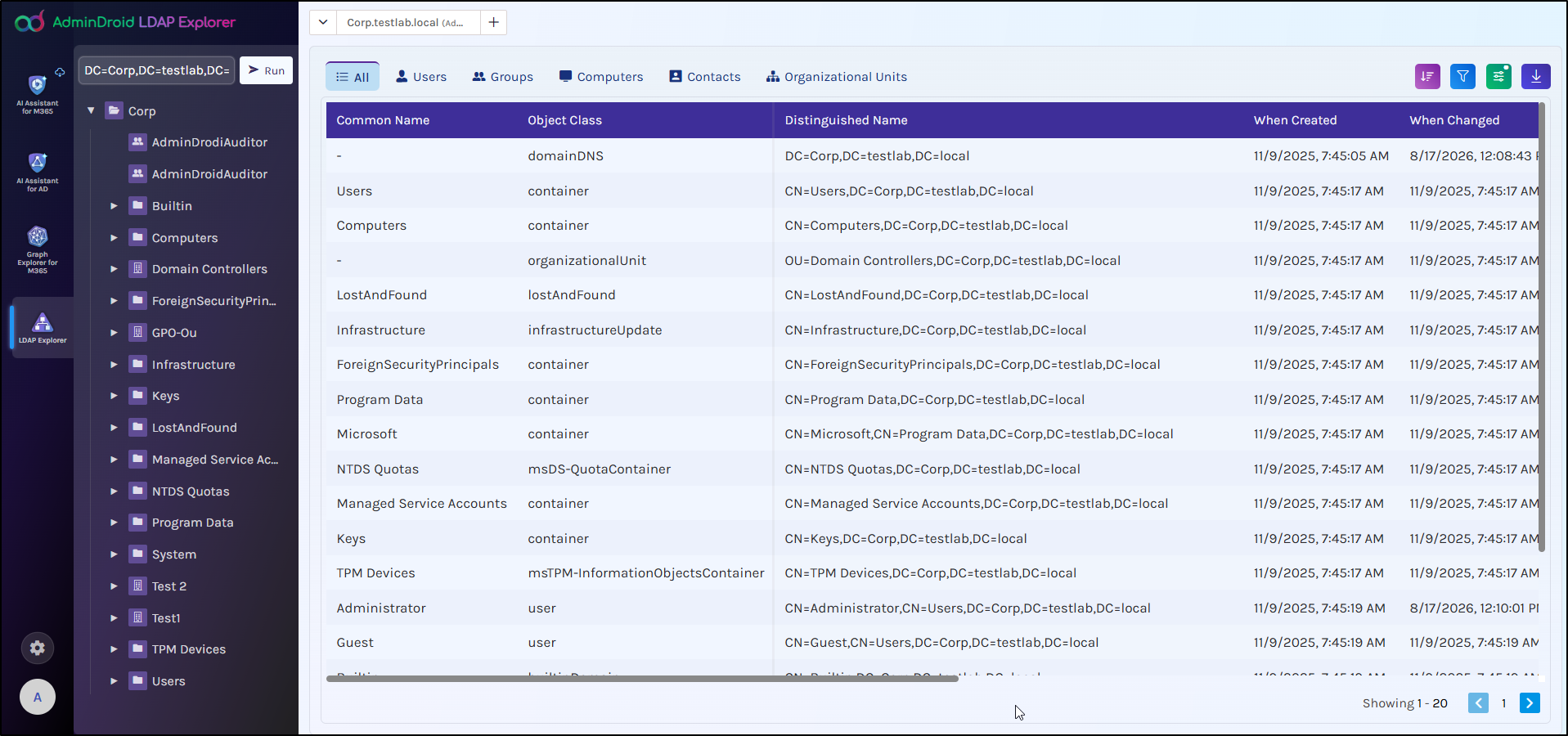
Core capabilities:
- Navigate Active Directory structures and objects through a tree-based directory view.
- View detailed LDAP attributes in a structured table layout.
- Export directory data in CSV, Excel, HTML, and PDF formats.
- Sort and filter Active Directory data to quickly find the information you need.
- Switch between multiple Active Directory domains.
- Navigate large datasets with built-in pagination.
Need a simpler way to explore Active Directory? Launch AdminDroid LDAP Explorer and experience 360-degree directory visibility.
6. Adalanche: Visualize Your Active Directory Permissions & Privilege Relationships
Active Directory environments contain countless interconnected objects, but understanding these relationships often means piecing together information from different tools and views. While BloodHound excels at mapping complex, multi-hop attack paths, its graph-based analysis can feel overwhelming when you simply need to explore Active Directory relationships and permissions. Adalanche offers a lightweight alternative.
How Adalanche works:
Adalanche runs as a standalone executable and turns collected Active Directory data into an interactive graph. Admins can explore objects, follow their relationships, and investigate permissions and group memberships without managing a separate graph database.
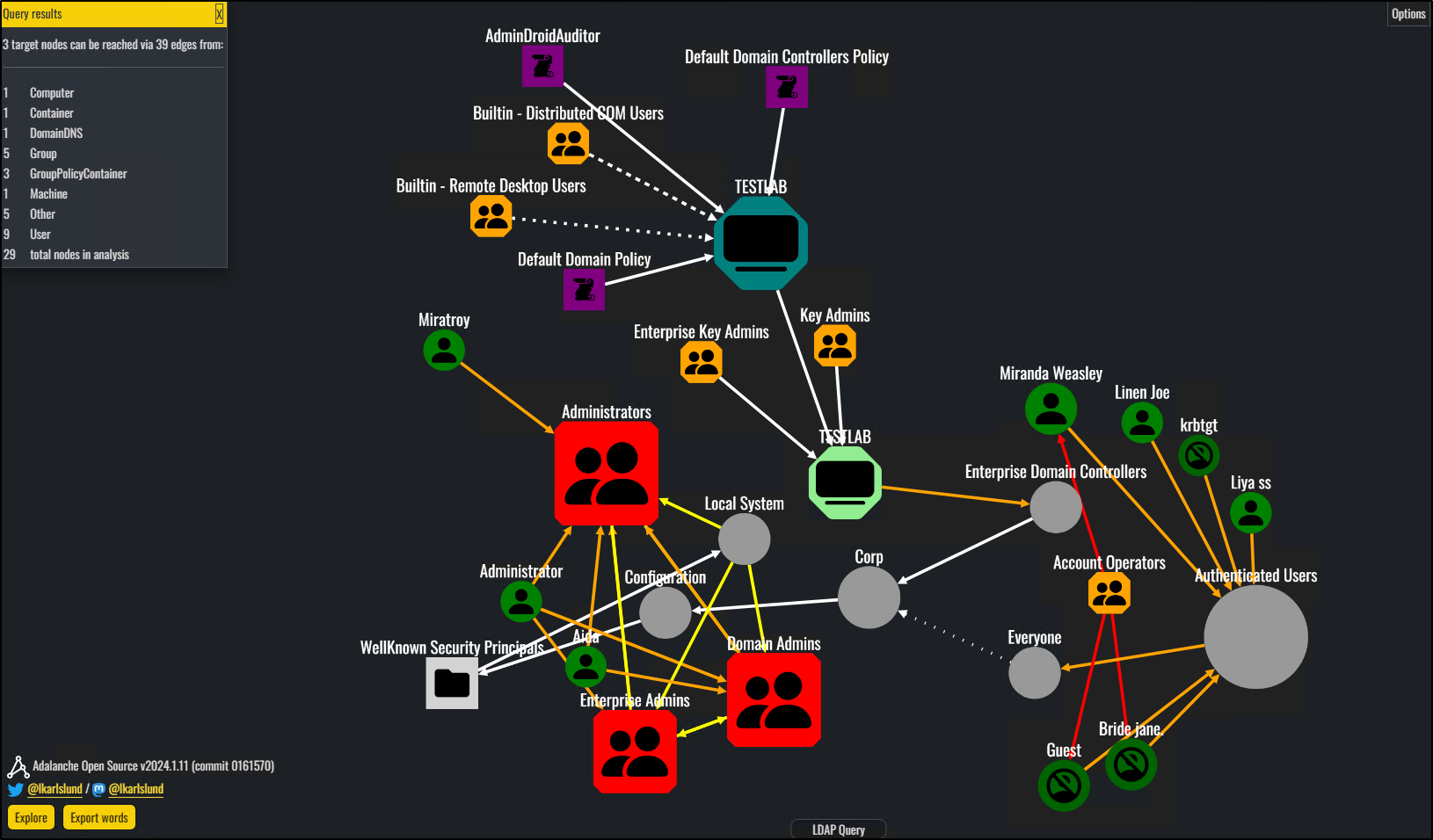
Core Capabilities:
- Collects Active Directory data from Windows machines and VMware vSphere environments for broader analysis.
- Maps AD relationships across users, groups, computers, permissions, and other objects through an interactive graph.
- Analyzes ACLs and ownership to uncover elevated privileges and misconfigurations.
- Explores complex relationships using Adalanche Query Language (AQL).
- Visualizes security-relevant findings such as delegation issues, Kerberoastable accounts, and AD CS misconfigurations.
Want to see how your Active Directory objects and relationships connect? Visualize them with Adalanche.
7. PingCastle: Simplify Active Directory Risk Assessment
Over time, Active Directory environments can accumulate dangerous delegation rights, stale objects, and misconfigured trust relationships. Identifying these risks manually across a complex AD environment can be time-consuming and difficult. That’s where PingCastle comes in. While tools like Purple Knight look for active threat indicators, PingCastle focuses on deep architectural hygiene.
What does PingCastle offer?
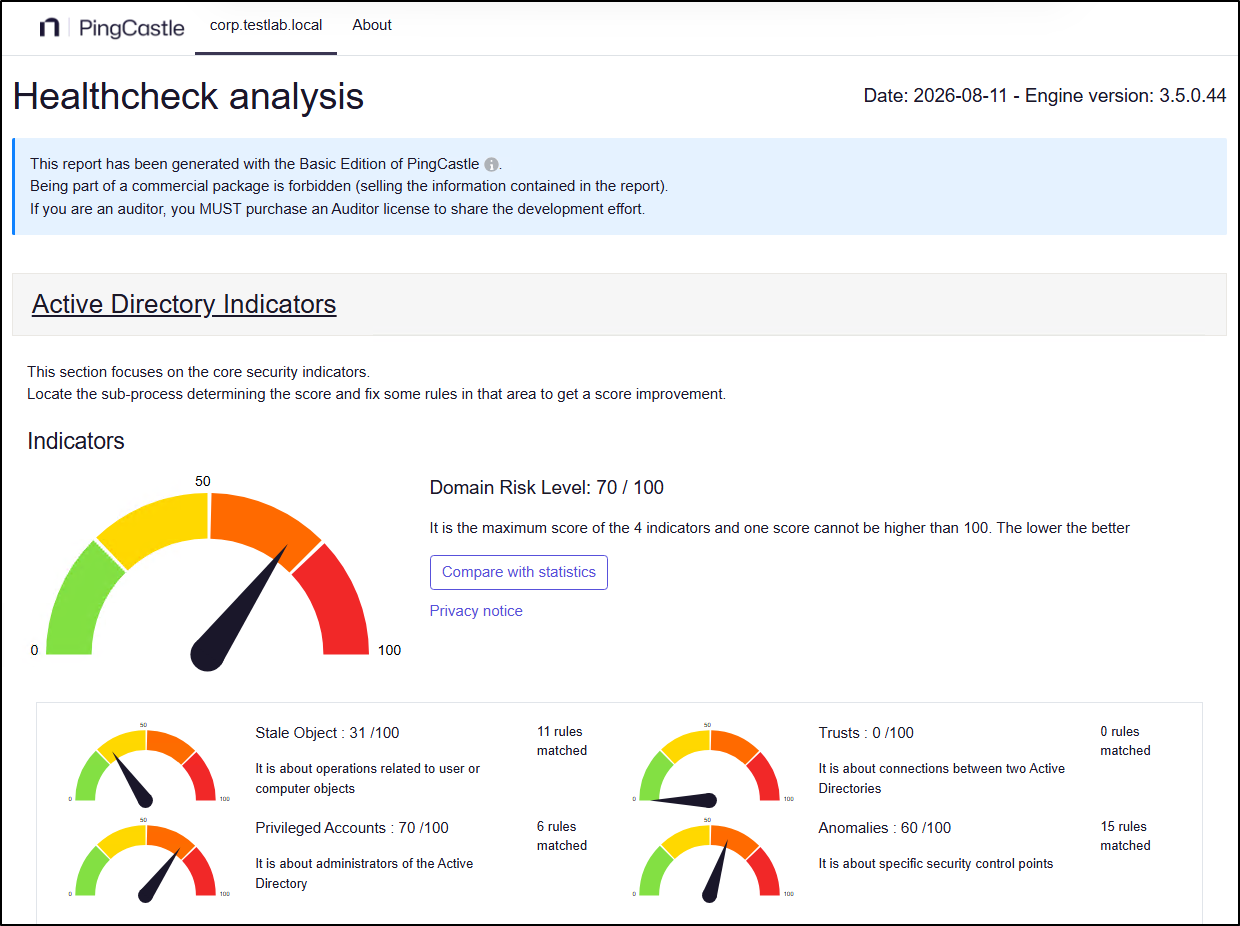
PingCastle is a free Active Directory security assessment tool that uses a risk-based methodology to evaluate your AD environment. It analyzes directory configurations, security practices, and trust relationships to calculate an overall risk score and highlight areas that need attention.
For a more complete view of Active Directory security, combine PingCastle’s risk assessment with Purple Knight’s security indicators and BloodHound’s attack-path analysis. Together, these tools help identify security risks, signs of exposure or compromise, and potential paths to privileged access.
Core Capabilities:
- Measures Active Directory risk and maturity using a risk-based assessment methodology.
- Maps Active Directory domains and trust relationships for a visual view of interconnected environments.
- Identifies stale and risky user and computer accounts through security checks.
- Analyzes delegation and permissions to identify potentially risky access configurations.
- Supports command-line and scheduled scans for recurring AD assessments.
- Generates HTML and XML reports with detailed findings and risk information.
- Exports user and computer data for further analysis.
Wonder how secure your Active Directory really is? Run PingCastle to uncover and prioritize AD security risks.
8. GPOZaurr: Analyze and Troubleshoot Group Policy Issues Across Active Directory
Group Policy Objects (GPOs) in Active Directory play a key role in governing security, yet managing them manually can quickly become complex. Over time, GPOs can accumulate broken links, orphaned objects, permission inconsistencies, stale settings, and SYSVOL issues.
Finding and troubleshooting these issues across large Active Directory environments can be tedious with native tools. That’s where GPOZaurr comes to the rescue.
How GPOZaurr works:
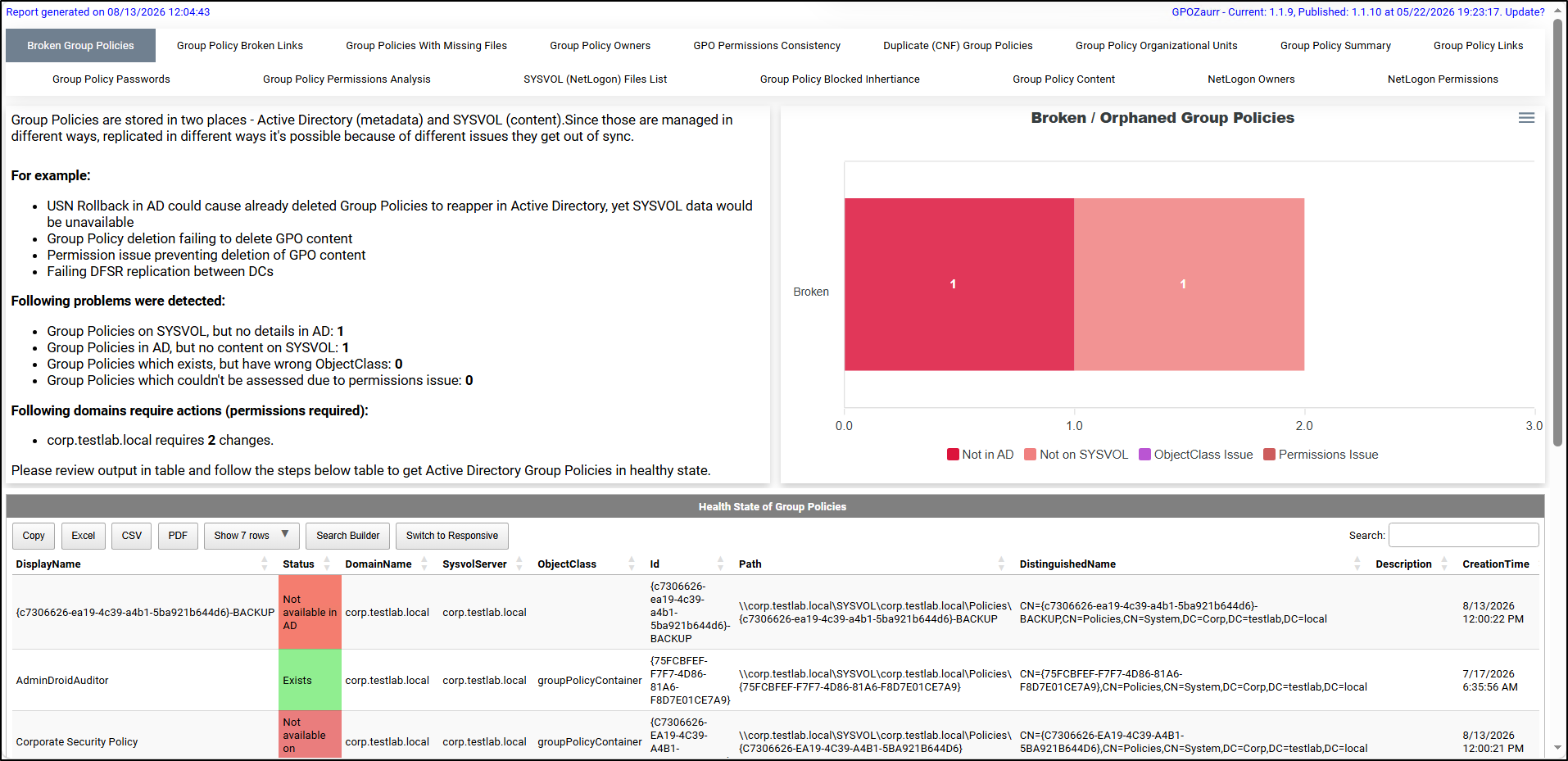
GPOZaurr (Group Policy Eater) is a PowerShell module for inspecting, analyzing, and fixing issues in Active Directory Group Policy. It examines GPOs, links, permissions, files, and configurations across Active Directory and SYSVOL. Admins can use these insights to identify configuration issues, broken objects, and other Group Policy problems.
Core Capabilities:
- Analyzes GPO settings and configurations across 70+ categories with detailed charts.
- Identifies broken GPOs, broken links, empty and unlinked GPOs, and issues with SYSVOL files and NetLogon ownership.
- Generates interactive HTML reports with a 360-degree view of Group Policy.
- Exports reports in Excel, CSV, and PDF formats.
- Supports GPO backup, restore, repair, and permission fixes.
- Provides step-by-step remediation guidance for each identified issue.
Tired of identifying and troubleshooting broken GPOs manually? Detect, analyze, and remediate GPO issues with ease using GPOZaurr.
9. AI Assistant for Active Directory: Simplify Active Directory Management with AI
As AI becomes part of everyday IT workflows, managing Active Directory through natural language is a natural next step. While AI can simplify these tasks, using it with sensitive directory data raises important security and privacy concerns. That’s the challenge AdminDroid’s AI Assistant for Active Directory is built to solve.
How AdminDroid AI Assistant helps:
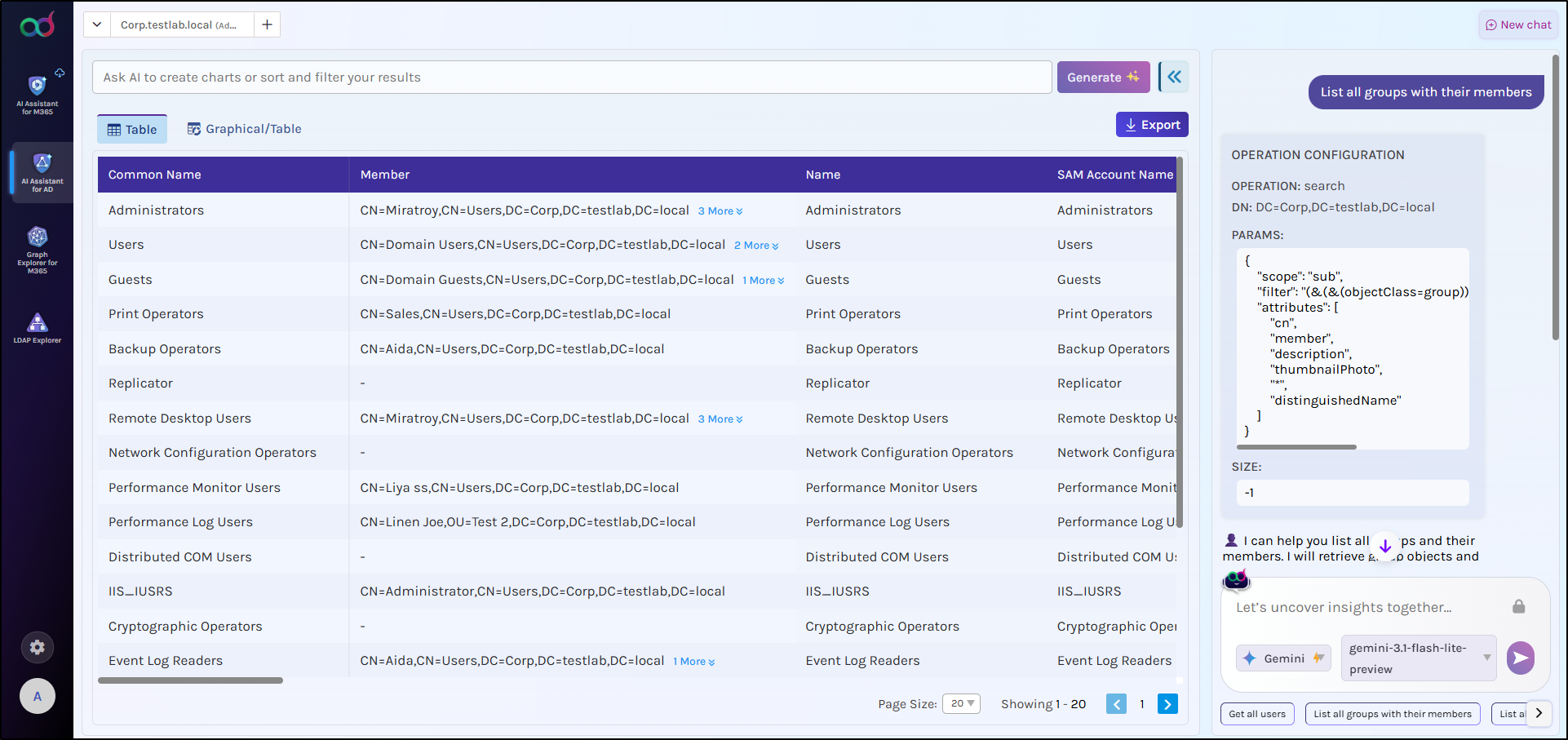
AdminDroid AI Assistant is a free tool that lets admins manage and explore Active Directory using natural language. Whether you need to pull a report, or perform actions such as creating, updating, or deleting AD objects, you can do it through a simple chat interface. Most importantly, this free Active Directory management tool features built-in data masking to protect sensitive directory information before it is sent to AI.
Core Capabilities:
- Generate Active Directory reports and graphical charts through conversational prompts.
- Ask AI to perform AD management actions using natural-language commands.
- Keep sensitive directory data secure with automatic data masking.
- Manage multiple Active Directory domains through the assistant.
- Export reports and visualizations in multiple formats.
Ready to skip the PowerShell scripts and manage Active Directory in plain English? Try AdminDroid AI Assistant for Active Directory.
10. HardeningKitty: Assess and Harden Windows Systems Across Your Active Directory Domain
Windows security configurations across Active Directory domain controllers and domain-joined systems can be difficult to assess consistently. Manually checking systems against security baselines takes time, making critical configuration gaps and hardening opportunities easy to miss. That’s exactly what HardeningKitty is designed to solve.
How HardeningKitty helps:
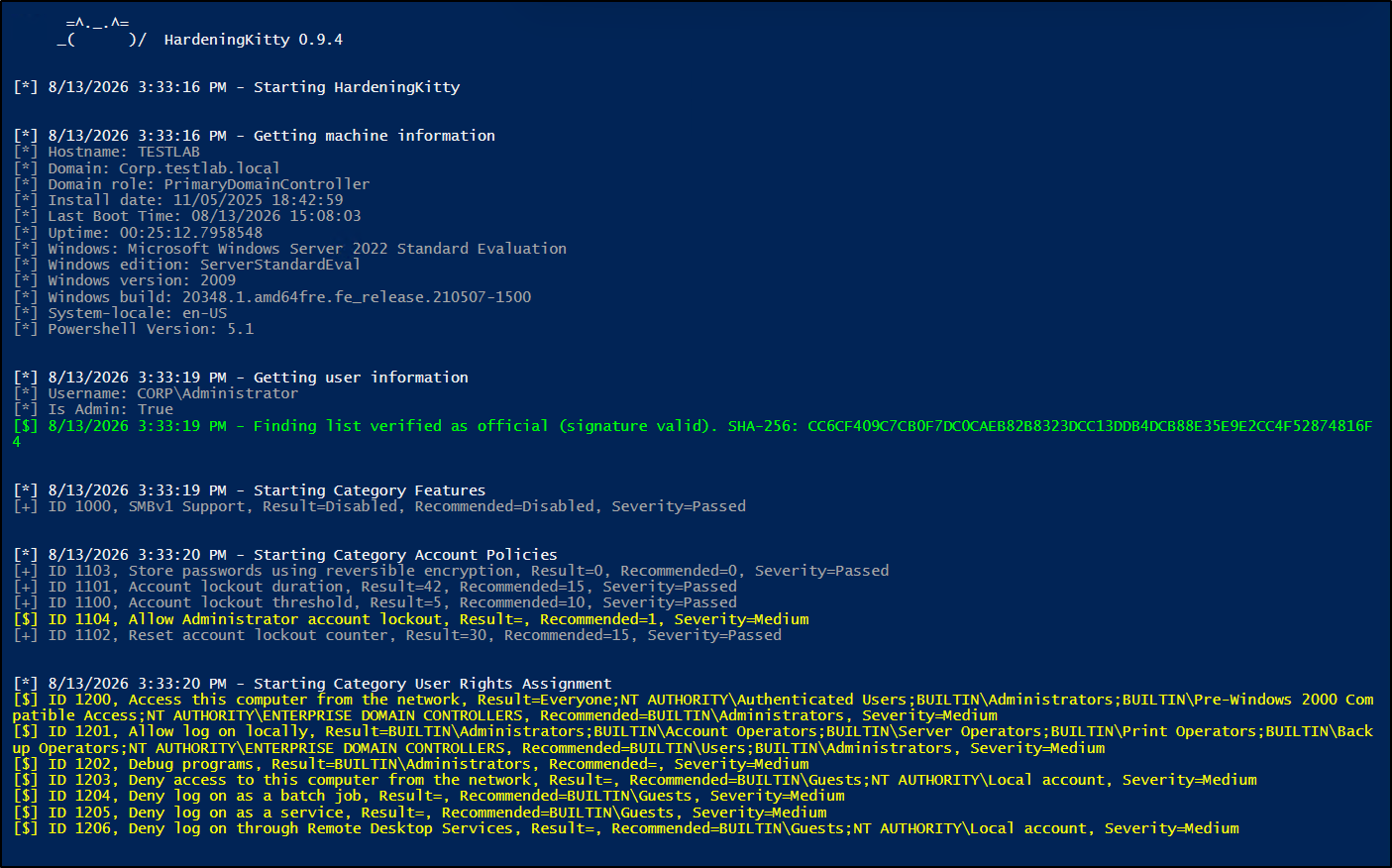
HardeningKitty is a PowerShell-based Windows security auditing and hardening tool that assesses systems against established security baselines. It evaluates settings such as password policies, user rights, audit policies, security options, registry configurations, and more. It helps admins identify configuration gaps, assess their severity, and review recommended values for remediation.
Core Capabilities:
- Supports CIS Benchmarks, DoD STIGs, and Microsoft Security Baselines for security assessments.
- Audits registry settings, user rights, and security policy configurations to pinpoint vulnerabilities.
- Allows admins to build custom lists and tailored baselines to match specific organizational needs.
- Provides a hardening score to easily assess system security posture.
- Supports automated remediation by applying recommended security configurations through HailMary mode.
- Generates CSV and text reports for security auditing and compliance tracking.
Need a reliable way to audit and harden your Windows systems across your Active Directory? Check out HardeningKitty.
11. Locksmith: Find and Fix Active Directory Certificate Services Misconfigurations
Active Directory Certificate Services (AD CS) can introduce serious security risks when certificate authorities, templates, permissions, or other PKI settings are misconfigured. These weaknesses can create opportunities for unauthorized certificate enrollment and privilege escalation, making AD CS configuration an important part of Active Directory security.
Locksmith helps admins uncover these misconfigurations before they introduce security risks.
How Locksmith works
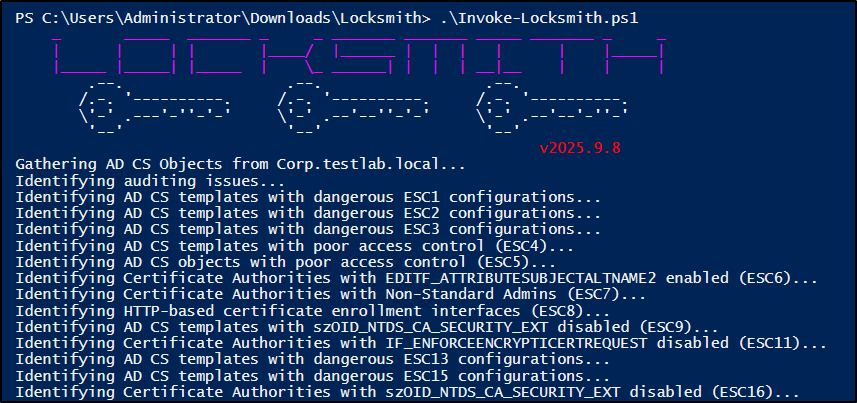
Locksmith is a PowerShell-based tool that checks Active Directory Certificate Services for common security misconfigurations. It analyzes the AD CS environment, identifies risky configurations, and provides remediation guidance to help admins address them.
Core Capabilities:
- Audits AD CS for common misconfigurations, including ESC1–ESC8 and newer ESC techniques.
- Analyzes enrollment permissions to identify risky certificate template access and enrollment conditions.
- Supports selective scanning to run specific AD CS checks or the full assessment.
- Provides remediation options with PowerShell fixes and an automated mode to apply identified fixes.
- Generates actionable CSV reports with findings, affected objects, risk details, and recommended fixes.
Want to uncover hidden AD CS security gaps? Run Locksmith to find and fix certificate service security issues.
12. Blue Tuxedo: Audit and Harden Active Directory-Integrated DNS
DNS (Domain Name System) is tightly integrated with Active Directory to support domain name resolution, but misconfigurations can create security and operational risks across the domain. Issues such as insecure DNS permissions, dangling SPNs, and other AD-integrated DNS weaknesses can be difficult to spot through routine administration.
BlueTuxedo helps uncover these DNS-specific gaps.
How BlueTuxedo works
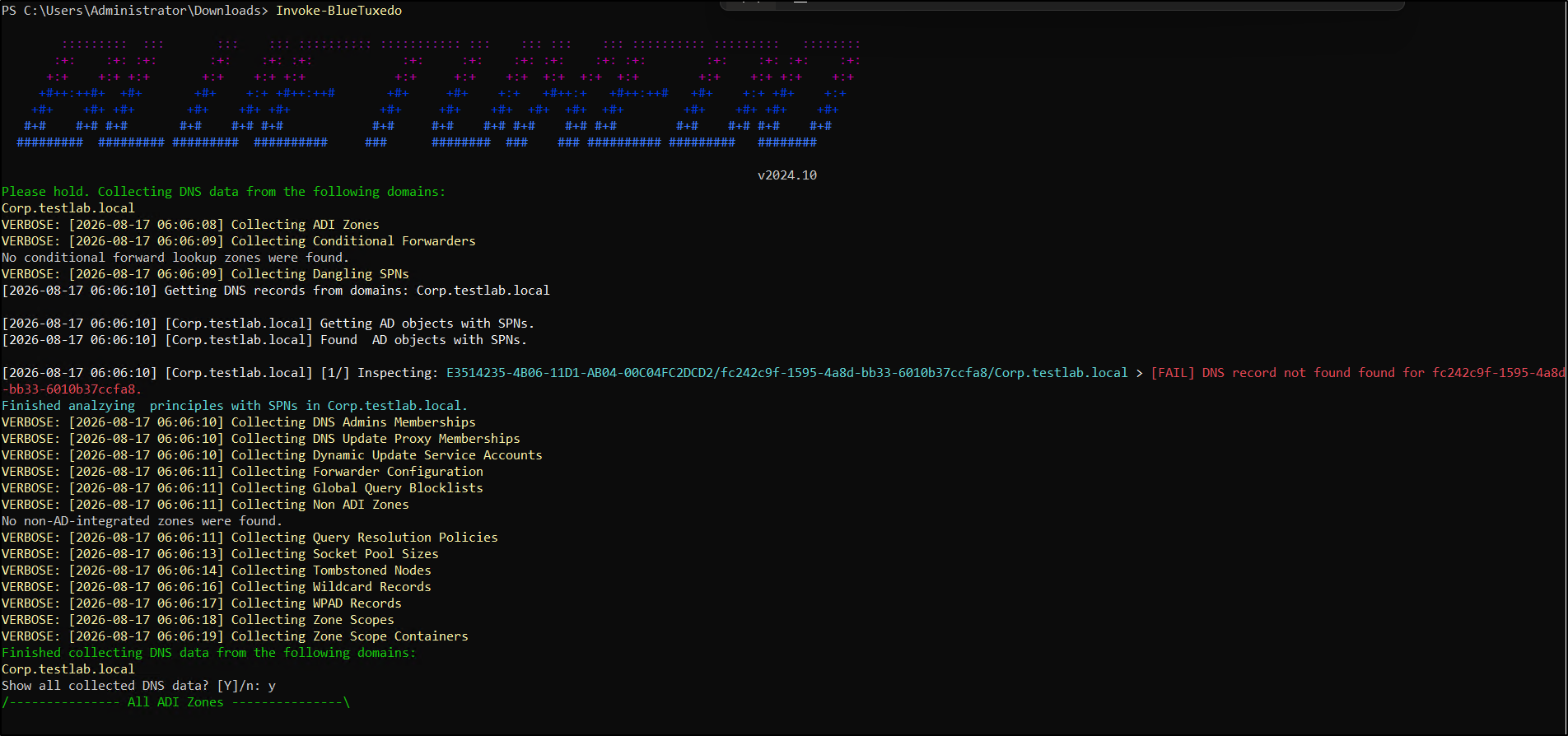
BlueTuxedo is a PowerShell-based tool that tests Active Directory-integrated DNS configurations and analyzes the results to identify potential security and configuration issues. It provides findings and remediation options to help admins address the identified gaps.
Core Capabilities:
- Checks DNS permissions for insecure or excessive access.
- Detects dangling SPNs and related security risks.
- Examines DNS zone configurations for potential weaknesses.
- Provides remediation options to address identified issues.
- Exports results to CSV for further analysis and documentation.
Want a clearer view of your Active Directory-integrated DNS? Explore it with BlueTuxedo.
From Group Policy and DNS health to complex attack paths, AD CS misconfigurations, and directory exploration, Active Directory comes with no shortage of challenges. The free tools covered in this guide take different approaches to help you explore, manage, assess, and harden your environment. Which one will you add to your admin toolkit first? Share your thoughts, questions, or favorite Active Directory utilities in the comments below!