Hybrid identity has always been a balancing act. Most organizations hybrid-join their devices to get the best of both worlds: traditional controls from Active Directory, and modern security features like Conditional Access and Single Sign-On from Microsoft Entra ID.
But, achieving this balance hasn’t been simple. For years, this setup depended on Active Directory Federation Service (AD FS) or through Microsoft Entra Connect sync. In reality, this meant extra servers, complex designs, and higher maintenance effort. 😥
The new approach:
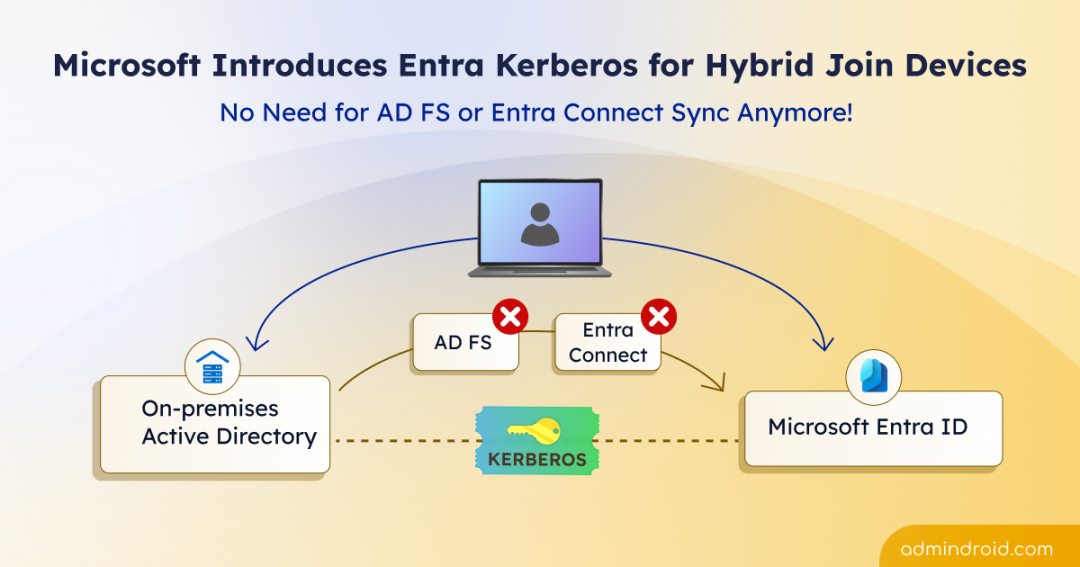
Now comes a smarter approach. Microsoft has introduced Entra Kerberos for hybrid-joined devices, which is currently in Preview. It removes the need for legacy AD FS and reduces the dependency on complex sync-based authentication. In this blog, let’s walk through how Entra Kerberos simplifies hybrid-joined device configuration, and where this new approach works best.
Challenges with Traditional Hybrid Join Method
Before stepping into the modern Entra Kerberos approach, it is essential to understand where traditional hybrid join starts to struggle. Legacy hybrid join depends on either directory synchronization or federation to make devices work across on-premises and cloud identity.
The device registration through Microsoft Entra Connect Sync requires devices to first sync from Active Directory to Microsoft Entra ID before hybrid join can begin. In many environments, this depends on directory synchronization cycles. Since the default sync interval is 30 minutes, delays can occur, especially in large directories.
The other option, Active Directory Federation Services (AD FS), is effective and can be used to enable Single Sign-On. However, it is complex by design. It requires additional servers, certificates, load balancers, careful planning, and also troubleshooting is more difficult.
Microsoft Entra Kerberos for Hybrid Join Devices
To address the traditional limitations, Microsoft Entra Kerberos introduces a modern authentication approach for hybrid scenarios.
What is Microsoft Entra Kerberos?
Microsoft Entra Kerberos is a cloud-based Kerberos authentication capability that allows devices and users to access on-premises resources using identities stored in Microsoft Entra ID, without requiring traditional domain controller authentication at sign-in time.
Using Entra Kerberos for hybrid join enables domain-joined devices to achieve hybrid join behaviour through cloud-based Kerberos trust.
Unlike the traditional method which waits for device objects to sync before hybrid join, Entra Kerberos enables an instant hybrid join experience. This removes the latency caused by scheduled sync intervals. It also allows users to sign in with a streamlined Single Sign-On experience. This gives you a faster device onboarding, less delays, and a better user experience.
Behind the scenes, Microsoft Entra ID acts as a cloud-based Key Distribution Center (KDC) for Kerberos authentication and issues Microsoft Entra Kerberos tickets. This reduces dependency on on-prem domain controllers for hybrid authentication scenarios.
The following table illustrates the basic differences between the traditional and Entra Kerberos hybrid-join methods:
| Characteristic | Traditional Hybrid-Join Method | Entra Kerberos Hybrid Join |
| Dependency on synchronization | Depends on synchronization through Microsoft Entra Connect | No |
| AD FS dependency | Often | No |
| Deployment complexity | High/Medium | Low |
| Sign-in method | Federation/Sync | Kerberos cloud trust |
| Kerberos ticket issued by | DC | Microsoft Entra (cloud trust) |
Prerequisites to Configure Hybrid Join Using Entra Kerberos
To configure the hybrid join using Entra Kerberos, you must have the following requirements.
Role requirements:
- You must be the member or the Domain Admin and Enterprise Admin groups in on-premises Active Directory.
- You must have the Hybrid Identity Administrator and an Application Administrator roles in Microsoft Entra ID.
License requirements: No additional license is required.
Device requirements:
- Each domain must require at least one Windows Server 2025 domain controllers.
- The client computers must be running Windows 11 build 26100.6584 or later.
With these prerequisites in place, you can now set up hybrid join using Entra Kerberos.
Steps to Configure Microsoft Entra Kerberos for Hybrid Join Devices
Below are the steps to set up Microsoft Entra Kerberos for hybrid join devices.
- Create Microsoft Entra Kerberos Trusted Domain Object
- Configure Key Distribution Center (KDC) proxy server GPO
- Create a Microsoft Entra device registration service principal
- Deploy Service Connection Point (SCP)
- Set up client computer for Entra Kerberos-based hybrid join
1. Create Microsoft Entra Kerberos Trusted Domain Object (TDO)
The first step in configuring Microsoft Entra Kerberos is to establish trust between your on-premises environment and the cloud. This is done by creating a TDO in Active Directory domain and registering that trust information in Microsoft Entra ID. This step is crucial because it creates an inbound trust relationship from your on-premises Active Directory to Microsoft Entra ID.
The TDO tells Active Directory to trust Kerberos tickets coming from Microsoft Entra. Once this trust is configured, Active Directory validate authentication requests that originating from the Microsoft Entra tenant.
This allows Windows sign-in to work using a cloud-first authentication flow, while still supporting Kerberos for on-prem resources.
The flow:
Cloud authentication → Kerberos ticket from Microsoft Entra → Access on-prem resources.
2. Configure Key Distribution Center Proxy Server GPO
Once the trust relationship is in place, the next step is to configure the KDC proxy server Group Policy Object. It’s a Group Policy configuration that allows domain-joined devices to obtain Kerberos authentication over HTTPS instead of directly contacting an on-prem Key Distribution Center (KDC) on a domain controller. This is required only if a KDC proxy server is deployed; otherwise, it can be skipped.
3. Create a Microsoft Entra Device Registration Service Principal
The next step is to set up the Microsoft Entra device registration service principal. This step adds a Kerberos key to the Microsoft Entra device registration service principal, allowing it to participate in Kerberos-based authentication.
This configuration is important because it enables Microsoft Entra ID to securely issue Kerberos tickets for device registration. The device registration service must have its own Kerberos identity before it can communicate with your on-premises Active Directory in a trusted way. Only after this service principal is created and updated in Microsoft Entra ID, hybrid device registration can work correctly.
4. Deploy Service Connection Point (SCP)
The Service Connection Point (SCP) tells domain-joined devices which Microsoft Entra tenant they belong to. You can configure SCP either through Microsoft Entra Connect or PowerShell.
When a Windows device is domain joined, it reads the SCP from Active Directory to obtain tenant details, and automatically registers with Microsoft Entra ID as a hybrid-joined device.
Without SCP, devices won’t know where to register, and hybrid join will fail.
5. Set Up Client Computer for Entra Kerberos-Based Hybrid-Join
To configure a client device for Entra Kerberos hybrid join, first join it to your on-premises Active Directory domain. Once all the above pre-requisites are met, domain joining the device allows it to automatically register with Microsoft Entra ID as a hybrid-joined device using Microsoft Entra Kerberos.
Note: If the prerequisites are not met or if the client computer have network interruption to the Windows Server 2025 domain controller during the join process, the hybrid join may fail.
Where Can You Use Entra Kerberos Hybrid Join?
The Entra Kerberos–based hybrid join can be used in several practical, real-world scenarios where traditional synchronization or federation models fails. Here are the use cases:
- Non-persistent VDI deployments: Temporary virtual desktops in Azure Virtual Desktop can get hybrid join behaviour without device sync delays.
- Environments using Microsoft Entra Cloud Sync: Entra Kerberos allows devices to be hybrid joined without depending on the traditional full sync model.
- Improved provisioning for cloud desktops: Since the device registration does not stall while waiting for directory synchronization, new virtual desktops can be provisioned faster and become usable almost immediately. This removes one of the biggest pain points in hybrid VDI and Cloud PC scenarios.
- Disconnected AD Forest scenarios: As it does not rely on the traditional sync-based model, it becomes possible to support hybrid join even in complex or isolated directory architectures.
- Gradual migration from on-prem AD to cloud identity: Enables organizations to move authentication to Microsoft Entra ID while keeping legacy on-prem apps, allowing devices to stay domain joined and reducing on-prem dependency over time.
Closing Lines
And that’s a wrap! 🎉 We hope this blog helped you understand why Microsoft introduced Entra Kerberos for hybrid-joined devices and how it works in real-world scenarios. If you have any questions or experiences to share, feel free to drop them in the comments section below. We’d love to hear from you! Stay tuned for more upcoming quick updates.