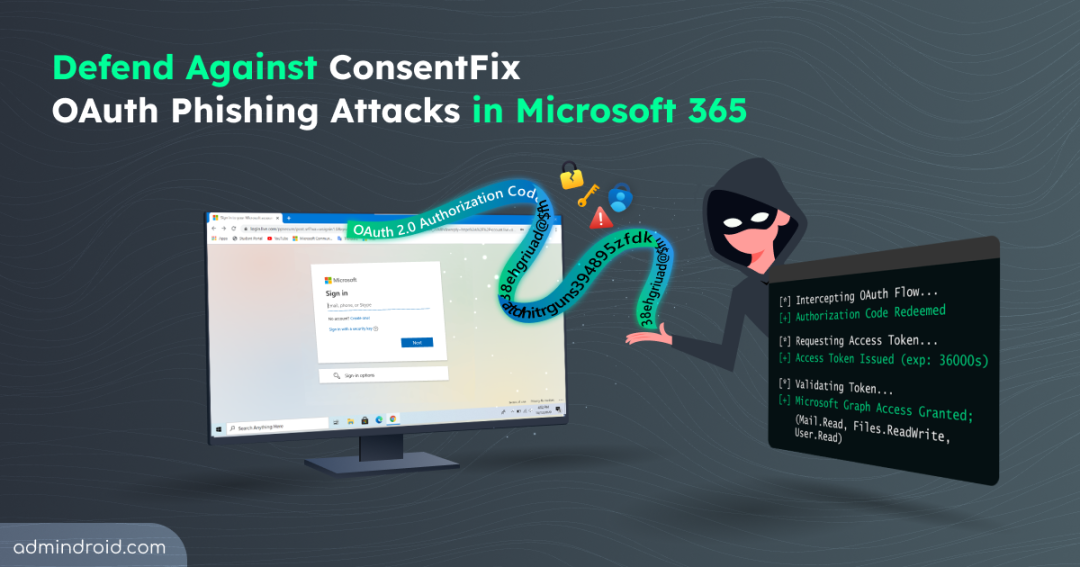
What if an attacker never steals a password, never bypasses MFA; yet still manages to slip into a cloud environment?
The tactic behind this is called the ConsentFix — a modern OAuth phishing technique that turns trusted sign-in flows against us. It challenges the way we think about authentication security in Microsoft Entra ID. Instead of the usual credential theft, attackers exploit the authentication process users rely on, making the attack harder to spot and far more dangerous.
In this blog, we’ll break down:
- What is ConsentFix OAuth phishing attack
- How ConsentFix attack works
- Mitigation strategies for ConsentFix attacks
- Built-in defense against ConsentFix attacks
- ConsentFix abuse prevention best practices
What is ConsentFix OAuth Phishing Attack?
ConsentFix also referred to as AuthCodeFix, is a new class of browser-based OAuth phishing targeting authentication flows in Microsoft Entra ID. It exploits the OAuth 2.0 authorization code flow, a legitimate protocol designed to securely authenticate native Microsoft 365 applications.
For years, security teams have long focused on defending against identity attacks in Microsoft environments, including credential theft, AiTM phishing, and malicious app consent abuse. But this new ConsentFix attack changes the game. Instead of stealing usernames and passwords, the attacker tricks the victim into completing a legitimate OAuth sign-in process and unknowingly sharing the authorization code.
“ConsentFix doesn’t break authentication, it breaks user expectations during authentication.”
The name ConsentFix highlights the trick behind the attack. It often appears as a harmless “fix” or verification step during sign-in, similar to ClickFix, nudging users to take one small action that secretly hands over access through a consent phishing method. In short, ConsentFix = ClickFix + Consent Phishing.
Early versions tricks the victims to copy and paste a URL containing authorization code. Newer variants use smoother methods, such as drag-and-drop or email communication to make the process feel natural and unsuspecting.
Why ConsentFix So Dangerous?
ConsentFix doesn’t break security controls, it hides inside them. It’s so vulnerable because:
- It abuses trusted first‑party apps in M365 like Azure CLI, Azure PowerShell, Visual Studio, Microsoft Graph PowerShell, etc, which are already in a pre‑consented state.
- This attack bypasses password and MFA protections. Even defenses such as phishing-resistant MFA cannot stop the attacker, because they target the OAuth authorization code issued after successful authentication.
- It excludes Conditional Access policies in some cases, because certain first‑party apps aren’t covered by those restrictions.
- It operates as a browser‑based attack, requiring no malware or payloads, just social engineering. As a result, traditional endpoint protection solutions often fail to detect it.
How Victims are Lured into ConsentFix Attack?
ConsentFix is entirely browser-based which means it can begin almost anywhere a user interacts with web content. Security reports indicate that attackers are experimenting with multiple delivery methods. In some observed campaigns, victims discovered malicious pages through Google search engine results, clicking on legitimate, high-reputation websites that had been quietly compromised.
Once loaded, attacker-injected content displayed what appeared to be a routine verification step to access the content of the website. Sometimes, mimicking services like Cloudflare Turnstile asks the user to confirm their email address. But this wasn’t a standard CAPTCHA, but they were redirected to a login page and tricked to hand over the authorization code.
When the page loads, the user is prompted to enter their email address to access the site content and complete the verification step. Subsequently, the page quietly checks whether the email domain belonged to a work or school account:
- If it wasn’t a target, the attack won’t proceed to the next steps.
- If it matched a targeted organization, the attack flow continued.
Other variations may involve traditional phishing emails, social media links, or shared documents that redirect users into similar browser-based OAuth flows. Instead of simply asking victims to copy and paste a URL, attackers may also trick users into clicking and dragging an element into a window, unknowingly exposing the authentication data.
Note: To reduce chances of detection by end users, the phishing content is designed to activate only once for a visitor’s IP address.
How ConsentFix Attack Works?
A ConsentFix attack unfolds in two distinct phases, the visible interaction experienced by the user, and the silent token abuse that follows. Now, let’s break down how a ConsentFix attack actually plays out in each phase.
Victim Interaction Through a Legitimate OAuth Sign-In Flow
In the first phase, the victim is guided into what appears to be a normal OAuth authentication process. For demonstration purposes, this example illustrates how the attack unfolds in a sample scenario.
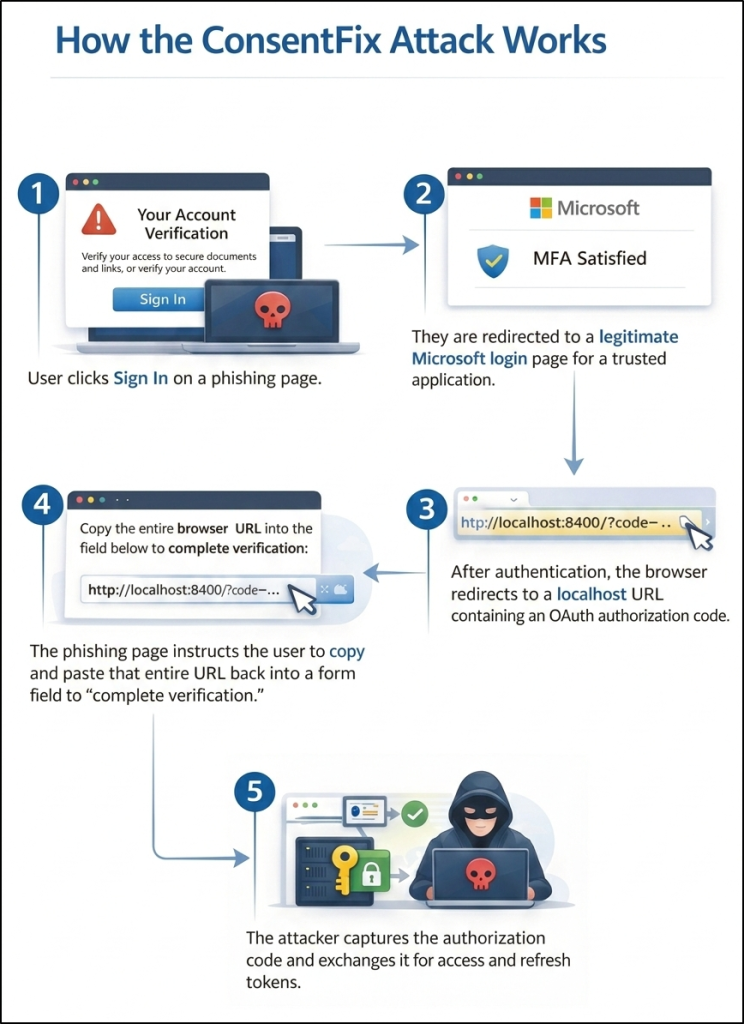
1. Compromised Website Initiates the Flow
The victim searches for legitimate website from a Google SERP and clicks a website that has been silently compromised. The page displays a fake verification prompt designed to mimic a security check and tricks the user into clicking sign-in, initiating a manipulated OAuth consent flow.
2. Legitimate Microsoft Login
Clicking the sign-in button redirects to a real Microsoft authentication page for a trusted application. The user logs in normally, including MFA if prompted. If already signed in, they were prompted to select the respective work or school account. No fake login page is involved.
3. Authorization Code Generated
After successful authentication, the browser redirects to a localhost URL containing an OAuth authorization code. This is normal behaviour for native apps like Azure CLI, which accepts localhost redirects during authentication.
4. Authorization Code Socially Engineered
The phishing page instructs the user to copy and paste the entire redirected URL back into the site to complete verification. The victim unknowingly shares the authorization code.
5. Tokens Issued to Attacker
The attacker captures the authorization code to Azure Resource Manager, Microsoft Graph, and other Microsoft services. While the victim believes they have simply completed a normal sign-in process, the attacker gains access to the victim’s resources.
Token Redemption and Silent Account Compromise (Behind the Scenes)
In the second phase, the attacker redeems the stolen authorization code on their own device and completes the OAuth handshake. Because authentication was legitimate, valid access and refresh tokens are issued. At this stage, MFA or password is not required, because authentication already occurred in the end user’s browser session.
Depending on the victim’s permissions, the attacker may attempt privilege escalation, persistence techniques. They easily gain lateral movement across the environment by targeting privileged users, service principals, or connected workloads.
Mitigation Strategies for ConsentFix Attacks
Since the ConsentFix attack leverages pre-consented first-party applications and valid OAuth authorization flows, traditional phishing protections alone are not enough. Mitigation must focus on the following solutions based on your organization’s scope, risk tolerance, and operational requirements.
Mitigation must be aligned to how the application behaves under Conditional Access, since not all first-party apps can be controlled the same way. Now, let’s explore remediation that falls into two groups: controls for apps fully covered by Conditional Access, and controls for apps that bypass or are excluded from Conditional Access.
1. Prevent AuthCodeFix Attack Using Conditional Access Policy
Since the OAuth code attack relies on valid token issuance and trusted first-party applications, Conditional Access (CA) becomes the most effective enforcement layer for controlling access. For apps that supports Conditional Access fully, CA becomes the primary defense layer.
Below are mitigation strategies, from strong targeted controls to broader protections, that you can implement in stages. Ensure you have Microsoft Entra ID P1 license to deploy these Conditional Access policies.
a) Strengthen Token Security by Enforcing Token Protection
This is the strongest technical mitigation against ConsentFix. Token Protection enforces proof-of-possession (PoP), binding the token to the originating device. If an attacker steals an authorization code through phishing, they cannot redeem it from another system because the broker-signed proof is missing. This directly mitigates authorization code redemption abuse.
Follow the below steps to enforce token protection using Conditional Access policy.
- Navigate to the Microsoft Entra admin center → Entra ID → Conditional Access → Create new policy.
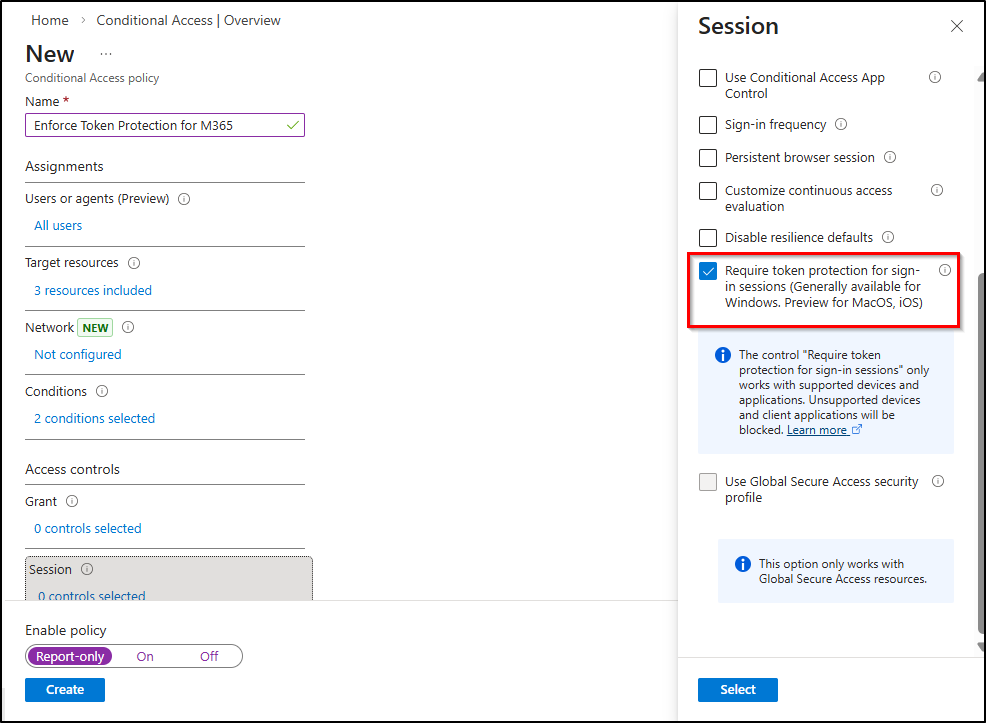
- Provide a clear and descriptive name such as Enforce Token Protection for M365.
- Under Assignments → Users, select All users for full protection or start with a pilot security group for phased rollout. Always exclude break-glass or emergency accounts to avoid accidental administrative lockout.
- Under Target resources, select the supported Microsoft 365 workloads (Exchange Online, SharePoint Online, Microsoft Teams).
- Under Conditions → Device platforms, select Windows.
- Under Conditions → Client apps, choose Mobile apps and desktop clients to allow access only from Microsoft Entra ID registered, Microsoft Entra ID joined, or Hybrid Microsoft Entra ID joined devices.
- Under Access controls → Session, enable Require Token Protection.
- Before enforcing, set the policy state to Report-only and click Create to validate behaviour. This helps assess potential impact before switching the policy to On.
Note: On Windows, token protection requires broker-supported apps and compatible devices. Unsupported clients cannot meet the requirement and will be fully blocked from accessing resources.
Warning: This control has a limited supported resource scope. Not all first-party apps are officially covered. It also requires broker-based authentication (WAM), and certain PowerShell versions may require adjustments. Additionally, this policy can affect Microsoft 365 productivity access, so proper testing is critical.
b) Restrict Certain First-party Apps for Specific Users
If token protection cannot fully cover all resources, blocking direct access to CLI tools for non-legitimate users significantly reduces attack surface. Follow the below steps to make them critical enforcement points for preventing unauthorized token usage.
- Navigate to the Microsoft Entra admin center → Entra ID → Conditional Access → Create new policy.
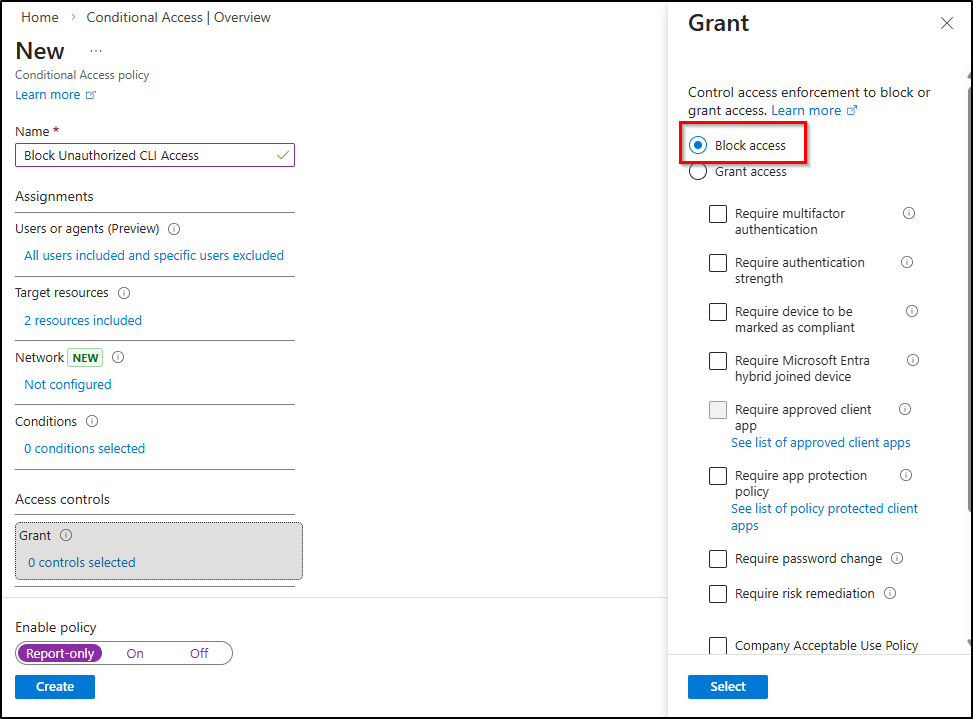
- Provide a clear and descriptive name such as Block Unauthorized CLI Access to clearly reflect its enforcement objective.
- Under Assignments → Users, select All users. Under Exclude, select a dedicated security group containing approved CLI users (and exclude break-glass accounts if applicable.
- Under Target resources → Cloud apps, select your preferred first-party apps like Microsoft Graph Command Line Tools, Windows Azure Service Management API.
- Under Access controls → Grant, select Block access.
- Before enforcing, set the policy state to Report-only, then click Create.
Monitor sign-in logs carefully to evaluate impact, validate exclusions, and identify legitimate dependencies before switching the policy state to On for full enforcement.
All legitimate users must be identified and excluded. Missing even one automation account may cause operational disruption. This approach is administrative-heavy and requires continuous lifecycle management of the exclusion group.
If you want broader protection beyond specific apps and want to restrict token usage based on network posture, implement the next solution.
2. Prevent ConsentFix Abuse Based on Service Principals
Certain Microsoft first-party apps have known Conditional Access exclusions or scope-based bypass behaviour. For these applications, CA alone is not reliable as the primary enforcement layer. Currently, there are 11 first-party apps that bypass CA policy and are exposed to ConsentFix attacks.
| Application Name | Client ID / GUID |
| Microsoft Azure CLI | 04b07795-8ddb-461a-bbee-02f9e1bf7b46 |
| Microsoft Azure PowerShell | 1950a258-227b-4e31-a9cf-717495945fc2 |
| Microsoft Teams | 1fec8e78-bce4-4aaf-ab1b-5451cc387264 |
| Microsoft Whiteboard Client | 57336123-6e14-4acc-8dcf-287b6088aa28 |
| Microsoft Flow Mobile PROD-GCCH-CN | 57fcbcfa-7cee-4eb1-8b25-12d2030b4ee0 |
| Enterprise Roaming and Backup | 60c8bde5-3167-4f92-8fdb-059f6176dc0 |
| Visual Studio | 872cd9fa-d31f-45e0-9eab-6e460a02d1f1 |
| Aadrm Admin Powershell | 90f610bf-206d-4950-b61d-37fa6fd1b224 |
| Microsoft SharePoint Online Management Shell | 9bc3ab49-b65d-410a-85ad-de819febfddc |
| Microsoft Power Query for Excel | a672d62c-fc7b-4e81-a576-e60dc46e951d |
| Visual Studio Code | aebc6443-996d-45c2-90f0-388ff96faa56 |
Enable User Assignment Control for First-party Applications
Restricting access to first-party application service principals ensures only approved users can obtain tokens and interact with sensitive APIs. This remediation strengthens governance and reduces token exposure to everyone in the organization.
Step 1: Create Service Principals for First-Party Applications
Most Microsoft first-party applications already have service principals created by default in your tenant once they are used. However, if a specific first-party application is not yet present, you can manually create its service principal by copying and replacing <app-id> from the above reference table and then run the below cmdlet.
|
1 2 3 |
Connect-MgGraph -Scopes "Application.ReadWrite.All" $AppId = "<app-id>" #Replace with the copied Application ID New-MgServicePrincipal -AppId $AppId |
This command creates the service principal for the specified first-party application in your tenant. Create service principal for all the 11 applications you plan to control.
Step 2: Enable User Assignment via Microsoft Graph PowerShell
By default, first-party application service principals do not require user assignment. This means any user in the tenant can obtain a token and access the application, as long as they satisfy authentication and Conditional Access requirements.
To restrict access so that only explicitly assigned users or groups can obtain tokens, you must enable User Assignment Required on the service principal. To do so, connect to Microsoft Graph PowerShell and replace <app-id> below with the target application ID:
|
1 2 3 4 |
Connect-MgGraph -Scopes "Application.ReadWrite.All" $AppId = "<app-id>" # Replace with the copied Application ID $sp = Get-MgServicePrincipal -Filter "appId eq '$AppId'" Update-MgServicePrincipal -ServicePrincipalId $sp.Id -AppRoleAssignmentRequired:$true |
This configuration restricts access so that only approved and explicitly assigned users or groups can sign in and obtain tokens for the first-party application.
Step 3: Assign Approved Users or Groups
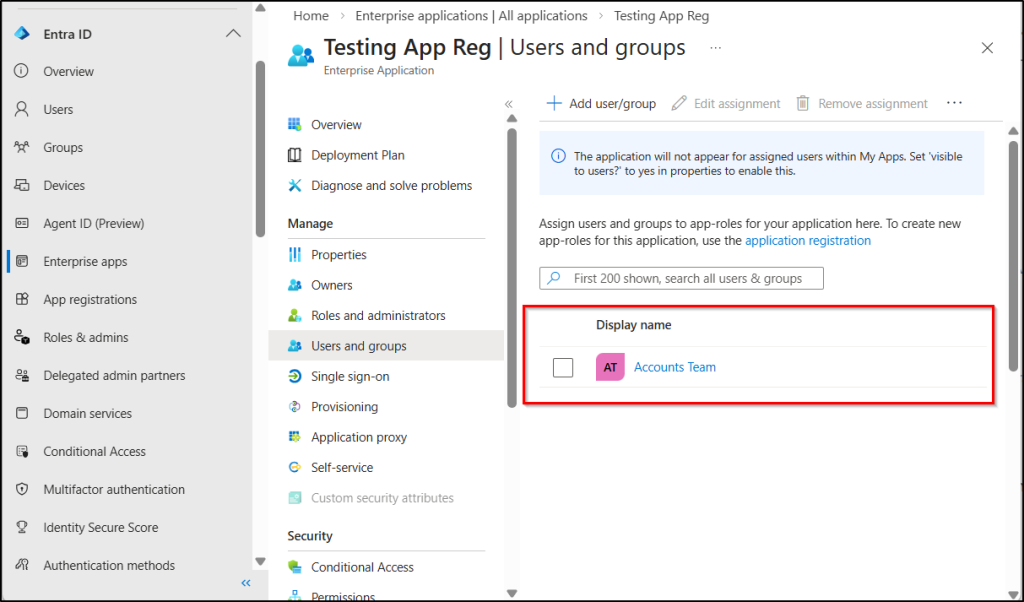
All legitimate user groups must be identified and explicitly assigned to all the 11 first-party apps before access is granted. Follow the below steps to ensure only approved identities can obtain tokens.
- In Entra ID, go to Enterprise applications, open the target application.
- Select Users and groups under the Manage section.
- Click + Add user/group and choose the required security group or individual users.
- Assign the appropriate role (if applicable).
- Click Assign to apply the changes.
Note: You can also use Entitlement Management to the group for approval-based access and just-in-time governance using PIM.
If a user reports suspicious activity resembling a ConsentFix attack, the first step is to investigate sign‑in behaviour reactively to confirm or detect the attack.
3. Remediate ConsentFix by Tracking Non-Interactive Activity Logs
If a user reports being tricked by a suspicious verification prompt, or if you want to proactively assess your tenant for potential ConsentFix activity, reviewing Azure AD sign-in logs is one of the most effective investigation steps.
Monitor Sign-In Logs for ConsentFix Indicators
To investigate a potential ConsentFix attack, administrators should analyse both interactive and non-interactive sign-in logs in Microsoft Entra.
This is critical because the attack involves two distinct authentication behaviours:
- Interactive sign-in: The victim performs a normal browser login to obtain the OAuth authorization code.
- Non-interactive sign-in: The attacker redeems the stolen authorization code and uses the resulting access token to access Microsoft resources.
As a result, attacker activity often appears in non-interactive sign-in logs, not in the original interactive login event. Administrators should review both log types to identify suspicious patterns such as:
- Sign-ins from IP addresses different from the original login.
- Non-interactive sign-ins occurring immediately after an interactive login.
- Access to services such as Microsoft Graph or Azure Resource Manager shortly after authentication.
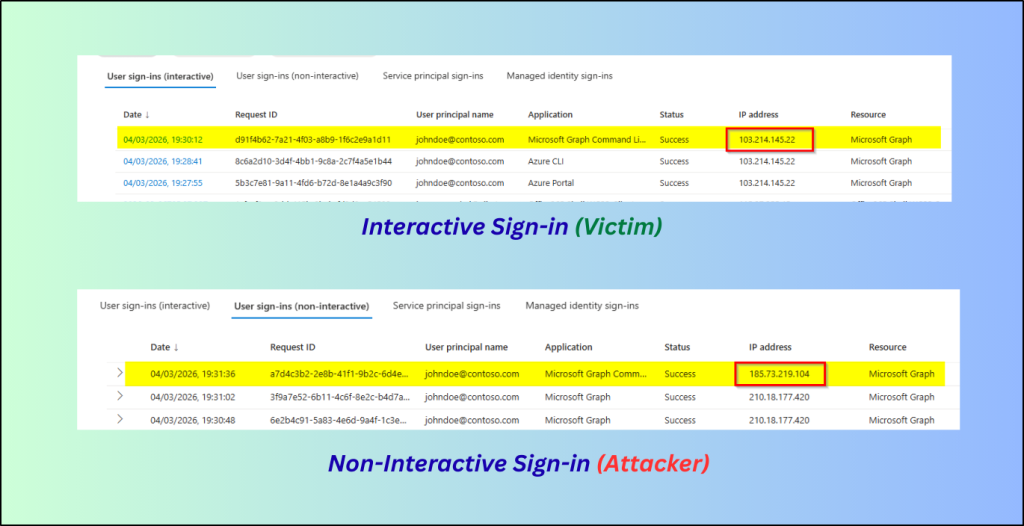
These indicators may suggest OAuth token abuse associated with a ConsentFix-style attack. To strengthen this analysis, accessing Microsoft Graph activity logs provides deeper visibility into Microsoft Graph operations and token usage. This offers richer audit data, supporting custom queries for security teams during investigation.
For example, log analysis may show a legitimate user signing in interactively from a trusted IP address, while at nearly the same time, a non-interactive sign-in occurs from a different IP address accessing Microsoft Graph or Azure Resource Manager. This behavioural mismatch is a strong indicator of token compromise.
Revoke Sign-In Sessions for Users Affected by ConsentFix
Unlike traditional phishing attacks, ConsentFix does not steal passwords or MFA methods. Instead, it abuses the OAuth authorization code to obtain valid access tokens.
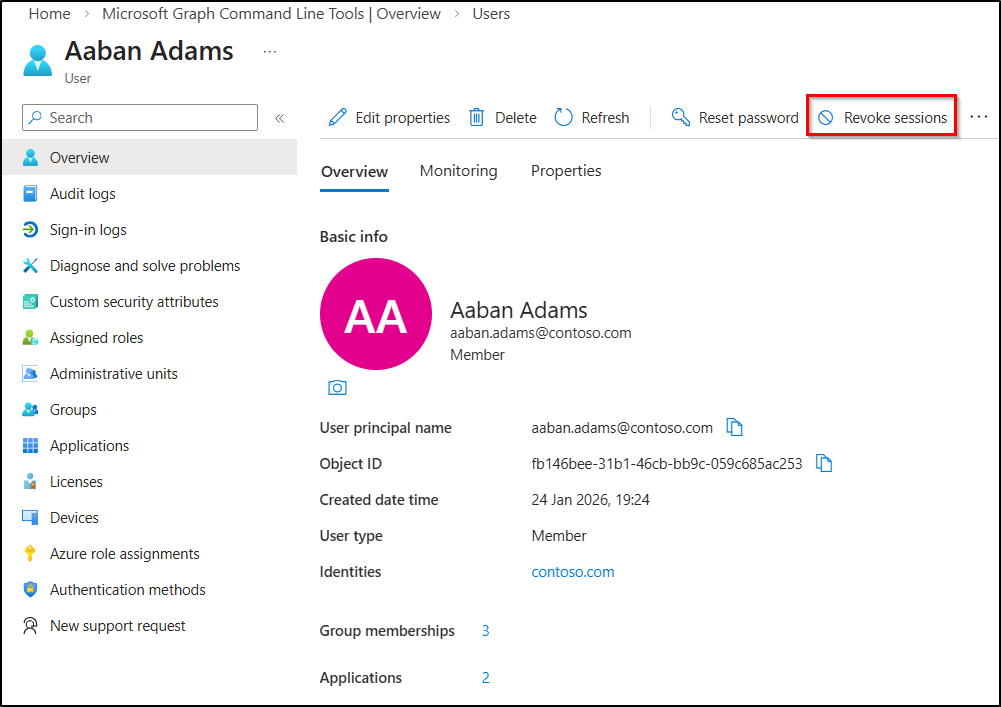
Because of this, revoking active sessions is a critical remediation step for securing compromised accounts. Invalidating the attacker’s tokens cuts off unauthorized access and helps prevent lateral movement.
To revoke active sessions:
- Go to Microsoft Entra admin center → Users → All users.
- Select the affected user account.
- Under Overview, click Revoke sessions and confirm by selecting Yes.
New Authorization Code Lifetime: Microsoft Limits Authorization Code Abuse
What if an attacker captures the OAuth authorization code, but it expires before they can use it? Recently, Microsoft has significantly reduced the OAuth authorization code lifetime from 10 minutes to just 1 minute. This change dramatically shrinks the window attackers previously relied on to capture and reuse the code.
Why does this matter? In a ConsentFix attack, the attacker must quickly capture the authorization code and redeem it for tokens. But with only 60 seconds of validity, the attacker now has very little time to complete the entire attack chain. If the code is not redeemed within that short window, it simply becomes invalid.
During testing in our lab environment, we observed exactly this behaviour. After about one minute, the authorization code expired, and the token exchange request failed. This effectively breaks the attacker’s workflow, preventing the OAuth flow from completing. This shortened lifetime does not eliminate the attack entirely, but it significantly reduces the practical exploitation window.

When combined with Conditional Access policies and user assignment governance, this shortened lifetime forces attackers to meet compliance requirements they cannot satisfy. Thereby, further hardening Microsoft 365 environments against consent abuse and unauthorized token issuance.
Note: You can also consider strengthening browser security using enterprise controls that can detect or block suspicious actions such as copying and pasting data from a localhost URL into a web form. It also seems modern browsers are also building default security defenses to protect against this type of attack.
ConsentFix OAuth Abuse Prevention Best Practices
Beyond Conditional Access enforcement and service principal restrictions, the following practices strengthen defense against ConsentFix-style OAuth abuse:
- Educate users never to copy-paste from untrusted websites, even if prompted to “fix” an error.
- If a login process results in an unexpected error page, instruct users to immediately close the browser and report the incident to IT or security teams.
- Users should not consent to unfamiliar apps or browser prompts. Once a legitimate OAuth flow is abused, there may be no immediate visual indicator to detect or block the attack in progress.
- Watch for token redemption from unfamiliar IP addresses, unexpected geolocations, or anomalous device patterns. Since the attacker redeems the authorization code on their own device, IP and device context become critical detection signals.
- Enable compliant network checks through Global Secure Access to add another enforcement layer. It not only helps block token replay scenarios but also generates enriched logs that are highly valuable for detection and threat hunting.
Closing Thoughts
That’s the wrap! ConsentFix reminds us that modern identity attacks no longer focus only on stealing credentials; they exploit trust in OAuth consent flows and token handling. By enforcing service principal controls, applying CA policies, monitoring sign-ins, organizations can greatly reduce the risk of consent abuse and token misuse.
We hope this helps you better understand and defend against ConsentFix-style attacks. Stay tuned for more upcoming blogs!