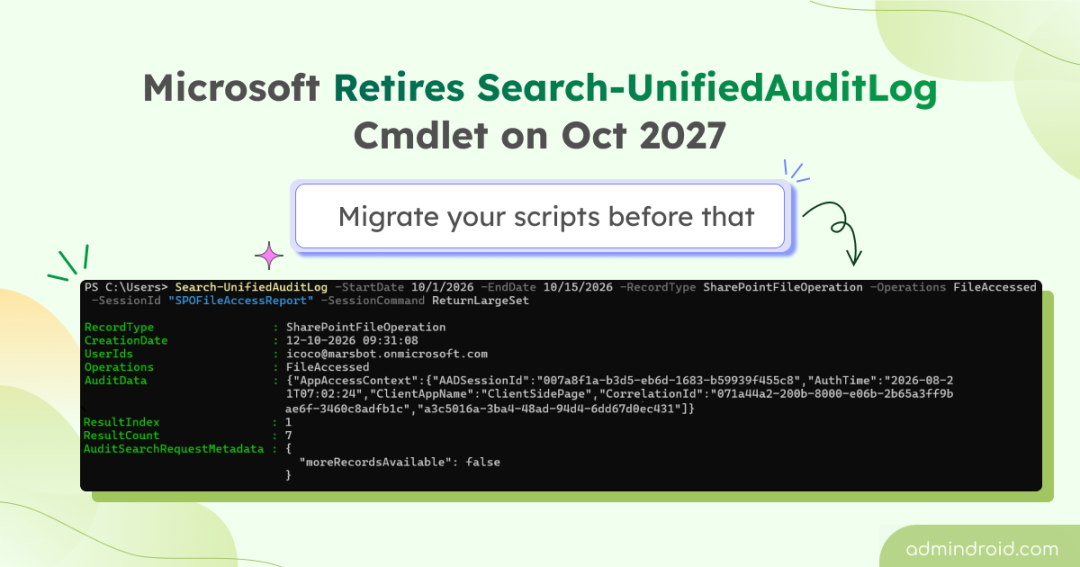
Search-UnifiedAuditLog plays an important role in Microsoft 365 auditing. Administrators use it to investigate suspicious activities, generate audit reports, and trigger alerts on critical changes.
However, this cmdlet is being retired, which could affect any scripts or workflows that depend on it. Microsoft has announced that Search-UnifiedAuditLog will retire on October 15, 2027, in Message Center notification MC1505599. Although Microsoft has assigned the notification a Medium relevance rating, the potential impact shouldn’t be underestimated. A cmdlet may be just one component in a larger workflow, but retiring it without updating dependent scripts and applications could disrupt the entire process.
If you use Search-UnifiedAuditLog, now is the time to identify those dependencies and plan your migration. Let’s look at what is changing and how to start updating your PowerShell scripts.
Why the Search-UnifiedAuditLog Retirement Deserves Attention
The unified audit log contains activities from Microsoft 365 workloads, including Exchange Online, SharePoint, OneDrive, Microsoft Teams, and Microsoft Entra ID. If your organization uses Search-UnifiedAuditLog to retrieve these records, the retirement could affect several workflows.
For example:
- Scheduled reports: A PowerShell job retrieves administrator activities and emails a weekly report.
- Security alerts: A script searches for suspicious changes and triggers an alert when it finds a matching event.
- Compliance investigations: An application retrieves audit records to support an investigation or review.
- Custom automation: A runbook or third-party tool retrieves audit records and passes them to another system for analysis.
These workflows may continue running until October 2027, but they will fail after the cmdlet retires unless they are migrated to an alternative.
Will it affect audit log search available in the Purview? This retirement affects the Search-UnifiedAuditLog cmdlet, not audit log searches performed through the Microsoft Purview portal.
What Replaces Search-UnifiedAuditLog?
Search-UnifiedAuditLog has scalability limitations that can affect performance and reliability when searching large volumes of audit data. It also limits retrieval to a maximum of 50,000 records per search, requiring additional queries when you need more data.
Microsoft recommends migrating to the Microsoft Graph AuditLogQuery API, which offers improved scalability, reliability, and more granular workload-level permissions. The API is generally available starting October 2026 and can be used directly or through the Microsoft Graph PowerShell SDK.
The main difference between Search-UnifiedAuditLog and the AuditLogQuery API is how you initiate a search and retrieve its results.
| Area | Search-UnifiedAuditLog | AuditLogQuery API |
| Query execution | Runs a synchronous query | Creates an asynchronous audit query |
| Query submission | Executes a command with search parameters | Creates an audit query resource |
| Result retrieval | Retrieves records through the cmdlet | Checks query status, then retrieves records |
| Large result sets | Uses session parameters for paging | Uses the query’s records endpoint and API paging |
| Authentication | Exchange Online PowerShell | Microsoft Graph authentication and permissions |
| Record limit and completeness | 50,000 records per search with ReturnLargeSet. Results may be incomplete without -HighCompleteness. | 1 million records per query. A query can succeed after hitting the limit, so check isRecordCountLimitExceeded. |
Hence, the migration involves more than replacing a cmdlet name. You need to update how your script authenticates, submits queries, waits for processing, retrieves pages, and handles incomplete results.
Map Search-UnifiedAuditLog Parameters to AuditLogQuery Filters
Before rewriting a script, identify the parameters your existing Search-UnifiedAuditLog command uses and map them to the corresponding filters supported by the AuditLogQuery API.
| Search-UnifiedAuditLog | AuditLogQuery | Migration Consideration |
| -StartDate, -EndDate | filterStartDateTime, filterEndDateTime | Provide explicit start and end timestamps. Use UTC consistently to avoid timezone errors. |
| -RecordType | recordTypeFilters | The API accepts a collection of supported record types. |
| -Operations | operationFilters | Map activity names to the API’s operation filter. |
| -UserIds | userPrincipalNameFilters | User specific filter |
| -IPAddresses | ipAddressFilters | Map the IP address criteria. |
| -ObjectIds | objectIdFilters | Confirm the expected object identifier or path for the workload being searched. |
| -FreeText | keywordFilter | The API keyword filter searches non-indexed audit data. Do not assume it behaves identically to the cmdlet’s free-text search. |
| -HighCompleteness | No equivalent switch required | API has no fast-versus-complete mode to choose. Check isRecordCountLimitExceeded to verify result completeness. |
| -ResultSize, -SessionId, -SessionCommand | Query resource and records endpoint | Replace session-based retrieval with query creation, status monitoring, and API paging. |
| AuditData output property | auditData property | API returns auditData as a structured object rather than JSON string. |
The Microsoft Graph AuditLogQuery API also supports filters such as AdministrativeUnitIdFilters, which has no direct equivalent in Search-UnifiedAuditLog. You can check the supported parameters in New-MgSecurityAuditLogQuery to identify additional filtering options.
How to Migrate a Search-UnifiedAuditLog PowerShell Script
Let’s use a weekly report that retrieves SharePoint file access activity as an example.
|
1 2 3 4 5 6 7 8 9 10 11 |
$EndDate = (Get-Date).ToUniversalTime() $StartDate = $EndDate.AddDays(-7) $SearchParams = @{ StartDate = $StartDate EndDate = $EndDate RecordType = 'SharePointFileOperation' Operations = 'FileAccessed' SessionId = 'FileAccessReport' SessionCommand = 'ReturnLargeSet' } Search-UnifiedAuditLog @SearchParams |
This command searches for SharePoint file access events within the specified date range. The SessionId and ReturnLargeSet parameters support session-based retrieval of results in batches, up to the cmdlet’s 50,000-record limit.
With the Microsoft Graph AuditLogQuery API, the workflow changes. Instead of running a search and retrieving subsequent batches through the same cmdlet, it involves four stages:
- Connect to Microsoft Graph.
- Submit the audit query.
- Monitor query status and check whether the results may be incomplete.
- Retrieve and export the audit records.
Step 1: Connect to Microsoft Graph
Install the Microsoft Graph Security PowerShell module if it isn’t already installed, then connect to Microsoft Graph using the required permission.
|
1 2 |
Install-Module Microsoft.Graph.Security -Scope CurrentUser ` Connect-MgGraph -Scopes ‘AuditLogsQuery-SharePoint.Read.All’ |
Use the least-privileged permission that supports the workloads you need to query. Microsoft provides workload-specific permissions, such as AuditLogsQuery-SharePoint.Read.All and AuditLogsQuery-Exchange.Read.All, as well as the broader AuditLogsQuery.Read.All permission.
Step 2: Submit the audit query
The following example creates a query for the last 7 days of SharePoint file access activity:
|
1 2 3 4 5 6 7 8 9 10 |
$EndDate = (Get-Date).ToUniversalTime() $StartDate = $EndDate.AddDays(-7) $QueryParams = @{ DisplayName = 'Weekly FileAccessed report' FilterStartDateTime = $StartDate FilterEndDateTime = $EndDate RecordTypeFilters = 'sharePointFileOperation' OperationFilters = 'FileAccessed' } $AuditQuery = New-MgSecurityAuditLogQuery @QueryParams |
The New-MgSecurityAuditLogQuery cmdlet submits the query and returns an audit query resource containing its ID. Because processing is asynchronous, the results may not be available immediately.
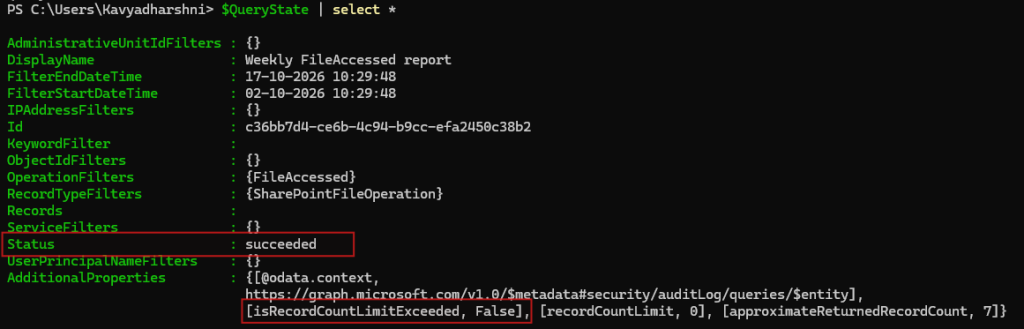
Run $AuditQuery to view the returned details, including the query ID.
Step 3: Check audit log query status
Unlike the Search-UnifiedAuditLog cmdlet, the AuditLogQuery API processes queries asynchronously, so you must check the query status before retrieving records. Processing may take several minutes, even for small and midsize organizations.
The following example checks the query status every 60 seconds for up to 60 minutes, waiting for it to complete.
|
1 2 3 4 5 6 7 8 9 10 |
$Deadline = (Get-Date).AddMinutes(60) do { Start-Sleep -Seconds 60 $QueryState = Get-MgSecurityAuditLogQuery -AuditLogQueryId $AuditQuery.Id Write-Host "Query status: $($QueryState.Status)" } while ( ($QueryState.Status -in @('notStarted', 'running')) -and ((Get-Date) -lt $Deadline)) if ($QueryState.Status -ne 'succeeded') { throw "Audit query did not complete. Final status: $($QueryState.Status)"} |
This checks whether the query completed successfully, but a successful status does not guarantee that every matching record was returned.
If a query exceeds its record-count limit, Microsoft Graph can stop generating additional records while still returning a succeeded status. Check the isRecordCountLimitExceeded property to determine data loss. If it is true, split the date range into smaller windows and rerun the queries to retrieve the data in manageable batches.
|
1 2 3 4 |
if ($QueryState.AdditionalProperties['isRecordCountLimitExceeded']) { Write-Host "The query reached its record-count limit. Split the date range into smaller windows and rerun." -ForegroundColor Yellow } |
Step 4: Retrieve and export the audit records
After the query completes successfully, retrieve its records using Get-MgSecurityAuditLogQueryRecord.
|
1 2 3 4 5 6 7 8 |
Get-MgSecurityAuditLogQueryRecord -AuditLogQueryId $AuditQuery.Id -All | Select-Object -Property @( @{Name = 'Activity Time'; Expression = { $_.CreatedDateTime }} @{Name = 'User'; Expression = { $_.UserPrincipalName }} @{Name = 'Operation'; Expression = { $_.Operation }} @{Name = 'Accessed File'; Expression = { $_.ObjectId }} @{Name = 'Client IP'; Expression = { $_.ClientIp }} ) | Export-Csv -Path '.\FileAccessedAudit.csv' -NoTypeInformation |
The -All parameter requests all available result pages through the Graph PowerShell SDK. Without appropriate paging, a script may export only part of the available result set.
To run the audit script as a scheduled job, configure app-only authentication by registering an app in Microsoft Entra ID and granting it the required application permissions and admin consent. Then, use Windows Task Scheduler or Azure Automation to run the script on your preferred schedule.
Other considerations before migrating to AuditLogQuery API
- Query limits and throttling: The API enforces tenant-level limits on query submissions, concurrent queries, and records per query.
- 200 query submissions per rolling 24 hours
- 50 queued or running queries at once
- API availability: The API isn’t available in US Government or China clouds operated by 21Vianet.
- Audit log retention: Audit log retention depends on your licensing and policies. Audit Standard generally retains records for 180 days, the same as Search-UnifiedAuditLog.
Where should your Search-UnifiedAuditLog migration start?
Migrating from Search-UnifiedAuditLog involves more than replacing a cmdlet. You need to identify every dependent workflow, map its search criteria, and validate that the AuditLogQuery API returns the records your reports and alerts rely on. Start migrating your critical workflows well before the deadline to avoid disruptions to Microsoft 365 auditing. If you have any queries related to Search-UnifiedAuditLog retirement, reach us through the comment section.