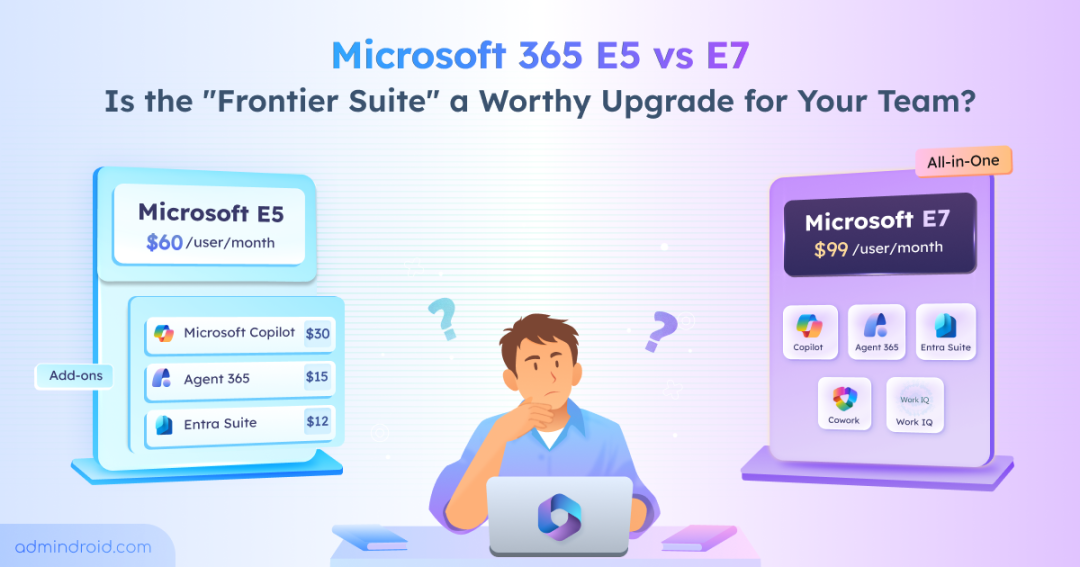
For over a decade, Microsoft 365 E5 was the definitive choice for any organization prioritizing security and compliance. In 2026, Microsoft unveiled its first new enterprise tier in over years: Microsoft 365 E7 Frontier Suite. The industry’s buzz is loud, and the pitch is compelling: Microsoft 365 E7 promises to turn organizations into a “human-led, agent-operated” enterprise. But for IT admins and procurement leads, the excitement is often met with a spreadsheet full of questions. It isn’t just about what’s included in the E7! It’s about what has fundamentally changed between Microsoft 365 E5 vs E7 and whether that change actually matters for your organization.
This Microsoft 365 E5 and E7 comparison will help you figure out whether the upgrade makes sense for your organization or whether you’re paying for capabilities you don’t need yet.
Microsoft 365 E5 vs E7 Subscription at a Glance
Before diving deep, let’s first understand the E5 and E7 subscriptions.
- Microsoft 365 E5 is the “Security & Compliance” powerhouse. It was built for an era where the primary goal was protecting human users and their data.
- Microsoft 365 E7 (The Frontier Suite) is the “Agentic” powerhouse. It will be launched in May 2026. It is Microsoft’s first license designed specifically for a human-led, agent-operated workforce.
Here’s the overall side-by-side comparison of Microsoft 365 E5 vs E7:
| Feature | Microsoft 365 E5 | Microsoft 365 E7 |
| Microsoft 365 Copilot | Not included ($30 add-on) | Included |
| Agent 365 | Not available | Included (governance only) |
| Work IQ | Not available | E7-exclusive |
| Copilot Cowork | Not available | E7-exclusive (Research Preview) |
| Entra Suite | Entra ID P2 only | Full Microsoft Entra Suite |
| Defender Suite | Included | Included (same) |
| Purview Suite | Included | Included (same) |
| Security Copilot | Included | Included (same) |
| Intune | Included (enhanced) | Included (same) |
| Feature Maturity | All GA, production-tested | Some features in preview at launch |
| Consumption Costs | None (flat per-seat) | Yes, for agent execution and Azure networking |
| Teams | Included (or without) | Included (or without) |
The security stack is identical. However, E7 adds the Copilot, agent governance via Agent 365, and the full Entra Suite for identity and network access.
What Does Microsoft 365 E7 Add Over E5?
Microsoft 365 E7 does not replace E5 subscription. Every security, compliance, and productivity feature in E5 carries over unchanged. It wraps E5 with three paid add-ons and two new Frontier-exclusive capabilities into one subscription.
Here, the focus is on what each capability means for an E5 admin weighing the upgrade.
1. Microsoft 365 Copilot: From Add-On to Included
Microsoft’s recent update: Copilot Wave 3 turns Microsoft 365 Copilot from a summarization tool into something more capable. You can create artifacts, build agents inside the apps you already use, and tap into multiple AI models. Microsoft calls the architecture “model diverse by design,” combining both OpenAI and Anthropic models.
If you want it in Word, Excel, PowerPoint, Outlook, & Teams, buy as add-on for $30 per user per month.
2. Agent 365: Governance, Not a Runtime
The Agent 365 control plane that registers, monitors and enforces policies on AI agents.
Every AI agent gets its own Microsoft Entra Agent ID. Means, they fall under the same identity controls as your human users — Conditional Access, lifecycle management, etc. For organizations already managing CA policies in Entra ID P2, this extends existing governance to non-human identities. Purview handles the compliance side (audit trails, data protection), and Defender watches for threats.
Agent 365 is also available as a standalone product at $15 per user per month.
3. Full Entra Suite vs Microsoft Entra ID P2
E5 already includes Microsoft Entra ID P2, which covers Conditional Access, Privileged Identity Management (PIM), and Identity Protection. That’s a solid identity foundation. In addition to this, E7 upgrades to the full Entra Suite, which adds five new capabilities:
| Capability | What It Does | Why It Matters |
| Entra Private Access | Replaces your legacy VPN with ZTNA | Your on-prem apps become accessible through Conditional Access with real-time risk signals. No code changes are needed. |
| Entra Internet Access | Filters web traffic through Microsoft’s network | You get cloud-delivered content filtering that ties into Conditional Access for real-time enforcement. |
| Entra ID Governance | Automates the joiner/mover/leaver lifecycle | Access reviews, entitlement management, and provisioning workflows replace manual identity housekeeping. |
| Entra Verified ID | Issues digital credentials you control | Employees, partners, and customers get verifiable credentials without relying on centralized identity providers. |
| Enhanced ID Protection | Tightens risk detection beyond Entra ID P2 | ML-based signals feed into Conditional Access more aggressively, especially useful in hybrid environments. |
If your organization is planning to replace VPNs with ZTNA or needs lifecycle automation for identity management, the Entra Suite is genuinely valuable.
The Microsoft Entra Suite is also available as a standalone add-on at $12 per user per month for customers with Entra ID P1 or higher.
Microsoft E5 Subscription is Getting Stronger in July 2026
Before assuming E7 is a major leap forward, it’s important to note that the E5 isn’t standing still. Starting in 2026, E5 is gaining significant new capabilities as part of M365 license price increase in July ($60 per user per month):
- Security Copilot is being added to all E5 subscriptions at no extra cost. Each tenant gets 400 Security Compute Units (SCUs) per 1,000 licenses per month. Rollout runs from April 20 to June 30, 2026, with automatic provisioning and no Azure setup.
- Intune Endpoint Privilege Management: M365 admins get just-in-time elevation on endpoints instead of standing admin rights.
- Enterprise Application Management: Admins can control which enterprise apps are installed, updated, and retired across the Microsoft 365 tenant.
- Microsoft Cloud PKI (Public Key Infrastructure): Certificate-based authentication without maintaining your own PKI infrastructure.
This means E5 at $60 in July 2026 is a stronger plan than E5 at $57 today.
What Microsoft E7 Doesn’t Include?
At the same time, Microsoft E7 subscription does not cover:
- Agent execution costs: Building and running agents through Copilot Studio or Microsoft Foundry carries consumption-based pricing. Microsoft has not published expected costs per agent or total cost of ownership guidance.
- Security Copilot overages: E5 and E7 both include 400 SCUs per 1,000 licenses. Overages are billed at $6 per SCU. Heavy security automation workloads can consume SCUs quickly.
- Azure networking: Entra Private Access and Internet Access route traffic through Microsoft’s network infrastructure, which may carry additional Azure networking costs depending on your topology.
E7 introduces a hybrid cost model which can impact your budget if not planned properly.
The Real Cost of Microsoft 365 E5 vs E7: When E7 is Cheaper?
Microsoft markets E7 as a 15% cost-saving bundle. But depending on your current license setup, it can just as easily increase your spending. Here’s what Microsoft 365 E5 vs E7 cost separately & bundled:
| Component | Standalone Price |
| Microsoft 365 E5 | $60/user/month (from July 2026) |
| Microsoft 365 Copilot | $30/user/month |
| Entra Suite | $12/user/month |
| Agent 365 | $15/user/month |
| Total | $117/user/month |
| E7 (bundled) | $99/user/month |
| Savings | $18/user/month (15%) |
This 15% savings only applies if you need all four components. Here are the three real-time scenarios to better decide which subscriptions suits for organizations with different needs:
Scenario 1: E5 + Copilot Only
Most organizations evaluating E7 start here. They want a Microsoft 365 Copilot on E5.
- E5 ($60) + Copilot ($30) = $90/user/month
- E7 = $99/user/month
- E7 costs $9/user/month more.
Scenario 2: E5 + Copilot + Entra Suite
Organizations replacing legacy VPN infrastructure or deploying ID Governance need the full Entra Suite alongside Copilot.
- E5 ($60) + Copilot ($30) + Entra Suite ($12) = $102/user/month
- E7 = $99/user/month
- E7 saves $3/user/month.
Scenario 3: All Four Components
Only organizations that need Copilot, Agent 365, and the Entra Suite together hit the full bundle discount.
- E5 ($60) + Copilot ($30) + Entra Suite ($12) + Agent 365 ($15) = $117/user/month
- E7 = $99/user/month
- E7 saves $18/user/month (15%).
As a result, the savings only become meaningful in Scenario 3. For Scenario 2, the $3 monthly savings per user is negligible. For Scenario 1, E7 is the most expensive option.
Mixed-Licensing in Microsoft 365: Not Everyone Needs E7
Organizations often end up overspending by upgrading every user to Microsoft 365 E7. In reality, not every user needs AI capabilities. The most effective approach is to assign licenses based on roles and actual usage.
| Role | Recommended License | Why this Tier? | Monthly Cost (Per User) |
| Legal, Marketing, & Analysts | Microsoft 365 E7 | Heavy Copilot daily usage + requirement for Agent 365 to govern custom automation bots. | $99 (Saves $18 vs. add-ons) |
| Power Users (Execs/HR) | E5 + Copilot | Need the AI assistance of Copilot but don’t require the advanced Entra Suite or Agent governance. | $90 (Saves $9 vs. E7) |
| IT & Security Operations | E5 + Agent 365 ($15) | Already have a Security Copilot in E5. Add Agent 365 ($15) standalone only for those managing the AI registry. | $75 (Lean & targeted) |
| General Office & Admin | Microsoft 365 E5 | Standard collaboration. Keep costs predictable at the baseline for those with low AI interaction. | $60 (Baseline) |
| Frontline & Field Workers | E5 or E3 | Minimal AI or Agent interaction. | $60 / $39 |
That’s the difference between a strategic investment and an expensive checkbox.
Pro Tip: Before committing to a E7 renewal, run a “Copilot Usage Report” in your admin center. If a user hasn’t interacted with AI in 30 days, they are a prime candidate for a downgrade to E5, instantly saving your department $39 per month.
When to Choose Microsoft 365 E7 vs Stay on E5
Upgrading from M365 E5 to E7 isn’t just a licensing upgrade—it’s a shift in operating model. The real question isn’t what E7 offers, but whether your current usage and roadmap justify the shift from E5 to an AI-first model.
| Decision Factor | When M365 E7 Makes Sense | When to Stay on M365 E5 |
| Copilot Usage | Users rely on Copilot daily for writing, analysis, meetings, or reporting. | Usage is minimal, experimental, or limited to a few users. |
| AI Strategy | Defined roadmap to deploy and govern AI agents within 6–12 months. | No clear plan for AI agents or still in exploration phase. |
| Workforce | Majority are knowledge workers who benefit from AI-driven productivity. | Large portion of frontline or task-based users with limited AI use. |
| Identity Access Needs | Moving toward Zero Trust (VPN replacement, identity governance, secure access) | Current Entra ID P2 setup is sufficient with no immediate changes planned. |
| Cost model | Comfortable managing a mix of fixed licensing and variable AI/consumption costs. | Prefer predictable, fixed per-user costs with no usage-based billing. |
Microsoft 365 E7 Readiness Checklist
If you are planning to switch to Microsoft E7, note that E7’s AI capabilities surface more data and automate more decisions than E5. So, it amplifies both the benefits and the risks. Before switching licenses, address these prerequisites:
- Audit SharePoint and OneDrive permissions: Copilot respects existing SPO permissions. If users have broad access, Copilot will surface sensitive documents in AI responses. This isn’t a Copilot bug. It’s a permissions problem that Copilot makes visible.
- Configure sensitivity labels: Both Copilot and Agent 365 depend on sensitivity labels for data governance. Without labels applied to documents and emails, these tools operate without guardrails.
- Deploy DLP policies across Exchange, SharePoint, and Teams: Data Loss Prevention policies prevent Copilot from surfacing restricted content in responses. Without them, AI capabilities that generate, summarize, and share content have nothing to stop sensitive data from leaking.
- Prepare Azure infrastructure for Entra networking: Entra Private Access and Internet Access route traffic through Microsoft’s global network. Review your network topology and deploy client agents before activating these features. If replacing a VPN with Private Access, run both in parallel until all applications are verified through Private Access. Do not decommission your VPN before confirming full coverage.
- Measure current Copilot usage: If you’re already using the Copilot add-on with E5, get usage data before upgrading. Baseline adoption rates reveal which users should get E7.
- Coordinate the license transition with your CSP partner: Switching from E5 + Copilot add-on to E7 is a license replacement, not a simple upgrade. Confirm the process to avoid service disruption.
Frequently Asked Questions
- What happens to my existing Copilot add-on when switching to E7?
E7 replaces your E5 + Copilot add-on combination with a single license. Coordinate the transition with your CSP partner to avoid service gaps during the switch. - Will all E7 features are production-ready at May 1,2026?
Partially no. Note that not every E7 feature will be production-ready on May 1, 2026. Organizations budgeting for full Agent 365 security or Copilot Cowork on day one need to adjust expectations. - What purchase channels support E7?
CSP channels are confirmed from May 1, 2026, with monthly, annual, and triennial term options. If you’re on an Enterprise Agreement, expect E7 there too, though Microsoft hasn’t officially confirmed EA availability as of March 2026.
This Is Not a License Upgrade — It’s a Mindset Shift
Microsoft 365 E7 is a strong bundle—but only to organizations ready for complete AI adoption, active agent governance needs, and full Entra Suite. If that’s you, E7 saves money and simplifies licensing. If it’s not, E5 at $60 with Security Copilot, new Intune features, and the option to add components à la carte remains the smarter play.
Start with a Copilot usage audit and an honest assessment of your AI agent roadmap. The license decision follows from there.