Back in July 2023, we wrote about early signs that Microsoft was quietly phasing out SMS & voice MFA. At the time, there was no confirmed retirement date, just a nudge toward Authenticator and a “voice OTP” upgrade. Three years later, Microsoft has stopped hinting and made it official.
The push behind it isn’t just tidying up old auth methods. As organizations lean harder into AI, phishable credentials become a bigger liability, and Microsoft wants phishing-resistant security to be the default, not something admins have to opt into. That’s why passkeys are taking over as the standard sign-in experience in Entra ID.
Let’s take a quick look at Microsoft’s shift to passkey-first authentication.
Security Risks of Phone-Based Authentication in Microsoft Entra
Phone-based authentication uses SMS text messages or voice calls to verify a user’s identity. For years, many organizations have relied on these methods for multi-factor authentication. It’s familiar and easy to set up, but it comes with real security gaps.
SMS and voice codes travel over the phone network, which makes them an easy target for:
- Interception – A code sent by text can be intercepted in transit.
- Social engineering – A voice call can be talked out of a user by an attacker posing as IT or support.
- SIM swapping – An attacker can hijack a user’s phone number and hand themselves the entire MFA flow, without ever touching the user’s actual device.
None of that requires much skill from an attacker, which is exactly why these methods keep showing up in real-world breaches. Therefore, organizations should begin removing phone-based authentication wherever possible and transition to stronger authentication methods like passkeys.
The Shift to Default Passkey Authentication in Microsoft Entra
Passkeys close that gap. Instead of a code that travels over a network, a passkey is a cryptographic key pair that simply can’t be reused, guessed, or handed over on a fake login page. Microsoft gives users two ways to set one up:
- Synced passkeys – Saved to a platform credential manager like iCloud Keychain or Google Password Manager and carried across all of a user’s devices. The better fit for people who already live in one of those ecosystems.
- Device-bound passkeys – Created and stored on a single device, such as Passkey in Microsoft Authenticator, Entra Passkey on Windows (via Windows Hello), or a FIDO2 hardware security key. The better fit for higher-security scenarios where you don’t want credential syncing anywhere.
SMS and Voice Retirement Timeline
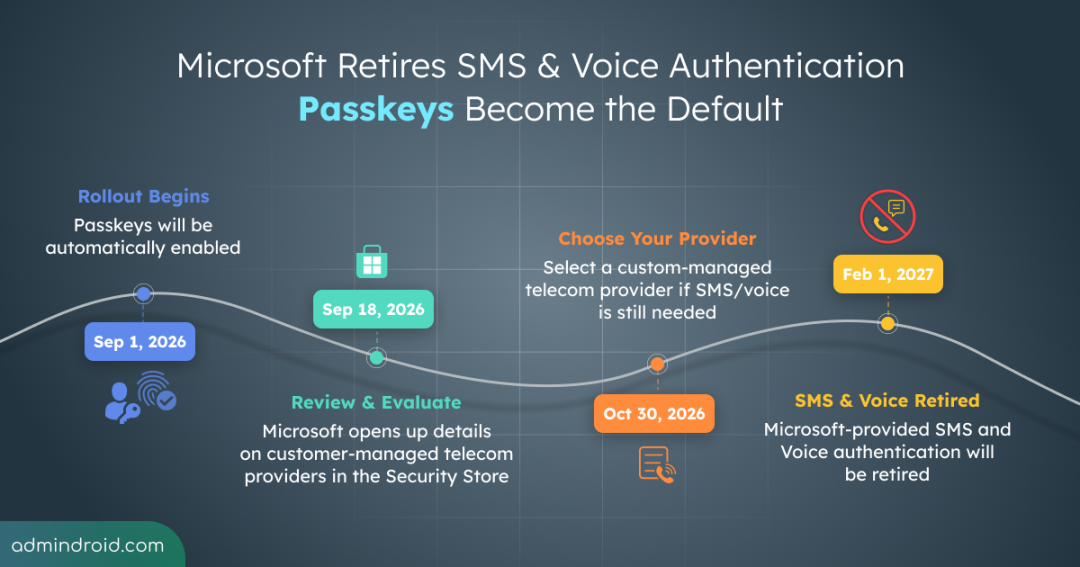
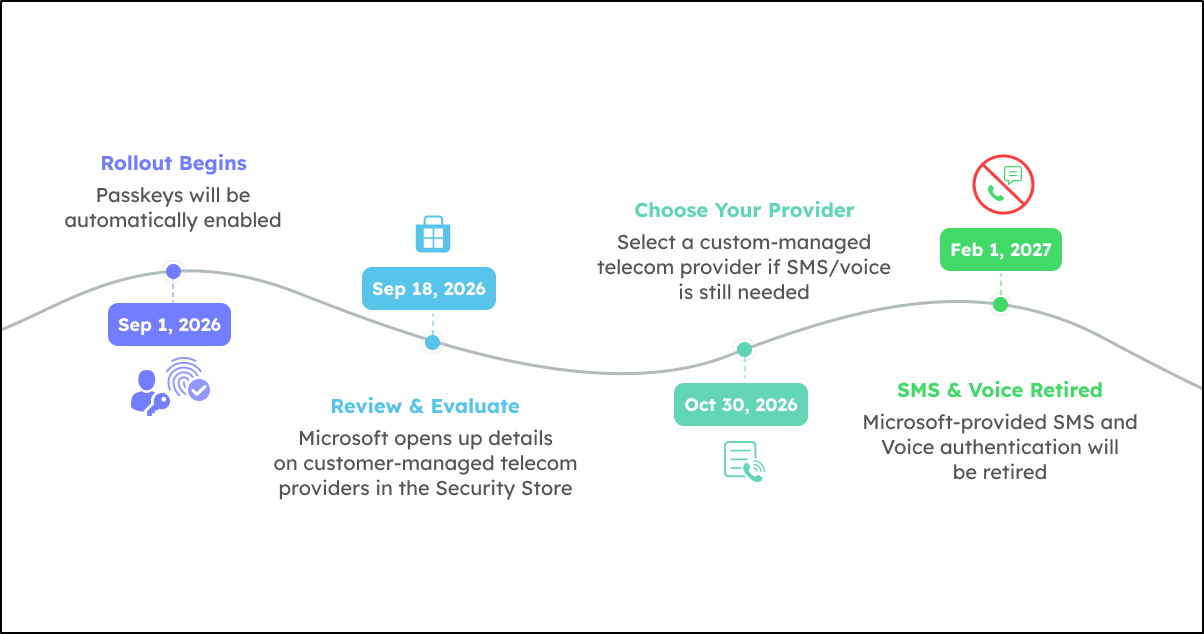
Here’s how the rollout breaks down, from passkeys going default to SMS and voice fully retiring.
- September 1, 2026 – Passkeys become the default authentication experience. Any user currently enabled for Microsoft-provided SMS or voice gets auto-enrolled for passkeys, and Registration Campaign switches to Microsoft-managed, nudging those users to register a passkey at their next MFA sign-in. Users can skip the prompt (with unlimited snoozes) unless admins turn that off.
- September 18, 2026 – Microsoft opens up details on customer-managed telecom providers in the Microsoft Security Store. These are third-party carriers that admins can contract to keep delivering SMS and voice codes, since Microsoft itself is stepping out of that role.
Microsoft is offering this route for organizations with a genuine business, regulatory, or operational need to keep using SMS or voice, while still pushing passkeys as the default for everyone else.
- October 30, 2026 – Customers can start selecting and configuring a customer-managed telecom provider through the Security Store.
- February 1, 2027 – Microsoft-provided SMS and voice delivery is fully retired. From this point, if a user’s only MFA method is SMS or voice and admins haven’t configured a customer-managed provider, they’ll hit a blocking prompt to register a passkey before they can sign in. There’s no opting out of this one.
How to Prepare for Passkeys and the SMS/Voice Retirement
Here’s how you can prepare for the transition:
Find Microsoft 365 Users Enabled for SMS or Voice
Before planning the transition, identify the users who are still relying on phone-based authentication. Microsoft provides a ready-to-use PowerShell script to identify users still using SMS or voice authentication.
Download the PowerShell script from GitHub: GetEntraSMSVoicePolicyUsers
The script checks users configured through both the Authentication Methods policy and legacy MFA settings.
Note: To run the script, you’ll need one of the following Microsoft Entra roles: Global Reader, Authentication Policy Administrator, or Security Reader.
However, being enabled for SMS or voice authentication does not necessarily mean that a user has registered these methods. To identify users who have actually registered phone-based authentication, you can use the Authentication Methods Activity report in the Microsoft Entra admin center.
- Go to Microsoft Entra admin center → Authentication methods → Activity.
- Select the Registration tab.
- Under Users registered by authentication method, select the relevant phone authentication method to view the users registered for it.
This gives you a clearer picture of which users have actually registered phone-based authentication.
Enable Passkeys and Set Up Your Registration Campaign
Once you’ve identified users still relying on SMS or voice authentication, the next step is to transition them to passkeys.
- Enable Passkey as an authentication method in Microsoft Entra.
- Add the identified SMS/voice users to a passkey-enabled authentication policy.
- Go to Protection > Authentication methods > Registration Campaign.
- Set the Registration Campaign to Microsoft Managed and target the user group.
With this configuration, users will be prompted to register a passkey the next time they complete the MFA. This helps complete the transition before the September 1, 2026 automatic enrollment while minimizing help desk requests.
⚠️ If your organization is ready, the registration campaign will help users transition smoothly to passkeys. But if you need more time or still have users who must rely on SMS or voice authentication, Microsoft provides a few options to ease the transition:
Delay Your Passkey Migration with Microsoft’s Temporary Opt-Out
If your organization isn’t ready to transition all users to passkeys, Microsoft offers a temporary opt-out to delay the rollout.
- The opt-out is available from September 1, 2026 to February 1, 2027.
- It lets you postpone passkey enrollment and the Registration Campaign while you complete your migration.
- API support for configuring the opt-out becomes available on August 1, 2026.
- This is only a temporary measure – all organizations must complete the transition by February 1, 2027, as no further extensions will be available.
Continue SMS and Voice Authentication with a Customer-Managed Telecom Provider
If some users must continue using SMS or voice authentication due to business, regulatory, or operational requirements, you can still support these methods using your own telecom provider.
- Starting October 30, 2026, Microsoft will no longer deliver SMS or voice authentication messages.
- Instead, you can configure a customer-managed telecom provider through the Microsoft Security Store.
- Messaging costs are charged per message and vary by provider and region, so be sure to plan your budget accordingly.
- If you intend to continue using SMS or voice authentication after February 1, 2027, Microsoft recommends configuring your telecom provider at least four weeks in advance to allow sufficient time for testing.
Microsoft Entra Passkey Migration FAQs
1. Will migrating to Entra passkey authentication cost extra?
No. Passkeys are included in all Entra plans. Telecom provider costs through the Security Store are separate and billed per-message.
2. Do I have to migrate users to passkeys manually?
Not if you don’t act. On September 1, 2026, in-scope users get auto-enrolled for passkeys and Registration Campaign flips to Microsoft-managed automatically. If you’d rather control the timing, move users out of SMS/voice before that date.
3. Does retiring SMS & Voice authentication affect self-service password reset (SSPR) too?
Yes, native SMS and voice retirement covers SSPR as well. A telecom provider through the Security Store can still support it.
4. Will Entra users be locked out on February 1, 2027, if they’re still using SMS or voice authentication?
Not exactly, but it’s close. Users still on SMS or voice without a custom-managed telecom provider will hit a blocking passkey registration prompt. They simply can’t sign in until they complete it.
Microsoft’s move to passkey-first authentication marks a significant step toward phishing-resistant security in Microsoft Entra. The sooner you begin the migration, the smoother the transition will be.
Thanks for reading!