Microsoft Teams plays an important role in everyday meetings and calls across organizations. With numerous meetings and calls taking place every day, monitoring their health is essential for admins. However, with the existing meetings and calls troubleshooting experience, admins may need to check different views and metrics to identify and investigate meeting and call issues. To simplify this process, Microsoft is introducing a centralized Meetings & Calls experience in the Teams admin center.
In this blog, we’ll take a quick look at the new Teams admin center experience and the key capabilities it offers to admins.
New Meetings & Calls Experience in Teams Admin Center
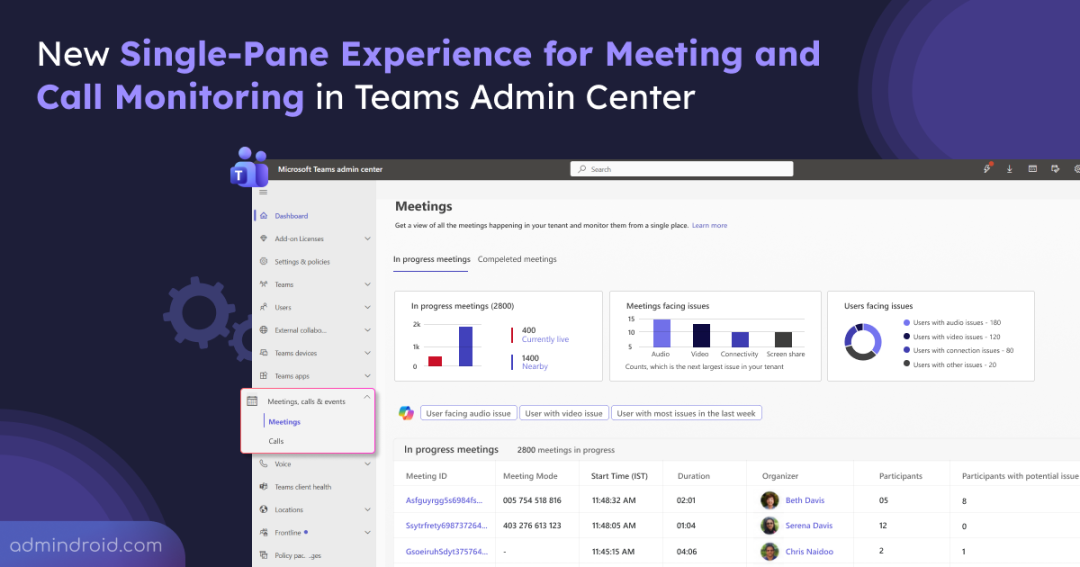
The new meetings & calls experience gives admins a unified view of meeting and call activity. It brings ongoing meetings, completed meetings and calls, participant details, and issue insights into a single experience, making it easier to identify and investigate problems.
The new meetings & calls experience is expected to roll out worldwide and in GCC from late September 2026, with the rollout expected to complete by mid-October 2026.
Once the rollout reaches your organization, admins can access the new experience from the Teams admin center:
- Sign in to the Teams admin center.
- Navigate to Meetings & Calls.
- Select Meetings or Calls.
Let’s look at the capabilities available under each section:
Meetings
Admins can monitor ongoing and completed meetings, review meeting health, and investigate issues across the organization.
- AI-powered meeting quality insights: Microsoft is enhancing meeting troubleshooting in the Teams admin center with AI-powered insights that help admins proactively detect unusual meeting-quality patterns across their organization.
- Meeting-quality hotspots: Identify locations and public IP addresses where meeting quality is behaving unusually and see how many users are affected.
- Quality trends: Review how meeting quality changes over time to understand emerging or persistent issues.
- Likely root causes: Identify potential issues related to network conditions (bandwidth, Wi-Fi, VPN, and proxy), system performance (CPU, memory, and Teams client), and devices (microphones, cameras, and speakers).
- Recommended actions: Get suggestions based on the likely cause and severity of an issue.
- Affected users and supporting evidence: Review impacted users and available evidence to understand the scope of an anomaly and prioritize troubleshooting.
The insights are updated daily, with machine learning automatically detecting anomalies based on changing meeting-quality patterns.
Note: Telemetry from SIP phones, PSTN calls, and peer-to-peer calls is excluded.
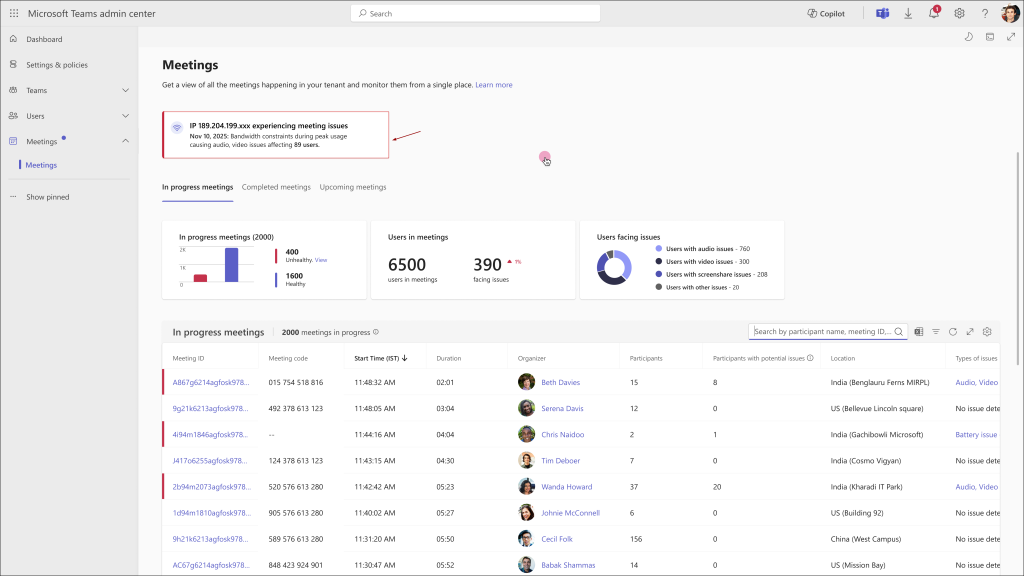
The rollout of AI-powered meeting-quality insights is expected to begin worldwide and in GCC in mid-November 2026, with completion by early December 2026. The feature is available to Global Administrators, Teams Administrators, Teams Communications Administrators, Teams Communications Support Engineers, and Teams Communications Support Specialists.
- In-progress meetings: View currently live meetings, town halls, and webinars in a dedicated tab. At least one participant must have a Teams Premium or Teams Rooms Pro license for the meeting to appear in this view.
- Completed meetings: Review meetings that occurred across the organization during the previous 30 days.
- Meeting health insights: Get a high-level view of meeting health through summary metrics and visual insights. The dashboard shows the total number of meetings, meetings facing issues, users facing issues, and the most frequently occurring issue for the selected period. Admins can also join the meeting directly from the same view for quick investigation.
- Search and filtering: Search for specific meetings and refine results using time ranges such as 7 days, 15 days, 30 days, or a custom date range, along with filters for issues, organizers, meeting types, and participant attributes.
- Export: Export meeting data for offline analysis, reporting, or further investigation.
Calls
Admins can monitor calls across the organization from a single view and identify call-quality issues.
- Call monitoring: View calls across the tenant, including calls from the last 7 days, to get an overview of call activity.
- Calls facing issues: Identify whether users have experienced call-quality issues in the last 7 days, including audio, video, app sharing, CPU, battery, and call result issues.
- Call details: Review call records, including the call ID, start time, end time, duration, caller, callee, and type of issue, to investigate specific calls.
- Export: Export available call data for offline analysis, reporting, or further investigation.
Wrapping Up
The new single-pane experience brings meeting and call monitoring into a centralized workspace in the Teams admin center. By combining real-time monitoring, troubleshooting, diagnostics, filtering, data export, and Copilot-assisted analysis, it streamlines meeting and call quality investigations.
We hope this blog provides a helpful overview of the new Teams admin center monitoring experience. Thanks for reading. If you have any questions or thoughts, feel free to share them in the comments section.