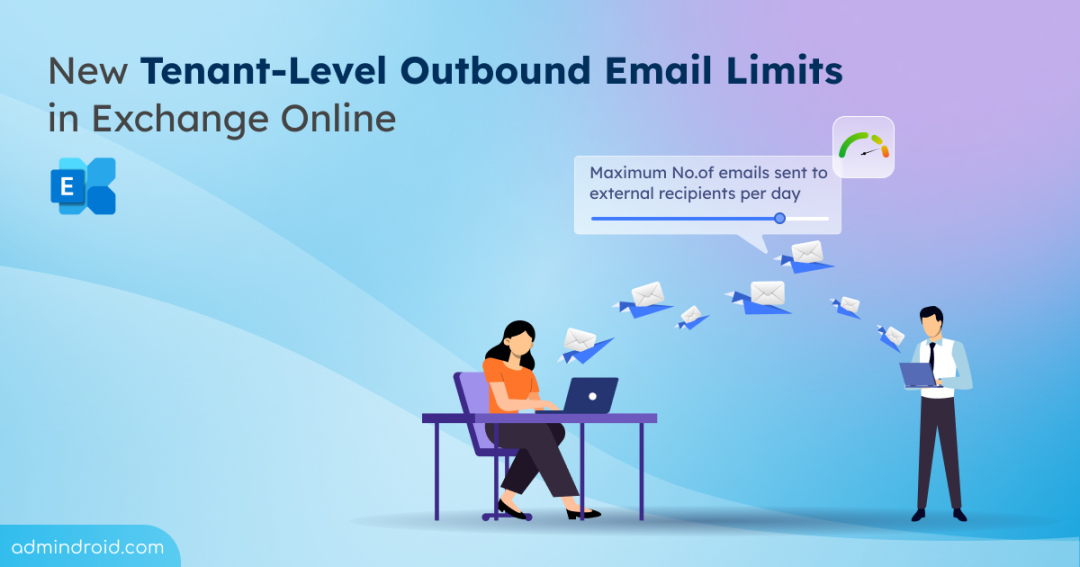
Many organizations rely on email for bulk communication to external domains, whether for customer outreach, newsletters, or notifications. However, sending too many external emails too quickly can lead to deliverability issues, spam detection, or even domain blacklisting. To regulate email flow and prevent abuse, Microsoft introduced Tenant Outbound External Email Limits / Tenant External Recipient Rate Limit (TERRL)—a restriction on the number of external recipients a tenant can email within a 24-hour window.
Let’s dive into how this limit works and what it means for your email flow.
What is Tenant External Recipient Rate Limit (TERRL) in Exchange Online?
The Tenant External Recipient Rate Limit (TERRL) or tenant-level outbound email limits is the maximum number of external recipients a Microsoft 365 tenant can send emails to within a rolling 24-hour sliding window.
Who are Considered as External Recipients?
An email recipient is considered external if:
- The recipient’s email domain is not listed as an accepted domain in your organization.
- The email is sent to personal email accounts (such as Gmail or Yahoo).
- Emails sent to users in other tenants, including those within an officially designated multitenant organization.
- The email is sent to a subdomain that is not configured as internal.
A subdomain will be treated as internal only if:
- The subdomain is explicitly added as an Accepted Domain, or
- The root accepted domain has the “Accept mail for all subdomains” option enabled (when the root domain type is set to Internal Relay).
How TERRL Works?
It works on a 24-hour sliding window. This means Microsoft tracks the number of external emails sent over the past 24 hours, not by calendar day.
Example:
- Your company can send up to 10,000 emails per day to external recipients.
- At 6:00 AM, you send an email to 6,000 people.
- At 3:00 PM, you send another email to 4,000 people.
- You’ve now reached the 10,000-email limit, so any more emails will be blocked. Microsoft keeps checking your past 24 hours of email activity.
- At 6:00 AM the next day, the tenant regains the quota and can be able to send up to 6,000 emails.
- After 3:00PM the next day, the remaining limit gets regained and now the tenant can be able to send 10,000 emails.
Tenant External Recipient Rate Limit Rollout Schedule
The Tenant External Recipient Rate Limit (TERRL) is fully implemented for tenants in the WW (Commercial) environment.
Microsoft has postponed the TERRL rollout for the GCC, GCCH, DoD, and 21Vianet environments. Rollout dates for these environments will be communicated by Microsoft once they are finalized.
How is TERRL Calculated?
The Tenant External Recipient Rate Limit (TERRL) is determined by the tenant’s status, age, and email licensing.
Here’s how the limit applies:
- New tenants: Newly created tenants receive a percentage of their standard calculated quota based on tenant age:
- Less than 31 days: 10%
- 31–60 days: 25%
- More than 60 days: 100%
- Trial tenants: Limited to 500 external recipients per day, regardless of license count.
- Non-trial tenants: The standard TERRL is based on the number of purchased Exchange Online or Exchange Online Protection licenses. The calculation varies depending on whether the tenant has free EDU licenses:
- With free EDU licenses: The calculation includes free EDU licenses, such as Office 365 A1, at a lower weighting:
500 × (Purchased Email Licenses^0.7 + Free EDU Licenses^0.3) + 9,500 - Without free EDU licenses: The standard quota is calculated using:
500 × (Purchased Email Licenses^0.7) + 9,500
Example:- 100 licenses → 22,059 recipients/day
- 1,000 licenses → 72,446 recipients/day
- With free EDU licenses: The calculation includes free EDU licenses, such as Office 365 A1, at a lower weighting:
These updated quota calculation changes are scheduled to begin rolling out on September 14, 2026.
What Doesn’t Count Toward the TERRL Quota?
The following are not included in the TERRL quota:
- Journaling messages
- Automatic Replies (including Out of Office)
- DSNs (NDRs, Delivery Receipts, Read Receipts)
- Messages sent using Azure Communication Services email and Exchange Online High-volume Email offerings
- Email notifications from Microsoft cloud applications e.g. SharePoint, Teams, Yammer
What Happens If Your Tenant Exceeds the Daily Outbound Limit?
If your tenant goes over its daily outbound email limit, any further emails to external recipients will be blocked. The block remains in effect until the tenant’s usage falls below the limit within the rolling 24-hour window.
Senders receive a Non-Delivery Report (NDR) with one of the following errors:
- Trial tenants: 550 5.7.232 – Your message can’t be sent because your trial tenant has exceeded its daily external recipient limit.
- Non-trial tenants: 550 5.7.233 – Your message can’t be sent because your tenant has exceeded its daily external recipient limit.
For organizations that need to send emails beyond their limit, Azure Communication Services email is recommended for high-volume or bulk emailing.
Tracking Outbound Email Volume in Exchange Online
Admins can monitor outbound email usage in the Exchange Admin Center -> Reports -> Mail flow -> Tenant Outbound External Recipients Rate report.
This report will display:
- The number of external recipients sent to.
- The tenant’s daily email limit and usage percentage.
- How many recipients were blocked due to exceeding the limit.
- Whether enforcement is enabled or disabled for your tenant.
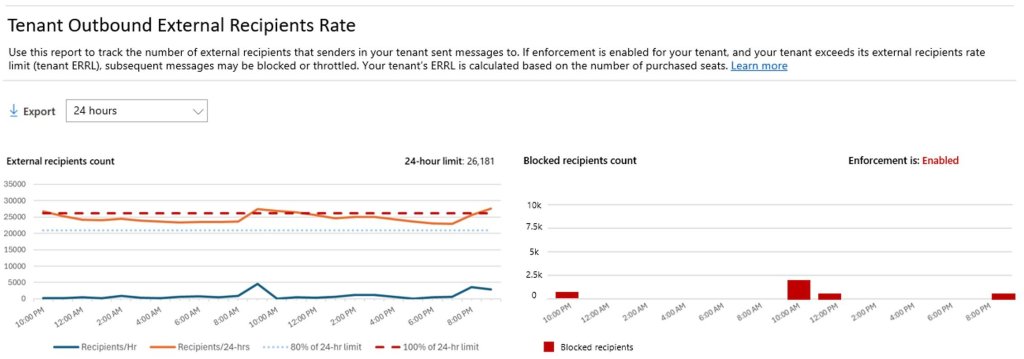
You can also use the Get-LimitsEnforcementStatus cmdlet to retrieve information about your Tenant Outbound External Email Limits.
Note: To identify your top senders, you can use the “Top senders and recipients” report in the Microsoft Defender portal (Microsoft Defender > Email & collaboration reports > Top senders and recipients) or run a Message Trace in the Exchange Admin Center (EAC) for a detailed breakdown.
We hope this blog provided a clear overview of the new Tenant Outbound External Email Limits in Exchange Online. Feel free to drop your questions in the comments. Thanks for reading!