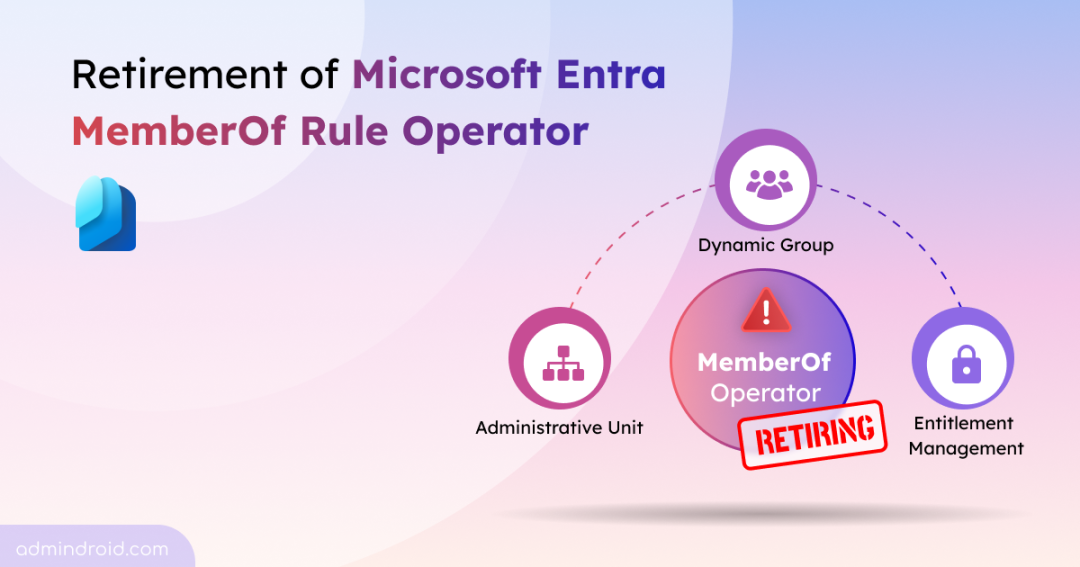
Microsoft is ending the long-running public preview of the memberOf rule operator on November 3, 2026, without moving it to general availability. Organizations that use this operator in dynamic membership scenarios will need to review their existing configurations and transition to supported approaches before memberships stop updating.
In this blog, we’ll explore how this retirement could affect your organization and use a PowerShell script to identify affected configurations and prepare for migration.
What Is the MemberOf Rule Operator in Microsoft Entra?
The memberOf rule operator allows you to define dynamic membership rules that include members from existing groups, instead of relying on user or device attributes.
Admins have used it as a simple way to combine members from multiple groups into a single dynamic membership rule. This is useful for applications that don’t support nested group memberships, including Power Platform environments, as well as for scenarios like licensing and access assignments.
Since its release, the operator has only ever been in public preview. Microsoft has found that even a single memberOf-based rule can slow down dynamic membership processing for every other dynamic group in the tenant, not just the one using it. That’s a scale and reliability problem Microsoft isn’t willing to carry into general availability, so the feature is being retired rather than promoted out of preview.
Rollout timeline:
- Retirement begins (Worldwide): Early November 2026
- Action required by: November 3, 2026
How Does MemberOf Rule Retirement Affect Your Organization
Organizations using the memberOf rule operator across the following Microsoft Entra services should replace those configurations before the retirement date:
- Dynamic membership groups
- Dynamic administrative units (AUs)
- Entitlement Management auto-assignment policies
After November 3, 2026, Microsoft will stop processing memberOf rules. Existing memberships and assignments won’t be removed, but they’ll remain in their last calculated state and won’t update as users join or leave the source groups.
As a result, you may experience:
- Outdated access to Microsoft Teams and SharePoint resources.
- New users not receiving the access they need, while former members retain access.
- Conditional Access policies evaluating outdated group memberships.
- Entitlement Management auto-assignment policies no longer adding or removing access package assignments.
- Group-based licensing failing to assign or remove licenses correctly.
- Dynamic administrative units with outdated membership and delegated administrative scope.
Now that we understand the impact of this retirement, let’s explore how to discover affected configurations and prepare for migration.
How to Mitigate MemberOf Rule Operator Retirement
Mitigating the impact of the memberOf rule operator retirement involves a two-step process:
- Identify memberOf configurations using PowerShell script
- Review and migrate affected memberOf configurations
Identify MemberOf Configurations in Entra ID Using PowerShell Script
Before migrating, you first need to identify every configuration that uses the memberOf rule operator. Microsoft Entra doesn’t provide a centralized view to list all affected dynamic groups, administrative units, and entitlement management policies. Manually reviewing each configuration can be time-consuming, especially in large environments.
To simplify this process, we’ve created a PowerShell script that scans your tenant and identifies every configuration using the memberOf rule operator.
Download: MemberOfRuleDeprecationReport.ps1
Download and run the script as below to find all memberOf-based configurations in your tenant:
|
1 |
.\MemberOfRuleDeprecationReport.ps1 |
The script supports both interactive sign-in and certificate-based authentication, making it suitable for running in automated or unattended environments.
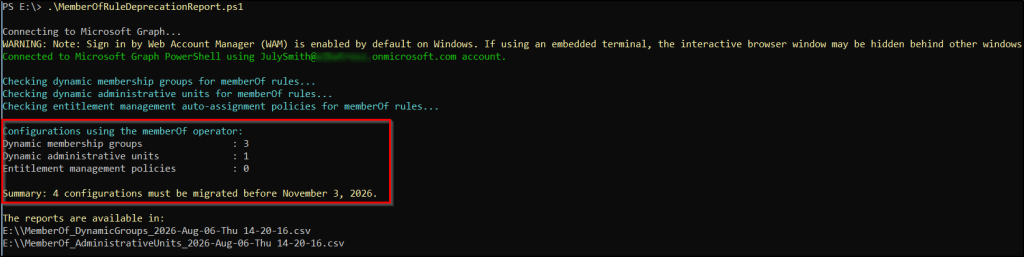
This script generates separate CSV reports for all supported memberOf configurations, helping you quickly identify affected objects and plan your migration.
Sample outputs for dynamic membership groups and administrative units using the memberOf operator shown below:


Note: By default, the script scans all supported configurations. If needed, you can use the built-in parameters like -DynamicGroups, -AdministrativeUnits, or –AutoAssignmentPolicies to scan a specific configuration type separately.
Review and Migrate Affected MemberOf Configurations
After identifying all affected configurations, review each one to understand its purpose and decide the best approach. Start by identifying the source groups referenced by the memberOf rule and determine how the group, administrative unit, or policy is being used. Once the purpose and membership requirements are clear, choose the right replacement approach based on your scenario.
- Replace with supported rules: If the same membership can be achieved using supported user or device attributes, recreate the configuration using a standard dynamic membership rule.
- Convert to assigned membership: If no supported dynamic rule can replace the memberOf logic, convert it to an assigned group and manage membership manually or through automation.
- Validate before deployment: Compare the existing and replacement memberships to ensure users retain the correct access, licenses, and permissions before moving to production.
- Remove unused configurations: If a memberOf-based group, administrative unit, or policy is no longer needed, remove it instead of migrating it.
That’s it! Preparing for the memberOf rule operator retirement doesn’t have to be difficult. Audit your tenant, identify affected configurations, and complete the required changes before the deadline to ensure your configurations continue to work as expected.