Microsoft Graph permissions have traditionally given applications fairly broad access to Microsoft 365 and Microsoft Entra resources. For instance, an app that only needs to create users may still receive permissions that allow it to perform additional user-management operations. While this makes it easier to authorize applications for multiple operations, it can also give an app more access than it actually needs. That all-or-nothing access model is now changing.
Microsoft is now adding more granular API permissions for specific operations, giving admins greater control over the access they grant to applications.
This is an important step toward applying the principle of least privilege more precisely across Microsoft Graph. Let’s look at this change in more detail.
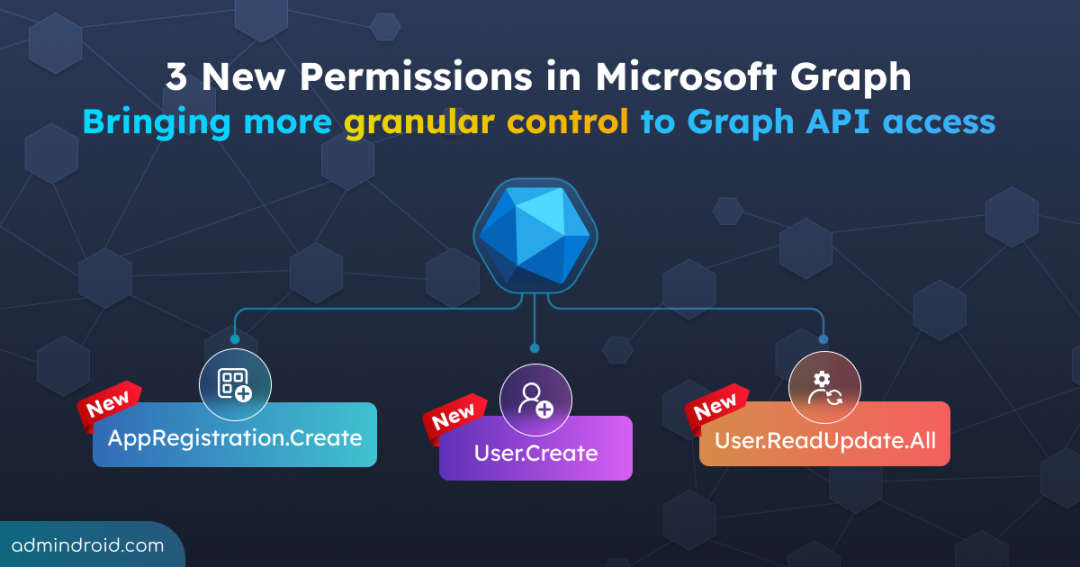
3 New Granular Permissions in Microsoft Graph
Microsoft’s current Graph documentation includes the following granular permissions:
- User.Create
- User.ReadUpdate.All
- AppRegistration.Create
Each permission targets a specific application or user-management capability, offering a more focused alternative to broader permissions where applicable.
1. User.Create: Grant User Creation Access Without Broad User.ReadWrite.All Permissions
User.Create allows an application to create users.
Previously, applications that needed to create users could only rely on broader user-management permissions such as User.ReadWrite.All, which grants directory-wide write access. The issue is that creating a user is only one operation, while a broader permission can provide additional capabilities to read and modify user properties, as well as delete users.
This meant applications could receive more access than required, increasing the potential impact of misuse or compromise.
With User.Create, applications that only need to create users can request a permission that is much more closely aligned with that specific operation.
It is available as both an application permission and a delegated permission. Both require admin consent.
2. User.ReadUpdate.All: Separating Read and Update from User.ReadWrite.All
User.ReadUpdate.All allows an app to read and modify user accounts.
The permission addresses applications that need ongoing access to user information rather than simply creating accounts. It essentially isolates user update capabilities from the creation and deletion rights covered by User.ReadWrite.All. It is offered as both an application permission and a delegated permission.
For applications whose job is limited to retrieving user information and making changes to existing users, admins can now grant User.ReadUpdate.All alone, instead of handing over full User.ReadWrite.All permission.
3. AppRegistration.Create: A Focused Alternative to Application.ReadWrite.All
AppRegistration.Create allows an app to create application registrations.
Previously, applications that needed to create app registrations could use the broader Application.ReadWrite.All permission. However, that permission also allows applications to manage existing application registrations, which may be unnecessary when the app only needs to create new ones.
With AppRegistration.Create, Microsoft is separating the creation capability from broader application-management access, giving organizations a more focused option for applications that only need to register new apps.
Where Are These Permissions Available Today?
These permissions are currently at different stages of availability across Microsoft Graph and its associated tools. Here’s a quick look at where each one can be found today:
| Permission | Documented in Graph | Available through Entra app registration portal | Available in Graph Explorer |
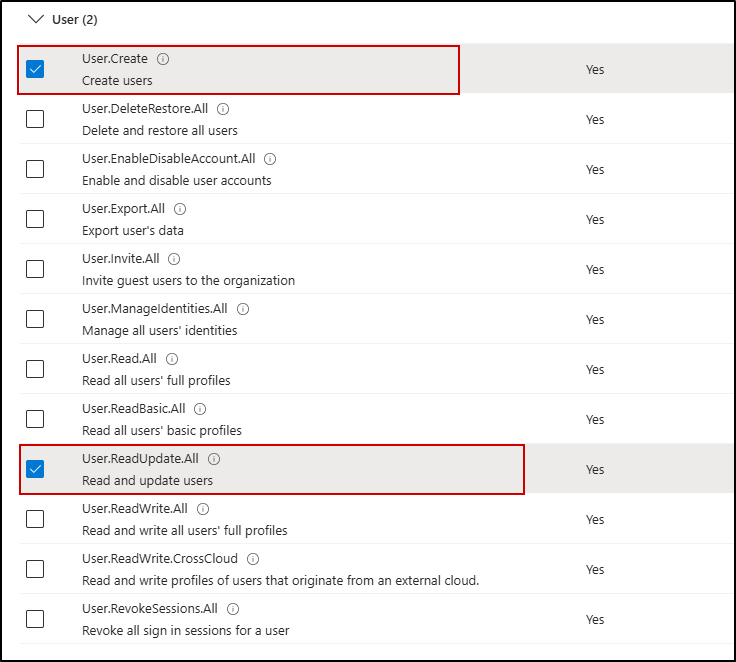
| User.Create | Yes | Yes | Not currently available |
| User.ReadUpdate.All | Yes | Yes | Not currently available |
| AppRegistration.Create | Yes | Not currently surfaced | Not currently available |
September 2026 Update: More Granular Permissions for Microsoft 365 Groups
Microsoft Graph has introduced more granular permissions for Microsoft 365 groups, giving applications more focused access to specific group-related operations.
1. Group.ReadBasic.All: Read Basic Group Properties Without Group.Read.All
Group.ReadBasic.All allows an application to read the basic properties of all groups.
Applications that only need basic information about groups may not need broader permissions such as Group.Read.All. With Group.ReadBasic.All, they can access basic group properties without being granted broader group read access.
This permission is available for both application permissions and delegated permissions for work or school accounts. It is not supported for delegated permissions with personal Microsoft accounts.
2. GroupMember.ReadBasic.All: A Narrower Choice Than GroupMember.Read.All for Membership Access
GroupMember.ReadBasic.All allows an application to read the basic properties of group members.
Previously, applications that needed to access group membership should rely on broader permissions such as GroupMember.Read.All, which provides wider access to group membership information.
With GroupMember.ReadBasic.All, applications that only need to read group membership can request a more focused permission instead of a broader group membership permission.
It is available as both an application permission and a delegated permission for work or school accounts.
3. Group-PreferredDataLocation.ReadWrite.All: Manage Group Data Location Without Broader Group Access
Group-PreferredDataLocation.ReadWrite.All allows an application to create, read, and update a group’s
preferredDataLocationproperty.
Applications that need to manage where a group’s data is stored geographically may otherwise require broader group or directory permissions. This permission provides access specifically to the group’s preferredDataLocation property.
It is available for application permissions and delegated permissions for work or school accounts, while delegated permissions for personal Microsoft accounts are not supported for the relevant group operations.
How Granular Microsoft Graph API Permissions Improve Security
The biggest benefit of more granular Microsoft Graph API permissions is least privilege.
Every permission granted to an application gives it a set of capabilities. If an application is compromised, having broader permissions than necessary can increase the potential impact.
By aligning permissions more closely with the operations an application needs, organizations can:
- Reduce unnecessary application access by limiting permissions to specific operations.
- Simplify permission reviews by making it clearer why an application needs a particular permission.
- Reduce the potential impact of compromised applications by limiting what they can do.
- Give developers more precise authorization options instead of relying on broad permissions simply because they support the required API operation.
- Improve application governance by making it easier to identify and reduce excessive permissions over time.
Overall, granular permissions create a clearer connection between what an application needs to do and what it is allowed to do, giving both administrators and developers more control over Microsoft Graph API access.
What Could Come Next?
The three permissions discussed here are examples of Microsoft’s move toward more granular API permissions.
Microsoft may continue introducing operation-specific permissions across Microsoft Graph, giving applications more focused options for accessing Microsoft 365 and Microsoft Entra resources.
As more of these permissions become available, the permission model could become increasingly precise, allowing applications to request access based on the specific operations they need rather than relying on broader permissions.
🔍 For organizations already using broader permissions, this is also a good time to review existing application access and identify opportunities to move to least-privilege permissions as more focused alternatives become available.
Thanks for reading.