Disabling a user account is a common administrative and security action. When an administrator disables a user account, the expectation is usually straightforward: the user’s access is stopped, and when the account is re-enabled, their previous access should come back.
Microsoft Teams doesn’t always work that way.
What Happens When You Disable and Re-Enable a User?
A recent incident reported by a Microsoft 365 admin on Reddit highlighted this strange behavior.
The user’s account was successfully phished, and Microsoft Defender’s automatic attack disruption disabled the account to contain the compromise. After the organization completed its compromised account remediation process and confirmed that everything was clean, the account was re-enabled.
After several hours, the user’s regular Teams memberships were restored. However, the user’s private channel memberships were gone.
This behavior is documented by Microsoft as a known limitation. When a user’s account is disabled, they’re automatically removed from Teams. After the account is re-enabled, regular Team memberships can take 24 to 48 hours to return, but private channel memberships aren’t automatically restored.
Why Private Channel Membership May Not Be Restored
A private channel has its own membership, even though it exists within a team. When a user leaves or is removed from a team, they’re removed from the private channels in that team. If they’re added back to the team, they must also be added back to the private channels.
The following example shows how Teams memberships can change when an account is disabled and re-enabled.
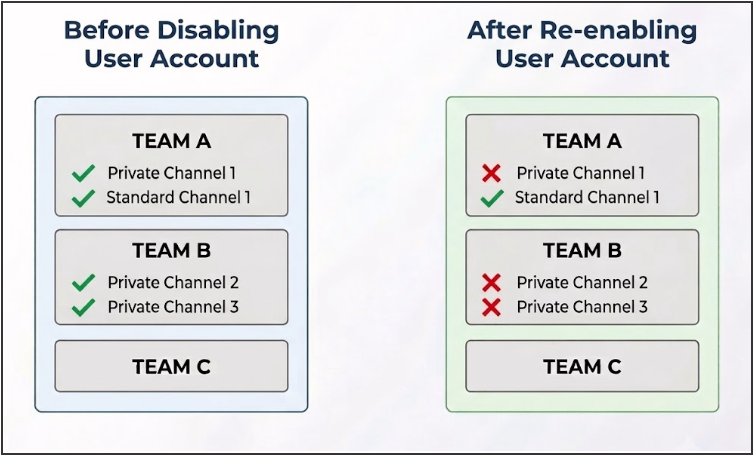
In this example, the user can access Team A and Team B again, but their private channel memberships are no longer available.
The Recovery Problem with Private Channel Membership
The bigger challenge is figuring out which private channels the user belonged to before the account was disabled.
If an account had access to multiple private channels across the organization, an administrator needs to determine:
- Which private channels the user previously belonged to
- Which team each private channel belonged to
- Whether the user was a member or owner of the private channel
Without a historical record, reconstructing that information can be difficult.
The Audit Log Gap:
I tested this behavior in my lab and couldn’t find any trace of the removed private channel membership in the audit logs.
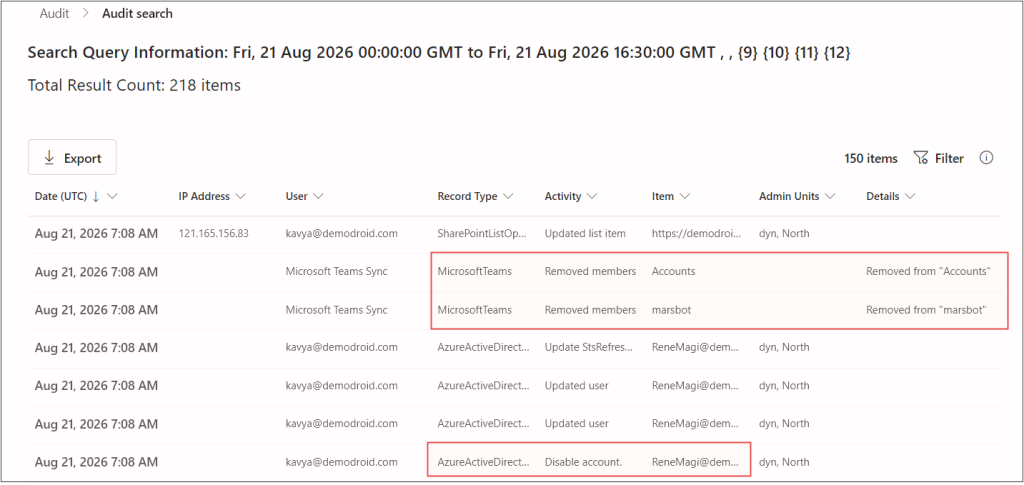
Audit logs can be useful when investigating what happened, but in this case, they didn’t give me the information needed to determine the user’s previous private channel memberships.
Why This Matters Beyond Compromised Accounts
The Reddit incident involved a compromised account, but this isn’t limited to security incidents. Organizations may disable and later re-enable accounts for several reasons, such as:
- Employee leave or temporary suspension: Organizations may temporarily disable a user’s account when an employee is on extended leave or suspended, then re-enable it when the employee returns.
- Employee rejoining the organization: An account may be disabled during offboarding and later re-enabled if the employee rejoins the organization.
- Security or administrative investigations: Administrators may temporarily disable an account while investigating suspicious activity, policy violations, or other security concerns, then re-enable it once the investigation is complete.
- Identity management or directory synchronization: Automated identity management processes may disable accounts based on HR status, directory synchronization, or other account lifecycle rules and re-enable them when the user’s status changes.
Regardless of why the account was disabled, the same consideration applies when the account is re-enabled. That’s why keeping a separate record of private channel membership can be useful.
Maintain a Periodic Private Channel Membership Report
I already had a scheduler-friendly PowerShell script for generating Microsoft Teams private channel membership reports, and this incident highlighted another practical use for it.
You can schedule the script to run periodically and retain copies of the generated reports. This gives you a historical record of private channel memberships that you can refer to if access needs to be restored later.
Here’s an example of the private channel membership report:
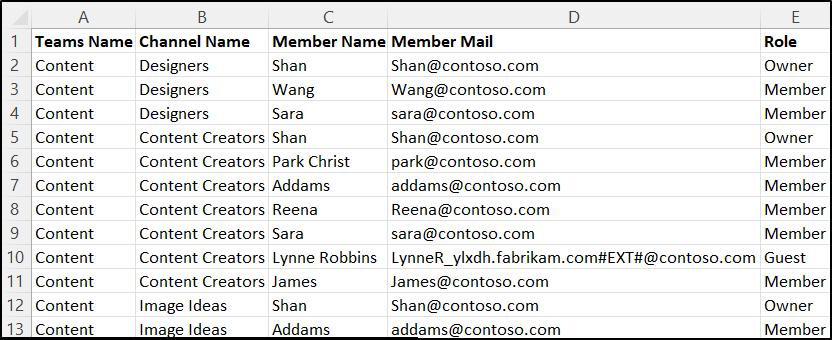
You can schedule the script to run periodically and retain copies of the generated reports. This gives you a historical record of private channel memberships that you can refer to if access needs to be restored later.
However, setting up and maintaining a scheduled PowerShell process requires additional effort from configuring the schedule and execution environment to managing the generated reports.
Fortunately, AdminDroid offers a easiest way to automate this!
Preserve Private Channel Memberships Before You Need Them
AdminDroid provides a reliable way to automate the Private Channel Membership Report, allowing admins to periodically capture membership details for future reference.
Schedule the Teams private channel membership report at your preferred frequency and store the reports locally or in cloud storage for easy access.
So, Be Prepared Before You Disable the Account
You may not know when an account will need to be disabled. When it happens, you may not have time to document the user’s Teams memberships first.
Keeping historical copies of private channel membership reports gives you something to refer back to if the user’s access needs to be restored later.
It’s easier to restore a lost membership when you already have a record of what was there.
Have you encountered private channel memberships being lost after disabling and re-enabling a user account? Share your experience in the comments.