As organizations retain years of email for business, legal, and compliance requirements, archive mailboxes can continue to grow over time. Auto-expanding archiving helps manage this growth by providing additional archive storage.
However, the existing 1.5 TB limit can eventually become a constraint for mailboxes with heavy retention requirements. When the applicable archive limit is reached, no more data can be stored in the archive. If the main archive and primary mailbox also reach their quotas, mail flow can eventually be affected.
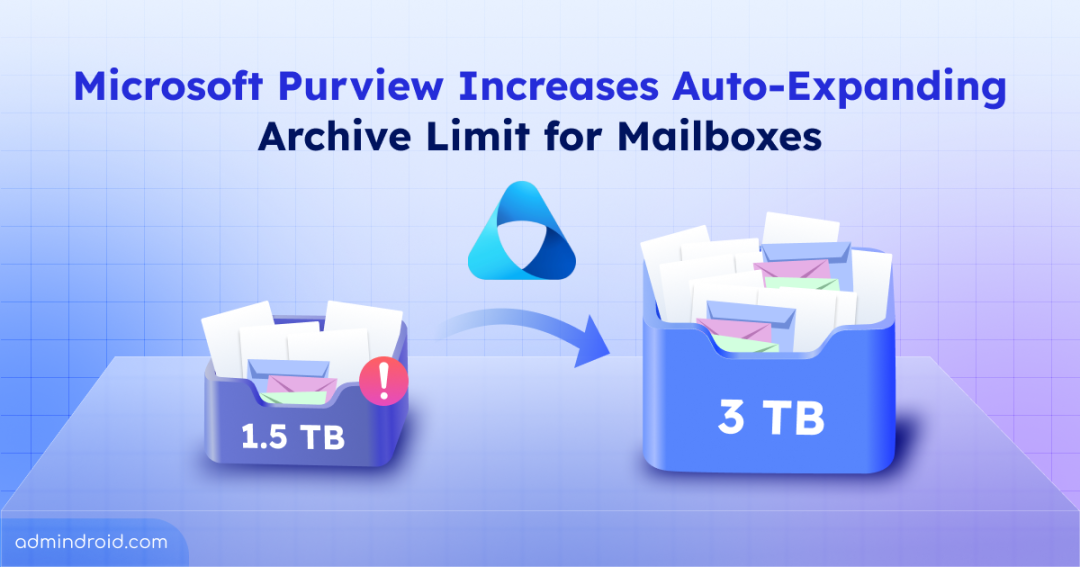
Fortunately, with the upcoming Microsoft Purview’s update, eligible Exchange Online mailboxes will be able to automatically expand beyond 1.5 TB, up to a maximum of 3 TB. In this blog, let’s look at what is changing in the mailbox archive, which licenses are eligible for the new archive capacity, and what Microsoft 365 admis need to know before the rollout.
What is Auto-Expanding Archive in the Microsoft Purview?
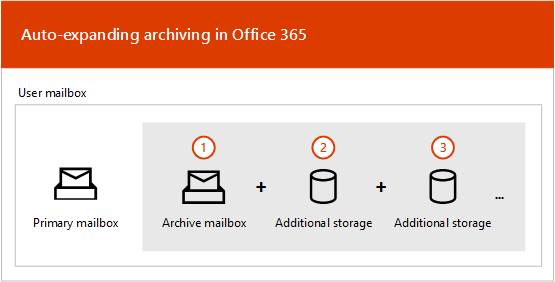
An auto-expanding archive is an Exchange Online mailbox archive that automatically adds more storage as archived mailbox data grows. By default, archive mailbox provides 100 GB of storage, and when auto-expanding archiving is enabled, Microsoft automatically provisions additional archive storage as needed when the mailbox approaches its storage limit.
This helps organizations manage mailboxes that need to retain more emails over longer period of time.
This helps organizations manage mailboxes that need to retain more emails over a longer period of time.
For example: If a mailbox archive approaches its 100 GB storage capacity, additional storage is automatically added, and then the archive continues to grow without the admin manually adding storage.
Below is the visualization of how auto-expanding archive works:
Note: Auto-expanding archive is different from auto-archiving. Auto-archiving automatically moves older emails from the primary mailbox to the archive, while auto-expanding archiving automatically provides additional archive storage as the archive approaches its capacity limit.
What is Changing in the Microsoft Purview Auto-Expanding Archive?
The most important change is that the maximum archive capacity is increasing from 1.5 TB to 3 TB per eligible Exchange Online mailbox.
This change gives eligible mailboxes additional capacity to retain large volumes of archived emails, particularly for inactive mailboxes retained after an employee leaves the Microsoft 365 organization.
| Rollout Timeline: The auto-expanding archive limit increase will be generally available from mid-October 2026 and expected to be completed in late October 2026. |
Who Gets the Increased Auto-Expanding Archive Capacity in M365?
The increased capacity is available only to archived mailboxes associated with eligible licenses. Microsoft lists the following eligible licensing combinations:
- Office 365 E5, A5, and G5
- Microsoft 365 E5, A5, and G5
- Microsoft 365 Purview Suite
- Microsoft 365 Purview Suite FLW, EDU, and GOV
- Microsoft Defender + Purview Suite FLW
- Microsoft 365 F5 Compliance
- Microsoft 365 F5 Security + Compliance
- Certain combinations of the eDiscovery & Audit, Insider Risk Management, and Information Protection & Governance mini suites
Important: If a mailbox has auto-expanding archiving enabled but is licensed only with Microsoft 365 E3, A3, or G3, or Office 365 E3, A3, or G3, it will remain limited to 1.5 TB and will not receive the increased 3 TB capacity.
A note on pricing: Microsoft had previously described archive storage beyond 1.5 TB as a consumption-based feature, with pricing of $0.25 per GB per month (or $0.0082 per GB per day). That pricing language was later removed from Microsoft’s documentation. For the current 1.5 TB-to-3 TB increase, Microsoft states that no per-GB consumption charge is being introduced as part of this change.
What Microsoft 365 Admins Should Check?
For eligible mailboxes that already have auto-expanding archiving enabled, admins don’t need to configure any additional configuration. However still, there are a few things below worth checking!
1. Identify and Monitor Large Archive Mailboxes: Find users whose archives are already approaching the 1.5 TB limit. This helps admins identify mailboxes that are most likely to benefit from the increased capacity and prioritize them for monitoring.
2. Verify License Eligibility: Check that users who need the higher limit, have one of the eligible Microsoft 365 licenses.
3. Check Auto-Expanding Archiving: Check whether auto-expanding archiving is enabled for archive mailboxes that need additional storage quota. So, they can automatically benefit from the increased capacity when the new limit takes effect.
4. Review Data Lifecycle Management policies: Check out the retention policies applied to mailboxes with growing archives. This helps admins understand what data is being retained, why it is being retained, and whether the retention period still aligns with business & compliance requirements.
5. Monitor Auto-Expanding Archive Usage: Track how quickly eligible mailboxes are approaching their current archive limits. Since the archive can grow by no more than 1 GB per day, monitoring usage helps admins plan for capacity needs even after the maximum limit increases to 3 TB.
What Stays the Same with Auto-Expanding Archiving in Microsoft Purview?
The increase from 1.5 TB to 3 TB changes the maximum archive capacity, but it does not change how auto-expanding archiving works. Below are the configurations that didn’t change in this update:
- Microsoft continues to automatically provision additional archive storage as the mailbox grows.
- The service can take up to 30 days to provision additional storage, and auto-expanding archives support a growth rate of no more than 1 GB per day.
- This auto-expanding archive limit supports both individual user mailboxes and shared mailboxes, subject to the applicable requirements.
Thus, Microsoft isn’t changing how admins manage retention. It’s giving eligible archives more room to operate within that strategy.
We hope this blog gives you a clear picture of the new 3 TB auto-expanding archive limit. How do you see this additional capacity helping your organization?