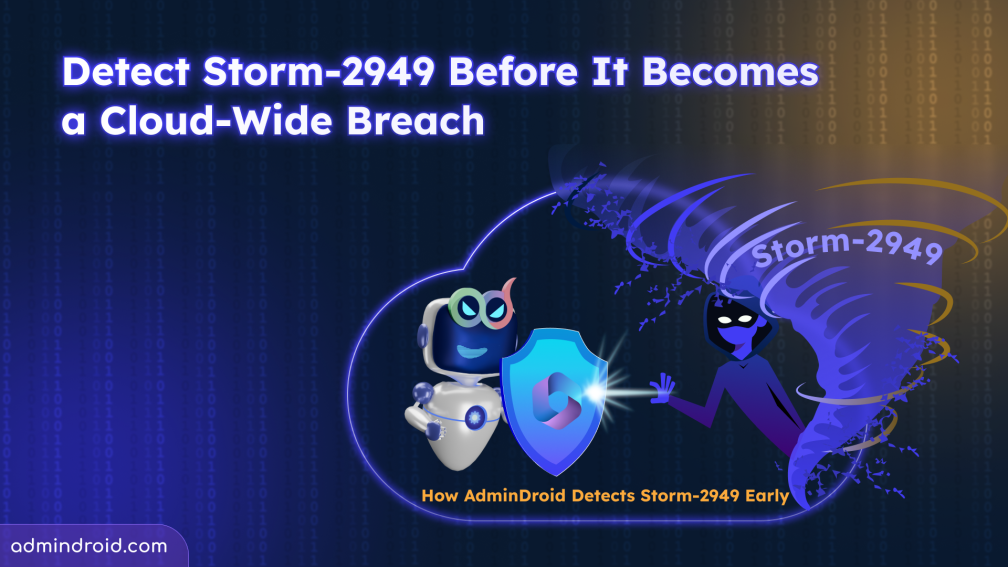
Recently, Microsoft disclosed details about the Storm-2949 campaign, where attackers abused legitimate Microsoft 365 and Azure services to compromise cloud environments through identity-based attacks.
In our previous blog, we explored how the Storm-2949 attack progressed from a single compromised identity to a large-scale cloud breach.
But an important question remains:
How can administrators identify Storm-2949 attacks before major damage occurs?
Before attackers begin cloud-wide data theft, they often leave behind several early warning signals, including:
- Entra ID risky sign-ins
- MFA registration changes
- Password reset anomalies
- Unusual Graph API activity
- Service principal modifications
- Suspicious privilege escalation
If security teams can identify these abnormal identity activities early, they can often stop the attack before deeper cloud compromise occurs.
However, without centralized visibility, many of these signals can easily go unnoticed. This is where the AdminDroid Microsoft 365 reporting tool helps security teams detect suspicious activities earlier and investigate identity-based threats more efficiently.
In this blog, we’ll explore:
- How to identify early signs of Storm-2949 attacks with AdminDroid
- Security hardening practices to reduce exposure to similar attacks
Detect Storm-2949 Attacks Early Using AdminDroid
By continuously monitoring Microsoft 365 activities, AdminDroid helps organizations detect Storm-2949 style attacks before attackers gain deeper access to cloud resources and sensitive data.
1. Spot Risky Sign-Ins Before the Breach Expands
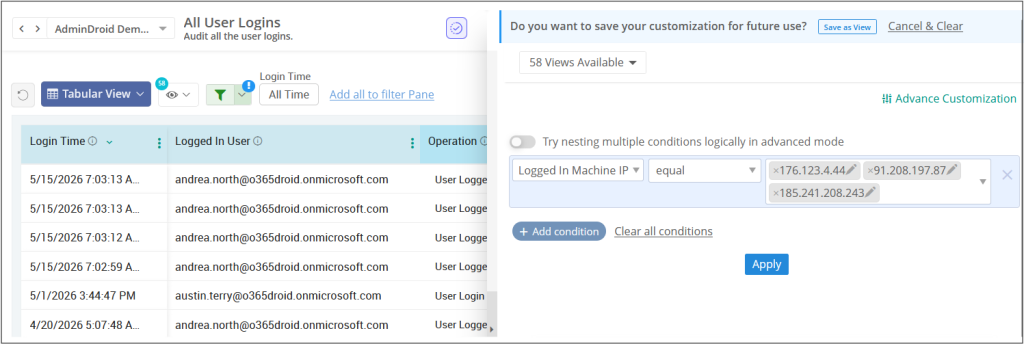
One of the fastest ways to begin threat hunting is through sign-in analysis using known Indicators of Compromise (IOCs). Microsoft published the following IP addresses associated with the campaign:
- 176.123.4.44
- 91.208.197.87
- 185.241.208.243
Using AdminDroid, administrators can quickly investigate whether users in their tenant interacted with these IPs.
Start by opening the All user sign-in report and filter the Logged-In Machine IP field using the published IOC addresses. If matches appear, immediately investigate the affected accounts across your organization.
However, IOC matching alone is not enough. Attacker infrastructure changes constantly, and future campaigns may use entirely different IP ranges. That’s why organizations should continuously monitor risky sign-in patterns such as:
- Impossible travel activities
- Password spray attempts
- Leaked credential detections
- Sign-ins from unfamiliar locations
- New browser or device combinations
When suspicious sign-ins occur, admins can use the detailed sign-in report to gain additional context such as device information, browser details, authentication protocol, and sign-in behavior patterns.
In many identity-driven attacks, suspicious sign-in activity is often the earliest visible indicator before the compromise expands further across Microsoft 365 and cloud environments.
2. Monitor SSPR Abuse and Password Reset Anomalies
The campaign began with identity takeover attempts involving Self-Service Password Reset (SSPR) abuse and MFA fatigue techniques. Because SSPR activities are generally considered normal administrative or user operations, unusual reset behavior can easily go unnoticed without proper monitoring.
With AdminDroid, admins can track Self-service password reset activities and set up alerts for suspicious reset patterns such as:
- Multiple SSPR attempts within short duration
- Unusual SSPR activity compared to historical trends
- Frequent reset failures
- High-privilege accounts using SSPR unexpectedly
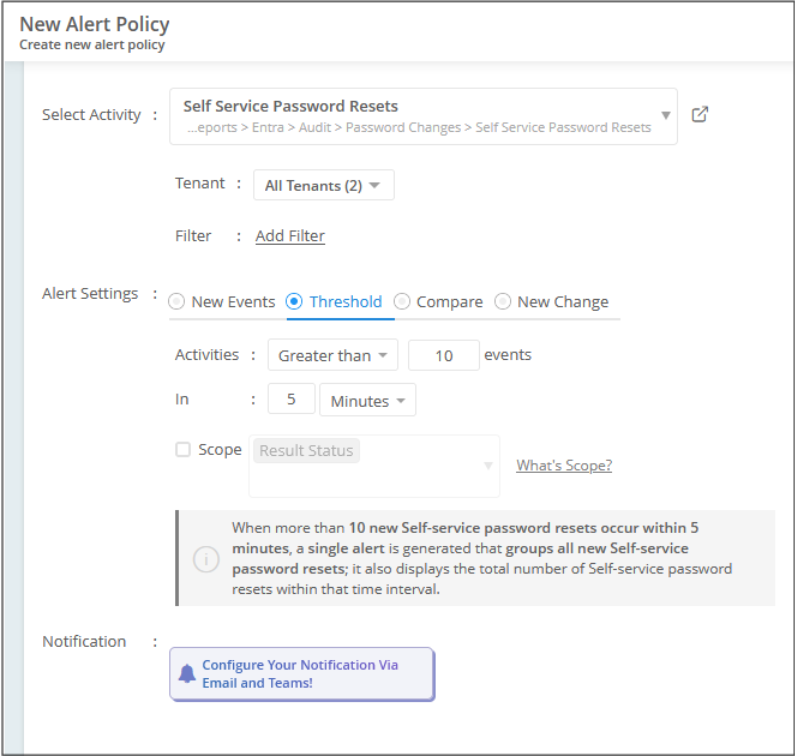
These anomalies become especially important when they appear alongside risky sign-ins or MFA configuration changes.
In many identity-driven attacks, password reset abuse becomes the gateway to full Microsoft 365 tenant-wide intrusion.
3. Identify MFA Tampering Attempts
One of the most critical Storm-2949 techniques involved replacing legitimate MFA methods with attacker-controlled authentication methods to maintain persistent access.
In some cases, attackers also modified registered phone numbers to strengthen control over the compromised Microsoft 365 account.
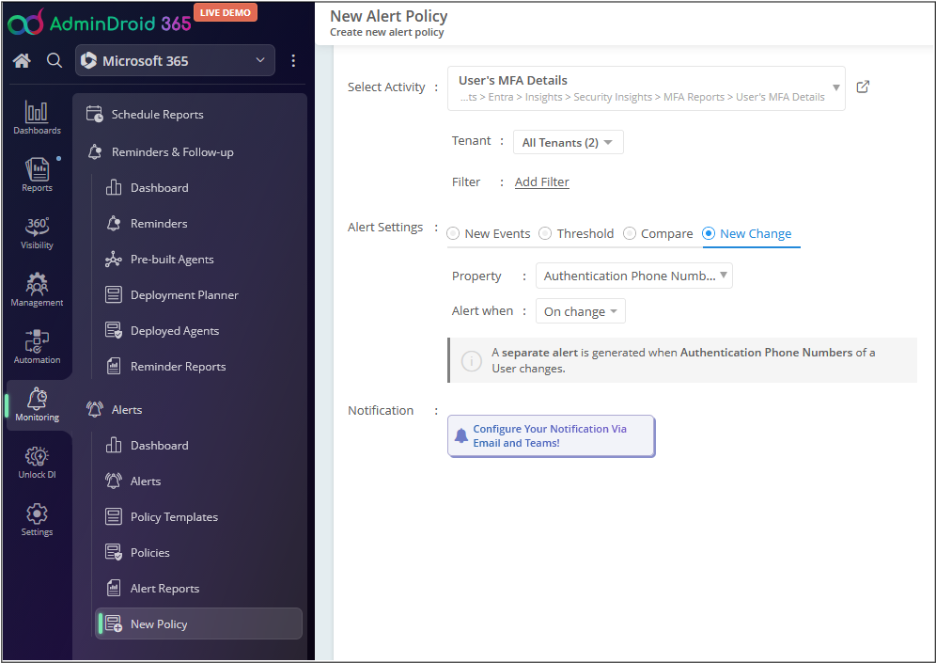
With AdminDroid, admins can monitor MFA configuration changes and configure alerts for:
- New MFA method registrations
- MFA method removals
- Microsoft Authenticator registrations
- Phone number modifications
- Authentication method updates
The High-Risk Correlation
A risky sign-in followed by an MFA method change for the same user within a short timeframe is one of the strongest indicators of account takeover.
In many cases, this becomes the earliest point where Storm-2949 style attacks become clearly detectable before privilege escalation and large-scale cloud compromise begin.
4. Identify Service Principal Changes
One of the most important signals during the campaign was the attempt to add credentials to a service principal for persistence. Because service principals can provide long-term access even after passwords are reset, or user sessions are revoked. If attackers successfully add their own client secret or certificate, they may continue accessing resources silently in the background.
In Microsoft’s documented case, the credential addition attempt failed due to insufficient permissions. Even failed credential addition attempts remain valuable detection signals because the audit events remain available for investigation.
With AdminDroid, admins can monitor critical service principal activities such as:
- Service principal changes
- New client secret additions
- Certificate additions
- Delegation changes
- Ownership modifications
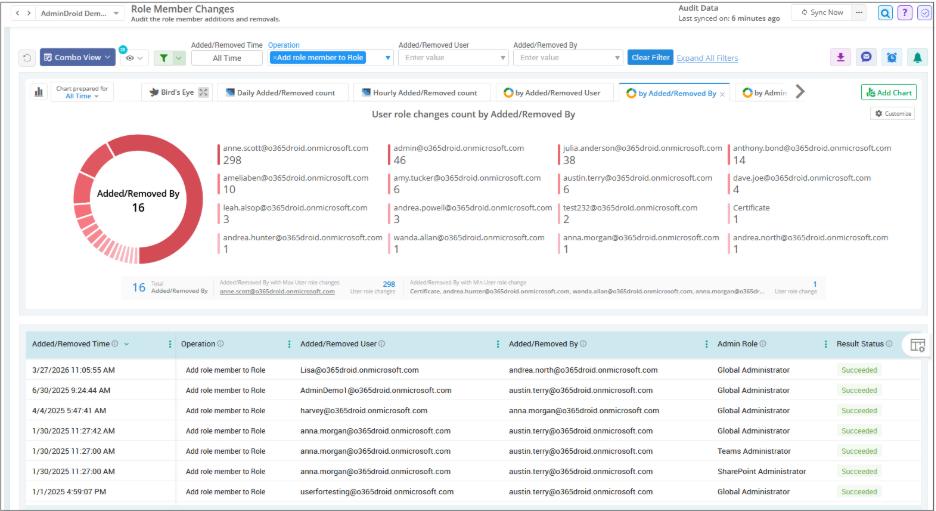
Normally, these activities occur during planned app deployments, certificate rotation windows, or scheduled maintenance. Unexpected credential additions immediately after risky sign-ins are extremely suspicious.
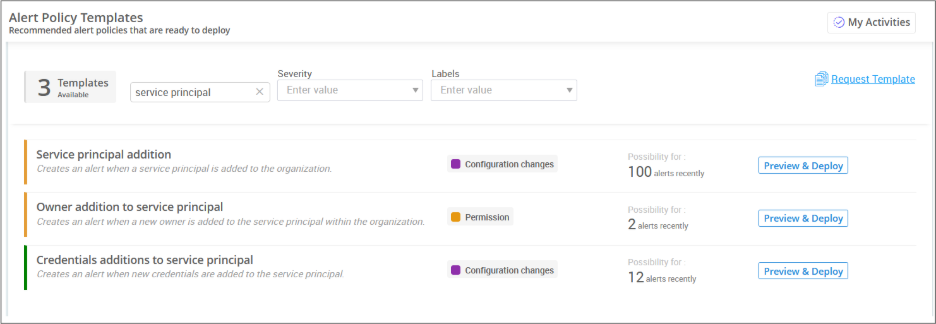
To simplify monitoring, AdminDroid also provides ready-to-deploy alert policies for critical service principal activities. These alerts help admins receive real-time alerts the moment sensitive service principal modifications occur.
5. Detect Large-scale Date Exfiltration in SPO & OneDrive
After successful compromise, attackers pivot toward SharePoint Online and OneDrive because these services often contain highly valuable organizational data. Microsoft observed Storm-2949 specifically targeting sensitive IT documentation such as VPN configurations, remote-access procedures, and internal operational documents.
With AdminDoid Microsoft 365 reporting tool, admins can monitor and receive alerts for suspicious activities such as:
- Large file download activities
- Mass sharing events
- External sharing changes
- Mailbox access activities
- SharePoint permission modifications
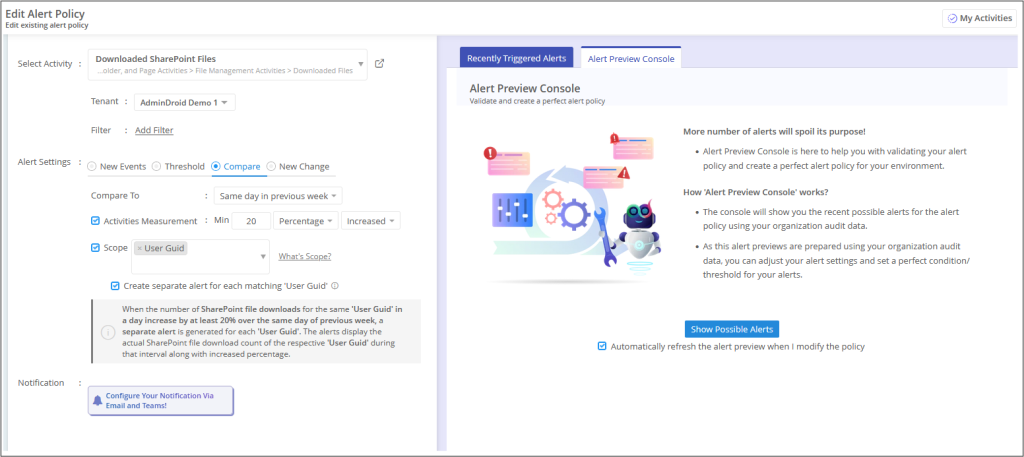
One of the biggest warning signs to detect Storm-2949 attacks is unusual download volume across SharePoint or OneDrive. Microsoft reported scenarios involving thousands of file downloads during single operations. If earlier identity-stage signals were missed, this becomes the next major opportunity to contain the attack before large-scale exfiltration completes.
6. Monitor Privilege Escalation and RBAC Abuse
Storm-2949 abused privileged Azure RBAC roles to move deeper into cloud infrastructure and expand control across subscriptions. This stage is especially dangerous because attackers transition from compromising identities to controlling infrastructure resources.
AdminDroid helps monitor the Entra ID and RBAC role activities, including
- New global admin assignments
- Unexpected PIM activations
- Privileged accounts added to sensitive groups
- Multiple RBAC changes within short time
So far, we’ve explored the major detection signals associated with Storm-2949 and how AdminDroid helps uncover suspicious activity during the early stages of the attack.
Once attackers move beyond identity compromise and reconnaissance, the attack shifts into broader cloud exploitation involving:
- Azure App Service abuse
- VM credential harvesting
- Key Vault secret theft
- Storage manipulation
- SQL firewall modifications
- Persistence techniques
- Broad data exfiltration
This is why prevention and hardening become just as important as detection.
Storm-2949: Hardening Techniques to Reduce Exposure
The Storm-2949 attack chain can involve:
- SSPR abuse and MFA manipulation
- Service principal persistence attempts
- Privileged RBAC abuse
- High-volume SharePoint and OneDrive exfiltration
- Azure App Service and VM credential harvesting
- Key Vault secret theft
- Storage and SQL manipulation
Organizations should implement layered security controls to reduce exposure to identity-driven cloud attacks.
Strengthen Identity Security to Stop the Attack Earlier
The best way to stop Storm-2949 is still during the identity compromise stage. Since the attack begins with SSPR abuse and MFA fatigue, strong identity protection remains the most effective defense.
Organizations should prioritize:
- Phishing-resistant MFA for administrators and privileged accounts
- Conditional Access authentication strength policies for employees and external users
- Microsoft Entra ID Protection risk-based policies
- Continuous risky sign-in monitoring
- Restricting or disabling SSPR for highly privileged accounts
By reinforcing identity controls at the right stage, organizations can effectively prevent identity-based attacks.
Reduce Exposure to Data Exfiltration and Cloud Resource Abuse
If attackers move beyond the identity compromise stage, the focus shifts toward data exfiltration, infrastructure abuse, persistence, and privilege expansion across Microsoft 365 and Azure environments.
Storm-2949 specifically targeted SharePoint Online, OneDrive, Azure RBAC roles, Key Vaults, storage accounts, SQL environments, virtual machines, and App Services.
Organizations should strengthen controls across these areas to reduce exposure.
Protect SharePoint and OneDrive Data
- Monitor bulk download activities and mass sharing events
- Restrict downloads from unmanaged devices
- Review external sharing permissions regularly
- Apply Microsoft Purview sensitivity labels and encryption to sensitive documents
- Enable alerts for unusual file access behavior
Restrict Excessive Privileged Access
- Review privileged role assignments regularly
- Restrict Graph API for non-admin users
- Enforce Privileged Identity Management (PIM)
- Require approval workflows for Owner-level access
- Reduce permanent administrator privileges
- Prefer built-in roles over custom RBAC roles
Secure Key Vaults, Storage, and SQL Resources
- Enable purge protection for Azure Key Vaults
- Restrict public access using private endpoints
- Disable anonymous blob access
- Restrict SQL firewall rules to approved IP ranges
- Prefer Microsoft Entra authentication over static credentials
- Enable logging and alerts for sensitive configuration changes
Restrict VM and App Service Abuse
- Restrict VM extension deployment permissions
- Audit Azure Run Command usage
- Limit unnecessary Contributor permissions
- Disable legacy authentication methods
- Prefer managed identities over static credentials
These controls help organizations reduce attacker movement, limit persistence opportunities, and minimize the impact of enterprise-wide cloud compromise attempts.
Where Should You Start with Storm-2949 Hunting?
The fastest way to start Storm-2949 cloud breach investigation is by validating sign-in activities first.
To begin with, download the AdminDroid Microsoft 365 Reporting Tool, open the Risky sign-ins report, and check for the published Storm-2949 IOC IP addresses. Even a single match can provide an immediate high-priority lead for investigation.
But remember, the absence of IOC matches does not necessarily mean the environment is safe. Storm-2949 demonstrated how attackers can abuse legitimate identities, cloud permissions, and trusted administrative paths to blend into normal activity. That’s why proactive hardening matters just as much as detection. Review and strengthen your Microsoft 365 and Azure environments.