If you manage a Microsoft 365 environment, you know that keeping accounts secure is half the battle. A stark reminder of this reality came recently when Microsoft uncovered a relentless, multi-layered attack campaign executed by a threat actor known as Storm-2949.
Unlike traditional attacks that rely on loud ransomware or malware, Storm-2949 operated quietly with a clear objective: gaining persistent access and exfiltrating sensitive data from Microsoft 365 and Azure environments.
What makes this campaign especially concerning is the “attackers’ persistence”. They didn’t rely on a single attempt. Their strategy is continuously testing different ways until one attempt successfully opens the door.
This blog walks through the Storm-2949 attack that explains how attackers moved through different phases to gain access to Microsoft 365 data and how to stop Storm-2949 breach.
What is Storm-2949 Attack and Why is it Extremely Dangerous?
Storm-2949 represents a group of suspicious attack activities connected through similar behavior patterns.
Microsoft uses a specific weather-themed naming convention to track cyber threats. It uses the name “Storm” for emerging or developing threat groups whose full origin or identity is still being tracked.
Storm-2949 often blends into normal user behavior, making detection significantly more difficult for security teams. Here’s a closer look at why this attack is so dangerous!
- The Storm-2949 campaign is heavily identity-focused, where a single compromised Microsoft 365 account can potentially lead to wider access across both Microsoft 365 and Azure environments.
- The attackers do not rely on traditional malware or ransomware that gets installed on Microsoft 365 user devices.
- Instead of malicious software, attackers use legitimate Microsoft cloud services to gain control and access to organization sensitive data.
- In many cases, nothing is written to disk, leaving antivirus and endpoint protection tools with very little to detect.
- Activities such as unusual sign-ins, repeated MFA prompts, unexpected device registrations, and permission grants can often appear normal in the organization, making Storm-2949 attacks much harder to detect early.
- The campaign focuses on silently gaining access, maintaining persistence, and exfiltrating sensitive organizational data.
Thus, defending against Storm-2949 depends more on strong identity security, Conditional Access policies, MFA protection, and continuous monitoring rather than focusing on network and endpoint security alone.
The Anatomy of the Storm-2949 Attack: A Step-by-Step Story
The Storm-2949 attack didn’t rely on zero-day vulnerabilities; they relied on human error and configuration gaps. When one M365 security control failed, they simply pivoted and tried another security compromise.
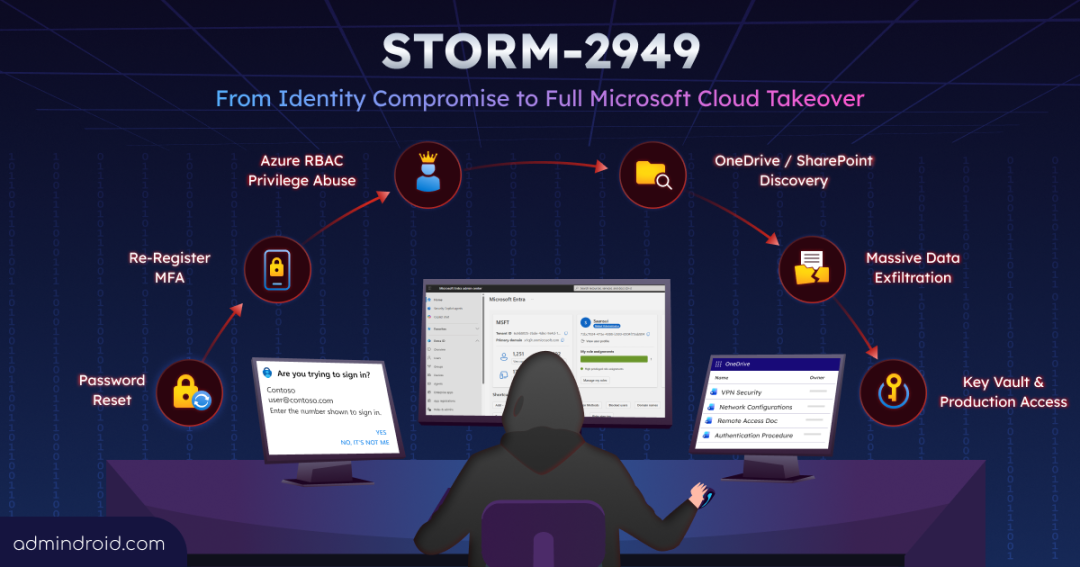
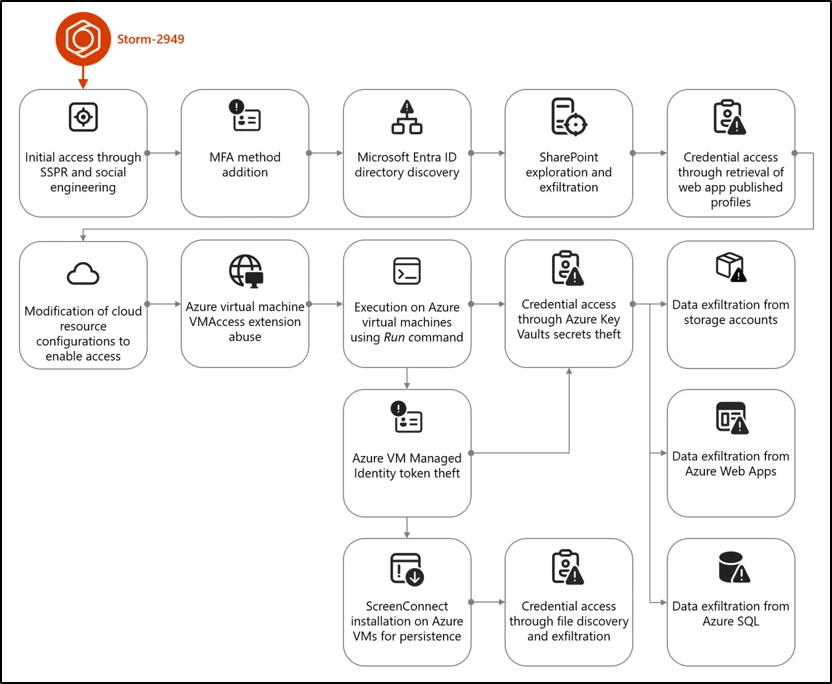
Microsoft traced 13 distinct techniques chained together by this group. It started with a simple phone call and ended in a full cloud compromise.
Step 1: Initial Access via SSPR (The Fake IT Call)
The attack begins with a phone call. The attacker claims to be IT support. While on the call, the attacker triggers a Self-Service Password Reset (SSPR) for the user’s account. When the user gets an authenticator prompt on their phone, the “IT guy” tells them to approve it as part of the process. The user complies, and the attacker changes the password.
Step 2: MFA Method Addition (Locking in the Foothold)
Immediately after resetting the password, the attacker removes existing authentication, re-register MFA, and enrolls Microsoft Authenticator on their own device. Now, the attacker can sign in whenever they want without needing to trick the user again.
Step 3: Entra ID Directory Discovery (Mapping the Territory)
With the gained M365 account access, the attacker uses Microsoft Graph API to scan the organization’s Entra ID. They begin identifying users, groups, applications, and assigned roles. Here, they uncovered a jackpot for their hijack and discovered the compromised user holds privileged Azure admin roles. Also, during this phase, they tried to gain long-term access by adding credentials to a compromised service principal, but the attempt failed due to insufficient permissions.
Step 4: SharePoint & OneDrive Data Exfiltration (The Microsoft 365 Raid)
Before diving into Azure, the attacker focuses on collecting as much data as possible from the compromised Microsoft 365 environment. Using normal SPO and OD web access, they quietly downloaded large numbers of files and entire folder structures from the user’s SharePoint and OneDrive.
Step 5: Credential Access Through Web App Profiles (Grabbing Developer Keys)
After exploiting user Azure RBAC permissions, the attacker targets an Azure App Service web app. They download its XML publishing profile, which contains application deployment credentials. This grants them access to the app’s backend Kudu console, letting them browse the file system like a developer.
Step 6: Azure Key Vault Secrets Theft (Raiding the Vault)
Once attackers got access to Kudu console, they break into Azure Key Vault. Since the compromised account already had Owner-level access over the Key Vault, the attackers were able to quickly extract high-value data such as database connection strings, certificates, and API keys within 4 minutes.
Step 7: Modifying M365 Cloud Configurations (Quick Tweaks)
The attacker then begins making small but strategic changes within the Microsoft cloud. They add a new allowed IP to a SQL firewall rule to enable access to server and tweak a storage account access policy. Individually, these changes may appear harmless or routine, which makes them much harder for security teams to recognize as part of an ongoing attack.
Step 8: Bulk Data Exfiltration (Extensive Data Leakage)
The attack ends in massive data theft. The attacker drains blobs from Storage accounts, lifts data from Web Apps, and queries Azure SQL databases over multiple days. By the time the organization becomes aware of the theft, the attacker has already disappeared.
Step 9: VMAccess Extension Abuse (Backdooring Servers)
Azure’s built-in tool VMAccess extension, meant for admins to reset local passwords and restore access to VM. Storm-2949 attacker abuses this legitimate tool to silently create their own local administrator account inside a customer’s Virtual Machine (VM); no exploit required.
Step 10: Managed Identity Token Theft (Stealing the Keys to the Kingdom)
Azure VMs use “Managed Identities” to securely connect to other Azure services. During the attack, the threat actor attempted to steal these identity tokens from the VM to gain access to sensitive Azure resources without needing passwords. However, the attempt was unsuccessful because the managed identity did not have sufficient permissions to retrieve the targeted secrets.
Step 11: Azure Run Command Vulnerability (Remote Executions)
Using another built-in Azure portal feature, the “Run Command”, the attacker executes malicious PowerShell scripts inside the VM to exploit VM’s managed identity and disable Microsoft Defender Antivirus protection settings. They don’t even need a network connection or an agent installed on the machine to do this action.
Step 12: ScreenConnect Installation (Setting Up Camp)
To ensure they don’t lose access, the attacker installs ConnectWise ScreenConnect on the compromised VMs. Because this is a legitimate remote-access tool (cleverly disguised as a Windows update), antivirus software ignores it, giving the attacker a permanent backdoor.
Step 13: Scavenging for More (Configuration File Discovery)
Inside the compromised VMs, the attacker searches for leftover credentials such as plaintext passwords in scripts, SSH keys, certificates, and sensitive configuration files. Every credential they uncover can become a new entry point, allowing them to move laterally and compromise additional resources across the environment.
The simplified flow chart below illustrates how the Storm-2949 attack progresses across Microsoft 365 and Azure environments, based on Microsoft’s analysis.
How to Stop Storm-2949 Attack in Microsoft 365?
To break this cloud-heist completely, admins must enforce strong threat detection tools and apply targeted Microsoft 365 security hardening across identity, cloud workloads, and data endpoints. Here is how to protect your Microsoft 365 organization from Storm-2949 hijack.
1. Identity Protection & Access Hardening
- Require Phishing-Resistant MFA: Traditional push notifications are vulnerable to fatigue attacks. Move administrators and privileged accounts to phishing-resistant methods like FIDO2 security keys or Windows Hello for Business.
- Pre-Register MFA for Admins: Ensure every privileged user has an actively registered MFA method. This prevents an attacker from exploiting a non-MFA user account to register their own malicious authentication device.
- Enforce Conditional Access and Entra ID Protection: Evaluate device compliance, trusted IP locations and prevent attackers from registering MFA using Conditional Access polices. Turn on identity risk monitoring to block or force remediation on suspicious, high-risk sign-ins.
- Maintain Strict Credential Hygiene: Enforce the least privilege access, audit privileged roles regularly, and utilize Microsoft Entra ID to monitor over-permissioned identities.
2. Cloud Resource & Workload Safeguards
- Restrict Graph API for Non-admin Users: Prevent attackers from gaining access to Entra by restricting non-admin users from accessing the Microsoft Graph PowerShell and Graph Explorer.
- Restrict VM Extensions & Utilities: Limit Azure RBAC permissions to features like VMAccess and Run Command. Deploy Azure Policies to audit or entirely restrict unauthorized VM extension deployments across your subscriptions.
- Harden Azure App Services: Disable legacy authentication methods and enforce Managed Identity usage. Restrict access to publishing credentials by limiting RBAC permissions on the publish profile API to stop credential harvesting.
- Lock Down Network Firewalls: Configure resource firewalls to strictly permit traffic from known, trusted IP ranges and virtual networks.
- Deploy Private Endpoints: Disable public network access to Azure Key Vault and Azure Storage accounts by routing traffic exclusively through private endpoints.
3. Data Storage & Vault Security
- Enable Key Vault Purge Protection: Turn on purge protection with a default retention interval of 90 days. This stops threat actors from executing immediate, irreversible deletions of your vaults and secrets.
- Adopt Azure RBAC for Key Vaults: Transition away from legacy Key Vault access policies. Microsoft explicitly recommends using the Azure RBAC model to ensure clearer access trails.
- Implement Immutable Storage & Backups: Protect business-critical data from malicious alteration or deletion by enabling immutable storage for Azure Blobs and configuring automated Azure Backups for VMs and storage accounts.
- Block Anonymous Access & Log Everything: Prevent anonymous read access to blob data. Enable Azure Monitor for Azure Blob Storage and retain Key Vault logs for up to a year to ensure a recreation trail is available for forensics.
By following these essential security best practices, Microsoft 365 admins can strengthen their defenses and reduce the risk of Storm-2949-style attacks targeting their organization.
How AdminDroid Detects Storm-2949 Attack in a Single Console?
One of the biggest challenges with attacks like Storm-2949 is that malicious activities are spread across multiple Microsoft 365 services. Admins often need to switch between different portals, unified audit logs, reports, and expensive licenses to identify the attack.
Fortunately, AdminDroid simplifies this by bringing important Microsoft 365 security and audit insights into a single portal! Instead of manually reviewing multiple audit logs, admins can configure real-time alerts to quickly detect suspicious identity-related activities before the attack progresses further within the organization.
With AdminDroid, admins get alerted on activities such as:
- Self-Service Password Reset (SSPR) attempts and completions
- New MFA registrations and authentication method changes
- Risky sign-ins and unusual login locations
- Privileged role assignments and admin role changes
- OneDrive and SharePoint mass download activities
- Policy modifications and suspicious configuration changes
Instead of manually analzying activities across multiple Microsoft portals, admins can view these activities from a centralized dashboard and configure alerts for suspicious behavior patterns.
If a user suddenly performs an SSPR, registers a new MFA method, and receives an admin role within a short period, AdminDroid can quickly detect these activities for investigation.
“Detect Critical Storm-2949 Identity Signals Before the Attack Escalates with AdminDroid “
Since Storm-2949 relies heavily on identity misuse and suspicious activities, early visibility into these signals can help organizations detect and stop the attack before it moves deeper into the environment.
We hope this blog gave you a clear overview of how the Storm-2949 attack operates and why monitoring identity-related activities is more important than ever in Microsoft 365 environments.
What are your thoughts on attacks like Storm-2949 and the growing misuse of legitimate cloud features? Let us know in the comments!