Imagine performing a routine access audit, only to discover a user has permissions they never should have had. Their account looks clean, their group memberships appear normal, and no permissions have been explicitly delegated to them. Still, the user can access resources they should not.
How did that access go unnoticed? 🤔
The answer may be buried deep within Active Directory’s nested groups. Without further delay, let’s explore how nested groups work, the hidden privilege risks they pose, and how to identify indirect access paths.
How Nested Groups Hide Privileges in Active Directory
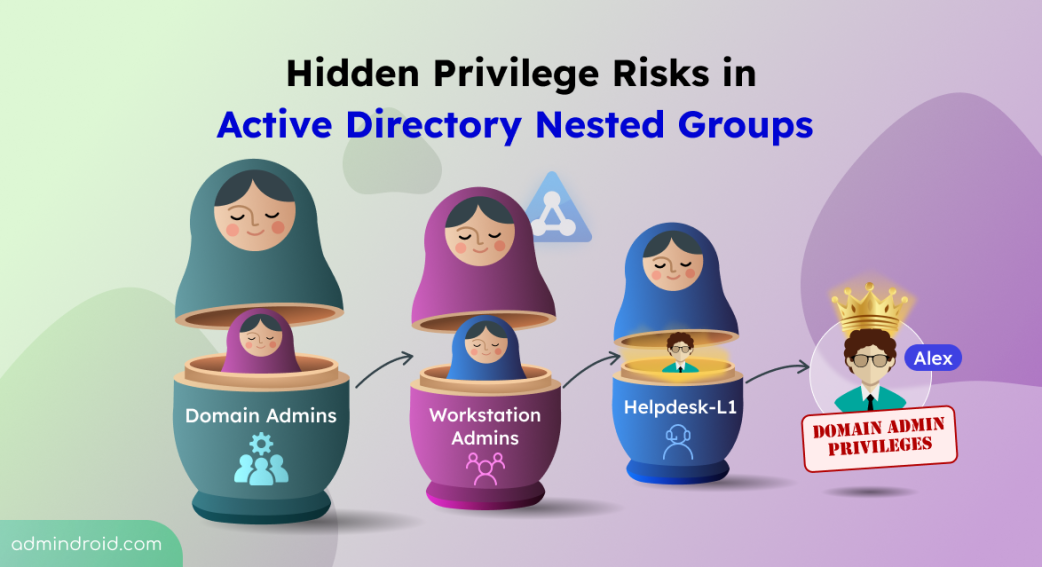
Like Russian nesting dolls, groups in Active Directory can sit inside other groups, subject to specific rules based on group type and scope. This practice is called group nesting and was primarily introduced to simplify access management.
Instead of assigning individual users to multiple network resources, admins can add users based on their roles in a group and nest those groups within resource-access groups. This makes it easier to grant or revoke access for multiple users.
When configured correctly, nesting a group in another group streamlines access management and makes permissions easier to maintain. However, the real security risk starts when AD group nesting stretches multiple layers deep.
An Example of Hidden Privileges Through Nested Groups in Active Directory
Consider a newly onboarded helpdesk technician, Alex. To provide standard support capabilities, an admin adds Alex directly to the Helpdesk-L1 group.
Months later, an operational change requires Helpdesk-L1 to manage workstation reboots. An admin nests Helpdesk-L1 inside Workstation-Admins.
However, Workstation-Admins was previously nested inside Domain Admins during a legacy troubleshooting session and was never removed.
The resulting membership chain can be illustrated as:
Alex >> Helpdesk-L1 >> Workstation-Admins >> Domain Admins.
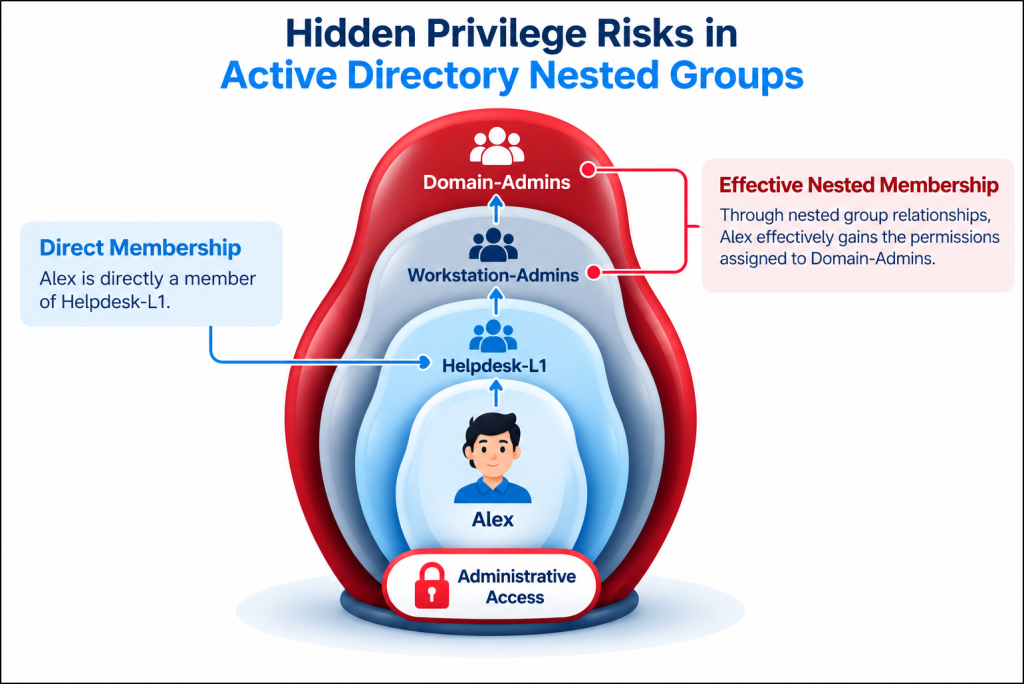
Alex was never directly added to Domain Admins. Yet, through this nested group membership chain, Alex indirectly gains membership in a highly privileged group, inheriting its administrative privileges. This could allow him to log on to domain controllers, modify Group Policy settings, manage domain user accounts, and more. This is how nested groups can hide privilege and introduce serious security risks across Active Directory.
Understanding how privileges flow through nested groups is one thing, but can you trace a hidden access path yourself?
Test your knowledge with today’s interactive brain teaser. Decode the clues, follow the nested group hierarchy, and uncover who inherits the hidden privileges! 🧩
👉 https://admindroid.com/cybersecurity-awareness-month-2026?play=14
Privilege Escalation Risks of Active Directory Nested Groups
Hidden access paths make nested groups attractive targets for attackers. If Alex’s credentials are stolen, an attacker may not need to create new permissions or add themselves directly to Domain Admins. Instead, they can exploit existing nested group memberships to inherit elevated privileges and escalate access undetected.
1. Exploiting Legacy Access Chains
Once attackers compromise a user or service account, they can exploit its nested group memberships. Depending on the inherited privileges, they may access sensitive resources, modify configurations, or move laterally across the domain.
By tracing these membership chains, attackers can identify accounts with indirect access to sensitive resources, even when those accounts lack direct membership in privileged groups. This allows them to exploit gaps between intended access policies and actual effective permissions to gain unauthorized access.
2. Evading Detection
Nested groups can complicate threat detection because risky permissions may sit several levels deep from the initially compromised account. Security analysts investigating an Active Directory user or endpoint in isolation may overlook the broader authorization path.
This visibility gap can give attackers more time to:
- Enumerate resources accessible through nested group memberships in Active Directory.
- Move laterally to high-value targets using existing permissions, potentially without triggering alerts designed to detect privilege changes.
3. Uncontrolled Privilege Persistence
When defenders attempt to remediate a compromised account or revoke suspicious access, they may remove direct group memberships or terminate obvious access assignments. However, if another nested membership path remains intact, attackers can retain their indirect privileges.
Attackers can exploit these overlooked access paths to maintain unauthorized access, even after admins or security analysts believe they have successfully remediated the issue. As a result, these attackers may retain access to sensitive resources despite completed access reviews or remediation efforts.
Other Security Risks of Group Nesting in Active Directory
Beyond privilege escalation, complex or improper group nesting can introduce several other security risks in Active Directory domains.
- Insider Risk and Privilege Abuse: Hidden or overly broad access paths can give users more privileges than their roles require. If users discover these excessive permissions, they may intentionally or unintentionally use them to access sensitive resources or make unauthorized changes.
- Broken Audit Visibility: Native Active Directory event logs track direct membership changes, but it does not generate audit events for inherited privileges gained through group nesting. This audit blind spot leads to permission sprawl, gaps in access reviews, and compliance failures.
- Circular Nesting: Circular relationships occur when groups contain one another, such as Group A containing Group B while Group B contains Group A. These configurations can complicate membership resolution and troubleshooting, potentially causing operational issues such as application crashes and script errors.
Common Causes of Hidden Privilege Risks in Active Directory Nested Groups
Active Directory groups are often nested to meet specific operational needs. However, these nested memberships may remain long after the original need disappears, creating hidden privilege paths. Common causes include:
- Unreverted Temporary Access: Helpdesk or support groups are nested into privileged groups for temporary troubleshooting. Unfortunately, these memberships are rarely removed once the work is done.
- Incomplete Cleanup After Migrations: During domain merges or migrations, admins frequently create nested group bridges to preserve user access across environments. Once the migration ends, these temporary relationships are often forgotten, leaving permanent, undocumented privilege paths behind.
- Unclear Group Ownership: Shared operational groups are nested within privileged groups without a clearly assigned owner to review and validate their continued access.
- Outdated Project Memberships: Temporary project groups are often nested into resource-access groups and forgotten when the project ends. This leaves transferred employees and service accounts with permanent indirect access.
Over time, these relationships can create privilege paths that are difficult to spot during a routine membership review.
How to Trace Nested Group Membership in Active Directory
Removing a user from a direct group may not eliminate excessive access if another nested membership path still grants the same privileges. Therefore, admins must trace every level of group nesting to identify and remove all unintended access paths.
Native tools such as Active Directory Users and Computers (ADUC) and Active Directory Administrative Center (ADAC) allow admins to view a user’s group memberships through the Member Of tab. However, they do not show how those memberships extend through multiple levels of nesting. Admins must open the listed groups and inspect their memberships to trace the full path. 😖
Instead of relying on tedious manual clicks, you can leverage PowerShell to instantly retrieve nested group memberships in Active Directory.
Identify Inherited Privileges Through Nested Group Memberships Using PowerShell
Ensure that the ActiveDirectory PowerShell module is installed and available on your system before running the command.
- Then, you can use the Get-ADGroupMember cmdlet with the -Recursive parameter, as shown below, to retrieve members across the nested group hierarchy.
|
1 |
Get-ADGroupMember -Identity "<GroupName>" -Recursive | Select-Object SamAccountName, ObjectClass, DistinguishedName |
Replace GroupName with the target privileged group name to retrieve its full recursive membership

However, this approach still has limitations:
- The recursive query identifies members that ultimately belong to the target group. It does not show the complete group-by-group path that leads a specific user to that group.
- For example, it may show that Alex is a member of Domain Admins without displaying the intermediate chain: Alex > Helpdesk-L1 > Workstation-Admins > Domain Admins.
- To trace indirect inheritance, admins must manually query each privileged group and correlate complex membership chains.
Doesn’t piecing together nested group data this way feel tedious? AdminDroid’s Active Directory nested group membership report maps inherited access in seconds. No scripts, no hopping between groups, and no manual piecing together. ⚡
Identifying hidden privilege paths is only half the battle. To avoid hidden privilege risks, you need proactive management strategies.
Best Practices to Mitigate Privilege Risks in Active Directory Nested Groups
Implement the following best practices to enforce clean group structures, reduce inheritance complexity, and keep your directory audit-ready.
- Limit Nesting in Privileged Groups: Avoid or limit nesting groups within highly privileged Active Directory security groups, such as Administrators, Domain Admins, Enterprise Admins, and Schema Admins. Regularly review their nested memberships and remove unauthorized nesting to prevent unintended privilege inheritance.
- Enforce Tiered Administration and Least Privilege: Apply tiered administration to separate accounts and resources into security tiers based on their sensitivity. This helps prevent lower-tier groups from nesting into highly privileged groups like Domain Admins.
- Audit Group-to-Group Membership Changes: Enable Active Directory auditing to track group membership additions, especially when one group is added to another. Pay particular attention to changes involving privileged groups. Investigate the following security events and trace the affected group’s nested memberships to identify potential privilege escalation paths.
- 4728: A member was added to a security-enabled global group.
- 4732: A member was added to a security-enabled local group.
- 4756: A member was added to a security-enabled universal group.
- Maintain Group Hygiene and Simplify Nesting: Detect and remove circular group memberships, simplify unnecessarily deep nesting structures, and review stale or empty groups. Assign accountable owners to security groups and remove obsolete memberships to prevent unmanaged privilege accumulation.
- Use Privilege Mapping and Attack-Path Analysis: Leverage free Active Directory management tools such as Adalanche and BloodHound to visualize nested group relationships. Use these insights to identify potential attack paths from low-privilege accounts to high-value targets. Remediate risky group memberships and excessive permissions to disrupt these paths.
In a nutshell, nested groups simplify access management, but poorly maintained relationships can create hidden privilege paths in Active Directory. Regularly reviewing nested memberships, auditing changes, and removing unnecessary access helps reduce these risks.
Have questions or insights to share? Drop them in the comments below. Thanks for reading!