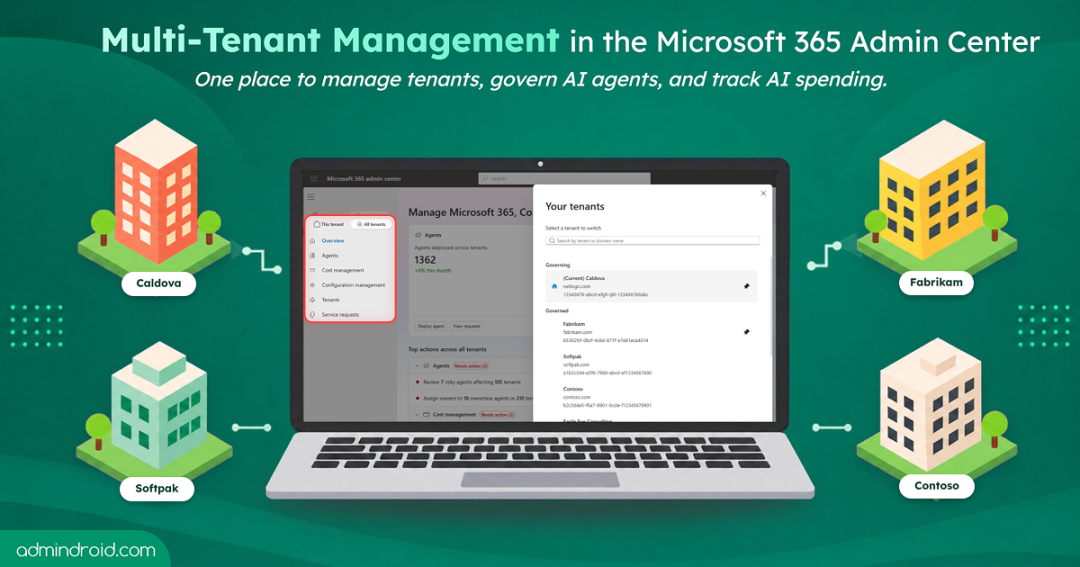
Admins managing more than one tenant know the routine. Sign out, sign in with a different account, find the setting, make the change, then repeat it all for the next tenant. Now add Copilot and AI agents to the mix, and the work doesn’t just grow; it multiplies.
To help with this, Microsoft expanded its multi-tenant management experience in the Microsoft 365 admin center as part of its Microsoft Ignite 2026 announcements. By adding cost and configuration management alongside the existing AI agent management, admins can now switch between tenants without signing out, manage agents, standardize configurations, and control AI spend.
In this blog, we’ll explore each of these capabilities, how they simplify multi-tenant administration, and what admins need to get started.
What is Multi-tenant Management in the Microsoft 365 Admin Center?
Multi-tenant management brings together a set of capabilities in the Microsoft 365 admin center that help authorized admins manage multiple connected tenants from one place. Instead of navigating between individual environments to perform administrative tasks, they can switch tenants, manage AI agents, maintain configuration baselines, and monitor AI spending through a centralized experience.
This experience is designed for two types of admins:
- Microsoft partners and MSPs: Organizations that manage Microsoft 365 environments for multiple customers and want to simplify administration across their customer portfolio.
- Enterprises: Organizations with multiple tenants across subsidiaries, regions, business units, or acquisitions that want centralized governance while allowing each business unit to retain its operational independence.
Although multi-tenant management brings connected tenants in one place, each tenant continues to operate independently with its own administrative boundaries. Partner access is managed through GDAP relationships in Partner Center, while enterprises establish governance relationships using Microsoft Entra Tenant Governance.
Along with delegated roles, these relationships determine which tenants admins can access and what actions they can perform.
Key Capabilities of Multi-tenant Management in M365 Admin Center
The multi-tenant management experience in Microsoft 365 gives admins a central place to manage various aspects across multiple environments. Let’s now explore each multi-tenant management capability in detail.
1. Simplify Tenant Administration with Centralized Switching in Microsoft 365
Availability: Generally Available
Admins managing multiple Microsoft 365 tenants often have to switch between different environments to perform routine tasks. Repeated sign-ins and navigating individual admin centers can make even simple administrative work time-consuming.
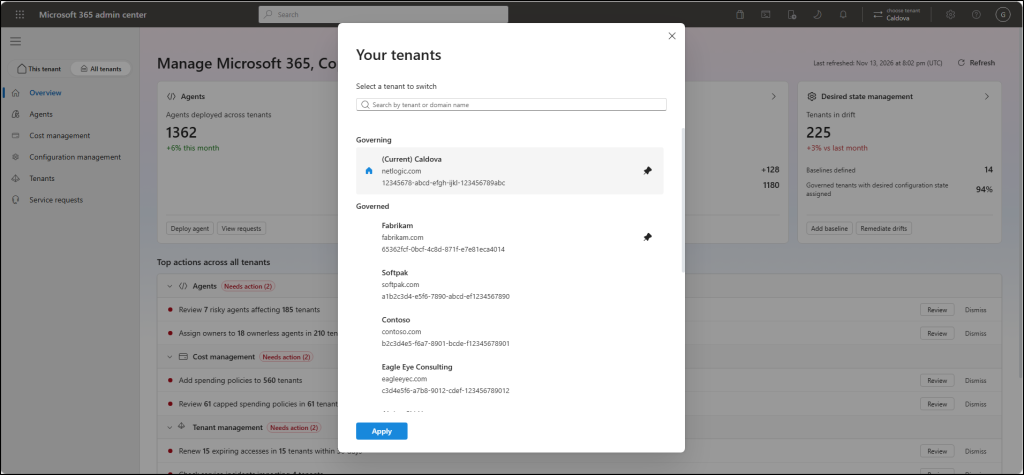
Microsoft’s new tenant-switching experience makes this easier. Admins can view and manage multiple connected Microsoft 365 tenants under All tenants. They can switch directly between them without signing out and signing back in or maintaining separate admin accounts in each tenant.
The experience provides:
- Consolidated tenant view: View the tenants connected to the governing tenant from one place.
- Tenant search: Quickly find a specific tenant instead of navigating through multiple environments.
- Direct tenant switching: Select a tenant to move into its administrative environment without repeating the sign-in process.
This makes navigating between customer or organizational tenants simpler while retaining the delegated access boundaries of each tenant.
2. Manage and Govern AI Agents Across Multiple Tenants
Availability: In Public Preview
As organizations adopt more Copilot and AI agents, admins need visibility into where agents are deployed, who can access them, and how they are governed. Microsoft Agent 365 helps admins manage and govern agents in a single tenant. However, for enterprises and partners managing multiple tenants, repeating these activities across individual tenants can add considerable administrative overhead.
Microsoft’s multi-tenant agent management capability brings agent inventory and governance into one centralized experience. Admins can view and manage supported agents across multiple tenants without handling each deployment separately.
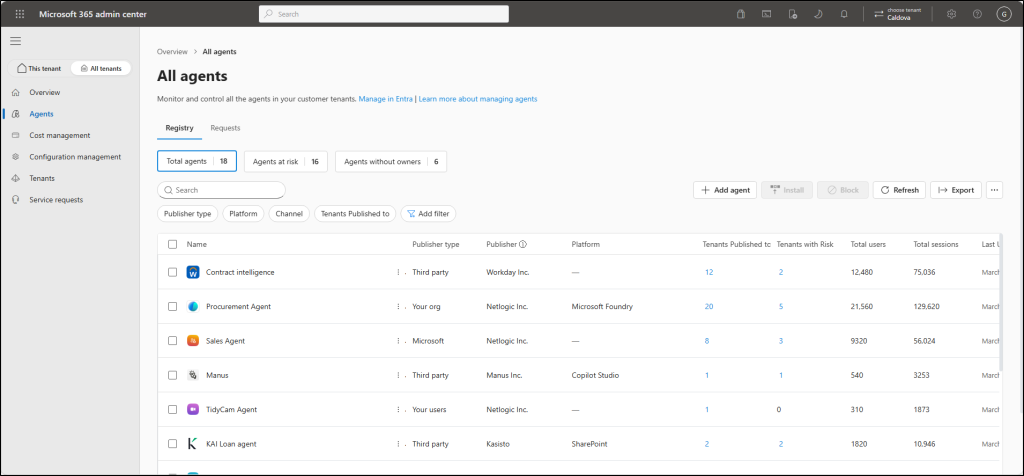
With multi-tenant agent management, admins can:
- View agent inventory: Get a consolidated view of agents across connected tenants, including agents that are at risk or have no assigned owners.
- Add agents: Add supported agents to the centralized inventory for management.
- Install agents: Deploy approved agents across all eligible tenants or selected tenants.
- Identify risky agents: Quickly spot agents flagged for security concerns and review their risk information.
- Find agents without owners: Identify agents that no longer have an assigned owner and require administrative attention.
- Manage agent permissions: Review and manage agent settings and permissions across supported tenant environments.
- Block agents: Block agents across selected tenants when they should no longer be available.
Admins can also open individual agent details to review information such as tenant deployments, users, data and tool access, security, permissions, certification, and activity.
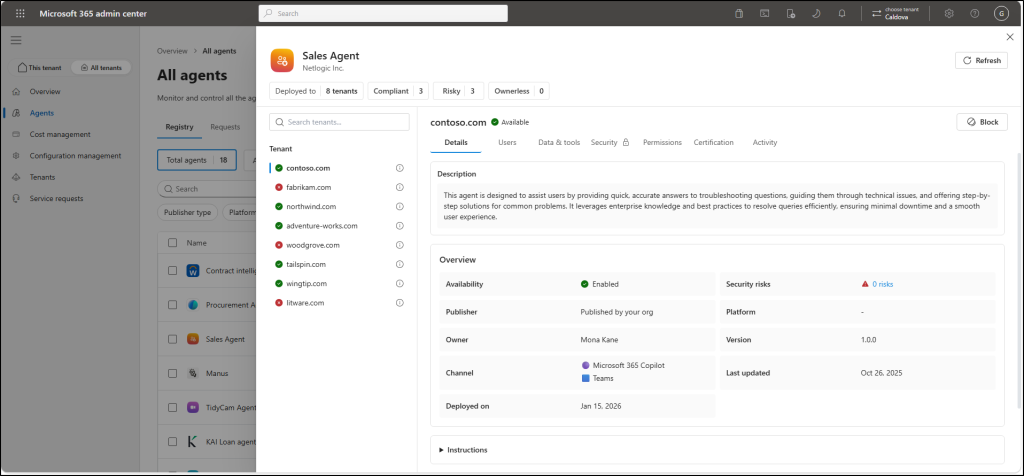
This helps IT teams maintain better visibility and control over agent deployments while reducing repetitive administration.
3. Maintain Configuration Consistency Across Tenants
Availability: In Public Preview
When different teams and admins manage individual Microsoft 365 tenants, configurations can gradually become inconsistent. A setting changed in one tenant might remain unchanged in another, making it difficult to maintain common security and operational standards.
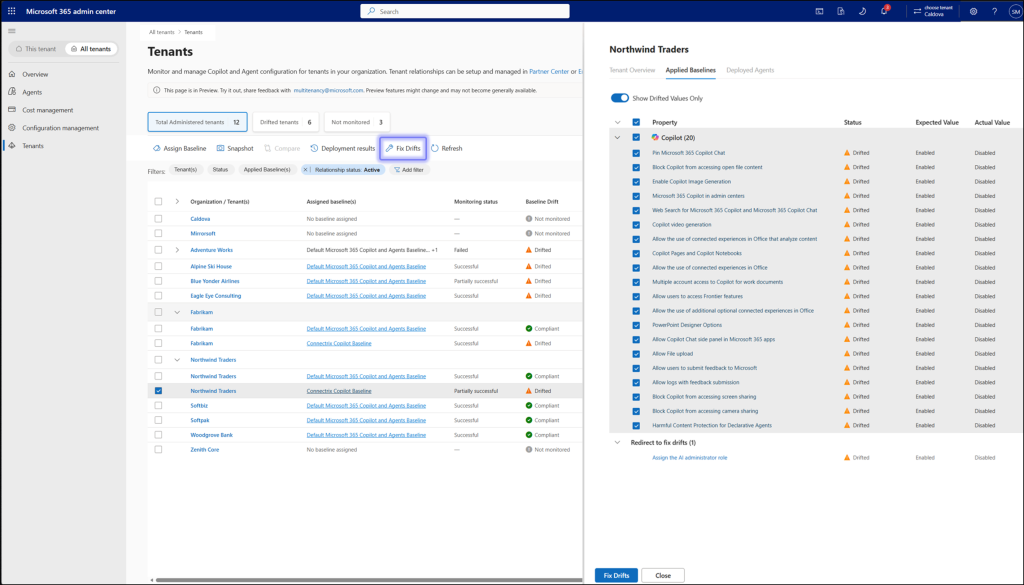
To address this, Microsoft introduces desired-state configuration management in the multi-tenant management experience. With this, admins can define configuration baselines and use them to monitor and maintain consistent settings across connected tenants.
- Create configuration baselines: Start with Microsoft-recommended baselines or define custom baselines using supported tenant-wide settings.
- Assign baselines: Apply a baseline to one or more tenants to establish their desired configuration.
- Monitor configuration drift: Identify settings that differ from the assigned baseline.
- Remediate deviations: Review detected differences and apply the baseline-defined values to bring configurations back into alignment.
This provides a systematic approach to configuration management instead of relying on periodic manual checks across individual environments.
4. Monitor and Control AI Spending Across Tenants
Availability: In Public Preview
With Copilot and AI agents becoming part of everyday business operations, keeping track of their consumption and controlling costs across multiple tenants is increasingly important. Each tenant has its own spending policies, limits, and alerts to manage. Setting up these controls individually and monitoring spending across dozens of tenants can quickly become an administrative burden.
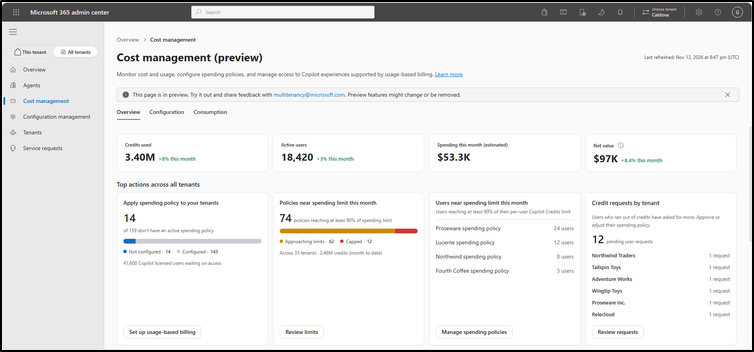
Microsoft’s multi-tenant AI cost management capability brings these activities together, giving admins a centralized view of AI consumption and spending controls across connected tenants. With this capability, admins can:
- View AI consumption: Get an overview of AI consumption across supported tenants.
- Review tenant-level usage: Drill down into individual tenants to understand their consumption.
- Create reusable spending templates: Define spending policies that can be reused across tenants.
- Apply spending policies: Use reusable templates to manage spending controls across selected tenants.
- Monitor spending limits: Review configured limits and consumption to identify potential cost concerns.
- Review credit requests: Access credit request information as part of AI spending oversight.
For partners, this means moving from fixing individual customer issues to proactive portfolio oversight.
Now that we’ve explored the four multi-tenant management capabilities, let’s look at how admins can access them in the Microsoft 365 admin center.
Prerequisites for Multi-Tenant Management in Microsoft 365
Before getting started with multi-tenant management, admins need to ensure that the following requirements are in place.
1. Establish the relationship between tenants
The relationship setup depends on whether you’re managing customer tenants or multiple tenants within your own organization.
- For enterprises: Establish a governance relationship between the governing and governed tenants using Microsoft Entra Tenant Governance.
- For Microsoft partners and MSPs: Establish a Granular Delegated Admin Privileges (GDAP) relationship with customer tenants through Partner Center.
The governing tenant must have an active supported relationship with at least one governed tenant.
2. Assign the required delegated administrative permissions
Establishing a tenant relationship does not automatically give every admin access to all management capabilities. You must assign the appropriate roles and permissions for the tasks they need to perform.
The roles required depend on the multi-tenant capability being used:
| Capability | Required role or permission |
| Tenant switching | A delegated admin role in each tenant you want to switch to. |
| AI agent management | AI Administrator or Global Administrator to view and manage agents; Global Reader for view-only access |
| Configuration management | The delegated administrative rights to the governed tenant and fine-grained permissions required for the settings included in the baseline. |
| AI cost management | Varies by task: AI Administrator or Billing Administrator to manage policies, Billing Administrator or Global Administrator for billing setup, AI Reader, Global Reader, or AI Admin to view usage and reports. |
3. Meet additional feature requirements
In addition to tenant relationships and delegated administrative permissions, some capabilities have their own licensing and configuration requirements.
- AI agent management: Viewing and managing the agent inventory doesn’t require an additional license. However, admins need a Microsoft Agent 365 license assigned to their account to view agent risk and activity information.
- Configuration management: The admin must have the specific workload permissions required to deploy, monitor, and remediate the settings included in a baseline. These permissions depend on the workloads and settings selected.
- AI cost management: Each governed tenant must meet the licensing, service, discovery, and billing requirements for the Copilot experiences it uses. Administrators who manage billing methods must also have access to an eligible Azure subscription and billing account for the governed tenant.
How to Access Multi-Tenant Management in the Microsoft 365 Admin Center
Once the required tenant relationships and delegated permissions are configured, admins can access multi-tenant management using the steps below.
- Sign in to the Microsoft 365 admin center with the governing tenant admin account.
- In the left navigation pane, select All tenants.
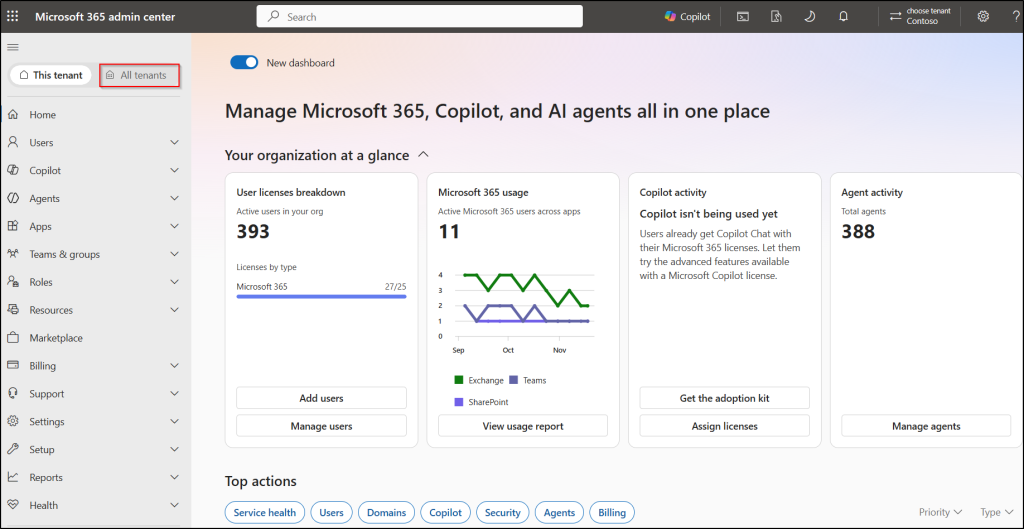
The All tenants page provides a consolidated view of the connected tenants. Administrators can search for a tenant, select it, and navigate to the available management experiences. From here, they can access supported capabilities such as AI agent management and configuration management, as well as switch between tenants without signing in and out of separate accounts.
Final Thoughts
Multi-tenant management shifts tenant administration from “repeat it everywhere” to “decide once, apply broadly.” Bringing tenant administration, AI agent governance, configuration management, and AI spending into one experience also gives admins a more centralized way to oversee their growing Microsoft 365 environments.
With three of the four capabilities currently in public preview, some functionality and requirements may change before general availability. If you’re planning to try them, start by reviewing your tenant relationships and delegated permissions, then evaluate the preview capabilities in a controlled set of tenants.
We hope this blog gives you a clear understanding of the new multi-tenant management capabilities in the Microsoft 365 admin center. Have questions or something to add? Share them in the comments. We’d be happy to help you!