AI agents are rapidly becoming core to enterprise workflows, accessing sensitive data, running code, and executing tasks across organizational resources. However, even a trusted agent can become a security risk in seconds if its identity or activity is compromised or manipulated.
This highlights a growing challenge in identity protection. While identity risk signals focus on compromised identities, risks can also arise during agent execution. This makes understanding and managing agent session risk increasingly important.
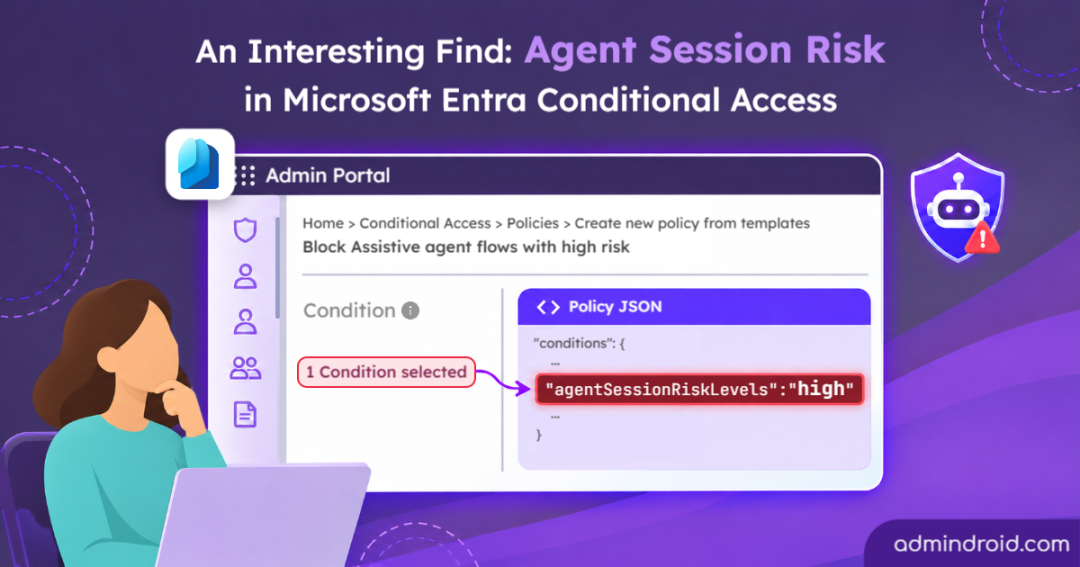
While examining Microsoft Entra Conditional Access policy templates and their raw JSON payloads, I uncovered an undocumented parameter: agentSessionRiskLevels. Although Microsoft hasn’t officially documented this property or explained what signals determine an agent session’s risk level, its presence suggests that Entra is extending risk-based access controls to agent sessions.
Agent Session Risk in Microsoft Entra Conditional Access
While exploring Conditional Access capabilities for AI agents, a specific built-in template caught my attention: Block Assistive Agent Flows with High Risk.
Interestingly, the policy summary didn’t explicitly display any AI agent-related conditions. However, it indicated 1 condition configured. When I inspected the available condition pickers, none of the visible conditions appeared to be selected.
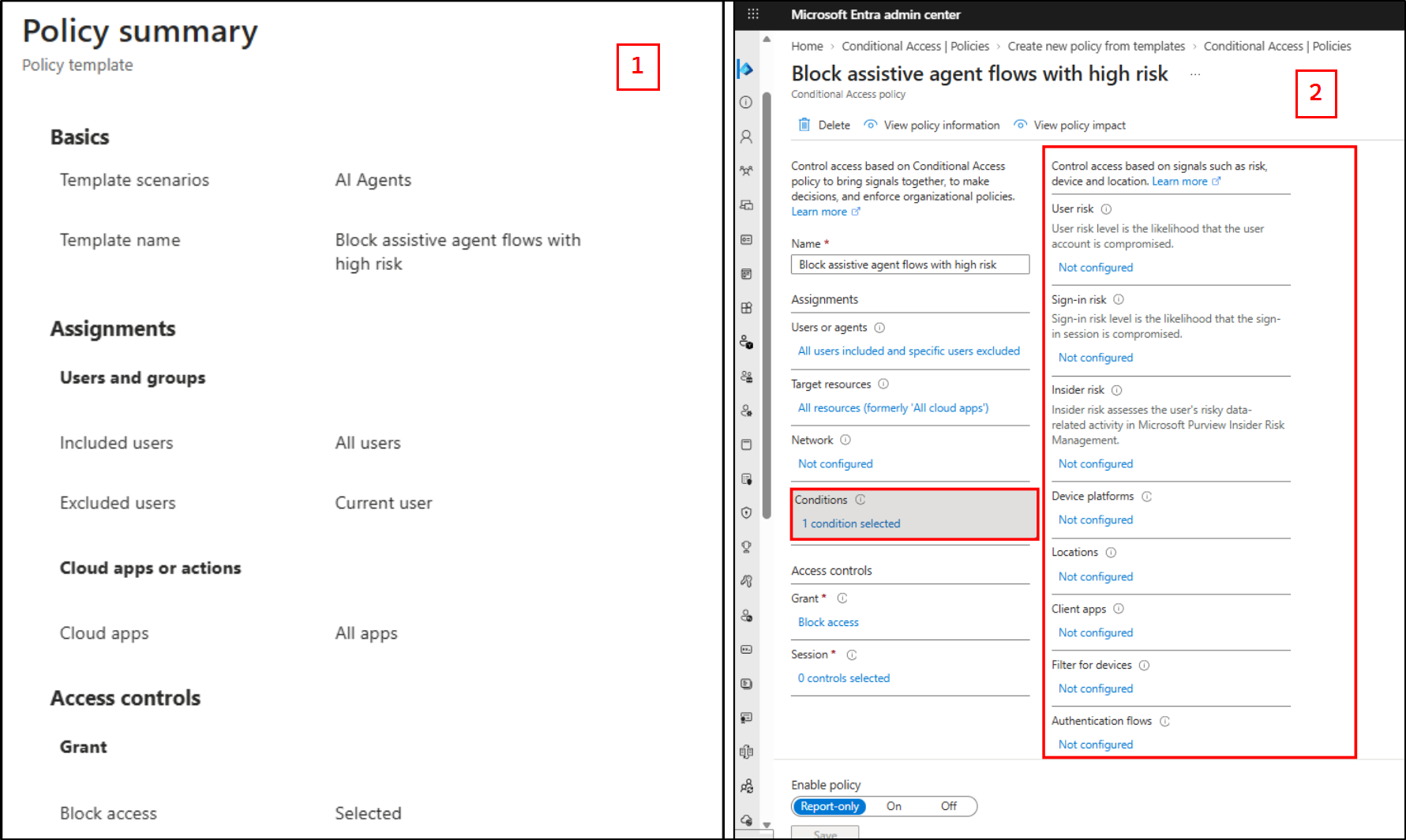
This raised a question: What condition had Microsoft actually configured in this template?
To investigate further, I exported the policy configuration and inspected its raw JSON payload. That’s when I discovered the undocumented parameters that weren’t exposed through the Entra admin center UI:
| “conditions”:{“userRiskLevels”:[],”signInRiskLevels”:[],”clientAppTypes”:[“all”],“agentSessionRiskLevels”:”high”,”platforms”:null,”locations”:null,”times”:null,”deviceStates”:null,”devices”:null, “agentContext”:{“includeAgentContexts”:[“allAgentAssistedFlows”],”excludeAgentContexts”:[]}},”grantControls”:{“operator”:”OR”,”builtInControls”:[“block”], |
These properties reveal two important aspects of the policy configuration. The agentSessionRiskLevels property specifies High as the targeted session risk level, while agentContext defines the scope of the policy by including all agent-assisted flows.
Importantly, this configuration targets agent acting on behalf of a user (OBO) scenarios, where an AI agent performs actions using the user’s delegated permissions. It should not be confused with policies targeting autonomous agent identities or standalone agent user accounts. These represent different agent access patterns and require their respective Conditional Access configurations.
This discovery highlights three important aspects of agent security:
- Underlying policy schema: The exported configuration contains properties for agent session risk and agent context scoping, even though corresponding granular controls aren’t exposed in the Entra admin center UI.
- Flexible risk thresholds: Administrators can target different Agent Session Risk levels, including Low, Medium, and High, based on their organization’s security requirements.
- Access pattern specificity: The allAgentAssistedFlows value scopes the policy to agent-assisted executions rather than all AI agent authentication scenarios.
This is where Agent Session Risk adds another layer of protection. It allows Conditional Access to evaluate the risk of individual agent-assisted sessions instead of treating all activity associated with a user equally. If a session is identified as high risk, a configured policy could block the agent’s request without necessarily blocking the user’s own access. This could help users continue their work while restricting risky agent-assisted activity.
Create a Conditional Access Policy Targeting Agent Session Risk in Entra
As discussed earlier, Agent Session Risk is not exposed as a selectable condition in the Conditional Access policy editor. Therefore, the policy can be created using Microsoft’s built-in template or by configuring the policy through Microsoft Graph PowerShell.
Here’s how to create the CA policy using the Microsoft Entra admin center:
- Navigate to Microsoft Entra admin center → Entra ID → Conditional Access → Create new policy from templates.
- Search for and select Block assistive agent flows with high risk.
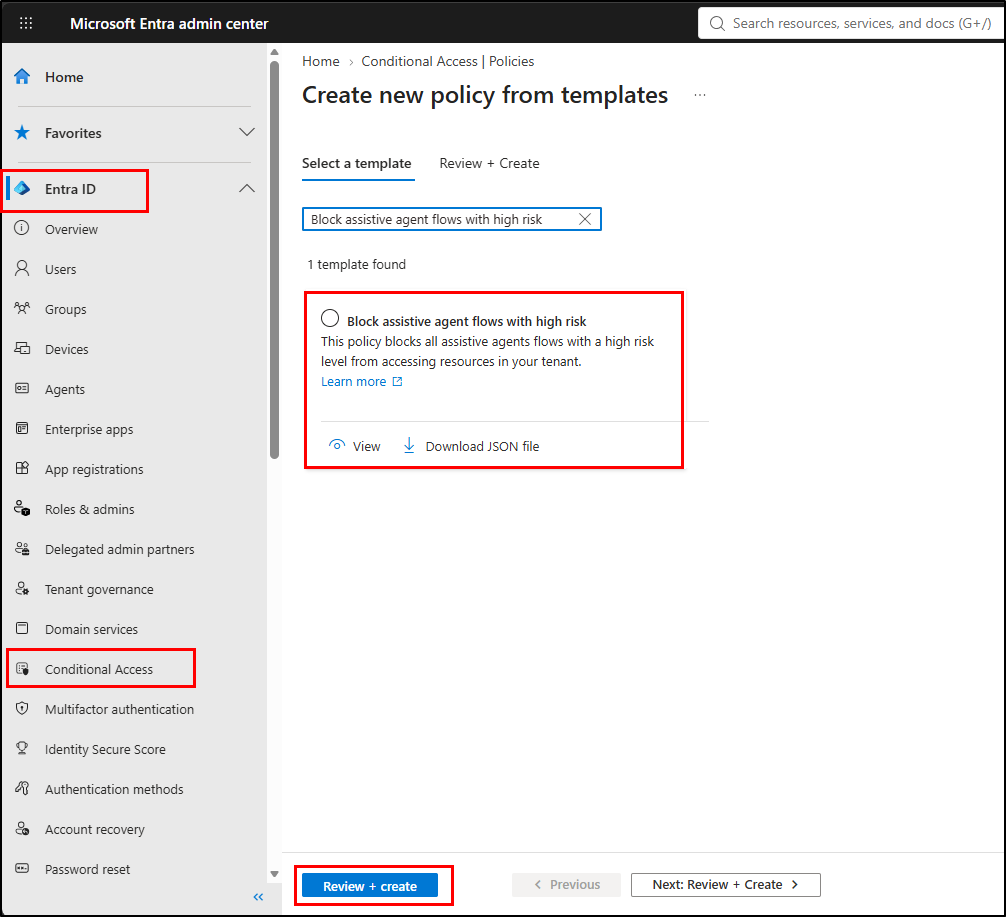
- Click Review + create to review the policy configuration.
- Set the policy to Report-only mode and create it. Once validated, switch it to On mode to block high-risk agent sessions.
Optional: After creating the policy, export its JSON configuration to verify that it includes agentSessionRiskLevels: “high” and the allAgentAssistedFlows scope.
Create a Custom Agent Session Risk Policy Using Microsoft Graph PowerShell
The built-in Block assistive agent flows with high risk template targets only high-risk sessions. However, what if you want to apply the policy to medium-risk agent sessions too?
This is where Microsoft Graph PowerShell comes in handy. It allows you to define the policy configuration programmatically, including the agent session risk levels and the agent-assisted flow scope, rather than relying on the fixed settings in the built-in template.
The following PowerShell snippet creates a Conditional Access policy targeting Medium agent session risk and configures it in Report-only mode.
Before running the script, connect to Microsoft Graph PowerShell with the required permissions.
|
1 2 3 4 5 6 7 8 9 10 11 12 13 14 15 16 17 18 19 20 21 22 23 24 25 26 27 28 29 30 31 32 33 34 35 36 37 38 39 40 41 42 43 44 45 46 47 48 49 50 51 52 53 54 55 56 |
# Connect to Microsoft Graph Connect-MgGraph -Scopes "Policy.Read.All", "Policy.ReadWrite.ConditionalAccess" # Define the Conditional Access policy $params = @{ displayName = "Report-only - Block Medium Risk Agent Sessions" state = "enabledForReportingButNotEnforced" conditions = @{ clientAppTypes = @("all") # Target medium-risk agent sessions agentSessionRiskLevels = "medium" # Target all agent-assisted flows agentContext = @{ includeAgentContexts = @("allAgentAssistedFlows") excludeAgentContexts = @() } # Target all users users = @{ includeUsers = @("All") excludeUsers = @() includeGroups = @() excludeGroups = @() includeRoles = @() excludeRoles = @() } # Target all cloud applications applications = @{ includeApplications = @("All") excludeApplications = @() } } # Block access when the policy is evaluated grantControls = @{ operator = "OR" builtInControls = @("block") } } # Create the Conditional Access policy using Microsoft Graph beta $policy = Invoke-MgGraphRequest ` -Method POST ` -Uri "https://graph.microsoft.com/beta/identity/conditionalAccess/policies" ` -Body ($params | ConvertTo-Json -Depth 20) ` -ContentType "application/json" # Display the created policy details Write-Host "Policy created successfully!" -ForegroundColor Green Write-Host "Policy Name: $($policy.displayName)" Write-Host "Policy ID: $($policy.id)" Write-Host "Policy State: $($policy.state)" |
The policy was successfully created using Microsoft Graph beta with the specified agent session risk level and agent-assisted flow scope.
During our hands-on testing, the Agent Session Risk condition was not triggered in the scenarios we evaluated, including sessions where malicious instructions were introduced. As Microsoft has yet to document the specific signals used to determine agent session risk, it will be interesting to see how this condition evaluates different agent-assisted scenarios.
Final Thoughts
While Microsoft Entra already provides risk-based protection for agent identities and agent user accounts, these measures alone may not address risks that emerge when agents act on behalf of users. Agent Session Risk Levels condition appears to be a step toward closing this gap by bringing session-level risk into Conditional Access decisions for agent-assisted flows.
Until Microsoft documents it, testing it in your tenant is the best way to stay ahead. Have you tried deploying this policy? If you spot anything interesting or unexpected, drop your findings in the comments below so we can explore them together!