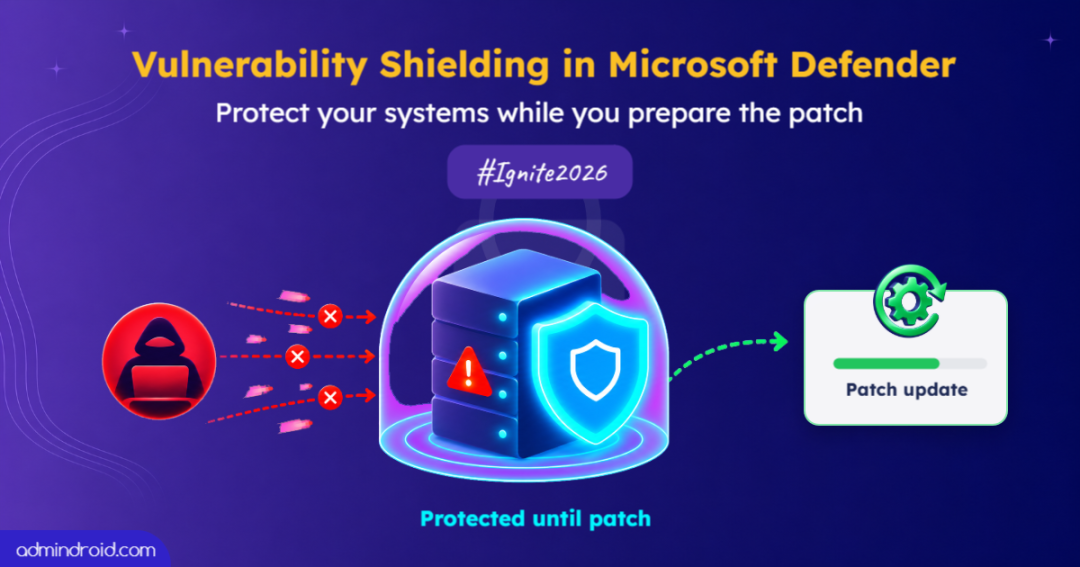
When a vulnerability is discovered, organizations cannot always deploy a patch immediately. They first need to test updates and ensure they are compatible with existing systems. This process takes time, leaving a window for attackers to exploit unpatched systems.
In fact, Microsoft reports that 38% of critical Patch Tuesday exposures remain unpatched for more than five days. ⚠️
At Ignite 2026, Microsoft introduced Vulnerability Shielding in Microsoft Defender to help organizations protect vulnerable systems during this waiting period. Let’s understand how Vulnerability Shielding works and how it helps organizations stay protected while patching is underway.
What is Vulnerability Shielding in Microsoft Defender?
Vulnerability Shielding is a new Microsoft Defender capability, currently available in public preview. It applies temporary security controls to protect vulnerable systems while organizations prepare to deploy the required patches.
Rather than applying broad restrictions that could disrupt business operations, Vulnerability Shielding uses AI-driven threat intelligence and environment context to target specific attack paths.
Vulnerability Shielding provides protection in two scenarios:
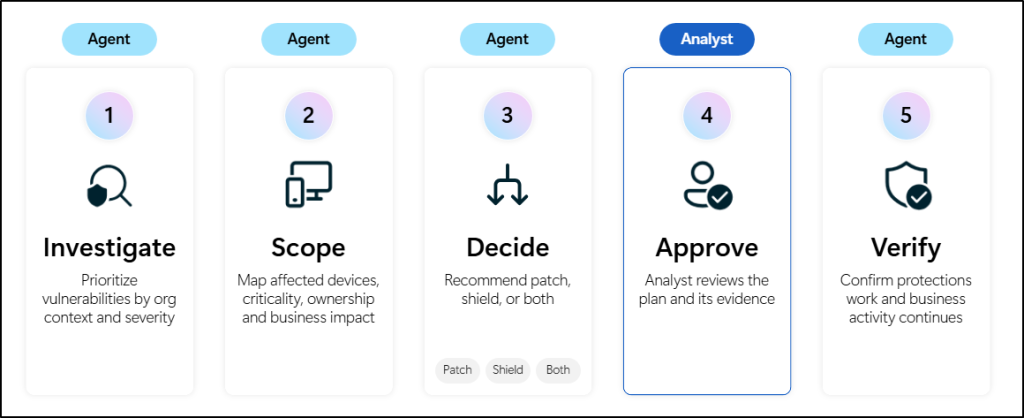
- Proactive protection: Microsoft Defender provides proactive protection using the Risk Reduction Agent in Microsoft Perception. It identifies vulnerabilities and recommends shielding plans for administrators to review and approve.
- Protection during active attacks: For ongoing attacks, Microsoft Defender uses Attack Disruption to automatically apply shielding controls. These controls help stop attackers from exploiting additional paths.
These protections are temporary and reversible. Once the permanent patch is deployed, the shields retire automatically.
Let’s take a closer look at how Microsoft Defender applies these protections in both scenarios.
Proactively Reduce Exposure with the Risk Reduction Agent
Vulnerability Shielding supports proactive protection through green agents in Microsoft Perception. One of these agents, the Risk Reduction Agent, uses the Reduce exposure risk playbook to identify and prioritize vulnerabilities.
The agent evaluates vulnerabilities based on factors such as exploitability, asset criticality, attack paths, patch readiness, and business impact. Based on this assessment, it recommends suitable actions to reduce exposure.
The recommended actions depend on whether a patch is available:
- When a patch is available: The agent can coordinate patching through Microsoft Intune, while IT teams retain control over deployment.
- When patching is delayed: The agent can recommend Vulnerability Shielding to provide temporary protection until the patch can be deployed.
During the public preview, the Risk Reduction Agent will support vulnerability shielding for server-side remote code execution (RCE) vulnerabilities.
How Vulnerability Shielding Works During an Active Attack
Microsoft Defender protects against ongoing attacks through Attack Disruption. It uses AI-powered analysis and threat intelligence to identify attacker activity and automatically take action to contain the threat. This helps stop attackers from moving further through the organization’s environment.
Vulnerability Shielding extends Attack Disruption by applying targeted controls to vulnerable systems and blocking additional attack paths.
Microsoft Defender uses the following enforcement controls to apply these protections:
- Reducing network reachability: Limits the network connections attackers can use to reach vulnerable systems.
- Restricting access paths: Blocks potential routes that attackers could use to move through the environment.
- Tightening permissions: Limits unnecessary access to reduce opportunities for further exploitation.
🛡️Vulnerability Shielding in a Real-World Scenario :
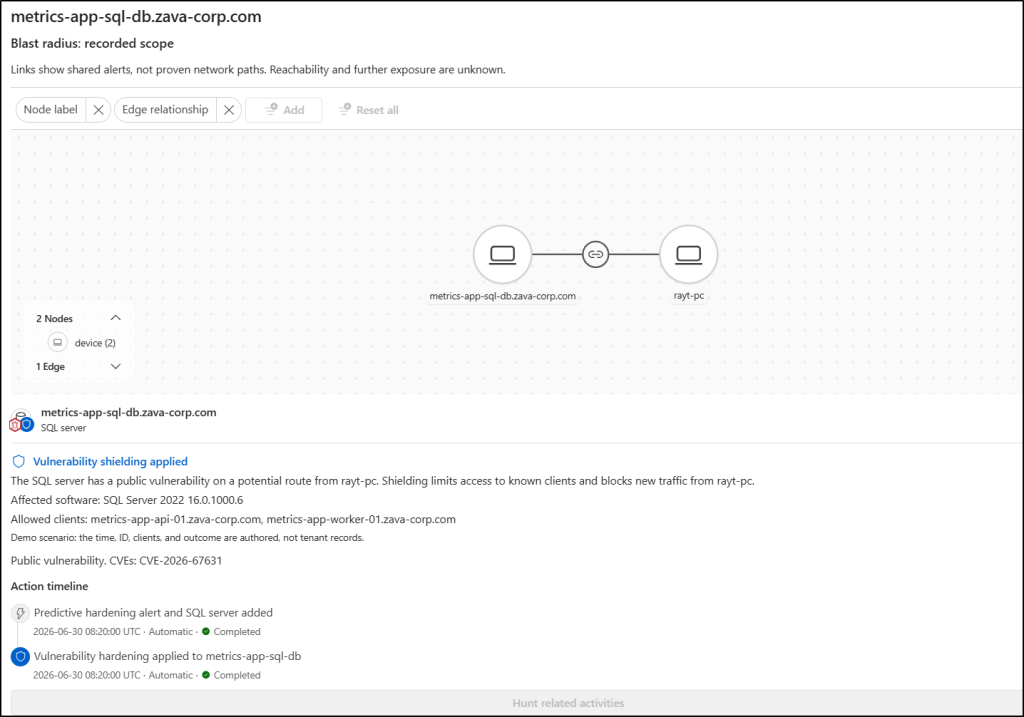
Consider an organization with a SQL Server affected by a known vulnerability. An attacker exploits it to access the server and attempts to move to other systems in the network.
With Vulnerability Shielding, Microsoft Defender can restrict network connections and access to the affected server. These controls help block suspicious activity while allowing legitimate business traffic to continue.
As we can see in the image below, these restrictions prevent attackers from accessing other systems without disrupting normal business operations.
Manage Vulnerability Shielding in Microsoft Defender
Although Vulnerability Shielding automates protection, administrators retain control over how shields are applied and managed. Microsoft provides the following management options:
- View active shields: Review each active shield, the vulnerability it covers, the devices it affects, and the reason it was applied.
- Configure exclusions: Exclude specific devices or applications through Microsoft Intune.
- Roll back protection: Remove an applied shield with one click when needed.
- Turn off shielding: Disable the capability if the organization does not want to use it.
- Extend protection: Apply shielding to vulnerabilities beyond published CVEs, including those affecting in-house applications, legacy builds, or AI-written code.
Final Thoughts
Patching remains the permanent solution to vulnerabilities, but organizations cannot always deploy fixes immediately. Vulnerability Shielding in Microsoft Defender helps bridge this gap by applying targeted protections before or during an attack.
By combining AI-driven threat intelligence, environment context, and native security controls, Microsoft helps organizations limit attack paths while giving IT teams the time they need to deploy patches safely.
Thanks for reading!