Keeping up with Microsoft 365 updates isn’t easy. With constant feature rollouts, important changes can easily get lost in the noise. Because of this, there’s always been a need for better control over release updates, especially as features roll out faster than review cycles. Finally, Microsoft is tackling this with a modernized change management model for Microsoft 365 tenants.
It changes three things: how your tenant receives updates, how Message Center posts are structured, and how you can query release information using AI tools.
In this blog, we’ll take a quick look at what this modern change management model offers and how to configure it without disrupting your existing release setup.
Inside Microsoft 365 Change Management
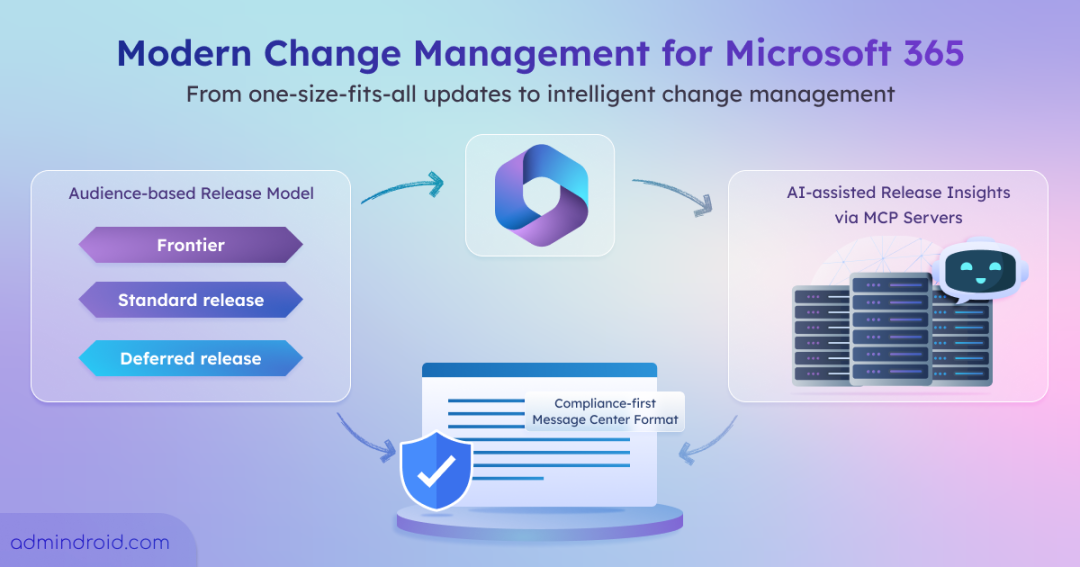
Microsoft’s modernized change management model introduces more structured control over how updates are delivered. It brings three major improvements:
- Audience-based release model
- Compliance-first Message Center format
- AI-assisted release insights via MCP servers
As of now, this model applies only to Microsoft 365 Copilot features. This means not all updates can be controlled using the new model yet—only specific Copilot-related changes will follow these settings. However, this approach is expected to expand to other Microsoft 365 services over time as the model matures.
The rollout will begin in late April 2026, and Copilot features will start following your settings from late May 2026.
Now, let’s take a closer look at each of these change management improvements.
1. The Three Release Audiences: Frontier, Standard, Deferred
Instead of the binary “Standard or Targeted” choice you’re used to, you can now place your tenant on one of three release tracks:
| Release audience | Purpose | Timing | Feature readiness |
| Frontier | Early experimentation and feedback | Pre-GA | Pre-release, not governed by GA SLA |
| Standard (default) | Default GA rollout | At general availability | Fully supported GA |
| Deferred | Delayed GA for additional preparation | 30 days after standard GA | Fully supported GA (delayed) |
- Frontier isn’t configured like the others. It’s a separate program you need to enroll in, not something you set through release preferences.
- Standard is the default, and most of your tenant will stay on it without any changes.
- Deferred is the one to watch. It holds eligible major features for 30 days after GA, giving your compliance or security teams time to review before anything reaches users.
Note: If you run a GCC, GCC High, or DoD tenant, Standard and Deferred channels won’t appear in your admin center. In these environments, you’ll continue using Targeted Release.
Modern Release and Targeted Release: How Both Work Together
Targeted Release lets admins preview upcoming Microsoft 365 changes with a selected group of users before they roll out organization-wide. If you’re already using Targeted Release to preview Outlook or SharePoint updates with a power-user group, there’s no need to change anything. The new Modern Release audiences don’t replace Targeted Release – they work alongside it.
Each release model controls different types of updates:
| Release Model | Controls | Admin Center Path |
| Modern Release (Standard / Deferred) | Copilot features that support deferred rollout | Copilot → Settings → Copilot release preferences |
| Targeted Release | Outlook, OneDrive, SharePoint, Teams, Microsoft 365 admin center, Microsoft 365 for the web | Settings → Org Settings → Release preferences |
Microsoft calls the combined setup a “converged release strategy.” You’re maintaining both: Targeted Release for non-Copilot services, Standard or Deferred for Copilot on top.
How to Configure Release Preferences in the Microsoft 365 Admin Center
To configure release audiences, make sure you’re assigned to one of these roles: Office Apps Admin, Security Admin, or AI Admin. Then follow these steps:
- Sign in to the Microsoft 365 admin center
- Navigate to Copilot → Settings → Copilot release preferences (General Availability)
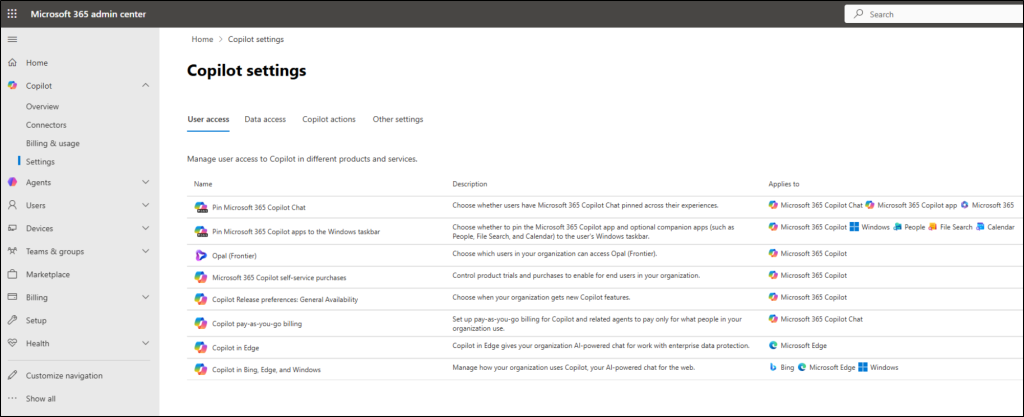
3. Choose Standard Release or Deferred Release as your tenant default
4. Add user exceptions (up to 100 users per channel) if certain users need the opposite setting
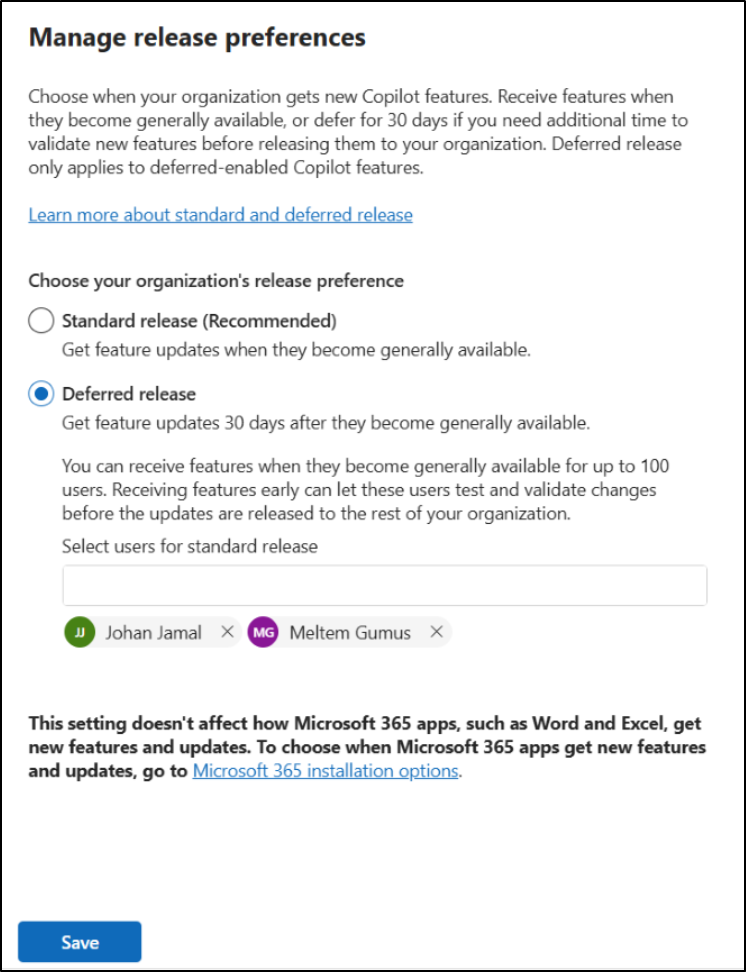
5. Click Save to apply the configuration
6. Allow up to 24 hours for the changes to propagate before validating
Important: Moving users from Standard to Deferred may temporarily remove access to features not yet available in Deferred, so notify users in advance and reserve Deferred primarily for those who haven’t received the feature yet.
2. The Redesigned Microsoft 365 Message Center
Microsoft 365 Message Center now features a redesigned layout to improve how admins review and manage upcoming changes:
- Message Center posts now use a structured layout, with Impact, Required action, and Compliance considerations shown at the top
- The 30-day advance notification posts for major changes are removed and replaced with this new format
- Look for the “Deferred-capable” flag in each post to identify features that respect Deferred release settings
- If the flag is missing, the feature will roll out at General Availability (GA) regardless of your configuration
- For organizations with compliance review workflows, the Deferred-capable flag signals when to begin review
3. AI-assisted Release Insights via MCP Servers
Modern change management introduces two new AI-assisted MCP server experiences to help admins track Microsoft 365 and Azure updates more efficiently. They allow you to query the Microsoft 365 Roadmap and Azure Updates directly from your editor using clients like Claude Code, VS Code, GitHub Copilot CLI, Claude Desktop, Cursor, or Codex.
Microsoft Release Communications (MRC) MCP Server :
The Microsoft Release Communications (MRC) MCP Server is free, public, and does not require authentication.
It provides four key tools:
- get_recent_roadmaps
- get_roadmap_by_id
- get_recent_azure_updates
- get_azure_update_by_id
Setup (Claude Code):
|
1 |
claude mcp add --transport http mrc-mcp https://www.microsoft.com/releasecommunications/mcp |
Once connected, you can ask queries like:
- “Which Outlook features on the M365 Roadmap were updated last week?”
- “List all Azure retirements scheduled for this year.”
Limitation: This server only exposes public Roadmap and Azure Updates data.
Microsoft MCP Server for Enterprise
For tenant-specific insights like Message Center posts and Service Health Dashboard data, you need the Microsoft MCP Server for Enterprise.
Unlike the public MRC server, this solution:
- Requires organizational access and authentication
- Works with your tenant’s internal Microsoft 365 data
- Covers Message Center and Service Health monitoring scenarios
This is a separate product designed for enterprise-grade change tracking and operational monitoring, beyond public roadmap visibility.
Best Practices for Microsoft 365 Change Management
- Align all Microsoft 365 changes with a structured change management process, including assessment, communication, rollout, and post-deployment review.
- Use release audiences (Standard, Deferred, Targeted) strategically to balance early adoption with organizational readiness.
- Review Message Center and Service Health updates regularly to stay ahead of upcoming changes and disruptions.
- Prioritize changes based on user impact, compliance requirements, and business criticality, not just feature availability.
- Use automation and AI-assisted tools (like MCP servers) to improve visibility into roadmap and release updates.
We hope this blog has helped you understand what the new modern change management approach in Microsoft 365 offers. Thanks for reading. For more queries, feel free to reach out to us through the comments section.