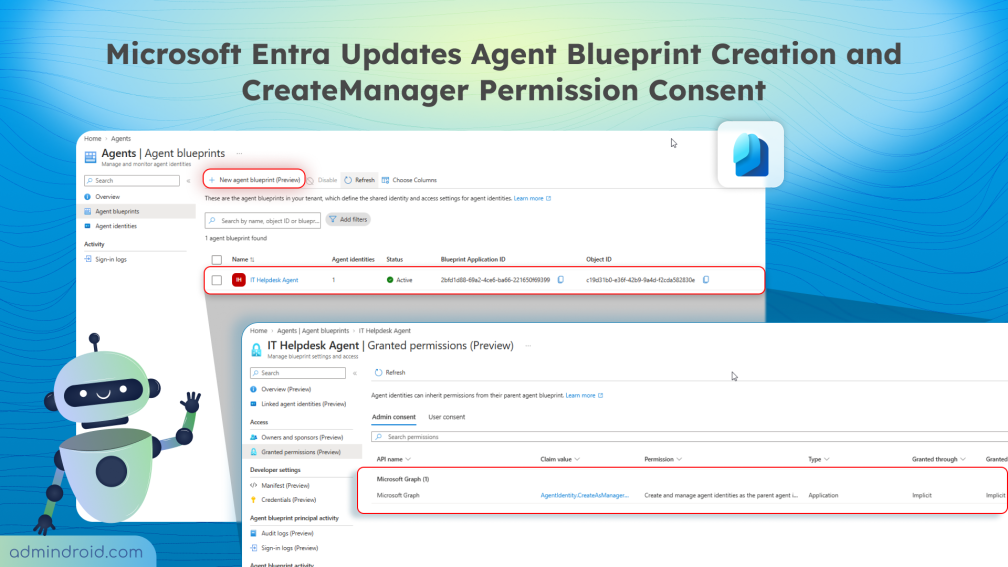
Deploying multiple AI agents shouldn’t mean configuring every identity from scratch. Microsoft Entra Agent Identity Blueprints provide reusable templates to create and manage identities for AI agents handling tasks like password resets, software access, and support tickets.
Until now, creating these agent identity blueprints required appropriate administrative roles, while the permission for blueprints to create agent identities was granted automatically behind the scenes.
Starting this November, Microsoft Entra introduces key changes to agent identity blueprints, affecting blueprint creation and permission governance. Without further delay, let’s explore what these Microsoft Entra updates mean for your tenant and how to manage them effectively.
What’s Changing in Agent Identity Blueprints in Microsoft Entra
To support growing AI workloads while maintaining tenant security, Microsoft Entra is introducing two major changes to Agent Identity Blueprints:
Rollout timeline: The worldwide rollout begins on November 4, 2026, and is expected to complete by late November 2026. Until the rollout begins, administrators can configure their tenant settings in advance to prepare for these changes.
1. Default Users Can Now Create Entra Agent Blueprint Identities
Currently, creating an agent identity blueprint in Microsoft Entra required specific administrative roles, such as the Agent ID Developer or Agent ID Administrator. However, as per MC1506733, Microsoft Entra is expanding blueprint creation access to default users and introducing a new setting for administrators to control it.
With this change, standard users without a built-in or custom admin role can create agent identity blueprints. This capability is enabled by default unless an administrator explicitly opts out or disables the setting.
What Does This Change Affect?
This update applies only to the creation of new agent identity blueprints by default users. It does not:
- Modify or remove existing agent identity blueprints.
- Change the permissions required to create agent identities from existing blueprints.
- Prevent applications or agents from creating identities.
- Change the licensing or Azure subscription requirements of platforms such as Microsoft Foundry and Security Copilot.
While allowing users to create their own agents offers greater flexibility, blueprint creation should remain under the oversight of teams responsible for AI governance. Administrators can therefore disable this capability if it does not align with their organization’s governance policies.
How to Restrict Agent Identity Blueprint Creation for Default Users
To prevent default users from creating new agent identity blueprints, administrators can disable this setting in Microsoft Entra.
- Sign in to the Microsoft Entra admin center.
- Navigate to Entra ID > Users > User settings.
- Under Default user role permissions, locate Users can create agent blueprints.
- Set the toggle to No and save the change.
When this setting is disabled, default users cannot create new agent identity blueprints. Users with the appropriate administrative permissions, such as the Agent ID Developer role, can continue to create them.
Note: This setting is independent of Users can register applications. Administrators should review both settings separately to manage default users’ permissions in Microsoft 365.
2. Admin Consent Now Required for AgentIdentity.CreateManager Permission
Along with expanding blueprint creation, Microsoft Entra is tightening the identity governance model by changing how critical agent permissions are granted.
Currently, when an agent identity blueprint is created, the AgentIdentity.CreateManager permission is automatically granted to its service principal without admin approval. This permission allows the blueprint to create, configure, and manage child agent identities without requiring a signed-in user.
Under this new update, Entra is removing the automatic grant. Administrators must explicitly grant the Microsoft Graph application permission AgentIdentity.CreateAsManager to agent identities that need to create child identities without a signed-in user.
What Administrators Need to Know About This Permission Consent
This change introduces greater control over app-only agent identity creation. Here’s what administrators need to know:
- Administrators gain clearer visibility into which applications can create agent identities without a signed-in user, making this authority easier to audit and revoke.
- Requires administrators to explicitly grant the AgentIdentity.CreateAsManager application permission, which can be revoked if no longer needed.
- Both existing deployments and newly created agents fall within the scope of this change.
- Existing agent identities and blueprints will remain available; the update does not delete or remove them.
- Agents that rely on directory roles to authorize identity creation can continue using that authorization method without being affected by this change.
How to Identify and Prepare Affected Agent Identities in Entra Admin Center
Before enforcement begins, identify agents that rely on the autonomous creation of child agent identities without a signed-in user.
- Sign in to the Microsoft Entra admin center.
- Navigate to Entra ID > Audit logs.
- Set the Category filter to ApplicationManagement and click Apply.
- Then, configure the Activity filter to Add service principal and select Apply.
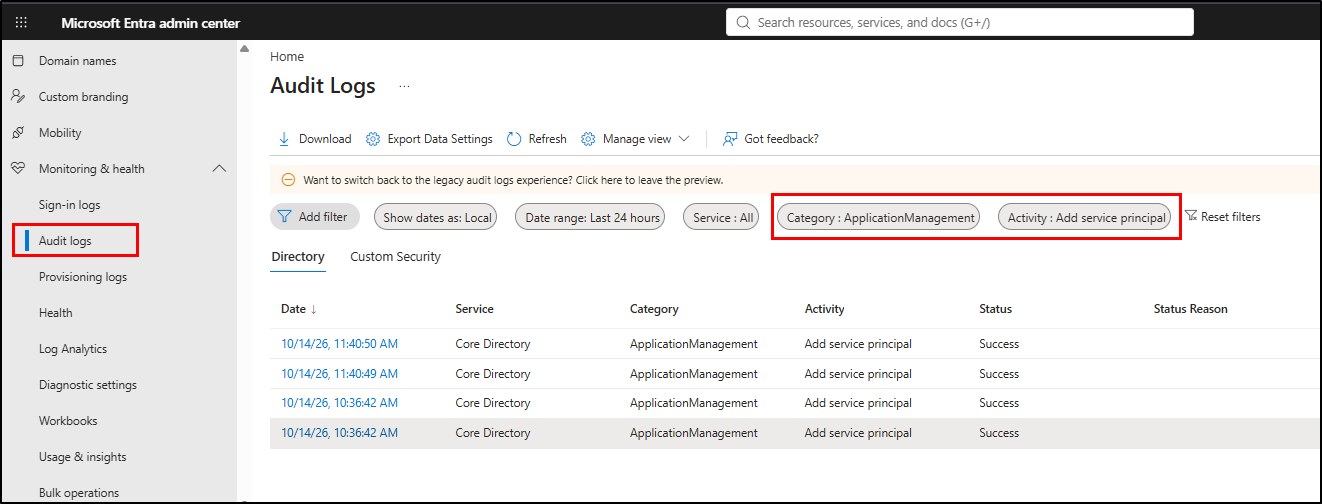
In the listed events, look for entries where Initiated By (actor) Type is application and the Target is an agent identity. These events help identify agents that create agent identities without a signed-in user.
How to Review Granted Permissions for Agent Identity Blueprints in Microsoft Entra
For each identified agent identity blueprint, follow these steps to determine whether it relies on the default permission grant.
- Open the Agents page in the Microsoft Entra admin center and select Agent blueprints.
- Search for and select the relevant agent identity blueprint. Under Access, select Granted permissions (Preview).
- Review the granted permissions to determine whether the agent has any alternative authorization for creating agent identities.
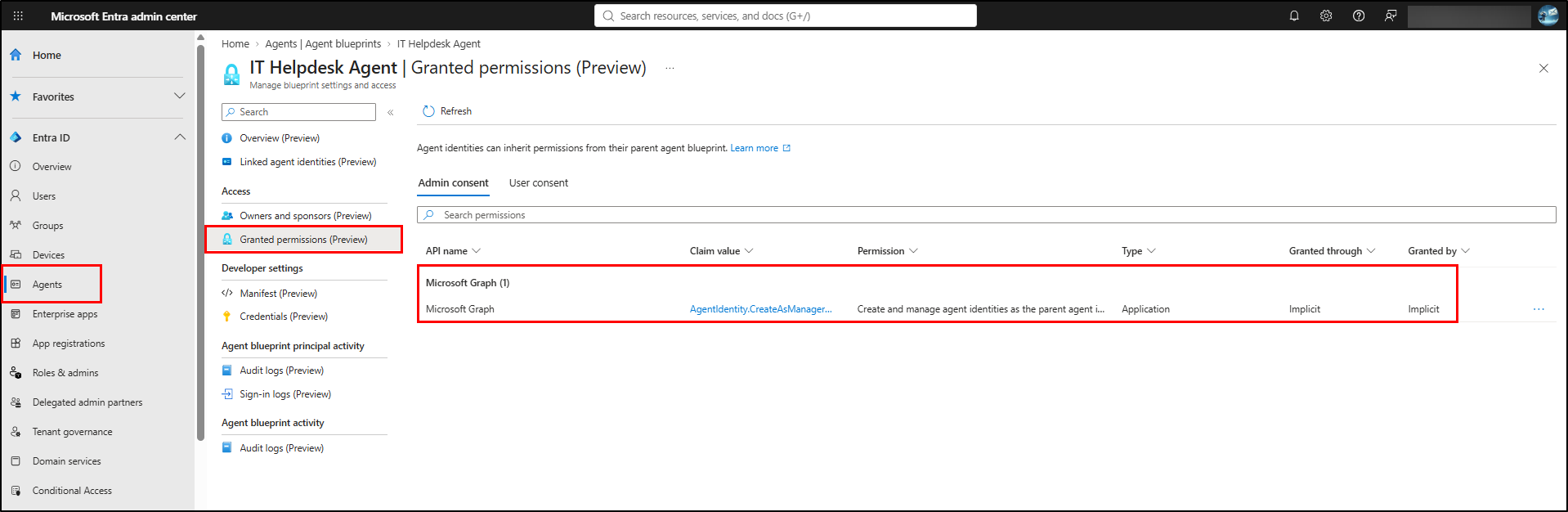
If the agent requires app-only identity creation and has no alternative authorization, an admin must explicitly grant the Microsoft Graph AgentIdentity.CreateAsManager permission. Admins can grant it through tenant-wide admin consent or manual app-role assignment in Microsoft Entra.
How to Grant Admin Consent for Agent Identity Creation
Follow these steps to grant tenant-wide admin consent for the AgentIdentity.CreateAsManager permission.
- Sign in to the Microsoft Entra admin center as at least a Cloud Application Administrator.
- Navigate to Entra ID > Enterprise apps > All applications.
- Search for and select the relevant application.
- Under Security, select Permissions.
- Grant tenant-wide admin consent for the Microsoft Graph application permission AgentIdentity.CreateAsManager.
Important: Grant this permission only to agents that need to create child agent identities. Starting October 16, you can grant this permission. Attempts to grant it before this date will return an error.
After enforcement reaches your tenant, app-only identity creation requests that rely solely on the removed default permission grant will fail with a 403 Forbidden authorization error. Test the agent’s identity creation capability before enforcement begins.
That’s it! Microsoft Entra is making agent blueprint creation more accessible while tightening control over child agent identity creation. These changes balance flexibility with security by allowing default users to create blueprints while requiring explicit authorization for agents that create child identities. Review your existing agent identities and grant the required permissions before enforcement begins.
Got any thoughts or questions about these changes? Tell us in the comments section!