Imagine being locked out of your own domain where your admin credentials no longer work. Whether it’s an accidental account lockout or a credential breach, a break glass account serves as a spare key to restore access and regain control of your Active Directory environment.
However, a key that opens every door is a prime target for attackers. While hardening is essential, applying the same techniques used for regular privileged accounts can backfire during disaster recovery scenarios and block critical access. To ensure your emergency access doesn’t fall into the wrong hands or fail when you need it most, you need a rock-solid strategy.
This blog explores best practices for securing break glass accounts in Active Directory.
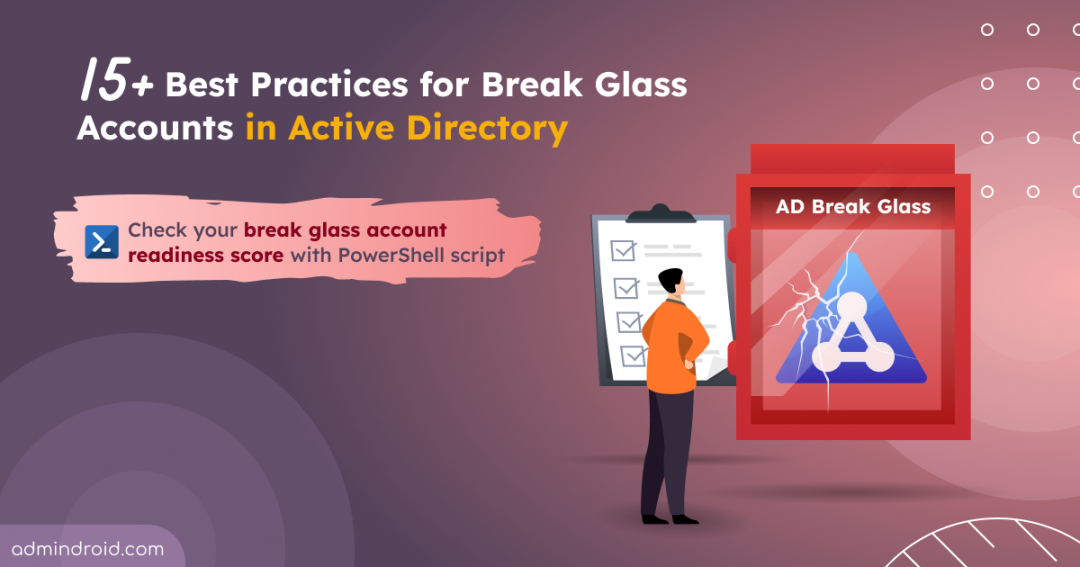
⚡Are your emergency accounts truly ready? Check your break glass account readiness for emergencies using the PowerShell validation script given below.
15+ Best Practices for Break Glass Accounts in Active Directory
Maintaining emergency access requires a balance between high availability and extreme security. Below are the key do’s and don’ts to keep AD break glass accounts functional and secure.
Do’s for Active Directory Break Glass Accounts
- Create on-premises–only break glass accounts
- Create two or more emergency accounts
- Use the built-in administrator or a dedicated account
- Apply strategic naming for break glass accounts
- Configure long and complex passwords
- Set break glass account passwords to never expire
- Store emergency account credentials securely
- Mark accounts as sensitive and non-delegatable
- Restrict logon to Domain Controllers
- Rotate credentials after each use
- Audit AD break glass account activity
- Regularly test break glass account access
Don’ts for Active Directory Emergency Accounts
- Don’t add emergency accounts to the Protected Users group
- Don’t rely on DSRM accounts for AD emergency access
- Don’t enable smart card is required for interactive logon
- Don’t rely on shared identity providers or dependency chains
- Don’t use emergency accounts for routine operations
1. Create On-Premises–Only Break Glass Accounts
In hybrid setups, using a single account for both environments creates a dangerous single point of failure. Microsoft recommends maintaining separate emergency accounts for on-premises Active Directory and Microsoft Entra ID. A local-only AD emergency account ensures access during internet outages or Entra Connect sync fails and helps reduce the attack surface.
Conversely, maintaining a dedicated cloud-only emergency account is one of the essential core best practices for Entra ID break glass accounts. By creating these accounts directly in the cloud, you ensure access during on-premises failures. This isolation prevents a failure in one environment from toppling the other.
2. Use Two or More Break Glass Accounts in Active Directory
Relying on a single Active Directory emergency account creates a critical bottleneck. If that account is locked, its credentials are lost, or it becomes inaccessible, you lose your last line of access to the domain. To ensure resilience, maintain at least two separate break glass accounts in Active Directory.
3. Use Built-in Administrator or Dedicated Accounts for Emergency Access
Admins can choose between using the built-in Administrator account or a dedicated account for emergency access, depending on their security and operational needs.
- Built-in Administrator account: This account cannot be deleted, making it a reliable fallback when used as a break glass account. However, because it uses the well-known RID 500, it is a common target for password-spray attacks. If used, it requires strong compensating controls such as enhanced auditing, restricted logon scope, complex passwords, and aggressive monitoring.
- Dedicated break glass account: Provides flexibility in naming, monitoring, and access control. The risk here is human error; because these accounts are rarely used, they can be accidentally deleted during routine inactivity clean-ups or automated “stale account” purges.
Choose the approach that aligns with your environment, ensuring the account remains secure, monitored, and always accessible when needed.
4. Apply Strategic Naming for Active Directory Break Glass Accounts
Explicit names for break glass accounts may simplify identification but also make them easier targets for attackers. Use strategic, non-descriptive names to reduce the risk of targeted compromise while keeping them recognizable to authorized administrators.
5. Configure Long and Complex Passwords for Emergency Accounts
Emergency accounts require enhanced protection measures that exceed standard user password policies in Active Directory. Passwords should be at least 25 characters long and include a diverse mix of uppercase and lowercase letters, numbers, and special characters.
Crucially, they must not contain the account name or easily identifiable organizational information. This level of complexity helps ensure the credentials remain resistant to brute-force and other password-based attacks.
6. Ensure Active Directory Emergency Account Passwords Do Not Expire
Set break glass account passwords to never expire in Active Directory. Otherwise, admins risk being locked out at critical moments, delaying recovery and increasing the impact of a system failure or security breach.
Expired passwords can also create uncertainty, as there may be no immediate way to reset them without existing administrative access. This defeats the purpose of a reliable fallback account.
In ADUC, configure emergency account passwords to never expire by going to Properties > Account, selecting “Password never expires,” and clicking OK, so they remain consistently accessible.
7. Safeguard Break Glass Account Passwords
Securely store passwords for emergency accounts to prevent credential theft or misuse. Active Directory break glass credentials should be sealed in a tamper-evident envelope and stored in a fireproof safe for immediate access when digital access is unavailable. For a digital fail-safe, maintain a backup in a hardware-isolated password vault that requires multi-person approval to access.
These measures protect your domain’s “spare key” from digital theft and physical discovery, ensuring it remains available for true emergencies.
8. Enable “Account is Sensitive and Cannot Be Delegated” for Emergency Accounts
Break glass accounts hold high privileges and are used only during emergencies. If their credentials are delegated to other services, they can be exposed and reused, increasing the risk of misuse or lateral movement. Therefore, admins should configure these emergency accounts as “sensitive and cannot be delegated” to reduce the attack surface.
To configure this setting, open Active Directory Users and Computers (ADUC) and navigate to the break glass account’s Properties > Account tab. Select the “Account is sensitive and cannot be delegated” checkbox, and then click OK.
9. Restrict Account Logon to Domain Controllers
Leaving break-glass accounts without logon restrictions permits access from any machine on the network. This exposure allows attackers to gain control, transforming a recovery tool into a high-risk vulnerability if the credentials are intercepted.
To secure emergency accounts while maintaining recovery access, configure logon restrictions through Domain Controllers group policy. Apply Tier 0 logon policies and deny batch, service, and Remote Desktop logons using GPO to prevent remote access and lateral movement.
Additionally, use the “Log on to” (LogonWorkstations) setting in ADUC (Account tab) to restrict logon to specific Domain Controllers or approved administrative systems.
Important: Do not deny local logon. The account must be able to sign in from the physical or virtual console of a Domain Controller. This ensures access during critical failures such as network outages or directory service issues.
10. Rotate Active Directory Emergency Account Credentials After Use
While emergency accounts are exempt from automated expiration, their passwords must be manually rotated immediately after any login. Because these accounts bypass many standard security controls, their credentials should be treated as “one-time use” to maintain environment integrity.
Additionally, even if the accounts have not been used, you should rotate the credentials on a regular, scheduled basis (such as annually or bi-annually). This proactive rotation confirms that your stored passwords work and your team can still access them, preventing a “locked out” scenario during a real crisis.
11. Audit and Alert on Break Glass Account Activity in Active Directory
Break glass accounts are rarely used and hold high privileges, making any activity associated with them highly sensitive. Without auditing, unauthorized access or misuse may go unnoticed until significant damage has already occurred.
Auditing ensures that every sign-in, configuration change, or action performed using these accounts is recorded and traceable. This helps administrators quickly detect suspicious behavior, investigate incidents, and respond before an attacker can move laterally or escalate privileges.
To effectively monitor usage, enable advanced audit policies in Active Directory and track key Windows Security Event IDs for break glass accounts, including:
| Event ID | Activity Description |
| 4624 | Successful logon |
| 4625 | Failed logon |
| 4662 | Operation performed on object (modification, deletion, etc.,) |
| 4723 | Password change |
| 4724 | Password reset |
| 4725 | Account disabled |
| 4740 | Account locked out |
Furthermore, set up alerts for break glass account activity to ensure timely notification and immediate investigation of any usage.
12. Perform Regular Validation of AD Break-Glass Account Access
Test your Active Directory emergency accounts at least twice a year to ensure they remain functional. This validation confirms the account is enabled and can authenticate independently, even if standard infrastructure is unavailable. After each test, immediately rotate the account password to maintain its security integrity.
Alongside technical checks, keep recovery documentation current to reflect any environment or admin break glass account changes. Proactive testing helps identify broken access or outdated procedures, ensuring emergency access remains reliable when needed.
13. Exclude Emergency Accounts from the Protected Users Group
Adding break-glass accounts to the Protected Users security group in Active Directory might seem logical, but it can be counterproductive. This group enforces strict, non-configurable protections. These include a limited Kerberos ticket lifetime (4 hours), a block on credential caching, and the inability to authenticate using NTLM, Digest Authentication, or CredSSP.
While these controls improve security, they can prevent emergency accounts from functioning reliably in critical scenarios. By excluding emergency accounts from the ‘Protected Users’ group, you ensure they remain accessible during emergency scenarios where these restrictions could otherwise block authentication.
14. Avoid Using the DSRM Account as a Break Glass Account
In many organizations, the Directory Services Restore Mode (DSRM) account is treated as an emergency access option. However, DSRM serves a fundamentally different purpose and should not be considered a replacement for Active Directory break glass accounts.
DSRM is designed specifically for Domain Controller recovery scenarios, such as restoring Active Directory from backup, repairing database corruption, or performing offline maintenance. It is only usable when Active Directory Domain Services (AD DS) are stopped and the domain controller is booted into restore mode. As a result, it is not suitable for accessing or troubleshooting a live domain environment.
In contrast, break glass accounts are intended for domain-wide administrative access during operational incidents, such as authentication failures, misconfigured Group Policy, or account lockouts. These accounts must function while AD DS is running, allowing administrators to sign in and remediate issues without taking domain controllers offline.
15. Don’t Require Smart Card Logon for Emergency Access
Requiring a smart card for interactive logon is a common hardening recommendation for privileged accounts.
However, enabling the “Smart card is required for interactive logon” flag on emergency accounts creates a critical dependency on your Public Key Infrastructure (PKI). If your Certificate Authority or directory services are offline during a disaster, the system will be unable to validate the certificate, locking you out of the environment.
To ensure a reliable fail-safe, avoid this setting so your recovery does not depend on the system itself. Instead, enforce the use of a long, complex passphrase, and ensure the credentials are stored securely while remaining accessible during emergencies.
16. Eliminate Identity Dependencies for Active Directory Break Glass Accounts
Avoid adding extra dependencies to Active Directory break glass accounts. The goal is to prevent circular dependencies, where access to the account relies on systems that may be unavailable during a failure.
Keep authentication as simple as possible and avoid configurations that introduce additional points of failure. This includes federated authentication, third-party MFA agents, roaming profiles, redirected folders, or any setup that requires validation beyond core Active Directory services.
17. Restrict Routine Use and User Association for Emergency Accounts
Break glass accounts should be reserved strictly for emergencies and must not be tied to individual users. Using them for routine tasks or associating them with a specific user increases the risk of compromise and reduces accountability.
Now that you understand the best practices, it’s time to see how your Active Directory break glass accounts measure up.
Verify AD Break Glass Account Readiness Using PowerShell Script
Even well-configured break glass accounts can drift over time. Small changes, such as modifications to group membership or password settings, can make them unusable when you need them most. If an account fails during an emergency, it defeats its entire purpose. Regular validation is essential to ensure these accounts remain accessible and reliable.
To simplify this process, use the following PowerShell script to assess whether your break glass accounts align with recommended best practices. The script evaluates key configurations and exports a CSV report indicating whether each check is passed, failed, or requires manual assessment. It also provides an instant readiness score to help you quickly identify gaps before they impact emergency access.
Using this script, you can ensure your break glass accounts remain compliant and disaster-ready during security reviews or periodic audits.
Download: ActiveDirectory_BreakGlassAccount_Readiness_Score.ps1
- Open Windows PowerShell and execute the script using the command below. Provide the break-glass accounts as a comma-separated list under the -Accounts parameter:
|
1 |
.\ActiveDirectory_BreakGlassAccount_Readiness_Score.ps1 |
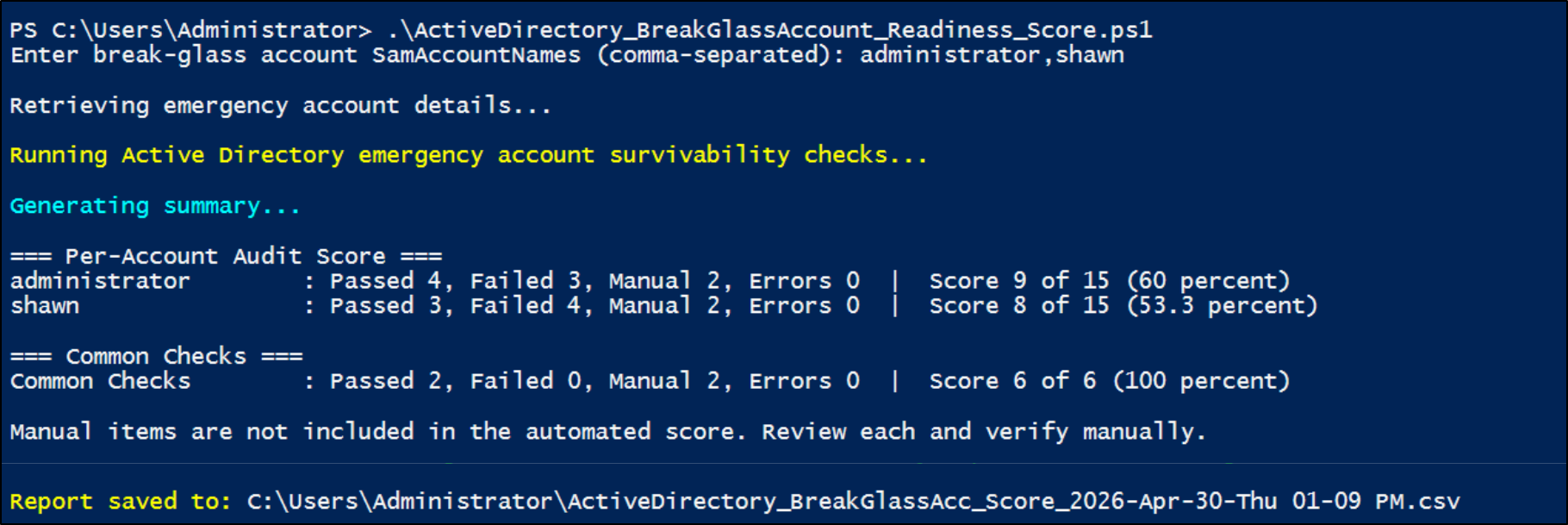
Output
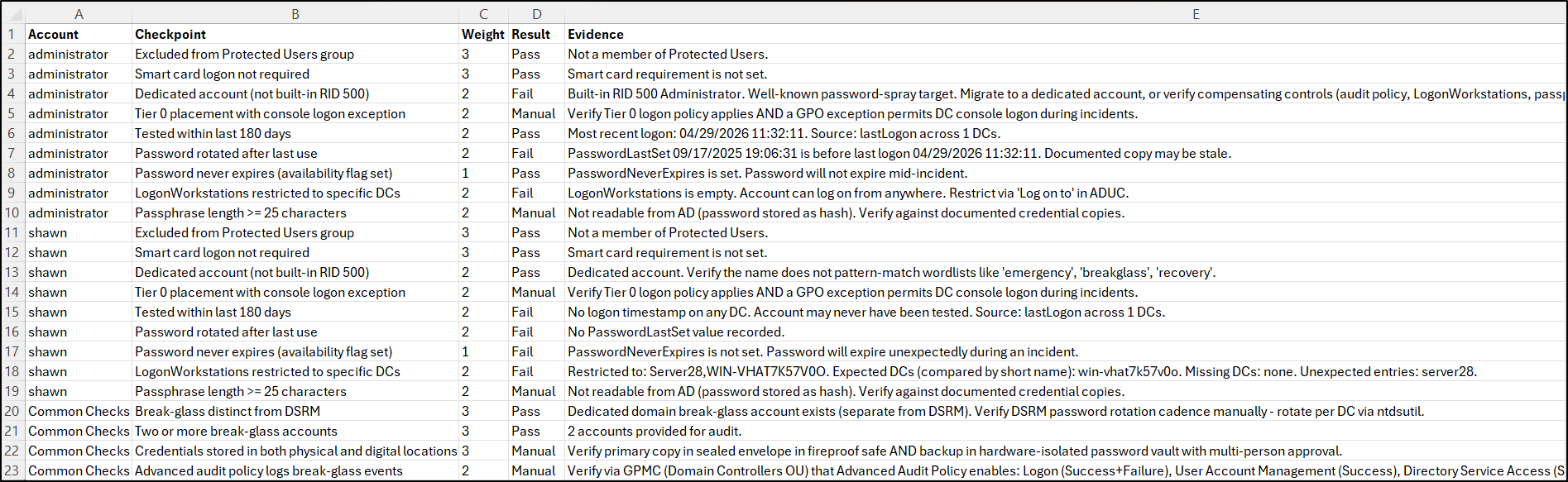
Note: This script requires the Active Directory PowerShell module, which is included by default on domain controllers. If you run the script from a non-domain controller (such as a workstation or member server), you will need to install the Remote Server Administration Tools (RSAT). The script can automatically install the required components after your confirmation.
Break glass accounts are more than just backup access—they are a critical recovery mechanism when everything else fails. Misconfigurations, over-permission, or lack of validation can render them ineffective or turn them into high-risk entry points for attackers.
Thus, follow best practices to ensure the right balance between security and accessibility for your Active Directory break glass accounts. The goal is simple: when a crisis occurs, your break glass accounts should work immediately—without introducing new risks.